
By Scot Johnson, Founder / CEO, i3solutions. Scot Johnson co-founded i3solutions 30 years ago with a focus on expert-led delivery, strategic advisory, and complex Microsoft-centered solutions for organizations where technology decisions carry operational, financial, and mission risk.
Dynamics 365 licensing runs from $8.00 per user per month for a Business Central Team Members seat to $300.00 per user per month for Finance Premium on Microsoft’s published US price list, all paid yearly. The three numbers most buyers need first: Dynamics 365 Sales Enterprise is $105.00 per user per month, Dynamics 365 Finance is $210.00, and Business Central Essentials is $80.00.
Those figures come straight from Microsoft’s public pricing pages and were confirmed there in July 2026. The rest of this page puts every current per-user list price in one table, explains the base and attach mechanics that decide what a multi-app user actually pays, and names the costs that never appear in the per-user price. Licensing is the recurring half of the budget; the one-time half is covered in our Dynamics 365 implementation cost guide.
Microsoft publishes a US list price for every Dynamics 365 application, per named user per month, paid yearly. This is the full current table, confirmed against Microsoft’s Sales, Finance, and Business Central pricing pages in July 2026. Microsoft adjusts list prices periodically, most recently in an October 2024 revision, so re-check the live page before a signature.
Two structural notes keep this table honest. First, Business Central and the enterprise Finance and Supply Chain applications are alternatives for the ERP role, not layers: a midmarket subsidiary runs Business Central at $80.00 to $110.00 per user while a global parent runs Finance and Supply Chain at $210.00, and the right question is which tier fits each entity. Second, the per-user price is the entry fee, not the budget; implementation, integration, and ongoing support all sit outside it.
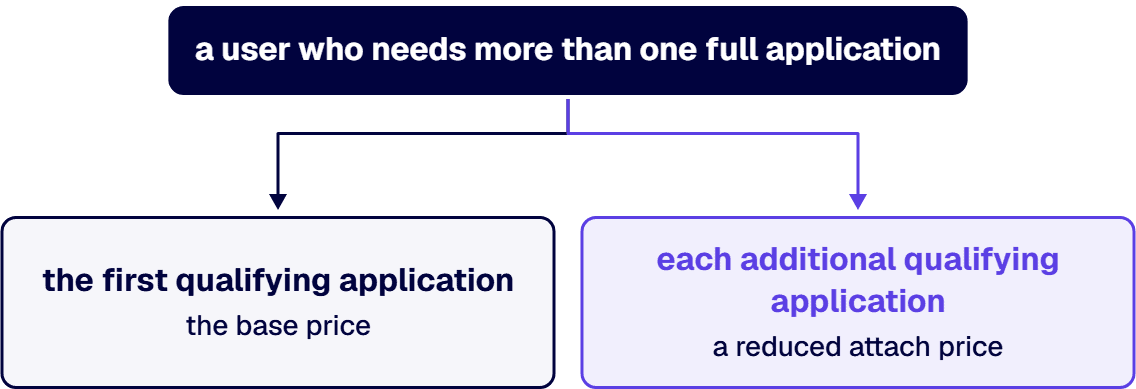
The single most misunderstood Dynamics 365 licensing mechanic is also the one that saves the most money: a user who needs more than one full application does not pay full list price twice. Microsoft licenses the first qualifying application at the base price and each additional qualifying application for that same user at a reduced attach price. A controller who works in both Finance and Supply Chain Management, or a seller who also handles service cases, is the normal case in an enterprise deployment, so model your actual role mix instead of multiplying headcount by list price. The qualifying combinations and current attach prices are defined in Microsoft’s Dynamics 365 Licensing Guide, which Microsoft updates regularly; the base price table above is the ceiling, and the attach mechanics decide how far below it your blended per-user cost lands.
Most licensing overspend comes from one habit: buying every user the license the most demanding user needs. Three decisions push against it.
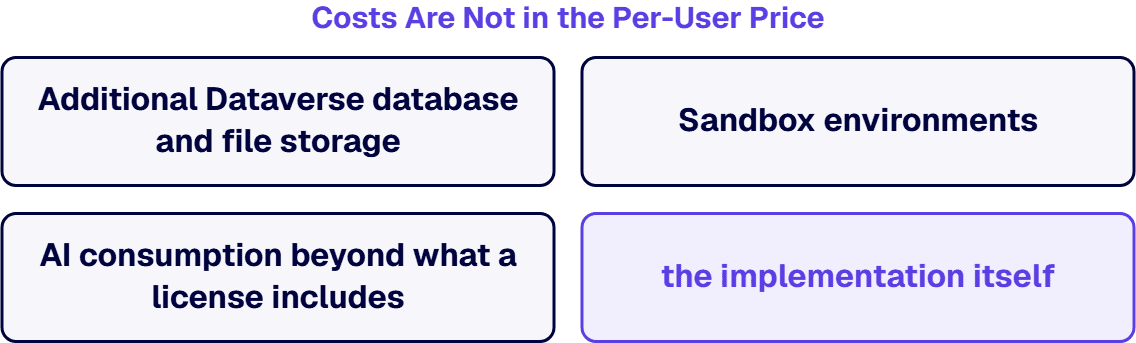
Four line items routinely surprise first-time Dynamics 365 buyers, and none of them appears in the table above. Additional Dataverse database and file storage beyond the included tenant capacity is billed separately per gigabyte per month, and transaction-heavy deployments do exceed the default. Sandbox environments for development, testing, and staging carry their own capacity implications, and a disciplined go-live needs them. AI consumption beyond what a license includes, such as Copilot Studio agent usage, is metered on credits rather than folded into the seat. And the implementation itself, the largest single number in year one, is a separate project budget whose drivers we break down in the implementation cost guide and, for the SMB tier, the Business Central implementation cost guide.
Licensing optimization is a role-mapping exercise, not a negotiation trick. Inventory who actually creates records versus who reads and approves, and license the difference; audit the mapping yearly, because roles drift and seats quietly ratchet upward. Use attach pricing deliberately by consolidating multi-app work onto the users who genuinely need it rather than spreading full seats thinly. Buy through the agreement vehicle that fits your size, because enterprise agreements and CSP partners price the same list differently at volume. And resist the reflex to under-license regulated users to save money: an approver who occasionally edits records needs the seat that covers editing, and a licensing audit finding costs more than the seats it would have taken to stay clean.
i3solutions is a Microsoft Solutions Partner, and we approach licensing as engineers rather than as a reseller: the license mix falls out of the role and process design, not the other way around. All i3solutions Dynamics 365 developers and consultants are U.S. based, and our licensing recommendations come attached to the implementation scoping they depend on, because a seat count built before the role design is a guess. What that scoping engagement itself costs, and how to choose who runs it, is covered in our Dynamics 365 partner cost guide. We have watched enterprises overpay five figures a year for full seats their approvers never used, and we have also seen the opposite failure, where an under-licensed team worked around the platform in spreadsheets. The fix in both directions is the same: map the roles first, then price them. If the platform decision itself is still open, our Dynamics 365 vs Salesforce and Dynamics 365 vs SAP comparisons price that choice on the same terms.
On Microsoft’s published US price list, Dynamics 365 runs from $8.00 per user per month for Business Central Team Members to $300.00 for Finance Premium, paid yearly. The most common anchors are Sales Enterprise at $105.00, Finance and Supply Chain Management at $210.00 each, and Business Central Essentials at $80.00. Multi-app users pay a base price for the first application and a reduced attach price for additional qualifying applications.
Dynamics 365 Sales has three tiers on Microsoft’s US price list: Sales Professional at $65.00 per user per month for core sales force automation, Sales Enterprise at $105.00 with contextual insights, AI, and advanced customization, and Sales Premium at $150.00, which adds advanced sales intelligence and agentic automation. All are paid yearly. Most enterprise deployments land on Sales Enterprise.
Dynamics 365 Finance lists at $210.00 per user per month on Microsoft’s US price list, paid yearly, with Finance Premium at $300.00 adding advanced business performance management. Supply Chain Management carries the same $210.00 and $300.00 tiers. A user who needs both Finance and Supply Chain pays the base price once and a reduced attach price for the second application.
Business Central Essentials is $80.00 per user per month and Premium is $110.00 on Microsoft’s published US price list, paid yearly, with Premium adding manufacturing and service management. Team Members access for light users who read, approve, and make limited entries is $8.00 per user per month. You cannot mix Essentials and Premium full users in the same company, so that choice is made once for everyone.
The base license is the first full Dynamics 365 application assigned to a user, bought at list price. When that same user needs an additional qualifying application, it is licensed as an attach at a significantly reduced price rather than a second full seat. The eligible combinations and current attach prices are published in Microsoft’s Dynamics 365 Licensing Guide, and modeling them against your real role mix is the difference between a list-price estimate and an accurate one.
Additional Dataverse database and file storage beyond the included capacity, billed per gigabyte per month; sandbox environments for testing and staging; metered AI consumption such as Copilot Studio credits; and the implementation project itself. For most first deployments the implementation is the largest year-one number, and it is a separate budget from licensing entirely.

US-Based | Est. 1997
© i3solutions. All rights reserved.
US-Based | Est. 1997
© i3solutions. All rights reserved.


