
By Michael Branson
As of September 2026, BOD 25-01 requires federal civilian agencies to implement the mandatory (“shall”) policies in CISA’s SCuBA Microsoft 365 baselines on every production or operational tenant that is part of an agency information system, whether the tenant is commercial, GCC or GCC High and whether the government or a contractor operates it, and to measure conformance with CISA’s ScubaGear, reporting to CISA at least once a quarter. The mandatory list lives on CISA’s Required Configurations page and changes over time: its Teams rows carry a Date Added / Modified of 02/11/2026, so the page is read each quarter, not memorized. CISA says “Agency Authorizing Officials (AOs), in accordance with applicable agency policy, may accept risk for deviations from the mandatory SCuBA policies to account for operational needs. Agencies shall identify and explain deviations in the output of the SCuBA assessment tools when reported to CISA.” A tenant the directive does not reach, such as a defense contractor’s own GCC High tenant outside any agency information system, can still use the baselines: CISA “strongly recommends all stakeholders implement these policies and leverage CISA’s SCuBA assessment tool and the information on this page.”
The quarterly ScubaGear report comes back with red rows. Some are real configuration gaps. Some point at a capability the agency never licensed, or at a feature Microsoft says is not yet available in GCC High. Each row that stays red needs either a change or a decision by someone with the authority to accept the risk, and an explanation CISA can read. This guide sets out what CISA’s directive and its guidance say about which tenants are in scope, which policies are mandatory, how conformance is measured and reported, and how deviations work, with the Microsoft setting behind the policies most teams ask about. Whether a given tenant is in scope, and whether a deviation is acceptable, is the agency’s determination and its authorizing official’s, not this guide’s.
The first mistake is reading policies before listing tenants, because the directive’s scope test is about the information system a tenant belongs to, not about the cloud it runs in. CISA’s directive page, BOD 25-01: Implementing Secure Practices for Cloud Services, dated December 17, 2024, says “A Binding Operational Directive is a compulsory direction to federal, executive branch, departments and agencies for purposes of safeguarding federal information and information systems.” It also says “These directives do not apply to statutorily defined “national security systems” or to certain systems operated by the Department of Defense or the Intelligence Community.” Its scope sentence reads: “This Directive applies to all production or operational cloud tenants (operating in or as federal information systems) with an associated and finalized SCuBA Secure Configuration Baselines published by CISA.”
CISA’s BOD 25-01: Implementation Guidance for Implementing Secure Practices for Cloud Services turns that sentence into tests, and it frames them as the agency’s evaluation: “As agencies evaluate whether their cloud service tenancies are in scope of the BOD’s requirements, they should consider the following guidance and how it applies to their situation”. The tests, in CISA’s words:
The cloud is a field in the inventory, not a scope test. For the tenant inventory’s service plan, the guidance says “For M365, select either Commercial, GCC, or GCC High.” A GCC High tenant inside an agency’s authorization boundary is in the same position as a commercial one; a GCC High tenant outside the authorization boundary of every agency information system falls outside CISA’s boundary sentence.
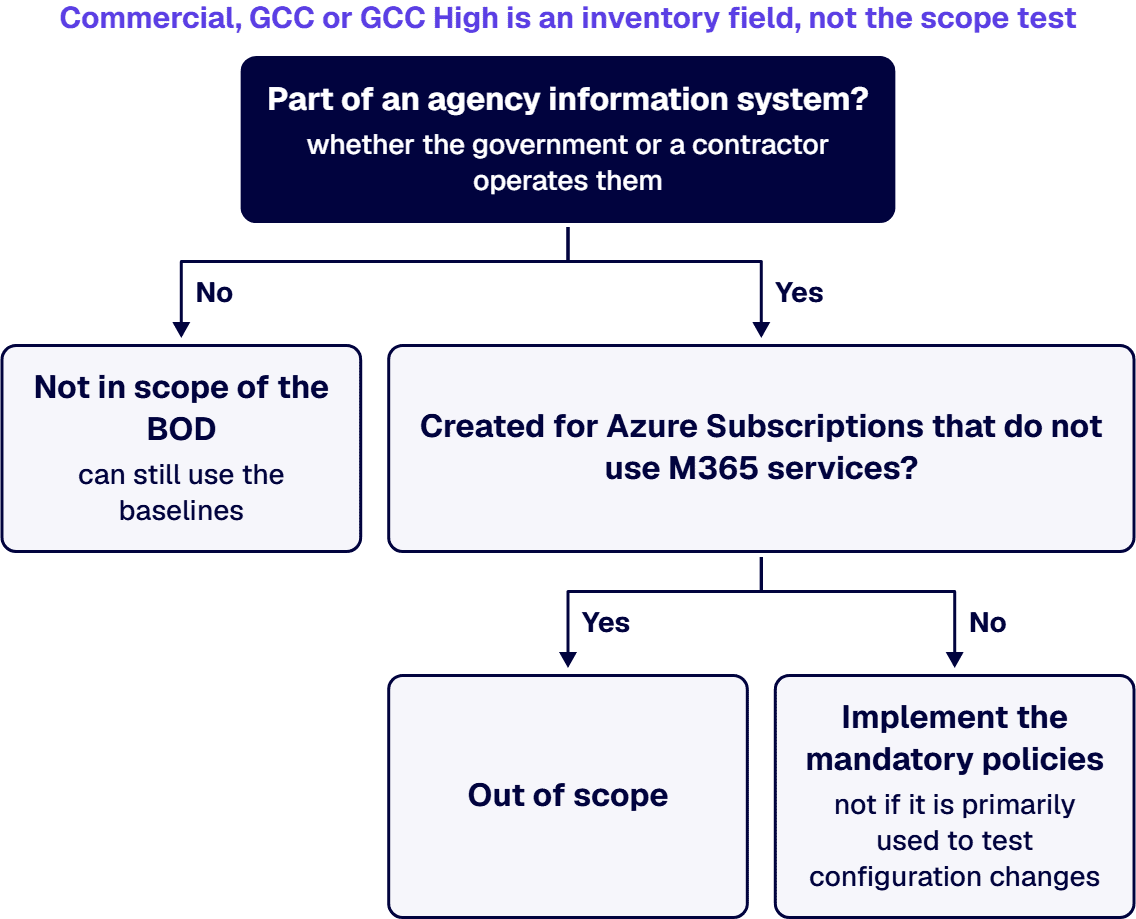
List every Microsoft 365 tenant the organization owns or operates, mark each one against these four tests, and record who made the call, before anyone reads a single policy.
A red row in a GCC High tenant is easy to misread as a missing purchase or a missing Microsoft feature, and each of those has a different answer. Start with who each cloud is for, in Microsoft’s words. Microsoft’s Office 365 GCC High and DoD service description, last updated August 3, 2026, says “To meet the unique and evolving requirements of the United States Department of Defense, as well as contractors holding or processing DoD controlled unclassified information (CUI) or subject to International Traffic in Arms Regulations (ITAR), Microsoft offers GCC High and DoD environments.” Microsoft’s Office 365 GCC service description, last updated June 28, 2023, says “To meet the unique and evolving requirements of the United States Federal, State, Local, and Tribal governments, as well as contractors holding or processing data on behalf of the US Government, Microsoft offers the Office 365 Government GCC environment.” Choosing between them is a separate decision, covered in Microsoft 365 GCC vs GCC High: Which Government Cloud Does Your Organization Need?
Feature availability differs by cloud, and Microsoft states it per feature. Microsoft’s Office 365 Government service description, last updated June 18, 2025, carries this note: “Anti-phishing for user and domain impersonation and spoof intelligence are not yet available in GCC High and DoD.” Check each red row against Microsoft’s current page for your cloud on the day you plan the fix, not against a note from a year ago.
Some policies depend on licenses. CISA’s Microsoft Entra ID baseline, as published in CISA’s ScubaGear v1.8.0 release, lists for its policies that block users and sign-ins detected as high risk: “Requires a Microsoft Entra ID P2 license”. Microsoft’s Risk-based access policies, last updated August 14, 2026, says “Microsoft Entra ID P2 is required to use risk-based access policies.” Microsoft’s What is Microsoft Entra Privileged Identity Management?, last updated April 23, 2026, says “Using Privileged Identity Management requires licenses.”
A license gap is not the end of the question. According to CISA’s implementation guidance, “Purchasing additional licensing is not a requirement of the BOD. Agencies may use third-party capabilities that provide equivalent protections, and more details can be found within the baselines. Agencies may also indicate a deviation in their configuration file and include the reason for the deviation.” Sort every license-dependent red row into one of those three paths, license it, meet it another way or document the deviation, and record which path was chosen and by whom.
Teams that treat the whole baseline as mandatory spend effort in the wrong order; teams that treat it as optional miss the rows CISA measures. CISA’s directive draws the line: “The following requirements pertain only to mandatory policies referenced within the SCuBA Secure Configuration Baselines as “shall” actions.” It explains both kinds: “SCuBA Secure Configuration Baselines specify both recommended policies that are left to agency discretion to implement (identified as “should” actions within the Baselines) and mandatory SCuBA policies that must be implemented pursuant to the requirements of this Directive (identified as “shall” actions within the Baselines).” The guidance adds: “Although recommended (“should”) policies are not required, CISA strongly advises agencies implement these policies to the greatest extent possible in their environment.”
The mandatory list is a web page, not a document you file once. CISA’s Required Configurations page lists each Microsoft 365 policy by product with a Date Added / Modified column and a Due Date column; every Microsoft 365 row’s due date reads “End of each fiscal quarter”. Its Date Added / Modified values for Microsoft 365 run from 07/07/2024 to 02/11/2026, the most recent on Teams policies. The directive orders agencies to “Implement all future updates to mandatory SCuBA policies in accordance with the timelines set forth in the CISA-managed Binding Operational Directive 25-01 Required Configurations website”, and the guidance says “CISA will notify agencies via email when changes are made to the SCuBA SCBs.” The directive also says “Any baselines not updated within one year will automatically fall out of scope and will be removed from the SCuBA Secure Configuration Baseline catalog, linked through the Binding Operational Directive 25-01 Required Configurations website”.
CISA’s first deadlines have passed. According to CISA’s implementation guidance, the first requirement read “No later than Friday, February 21, 2025, provide the tenant name (Tenant ID and fully qualified domain name [FQDN]) and the system-owning agency/component for each tenant, following CISA reporting instructions.” They were to deploy the assessment tools by April 25, 2025, and the guidance’s third requirement read “Implement all mandatory SCuBA policies effective as of this Directive’s issuance, as set forth in the CISA-managed BOD 25-01 Required Configurations website no later than Friday, June 20, 2025”. What remains is recurring: the quarterly due date, and every update CISA posts.
Subscribe the people who own the tenant to CISA’s change notices, and re-read the Required Configurations page at the start of each fiscal quarter rather than working from last quarter’s export.
A policy ID on a red row tells you what CISA measures, not where the switch is or what it costs to flip. According to CISA’s Required Configurations page, the Microsoft 365 mandatory policies are grouped under Azure Active Directory / Entra ID, Microsoft Defender, Exchange Online, Power Platform, SharePoint Online & OneDrive, and Microsoft Teams. The rows below are quoted exactly as that page prints them, version suffix included; the rest of each product’s rows are on CISA’s page and change over time.
Two cautions follow from Microsoft’s own wording. The SMTP AUTH statement recommends disabling it for the organization while keeping it only for mailboxes that still require it, so an exception for a named mailbox is a deviation to document, not a quiet setting. And the audit statement says audit logging is on by default but tells new organizations to verify it, so check the setting in each tenant rather than assuming it.
The identity rows go further than the three quoted here. CISA’s Entra ID rows also block users and sign-ins detected as high risk, require phishing-resistant MFA for highly privileged roles, restrict application registration and consent to administrators, and govern how privileged roles are provisioned and activated. One of them requires the Authentication Methods migration to be set to Migration Complete; Microsoft’s How to migrate MFA and SSPR policy settings to the Authentication methods policy for Microsoft Entra ID says of that mode, “In this mode, Microsoft Entra only follows the Authentication methods policy.” How MFA maps to NIST baselines is covered in MFA and NIST SP 800-53: Your Baseline Decides, Not the Catalog. CISA’s SharePoint rows quote only CISA’s policy text here; broader SharePoint hardening for regulated organizations is covered in SharePoint Security for High-Risk, Compliance-Heavy Organizations.
Map every mandatory row to the Microsoft setting that satisfies it, the license that setting needs, and whether Microsoft lists the feature as available in your cloud, before you schedule a single change.
A ScubaGear run without its configuration file, or a report nobody reads color by color, fails the quarter even when the settings are right. CISA’s Secure Cloud Business Applications (SCuBA) Project page says “ScubaGear is a no-cost assessment tool that verifies M365 tenant configuration alignment to the policies described in SCuBA’s secure configuration baselines.” CISA’s ScubaGear v1.8.0 release, published May 7, 2026, was the latest release when this guide was written, and its README says the YAML configuration file “is required if the usage is for” CISA’s Binding Operational Directive (BOD) 25-01.
According to CISA’s implementation guidance, the second requirement read “Deploy all SCuBA assessment tools for in-scope cloud tenants no later than Friday, April 25, 2025, and begin continuous reporting on the requirements of this Directive by manually reporting the results of the most recent SCuBA assessment tool version to CISA quarterly in a CISA-approved, machine-readable format, following CISA reporting instructions.” The guidance also says “Agencies may configure ScubaGear to run and report results as often as they want, with a minimum of once per quarter.”
The guidance describes more than one way to get results to CISA:
Read the colors the way CISA defines them. The guidance says “Red indicates that required baselines statement controls are not met, i.e., “shall” statements.” It also says “Gray indicates the controls that ScubaGear and/or ScubaGoggles is not able to evaluate using the Application Programming Interfaces, or APIs provided by the cloud service provider.” A gray row is not a pass; it is a control someone has to check another way.
Name, for each tenant, the person who runs ScubaGear on the current release with the configuration file, the person who reviews red and gray rows, and the person who submits to CISA.
The costly failure is an omission in the configuration file that nobody with authority approved: the report turns clean and the gap disappears from view. CISA’s directive puts the decision with the authorizing official and the explanation with CISA: “Agency Authorizing Officials (AOs), in accordance with applicable agency policy, may accept risk for deviations from the mandatory SCuBA policies to account for operational needs. Agencies shall identify and explain deviations in the output of the SCuBA assessment tools when reported to CISA.”
CISA’s implementation guidance describes the mechanics in the configuration file: “The config file includes an option allowing users to indicate policies that should be “omitted” or excluded from ScubaGear’s output, indicate the rationale for omission and optionally time-bound the exclusion.” It also says “Agencies may also indicate a deviation in their configuration file and include the reason for the deviation.” And it sets the condition on omissions: “Omitting policies must only be done if the omissions are approved within an organization’s security risk management process. Exercise care when omitting policies because this can inadvertently introduce blind spots in system assessment.”
New tenants have a stricter order of operations. The directive tells agencies to “Implement all mandatory SCuBA Secure Configuration Baselines and begin continuous monitoring for new cloud tenants prior to granting an Authorization to Operate (ATO).”
Give every omission or deviation in the YAML file an approval reference from the authorizing official’s risk process, a stated reason, and an end date where CISA’s option allows one, and keep that register beside the quarterly report.
When a test tenant or a contractor’s own tenant is forced into this plan, a quarter of work goes to the wrong place.
Whether the work is done by your own staff, a contractor or a firm, the failure to avoid is a green report with no record of how it got there. Require:
How to vet a firm for that work is covered in Hire a Microsoft 365 GCC High Implementation Firm: How to Vet One Before You Commit a Tenant.
When a directive like this lands on a team that already runs the tenant, the useful help is project work on the configuration and people who can sit inside that team, not another report. i3solutions configures Microsoft 365 tenants in GCC High as project work, and the work sits under our Embedding Governance into How the Enterprise Operates and Scales practice.
We manage GCC High migrations end-to-end: from eligibility validation and licensing coordination with your AOS-G supplier through identity architecture, data migration, security baseline configuration, and post-migration governance.
i3solutions maps governance to named control families, enforces it in the platform through Entra ID, Purview, and Azure Policy, and evidences it continuously rather than reconstructing it at audit. i3solutions governs identity and access for regulated Microsoft estates with senior, U.S.-based engineers and leaves an audit-defensible record.
The i3solutions Federal Compliance Assessment evaluates a client tenant against NIST SP 800-53 and CMMC using automated tenant configuration scripts and a 42-point security checklist. It is i3solutions’ own assessment against those two frameworks, a separate instrument from CISA’s ScubaGear. i3solutions engages its Federal Compliance Assessment when the scope spans a FedRAMP Moderate or FedRAMP High boundary, or when the client operates in a GCC High tenant.
i3solutions is an SBA certified small business providing technical and professional services to US Federal Agencies, the DoD and the private sector.
Where your team needs more hands, i3solutions can embed IAM and compliance specialists fluent in NIST inside it. Every engagement is delivered by senior, US-based people.
The cloud does not decide it; CISA’s information-system test does. CISA’s directive says “This Directive applies to all production or operational cloud tenants (operating in or as federal information systems) with an associated and finalized SCuBA Secure Configuration Baselines published by CISA.” CISA’s guidance says “Tenants outside of the authorization boundary of an agency’s information system are not in scope of the BOD.” and, for the inventory, “For M365, select either Commercial, GCC, or GCC High.”
It can. According to CISA’s guidance, “A production or operational tenant is a Cloud Service Provider (CSP) environment used by the government to conduct official government business, whether operated by the government or a contractor.” According to the same guidance, “The scope of the BOD is limited to tenants that are part of an Information System, as defined in 44 USC § 3502(8), that is owned by or operated by federal agency or on behalf of a federal agency by a contractor. Tenants outside of the authorization boundary of an agency’s information system are not in scope of the BOD.”
Not under the directive. CISA’s guidance says “Purchasing additional licensing is not a requirement of the BOD. Agencies may use third-party capabilities that provide equivalent protections, and more details can be found within the baselines. Agencies may also indicate a deviation in their configuration file and include the reason for the deviation.” Some Microsoft settings do carry license requirements: Microsoft says “Microsoft Entra ID P2 is required to use risk-based access policies.”
At least quarterly. CISA’s guidance says “Agencies may configure ScubaGear to run and report results as often as they want, with a minimum of once per quarter.”
Yes, through its authorizing official and with an explanation to CISA. CISA’s directive says “Agency Authorizing Officials (AOs), in accordance with applicable agency policy, may accept risk for deviations from the mandatory SCuBA policies to account for operational needs. Agencies shall identify and explain deviations in the output of the SCuBA assessment tools when reported to CISA.” CISA’s guidance adds “Omitting policies must only be done if the omissions are approved within an organization’s security risk management process. Exercise care when omitting policies because this can inadvertently introduce blind spots in system assessment.”

US-Based | Est. 1997
© i3solutions. All rights reserved.
US-Based | Est. 1997
© i3solutions. All rights reserved.


