Choosing the Right Business Automation Tools for a Regulated Enterprise

For a regulated enterprise, the right business automation tool is the one that makes every automated step auditable, governable, and maintainable by your own team, not the one with the longest feature list. Evaluate candidates on four criteria: the audit evidence each step produces, integration depth into your existing Microsoft estate, who owns the automation once it runs, and the full cost including year-two maintenance. The tool that scores well on those four is the one that survives both an audit and a platform update.
If you are a VP of IT or an IT Director at a regulated enterprise, the automation-tool decision rarely starts on a blank page. It starts with a pile of automations that already exist: a few sanctioned flows, several built by a department that did not wait for IT, and a spreadsheet macro nobody will admit to owning. The question in front of you is not whether to automate. It is which tool to standardize on so the next hundred automations are governable instead of being the next audit finding.
That framing matters because the cost of the wrong tool choice in a regulated environment is not slow software. It is an automated step you cannot prove ran correctly when an auditor asks. A tool that automates a control without producing the evidence that the control executed has not reduced your risk; it has hidden it. So evaluate candidates on what they prove, not only on what they do.
Four criteria predict whether an automation tool will hold up in a regulated enterprise.
The first is the audit evidence each automated step produces. Every automation replaces a human step, and in a regulated process that human step was a control point. The tool has to log who or what triggered the run, what it did, and what the result was, in a form you can hand to an auditor without reconstruction. When automation is built this way it moves a manual reporting or reconciliation step out of the place where errors and audit exposure live. On a nuclear power operator, i3solutions replaced a manual reporting process with an automated dashboard that saved over $293,000 a year and returned its full cost within three months, and the part that mattered for the control environment was that it removed the manual reconciliation that had been the audit exposure.
The second is integration depth into the estate you already run. Most regulated enterprises are already standardized on Microsoft 365, Azure, and Entra ID, and an automation tool that lives inside that boundary inherits its identity, its data-loss-prevention policy, and its compliance posture. A tool that sits outside it becomes a second place to govern, a second set of credentials, and a second thing to explain in an assessment. Integration depth is not a convenience feature here; it is the difference between one governance surface and two.
The third is who owns the automation once it is running. An automation is software, and software needs an owner who patches it, updates it when the platform changes, and answers for it when it breaks. A tool that lets a department build something IT cannot see or maintain produces exactly the sprawl you are trying to escape. The right question is not whether the tool is easy to build with, but whether what gets built lands in a place your team can govern, monitor, and hand off without unpicking a tangle nobody documented.
The fourth is the full cost, counted honestly, including the second year. The build is the visible cost. The license, the maintenance, and the ownership are the costs that decide whether the automation is still working in two years or quietly abandoned. A credible cost case includes year-two licensing and maintenance, because a number that omits them is the number that fails in front of a CFO. The returns are real when the case is honest: for a defense technology contractor, i3solutions delivered automation that reached full ROI inside the first fiscal year and took about $1.15 million a year out of the operation, and those are conservative, dated figures a committee can stand behind.
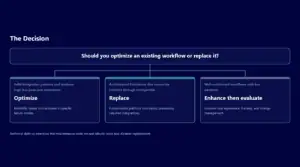
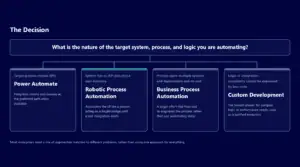
There is an honest counterpoint, and it is worth stating plainly, because the goal is the right tool, not the heaviest one. A low-code platform such as Power Automate is the correct answer for most processes in a Microsoft-standardized enterprise: it inherits the governance boundary, it is fast to build in, and it is maintainable by a governed team. The case for a heavier, pro-code build, on Azure Logic Apps or a custom service, is real only when the process exceeds what low-code can express: very high transaction volumes, complex stateful orchestration, or integration with systems that have no connector and need engineered handling. Choosing the heavier tool for a process the lighter one would have governed cleanly buys complexity you will pay to maintain. Choosing the lighter tool for a process that genuinely needed engineering produces something that works in the demo and fails at scale. The criteria above are how you tell which process you actually have.
Run a candidate tool through the four criteria and the decision usually makes itself. If a tool produces audit evidence by default, lives inside your existing Microsoft governance boundary, leaves the running automation somewhere your team can own, and carries an honest two-year cost you can defend, it is the tool to standardize on. If it fails any of the four, the gap is what you will be explaining to an auditor or a CFO later, and it is cheaper to find it now.
Key Takeaways
- In a regulated enterprise, the right automation tool is the one whose every step is auditable, governable, and maintainable by your team, not the one with the most features.
- Evaluate candidates on four criteria: the audit evidence each step produces, integration depth into your Microsoft estate, who owns the running automation, and the full two-year cost.
- Audit evidence is the first test: an automation that replaces a control without logging that the control ran has hidden your risk, not reduced it. (On a nuclear power operator, i3solutions automation saved over $293,000 a year, returned its cost in three months, and removed the manual reconciliation that was the audit exposure.)
- Prefer the tool that lives inside your existing Microsoft governance boundary; a tool outside it is a second identity, policy, and compliance surface to govern.
- Low-code such as Power Automate is right for most processes; reserve a heavier pro-code build for genuine high volume, complex orchestration, or no-connector integration, and count year-two cost or the case fails in front of a CFO.
The four criteria that decide the tool
| Criterion | What to ask | What a strong tool looks like |
|---|---|---|
| Audit evidence | Does each step record who did what, when, and with what result? | Evidence is produced by default, not reconstructed after the fact. |
| Integration depth | Does it run inside your Microsoft governance boundary? | One governance surface; it inherits identity and DLP rather than adding a second. |
| Ownership | Where does the running automation actually live? | Somewhere your team can see, monitor, and maintain, not a black box. |
| Two-year cost | Does the case include year-two license and maintenance? | An honest total a CFO can defend, not a year-one sticker price. |
Low-code or heavier pro-code
Power Automate or low-code wins when
- Most business processes: approvals, routing, notifications, data movement.
- You want to inherit governance rather than build it.
- Speed to build and a governed team that can maintain it both matter.
Azure Logic Apps or custom wins when
- Very high volume or complex, long-running stateful orchestration.
- Integration that no connector reaches.
- Throughput or latency the low-code runtime cannot meet.
Does the tool clear the bar?
- Evidence by default
- Inside the boundary
- Owned by your team
- Honest two-year cost
- Evidence has to be reconstructed, or
- It adds a second governance surface, or
- It runs where your team cannot maintain it, or
- The cost case omits year two
How to evaluate a candidate
- 1Pick a real, audited process to test againstNot a toy workflow; something an auditor would actually examine.
- 2Check whether evidence is automaticIf a person has to assemble the trail, the tool failed the first criterion.
- 3Trace where it runs and who owns itConfirm it sits inside your boundary and your team can maintain it.
- 4Build the two-year cost, then compareFor a defense technology contractor, the honest case reached full ROI in the first fiscal year and removed about 1.15 million dollars a year.
Frequently Asked Questions
What is the most important criterion when choosing a business automation tool for a regulated enterprise?
The audit evidence each automated step produces. In a regulated process, every step the tool automates was a control point, so the tool must log who or what triggered the run, what it did, and the result, in a form you can give an auditor without reconstruction. A tool that automates a control without producing that evidence has hidden your risk rather than reduced it, which is why audit evidence outranks feature count.
Is Power Automate enough, or do we need a custom build?
For most processes in a Microsoft-standardized enterprise, Power Automate is the right answer, because it inherits your existing governance boundary, is fast to build in, and is maintainable by a governed team. Reserve a heavier pro-code build on Azure Logic Apps or a custom service for processes that genuinely exceed low-code: very high transaction volumes, complex stateful orchestration, or integration with systems that have no connector. The decision criteria, not the vendor, tell you which case you have.
How do we keep automation from becoming the next governance problem?
Choose a tool whose output lands where your team can see, monitor, and maintain it, and require an owner for every automation. Sprawl happens when a department builds something IT cannot govern. A tool that lives inside your Microsoft estate inherits its identity and data-loss-prevention policy, which keeps automation on one governance surface instead of creating a second one to assess.
How should we evaluate the cost of an automation tool?
Count the full cost, including the second year. The build is the visible number; the license, maintenance, and ownership are what decide whether the automation is still working in two years. A cost case that omits year-two licensing and maintenance is the case that fails in front of a CFO. When the case is honest the returns are defensible: for a defense technology contractor, i3solutions automation reached full ROI inside the first fiscal year and removed about $1.15 million a year from the operation.
Does automation actually reduce audit risk, or just move work faster?
Done correctly, it reduces audit risk, because a uniform, logged, automated step is more provable than a hand-keyed one. The value is in the evidence, not only the speed. On a nuclear power operator, i3solutions replaced a manual reporting process with an automated dashboard that saved over $293,000 a year and, more importantly for the control environment, removed the manual reconciliation that had been the audit exposure.
What platform integrations are critical when comparing Power Automate vs. alternatives for a regulated enterprise with requirements for identity management, data residency, and secure enclave support?
Four, and every candidate tool is held to the same four tests. First, identity: the tool should sign users in through the identity system your regulated tenant already runs. On its Power Automate US Government page, last updated on 2024-06-20, Microsoft states that the GCC High deployment option enables and requires Microsoft Entra Government for customer identities, in contrast to GCC, which uses the public Microsoft Entra ID. Second, data policy: an administrator should decide which connectors a flow may use. On its Data policies page, last updated on 2026-04-08, Microsoft states that Power Platform admin center data policies allow administrators to control access to connectors in various ways to help reduce risk. Third, on-premises and enclave reach: ask how the tool reaches data that stays inside your network. On its on-premises data gateway page, last updated on 2026-08-19, Microsoft states that the gateway acts as a bridge for secure data transfer between on-premises data and several Microsoft cloud services, Power Automate among them. On its Azure Virtual Network support overview, last updated on 2026-09-23, Microsoft states that VNet support lets Power Platform integrate with resources inside your virtual network without exposing them over the public internet, and that in US government clouds this support is available only for environments in GCC High or DoD, not for GCC. Fourth, residency and authorization: ask where content rests and which authorization the environment holds. On the same US Government page, Microsoft states that Power Automate US Government stores customer content at rest in datacenters physically located only in the United States, that this content is physically separated from customer content in the commercial offering, that the GCC environment is compliant with FedRAMP High and DoD DISA IL2, and that its validation of eligibility includes confirmation of handling data subject to ITAR. Hold any alternative to the same four tests in writing: the identity system it signs users in through, the control an administrator has over its connections, how it reaches private networks without opening them to the internet, and where its data rests and under which authorization, shown on the authorizing record rather than in a vendor summary.
About the Author
Michael Branson, Founder and COO, i3solutions. LinkedIn
Choosing the tool you will standardize on is a decision worth getting right before the next hundred automations are built on it. If you want to pressure-test a candidate tool against the four criteria for your estate and your compliance context, the next step is a short scoping conversation with an i3solutions architect who has built governed automation in regulated environments.