Workflow Automation Support Services and Continuous Improvement

Enterprise workflow automation programs that deliver strong initial results often see their value steadily decline without dedicated post-launch support. This erosion isn’t dramatic, it’s gradual, measurable, and preventable. Organizations that treat deployment as the finish line rather than the starting point consistently underperform on automation ROI. Workflow drift, exception growth, and accumulated technical debt threaten automation investments that worked perfectly at launch. Professional workflow automation support services address these threats systematically, sustaining and improving the value that initial implementations create.
Key Takeaways
- 40-60% of deployed workflows experience performance degradation within 6 months without active monitoring and tuning. The decline begins immediately but only becomes visible to business users within the first quarter of production use.
- Workflow drift reduces automation effectiveness by an average of 30% annually when business processes change but automations remain static. New approval requirements, changed data formats, and updated compliance rules create gaps that silent failures don’t surface until users report problems.
- Business users abandon workflows with reliability rates below 85%, making consistent support critical for adoption. Once users lose trust in automated processes, rebuilding that confidence requires more effort than maintaining it through consistent support.
- Optimization of existing high-value workflows typically delivers 2-4x ROI compared to building new automations from scratch. Smart automation programs recognize when enhancing existing workflows outperforms new builds.
- Organizations with structured workflow governance report 45% higher automation ROI over 2-year periods compared to deploy-and-forget approaches.
- Support backlogs for neglected automations create 3-5x longer resolution times compared to proactively monitored workflows, while proactive approaches cost 40-60% less than reactive fixes due to earlier intervention.
Quick Answer
Workflow automation value erodes without dedicated post-launch support due to workflow drift, exception growth, and accumulated technical debt. Professional support services include monitoring, enhancement management, performance optimization, and governance-aware continuous improvement that sustains ROI and prevents the 50% automation failure rate seen in unsupported environments.
Why Workflow Automation Value Erodes Without Post-Launch Ownership
Workflow Drift and Exception Growth
Business processes evolve continuously, but deployed automations remain static unless actively maintained. Workflow drift occurs when business processes change but automations remain static, reducing effectiveness by an average of 30% annually. New approval requirements, changed data formats, or updated compliance rules create gaps between what workflows were designed to handle and what they encounter in production.
Exception handling becomes problematic as edge cases accumulate. Studies show that exception handling gaps cause 25-35% of automation failures to go unnoticed until business users report problems. These silent failures create data inconsistencies, missed SLA deadlines, and user frustration that compounds over time.
✅ Proactive Support
Identifies issues before they impact users. Costs 40-60% less than reactive fixes due to earlier intervention and reduced business impact. Maintains user confidence through consistent performance.
🔴 Reactive Support
Addresses problems after business disruption occurs. Creates 3-5x longer resolution times, user confidence erosion, and accumulating technical debt that eventually requires complete rebuilds.
Support Backlogs and Low Confidence
Without dedicated workflow support resources, issues accumulate in general IT queues alongside infrastructure problems and application bugs. Support backlogs for neglected automations create 3-5x longer resolution times compared to proactively monitored workflows. Business users experiencing delays lose confidence in automation reliability, often reverting to manual processes that defeat the original investment purpose.
User confidence directly impacts adoption rates. Business users abandon workflows with reliability rates below 85%, regardless of initial functionality quality. Once users lose trust in automated processes, rebuilding that confidence requires more effort than maintaining it through consistent support.
The Operational Cost of Neglected Automations
Unmaintained workflows consume disproportionate system resources through inefficient error handling, excessive retry attempts, and accumulated technical debt. Poorly maintained automations consume 20-40% more system resources due to inefficient error handling and retry logic. These resource drains affect platform performance for all users while delivering diminishing business value.
Organizations without dedicated workflow support see 50% of their automations become obsolete or problematic within 18 months. The cost of addressing accumulated technical debt often exceeds the original development investment, making neglected workflows net-negative contributors to business operations.
Consistent support investment costs 30-50% less than rebuild scenarios while preserving the institutional knowledge embedded in existing workflows – a cost comparison that makes the business case straightforward.
What Post-Launch Workflow Support Should Include
Effective workflow support operates as an integrated service covering monitoring, enhancement management, and performance optimization. This isn’t break-fix maintenance – it’s proactive value preservation and improvement that treats workflows as business-critical infrastructure requiring dedicated attention.
Monitoring, Triage, and Issue Resolution
Comprehensive monitoring tracks workflow execution patterns, error rates, and performance metrics to identify issues before they impact business operations. Research indicates that 40-60% of deployed workflows experience performance degradation within 6 months without active monitoring and tuning.
Power Platform Admin Center provides centralized monitoring capabilities for Microsoft 365 environments, enabling administrators to track workflow performance across SharePoint, Teams, and Exchange integrations. The Admin Center’s analytics dashboard displays execution success rates, error patterns, and resource consumption metrics that support proactive issue identification.
Triage processes categorize issues by business impact and technical complexity, ensuring critical workflows receive immediate attention while routine maintenance gets scheduled appropriately. This structured approach prevents support backlogs from developing and maintains user confidence through consistent response times.
Enhancement Intake and Prioritization
Business requirements evolve continuously, generating requests for workflow modifications, new integrations, and expanded functionality. Enhancement intake processes capture these requests systematically, evaluating them against business value, technical feasibility, and resource requirements. Organizations with structured workflow governance report 45% higher automation ROI over 2-year periods.
Microsoft’s Power Platform Center of Excellence (CoE) toolkit provides governance frameworks for enhancement request management, including approval workflows, impact assessment templates, and resource allocation guidelines. Power Automate’s solution-aware flows enable structured deployment processes that maintain consistency across development, testing, and production environments.
Prioritization frameworks balance immediate business needs against long-term platform sustainability, ensuring enhancement investments strengthen rather than complicate the overall automation architecture.
Performance Tuning and Process Refinement
Regular performance analysis identifies optimization opportunities in workflow logic, data handling, and integration patterns. This includes reviewing execution times, resource consumption, and user experience metrics to maintain optimal performance as data volumes and user bases grow.
Power Automate’s built-in analytics provide detailed execution timing data, connector performance metrics, and resource utilization patterns that guide optimization efforts. Flow run history analysis reveals bottlenecks in data processing, API call efficiency, and conditional logic execution that impact overall workflow performance.
Process refinement addresses workflow design improvements that enhance reliability, reduce complexity, or expand functionality – often delivering value improvements without requiring complete workflow rebuilds.
When Workflow Optimization Becomes More Important Than New Automation Builds
Smart automation programs recognize when enhancing existing workflows delivers superior ROI compared to building new automations. Optimization of existing high-value workflows typically delivers 2-4x ROI compared to building new automations from scratch.
Underused Workflows with Good Design Potential
Well-architected workflows with low adoption often represent optimization opportunities rather than design failures. These automations may have solid technical foundations but suffer from user experience issues, incomplete integration points, or misaligned business process assumptions.
Common improvement opportunities include simplified user interfaces, better error messaging, enhanced notification systems, or additional integration touchpoints. Workflows with high success rates but low usage volumes may need better promotion and user enablement rather than technical changes. Performance data reveals whether underutilization reflects workflow limitations or insufficient user training and change management.
High-Value Workflows Needing Improvement Rather Than Replacement
Mission-critical workflows that deliver business value but experience reliability or performance issues represent prime optimization candidates. These automations often handle complex business processes that would be expensive and risky to rebuild from scratch. Targeted improvements can address specific pain points while preserving institutional knowledge embedded in current workflow logic.
High-value workflows justify substantial optimization investment because improvements compound over time. Enhanced reliability, improved performance, or expanded functionality delivers ongoing benefits across all workflow executions. Legacy workflows that integrate with multiple systems often contain valuable exception handling and business rule logic that would be difficult to replicate in new builds.
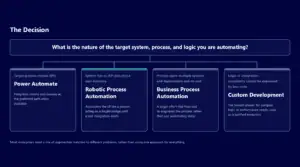
Optimize vs. Replace: Decision Criteria
- Optimize: Solid integration patterns and business logic but poor user experience. Reliability issues concentrated in specific failure modes. Valuable institutional knowledge embedded in existing exception handling.
- Replace: Architectural limitations that cannot be resolved through configuration. Fundamental platform constraints preventing required integrations. Technical debt so extensive that maintenance costs exceed rebuild costs.
- Enhance then evaluate: Well-architected workflows with low adoption – improve user experience, training, and change management before concluding the workflow itself is the problem.
How Continuous Improvement Strengthens Long-Term ROI
Better Reliability and Adoption
Continuous improvement cycles directly impact workflow reliability through systematic identification and resolution of performance issues. Regular optimization reduces error rates, improves execution speed, and enhances exception handling effectiveness. These reliability improvements create positive feedback loops: better performance drives higher adoption, which justifies additional optimization investment.
User confidence increases when organizations demonstrate commitment to workflow quality through ongoing improvement. Business users are more likely to adopt and expand usage of automations that show consistent performance improvements over time.
Governance and Support Maturity
Structured improvement processes strengthen organizational governance capabilities by establishing clear evaluation criteria, change control procedures, and impact assessment frameworks. Mature governance reduces the risk of workflow modifications that introduce unintended consequences or compliance issues.
Support maturity develops through systematic improvement cycles that build institutional knowledge about workflow behavior, common failure patterns, and effective optimization strategies. This accumulated expertise enables more effective troubleshooting, better architectural decisions, and more accurate effort estimation for future improvements.
Smarter Roadmap Decisions
Continuous improvement generates performance data and user feedback that inform strategic automation roadmap decisions. Organizations can make evidence-based choices about which workflows warrant additional investment, which processes need new automation approaches, and where manual processes remain more effective. Historical improvement data also helps predict the long-term value potential of new automation initiatives.
Delivery Model Options for Workflow Support
Internal Ownership with Targeted Partner Support
Organizations with established IT operations often prefer maintaining internal ownership while engaging specialized partners for specific expertise areas. Internal teams typically handle day-to-day monitoring, user support, and minor configuration changes, while partners provide performance analysis, complex troubleshooting, and enhancement architecture. This approach works effectively when organizations have dedicated workflow administrators and established governance processes but need specialized expertise for optimization projects or complex technical issues.
Managed Service or Optimization Partnership
Comprehensive managed services transfer ongoing workflow support responsibility to specialized providers while maintaining organizational oversight of strategic decisions. This model suits organizations that prefer to focus internal resources on business outcomes rather than technical maintenance activities. Effective managed services maintain transparency through regular reporting, performance metrics, and strategic planning sessions that keep organizational stakeholders informed about workflow performance and improvement opportunities.
Rescue-to-Support Transition Model
Organizations with problematic workflow implementations often require rescue services that stabilize existing automations before transitioning to ongoing support models. Rescue engagements typically begin with comprehensive workflow audits that identify critical issues, performance bottlenecks, and compliance risks requiring immediate attention. The transition from rescue to standard support requires systematic remediation of identified issues, implementation of monitoring and governance processes, and knowledge transfer to enable sustainable ongoing support.
How i3solutions Supports Workflow Programs After Go-Live
i3solutions provides comprehensive post-launch support that treats workflow optimization as a strategic capability rather than reactive maintenance. Our Power Automate developers combine technical expertise with business process understanding to sustain and enhance automation value over time.
Initial post-launch periods require focused attention to performance optimization, exception handling refinement, and user experience improvements based on production usage patterns. Our stabilization process addresses the predictable issues that emerge when workflows encounter real-world complexity beyond pilot testing scenarios. Performance tuning examines execution patterns, resource consumption, and integration efficiency to optimize workflow behavior under production loads.
All support activities operate within established governance frameworks that maintain compliance, security, and change control standards while enabling necessary improvements. Change control processes ensure that optimization and enhancement activities maintain audit trails, stakeholder approval, and rollback capabilities appropriate for production environments.
Strategic enhancement planning aligns workflow improvements with broader business objectives and technology roadmaps. Enhancement roadmaps balance user requests, technical debt reduction, and strategic automation objectives through systematic prioritization. Regular assessment cycles evaluate workflow performance, user satisfaction, and business outcome delivery to identify optimization opportunities and guide future automation decisions.
i3solutions builds client workflow automation on Power Automate cloud flows, Power Automate desktop flows for RPA, and Azure Logic Apps in both the Standard and Consumption tiers.
Frequently Asked Questions: Workflow Automation Support Services
How quickly do unsupported workflows start experiencing problems?
Most organizations see performance degradation within 6 months of deployment without active monitoring. Exception handling gaps and workflow drift begin accumulating immediately but become noticeable to business users within the first quarter of production use.
What is the difference between workflow support and general IT support?
Workflow support requires specialized knowledge of automation platforms, business process integration, and governance frameworks. General IT support treats workflows as applications, while dedicated workflow support understands the business process context and optimization opportunities that sustain long-term value.
When should organizations prioritize optimizing existing workflows over building new ones?
Optimization becomes the priority when high-value workflows show improvement potential that exceeds new build ROI. This typically occurs when existing automations have solid architecture but suffer from performance, reliability, or adoption issues that targeted improvements can address effectively.
How do you measure the success of workflow support services?
Success metrics include workflow reliability rates, user adoption levels, resolution times for issues, and business outcome delivery. Organizations should track automation ROI over time, support ticket volumes, and user satisfaction to evaluate support effectiveness.
What happens to workflows that do not receive proper support?
Without dedicated support, 50% of automations become obsolete or problematic within 18 months. They consume excessive system resources, create data inconsistencies, and lose user confidence, often requiring complete rebuilds rather than optimization.
Can internal teams handle workflow support, or do you need external partners?
Internal teams can handle basic monitoring and user support, but complex optimization, governance implementation, and strategic enhancement planning often require specialized expertise. Many organizations use hybrid models with internal ownership and targeted partner support for advanced capabilities.
What is included in a typical workflow optimization engagement?
Comprehensive optimization includes performance analysis, exception handling improvement, user experience enhancement, and integration refinement. The scope depends on workflow complexity and business requirements, but focuses on measurable improvements to reliability, efficiency, and user adoption.