
Michael Branson, Founder / COO, i3solutions. LinkedIn
Michael Branson co-founded i3solutions 30 years ago and brings executive, operational, and technical perspective to organizations working in secure and compliance-bound environments, including CMMC-scoped and defense supply-chain programs.
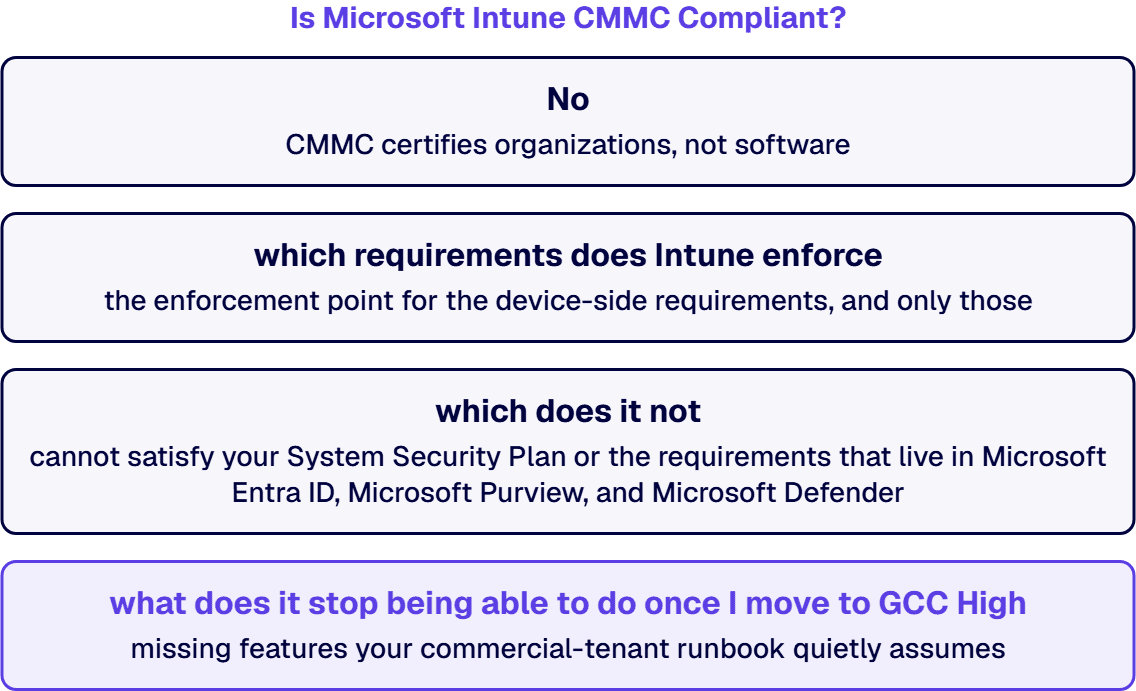
Short answer. No. Microsoft Intune is not CMMC compliant, and neither is any other product, because CMMC certifies organizations, not software. Intune is a control implementation tool, not a compliance certificate. What it does is enforce and evidence a specific slice of the 110 security requirements in CMMC Level 2, which come from NIST SP 800-171 Revision 2 and are incorporated by reference into the CMMC rule at 32 CFR 170.2. In a Microsoft 365 architecture Intune is the enforcement point for the device-side requirements: endpoint access control, configuration baselines, mobile device connection and encryption, removable media, and endpoint malicious code protection. It cannot satisfy your System Security Plan, your DFARS 252.204-7012 incident reporting obligation, or the requirements that live in Microsoft Entra ID, Microsoft Purview, and Microsoft Defender. And the environment matters more than most buyers expect: Intune for GCC High and DoD runs on Azure Government at Impact Level 4 and Impact Level 5, and it is missing features your commercial-tenant runbook quietly assumes.
This page is written for the person who has to defend the answer to a C3PAO assessor, not for the person writing a slide. Every requirement number, feature gap, and licensing rule below is sourced to Microsoft’s published service documentation or to the CMMC rule itself.
No, and that distinction is the entire answer. CMMC assesses an Organization Seeking Assessment against a set of security requirements. It does not certify software. A vendor can tell you their product is FedRAMP authorized, or that it runs at a given DoD Impact Level, or that it is Common Criteria certified, and all of those can be true and verifiable. None of them makes the product “CMMC compliant,” and none of them transfers to you.
Microsoft says this itself, plainly, in its own CMMC documentation: “CMMC compliance depends on customer configuration, implementation, and operational controls, as well as the use of qualified assessors and partners. Microsoft cloud services provide capabilities that can help support these requirements.” Note the verb. Microsoft services support requirements. They do not satisfy them, and Microsoft does not claim they do.
What Microsoft actually provides is a set of services that live inside your assessment boundary and that you configure to implement requirements. The requirement is yours. The evidence is yours. The certification is yours. Intune is the mechanism that lets you enforce a device-side requirement consistently and then prove you enforced it.
So the useful question is not “is Intune CMMC compliant.” It is: which of the 110 requirements does Intune enforce, which does it not, and what does it stop being able to do once I move to GCC High? That is what the rest of this page answers.
The CMMC Program rule at 32 CFR Part 170 took effect on December 16, 2024. Its own definition is explicit: CMMC Level 2 is “the 110 Level 2 requirements from NIST SP 800-171 R2,” incorporated by reference, and 32 CFR 170.14 adds that “the security requirements in CMMC Level 2 are identical to the requirements in NIST SP 800-171 R2.” NIST organizes those 110 requirements into fourteen families. The edition that governs is February 2020, including updates through January 28, 2021.
Two consequences of that, both of which trip people up:
Scoring is not pass or fail on day one, and the threshold is more precise than the “80 percent” you will see quoted. The rule conditions a POA&M on the assessment score divided by the total number of Level 2 requirements being greater than or equal to 0.8. Clear that bar and you receive a Conditional CMMC Status, with every NOT MET requirement placed on a POA&M that must be closed and verified by a POA&M closeout assessment within 180 days of the Conditional CMMC Status date, at which point the status becomes Final Level 2.
One detail worth knowing before you plan to POA&M your way through: six Level 2 requirements are ineligible for a POA&M entirely. They are AC.L2-3.1.20, AC.L2-3.1.22, CA.L2-3.12.4, PE.L2-3.10.3, PE.L2-3.10.4, and PE.L2-3.10.5. Those must be MET at assessment. None of the six is an Intune requirement, which is worth saying out loud, because it means no amount of endpoint management buys you relief on them.
Intune is the enforcement point for the device-side requirements, and only those. The table below maps the requirements where Intune is genuinely the control mechanism in a Microsoft 365 architecture, using the Rev 2 numbering a C3PAO will actually cite. The requirement text is NIST’s. The enforcement point and the evidence column are i3solutions’ implementation mapping, not a Microsoft claim of coverage.
| CMMC ID | NIST SP 800-171 Rev 2 requirement | Intune enforcement point | Evidence a C3PAO accepts |
|---|---|---|---|
| AC.L2-3.1.1 | Limit system access to authorized users, processes acting on behalf of authorized users, and devices (including other systems) | Device compliance policy plus a Conditional Access grant requiring a compliant device | Compliance policy export, Conditional Access policy export, device compliance report |
| AC.L2-3.1.2 | Limit system access to the types of transactions and functions that authorized users are permitted to execute | App protection policies and device configuration profiles restricting app-level actions | App protection policy export, per-app assignment report |
| AC.L2-3.1.12 | Monitor and control remote access sessions | Microsoft Tunnel plus Conditional Access device state signals | Tunnel configuration, Conditional Access sign-in logs |
| AC.L2-3.1.18 | Control connection of mobile devices | Enrollment restrictions and device compliance policy | Enrollment restriction configuration, enrolled-device inventory |
| AC.L2-3.1.19 | Encrypt CUI on mobile devices and mobile computing platforms | Device configuration profile enforcing BitLocker and FileVault, app protection policy encryption | Encryption report per device, policy export |
| CM.L2-3.4.1 | Establish and maintain baseline configurations and inventories of organizational systems (including hardware, software, firmware, and documentation) throughout the respective system development life cycles | Security baselines and device configuration profiles; Intune device inventory | Baseline assignment report, hardware and software inventory export |
| CM.L2-3.4.2 | Establish and enforce security configuration settings for information technology products employed in organizational systems | Settings catalog profiles and security baselines, aligned to the applicable DISA STIG | Profile export with per-setting values, per-device configuration status |
| CM.L2-3.4.6 | Employ the principle of least functionality by configuring organizational systems to provide only essential capabilities | Device configuration profiles disabling nonessential features; Endpoint Privilege Management | Profile export, EPM elevation rules and audit log |
| CM.L2-3.4.7 | Restrict, disable, or prevent the use of nonessential programs, functions, ports, protocols, and services | Attack surface reduction rules and Windows Defender Application Control policy delivered via Intune | ASR rule assignment report, application control policy export |
| CM.L2-3.4.9 | Control and monitor user-installed software | Enterprise Application Management and application control policy | Discovered-apps inventory, application control policy export |
| IA.L2-3.5.3 | Use multifactor authentication for local and network access to privileged accounts and for network access to non-privileged accounts | Intune supplies the device compliance signal; the MFA requirement itself is enforced in Microsoft Entra ID Conditional Access | Conditional Access policy export, authentication method registration report |
| MP.L2-3.8.7 | Control the use of removable media on system components | Device configuration profile with removable storage restrictions and Defender device control | Device control policy export, per-device status |
| SC.L2-3.13.11 | Employ FIPS-validated cryptography when used to protect the confidentiality of CUI | Device configuration profile enabling FIPS mode; enforced on the endpoint, not created by Intune | Profile export, per-device configuration status |
| SC.L2-3.13.16 | Protect the confidentiality of CUI at rest | Disk encryption profile plus app protection policy encryption on mobile | Encryption status report |
| SI.L2-3.14.2 | Provide protection from malicious code at designated locations within organizational systems | Microsoft Defender antivirus policy delivered through Intune endpoint security | Antivirus policy export, per-device protection status |
| SI.L2-3.14.4 | Update malicious code protection mechanisms when new releases are available | Defender antivirus policy with security intelligence update configuration | Antivirus policy export, definition version report |
That is roughly a sixth of Level 2, and it is the sixth that is hardest to prove by hand. It is also, note, a set of requirements that Intune enforces jointly with Microsoft Entra ID and Microsoft Defender. Intune is the delivery and reporting plane. On its own it is not sufficient for a single one of the requirements above.
Being explicit about the gap is what keeps an assessment honest. Intune does nothing for:
This is where most Intune-and-CMMC guidance is out of date, and where it costs you real money, because a remediation plan built on the commercial feature set will not survive contact with a GCC High tenant.
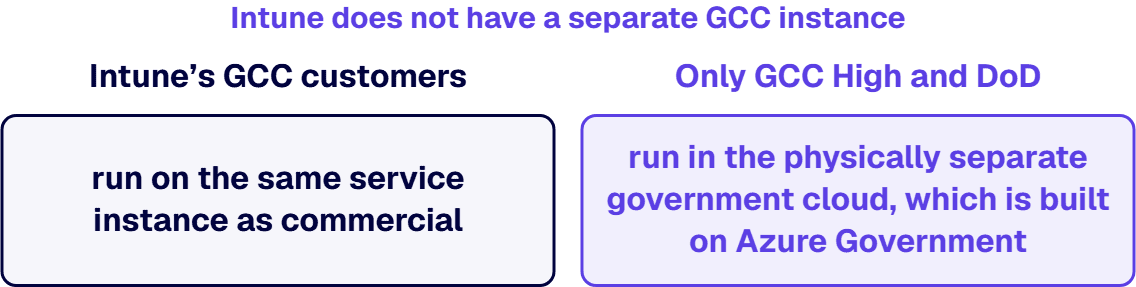
Microsoft’s own service documentation is blunt about this and almost nobody repeats it: Intune does not have a separate GCC instance. Where Microsoft 365 has a distinct GCC environment, Intune’s GCC customers run on the same service instance as commercial. Only GCC High and DoD run in the physically separate government cloud, which is built on Azure Government and which Microsoft identifies as Impact Level 4 and Impact Level 5. So “we are on GCC, therefore our Intune is in a government cloud” is false, and if you have written that sentence into a System Security Plan, an assessor can dismantle it.
You can check this yourself without taking anyone’s word for it, which is the useful part. The Microsoft Graph endpoint your tenant answers on is the tell: GCC High is https://graph.microsoft.us, DoD is https://dod-graph.microsoft.us, and GCC uses the worldwide https://graph.microsoft.com, the same endpoint as commercial. If your automation is talking to graph.microsoft.com, you are not in the government cloud, whatever the license says.
Microsoft currently lists these as unavailable with no planned support. If your remediation design depends on one of them, redesign now.
These are on Microsoft’s roadmap for GCC High and DoD but are not usable now. Several of them are load-bearing for a CMMC patching and configuration story, which is exactly why this list matters:
Read that patching list again. In a commercial tenant, requirement 3.14.1 on timely flaw remediation is commonly evidenced with Intune’s Windows update rings and update reports. In GCC High those update policies are not there yet. You need a different mechanism and a different artifact, and you need to say so in the SSP rather than describe a capability you do not have.
Widely cited Intune-and-CMMC articles, including the ones that currently rank for this question, still list Log Analytics, Mobile Threat Defense, and Endpoint Analytics as unsupported in GCC High. Microsoft’s current service description lists all three as supported: you can send Intune log data to Azure Storage, Event Hubs, or Log Analytics; MTD connectors work with vendors that also support GCC High; and Advanced Analytics, Endpoint Privilege Management, Enterprise Application Management, Microsoft Tunnel for MAM, and Linux management are all available in GCC High and DoD today. Those same articles map Intune to retired CMMC 1.0 practice IDs. Both errors point the same direction: they were accurate once, and the environment moved.
There is no built-in way to migrate an Intune tenant from the commercial service to the government cloud, or back. Devices must be unenrolled from the existing tenant and re-enrolled in the new one, which is operationally identical to replacing a third-party MDM. Plan it as a device-touch project with a re-enrollment window, not as a license change.
Microsoft organizes Intune into three plans: Microsoft Intune Plan 1, the base unified endpoint management service; Microsoft Intune Plan 2, additive to Plan 1, whose headline capabilities are Remote Help and Advanced Analytics; and the Microsoft Intune Suite, additive to Plan 1 and inclusive of Plan 2. Most organizations get Plan 1 inside a Microsoft 365 bundle rather than buying it standalone.
Here is the trap. Remote Help is one of the two capabilities you buy Plan 2 for, and Remote Help is not supported in GCC High or DoD. Advanced Analytics is supported. So a defense contractor who buys Plan 2 in a GCC High tenant expecting the full Plan 2 feature set gets half of it. Confirm what you are actually licensed for before you build a support model around it.
Separately: Conditional Access, which is what turns an Intune compliance policy into an enforceable access control for requirements 3.1.1 and 3.5.3, requires Microsoft Entra ID P1 or P2. An Intune license alone does not give you the control you are claiming.
On cost: Microsoft does not publish a public per-user list price for GCC High. GCC High carries a licensing premium over Commercial Microsoft 365, and it is sold through Microsoft agreements and authorized partners, so any per-user GCC High figure you have been quoted came from a partner price sheet and not from Microsoft. Commercial pricing is public: Microsoft 365 E3 lists at $39.00 per user per month on an annual commitment. Treat any published “GCC High costs X percent more than Commercial” claim as unsourced, because there is no public GCC High figure to compute it from.
An assessor is not impressed that you own Intune. They want to see, per requirement, that the policy exists, that it is assigned to the right scope, and that devices are actually in the state you claim. In practice that means four artifacts for each mapped requirement:
Microsoft Purview Compliance Manager ships a CMMC v2 Level 2 assessment template, and for GCC, GCC High, and DoD customers the CMMC templates are included alongside the Microsoft Data Protection Baseline. Use it as the scaffold for the improvement actions and the evidence register. Do not mistake its score for an assessment result: it measures the actions you have recorded, not the ones a C3PAO will accept.
The failure mode i3solutions sees most often is a tenant where the policies are right and the scoping is wrong: a compliance policy assigned to All Users rather than to the CUI enclave group, which means either the boundary is bigger than the SSP says, or the policy is not covering the devices that matter. Both are findings.
i3solutions plans and runs governed Microsoft 365 and Azure work for compliance-bound organizations, and maintains dedicated compliance specialists who understand CMMC, HIPAA, SOC 2, and financial services regulations within Microsoft environments, providing audit trail documentation and access control frameworks that reduce audit preparation time by 60 percent.
Two things we have learned that shape how we scope this work. First, under DFARS 252.204-7012 cybersecurity incident reporting, the artifact set expands roughly 30 percent versus commercial scope, so the evidence burden, not the configuration, is what drives the schedule. Second, the environment decision has to be settled before the endpoint design starts, because a GCC High tenant invalidates a meaningful part of a commercial Intune runbook.
The scale we work at is the reason we are blunt about scoping. i3solutions runs a governed Power Platform for a federal defense agency supporting roughly 10,000 personnel across about 180 locations, which works because it is governed, not despite it. And on the identity side, which is where an Intune compliance policy either becomes an enforceable control or stays a suggestion, i3solutions unified identity and automated provisioning across systems for 125,000 users by treating the interfaces as owned, governed contracts. Device policy at that scale fails on group scoping and exception handling long before it fails on a setting value, which is precisely the failure an assessor writes up.
A CMMC Level 2 implementation for a defense contractor with a defined CUI boundary typically ranges from $45,000 to $75,000, covering the Compliance Manager baseline assessment, Conditional Access redesign, DLP policy build and testing, Purview Audit Premium configuration, and post-implementation documentation. Where the work includes a GCC High migration, implementation for organizations with 50 to 500 users typically ranges from $50,000 to $200,000, covering tenant provisioning, identity migration, data transfer, security configuration, and compliance validation.
If you are building the internal case before committing to an environment, start with a scoped gap assessment rather than a licensing decision: our CMMC technology readiness assessment establishes the CUI boundary, tests what an assessor will actually test, and produces the evidence register your committee needs to approve the spend. You can also hire senior Microsoft architects who run CMMC readiness.
No. CMMC certifies organizations, not products, so no software can be CMMC compliant. Intune is a control implementation tool. In a Microsoft 365 architecture it is the enforcement point for the device-side requirements of CMMC Level 2, including 3.1.18 on controlling mobile device connection, 3.1.19 on encrypting CUI on mobile devices, 3.4.1 and 3.4.2 on baseline and security configuration settings, 3.8.7 on removable media, and 3.14.2 on malicious code protection. It does nothing for your System Security Plan, your POA&M, or your DFARS 252.204-7012 incident reporting obligation.
Intune is the enforcement point for roughly a sixth of the 110 requirements, and it is not sufficient on its own for any single one of them. Every device-side requirement it supports is enforced jointly with Microsoft Entra ID, which owns Conditional Access and MFA, and Microsoft Defender, which owns endpoint protection. Be wary of any article citing a precise practice count, because most of them are counting against the retired CMMC 1.0 model rather than the 110 NIST SP 800-171 Rev 2 requirements the current rule assesses.
Not necessarily. CMMC does not name a cloud environment. What forces GCC High is export-controlled data under ITAR or EAR, a DoD Impact Level 4 requirement, or a contract clause that names the environment. Many contractors meet Level 2 in GCC. Note that Intune has no separate GCC instance, so GCC customers run Intune on the same service instance as commercial; only GCC High and DoD run in the government cloud on Azure Government at Impact Level 4 and 5.
Microsoft lists Windows Autopilot, the on-premises Exchange Connector, Microsoft Store for Business, the ServiceNow and TeamViewer connectors, Windows Subscription Activation, and Azure Virtual Desktop multi-session as unavailable with no planned support. Windows Autopatch, Windows update policies, Remote Help, Cloud PKI, and Windows Device Health Attestation are planned but not available today. The missing Windows update policies matter most for CMMC, because they are the usual evidence for timely flaw remediation under 3.14.1.
Not directly. There is no built-in migration path between the commercial service and the government cloud in either direction. Devices must unenroll from the current tenant and re-enroll in the new one, which makes it a device-touch project rather than a licensing change.
Microsoft Intune Plan 1 is the base service and is what most organizations get inside a Microsoft 365 bundle. Plan 2 adds Remote Help and Advanced Analytics, but Remote Help is not supported in GCC High or DoD, so Plan 2 delivers only part of its value in a government tenant. Conditional Access, which is what makes an Intune compliance policy an enforceable access control, requires Microsoft Entra ID P1 or P2 separately.
i3solutions plans and runs governed Microsoft 365 and Azure work for compliance-bound organizations, with dedicated compliance specialists covering CMMC within Microsoft environments. A CMMC Level 2 implementation for a defense contractor with a defined CUI boundary typically ranges from $45,000 to $75,000, covering the Compliance Manager baseline assessment, Conditional Access redesign, DLP policy build and testing, Purview Audit Premium configuration, and post-implementation documentation.

US-Based Microsoft System Integrator | Est. 1997
© i3solutions. All rights reserved.
US-Based | Est. 1997
© i3solutions. All rights reserved.


