

Microsoft 365 access governance for AI readiness comes down to seven areas, three of them AI-specific: conditional access for AI surfaces, app permissions and consent, and the sequencing of Entra decisions ahead of a pilot. Each has to close before an AI surface is switched on.
Microsoft 365 access governance for AI readiness rests on seven governance areas, three of them specific to AI. This page settles those three: conditional access for AI surfaces, app permissions and consent, and the order the Entra decisions are taken in. Each closes before an AI surface is switched on, because the core assistant experience reaches tenant content through the signed-in identity your access model already trusts.
The people who answer for this are rarely in the same room. The Microsoft 365 owner holds the tenant, the identity and access lead holds Entra ID, and the security leader holds the policy set. The Copilot program sponsor holds a date, and the date arrives first, in front of a list of identity questions that were open long before anyone said the word AI.
This page carries no configuration steps. Policy design belongs to your identity and security team, working against an environment nobody outside it has seen.
Three decisions belong here: which applications, identities, and session scenarios a conditional access policy has to cover once an assistant is in scope; how application permissions and consent are granted, reviewed, and withdrawn before enablement; and what order the Entra decisions are taken in relative to a pilot. Everything adjacent already has a home, and this page points at it rather than repeating it.
Whether to start at all is answered by a broader readiness sequence covering licensing, identity, permissions, labelling, the semantic index, and government cloud; this page is the identity layer under that sequence’s second gate. Access review mechanics (creation, reviewer types, cadence, automation) belong to Entra ID governance work, not here; this page says a recurring review has to exist, not how to run one. Permission and sharing mechanics across SharePoint, OneDrive, and Teams (role design, tenant-level application visibility) sit in a separate access-and-permissions track. Content classification and labelling sit in a data governance track: an identity decision that leans on a label isn’t settled until the label owner accepts coverage and accuracy for the content in scope.
The core assistant experience that answers from tenant content arrives with no permission model of its own. It runs as the account that asked, so the access model you already operate becomes the model it works inside. That covers the core experience and stops there: agents, plug-ins, and connectors are a separate case. Each carries the grant it was given. A delegated grant stays inside what the signed-in person could already reach. An application permission and a connector’s access mapping do not: those two paths can bring back content the account alone could not open. What the core experience changes is the cost of discovery.
That shift is why identity governance decides readiness rather than accompanying it. Two phrases carry the argument in a security review: the access model is measured against least privilege (an account holds the access its work requires and nothing beyond it), and the policy set runs on zero trust (no request is trusted because of where it came from: identity, device, and session signals decide each one). Enablement raises the price of getting either wrong.
Microsoft’s own SharePoint guidance puts site and permission review ahead of making content broadly discoverable, and gives tenants a way to hold selected sites out of organization-wide search and assistant responses while review runs. Read that instrument with its limit: restricting discovery changes no permissions, and anyone holding direct access keeps it. It works site by site, and it buys time for remediation without standing in for it. The decisions stay yours: which sites are held back, who decides, and when the hold comes off.
Seven areas have to hold for an estate to be ready. Three carry the AI-specific decisions this page settles; the other four predate AI and are handled elsewhere. A row closes when somebody names the accountable person and points at evidence.
| Area | Decision to settle | Evidence that it is settled |
|---|---|---|
| Ownership | Who owns each group, site, and access decision? | A named person per object, recorded where the tenant can be queried |
| Identity lifecycle, groups, and roles | How do joiner, mover, and leaver changes reach access, and which memberships still match the work? | Access changes land the day the role changes, and an owner explains any membership in a sentence |
| External access | Three settings decided separately: guest admission, site-level sharing, and shared-link issuance and expiry | A tenant-level position for guest admission, and per-site positions for sharing and links |
| Access reviews | Who recertifies high-risk access, and on what cadence? | A recurring review with named reviewers |
| Conditional access for AI surfaces | Which target resources, identities, session scenarios, and workload identities the policy set covers | An inventory of applications and client experiences in scope, with a named owner on the residual risk |
| App permissions and consent | Which applications hold delegated grants, which hold application permissions, and who may grant each | A count of grants by type, a named approver per class, and a standing answer for new requests |
| Sequencing and exceptions | What precedes the pilot, what runs alongside it, and how an exception ends | A dated order of work, and every exception carrying an owner, a reason, and an end date |
Ownership decides whether anything else can be enforced: a review with no named owner returns to whoever called the meeting. External access is the row that surprises people: teams treating its three settings as one switch meet the other two during the pilot.
i3solutions designs and implements identity and access management across Microsoft Entra ID, hybrid environments, and platform identity, with the evidence trail regulated enterprises answer audits with.
Conditional access is the instrument, and it is already carrying the rest of the estate. The work here is deciding what it covers once an AI surface joins it.
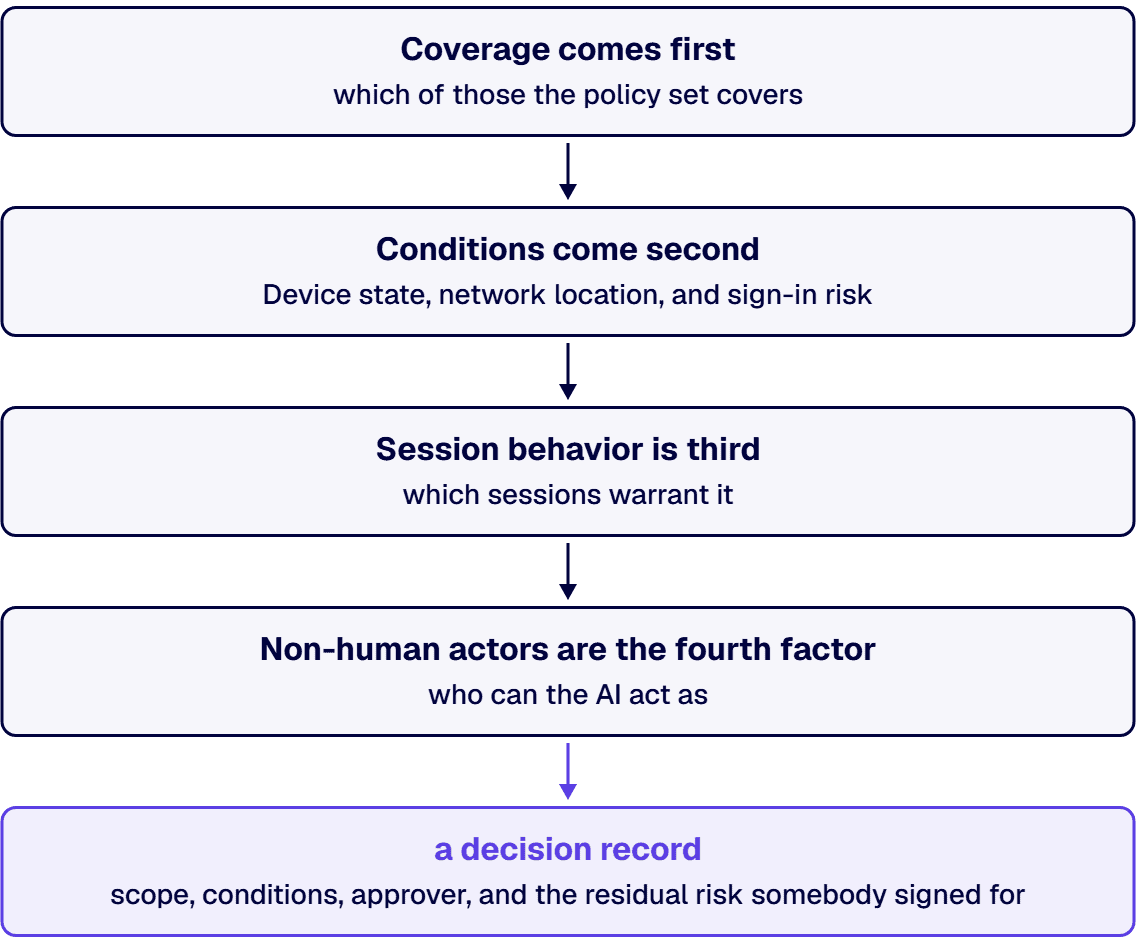
Coverage comes first. An assistant reaches a reader through several applications and client experiences, and the decision is which of those the policy set covers. The deliverable is an inventory of them, each marked covered, deliberately excluded, or not yet established, with a named owner accepting the residual risk on the last. An inventory carrying its own unknowns can be audited; a claim to have covered every surface cannot.
Conditions come second. Device state, network location, and sign-in risk are levers already in use elsewhere, and the decision is whether AI-assisted access carries the same conditions as email or tighter ones. A defensible landing point is parity with the strictest workload the assistant can reach: an organizational choice about risk appetite, not product behavior.
Session behavior is third. Where a policy constrains what happens after sign-in rather than only whether it succeeds, the decision is which sessions warrant it. Support is uneven across applications and clients, and no session control governs what a person does with an answer already on screen: the honest framing is one export path narrowed, not output contained.
Non-human actors are the fourth factor, and the skipped one. The question a security leader is actually asking is who can the AI act as, and the answer splits by actor: the assistant itself runs as the signed-in user; an agent or plug-in acting for that person runs on a delegated grant bounded by their access; an application acting on its own behalf runs on application permissions and workload identity governance; a connector bringing external content into the index answers through its own access mapping. All of them are governable, but policies written for people do not cover these actors by default, which makes workload identity governance a decision area of its own.
The four factors produce a decision record: scope, conditions, approver, and the residual risk somebody signed for.
Before an application reaches your organization’s data, somebody grants it permission, and the grant outlives the person who granted it. Those grants are not one population. A delegated grant lets an application act for the person signed in, reaching no further than that person reaches. An application permission, granted by an administrator, lets the application act on its own behalf, tenant-wide unless the resource scopes it down. An enterprise application federated only for sign-on can hold no API permissions at all, and its service principal still gets checked for grants before the inventory calls it clean.
That tail is called consent sprawl once somebody counts it, and the count is the first decision: what is connected, which type of grant each holds, who approved it, and whether it still does work for the business. Estates that skip the count write policy against an imagined inventory, which is how a governance program blocks something operational in week two and loses its mandate.
The second decision is where user consent sits: free consent to low-risk permissions, narrowed to verified publishers and low-impact permissions, or disabled entirely. An admin consent workflow is not a third mode: it’s an optional request path on top of whichever setting is chosen, and a narrow setting with no path sends every blocked user to the helpdesk.
Review is the third decision. Consent grants age badly, and permission sets issued for a pilot outlive it. Set the cadence, the reviewer, and the disposition rule before enablement, sorted by risk shape: an application reaching mail, files, and chat for a population is not the same object as one reaching a single list.
The fourth is the standing answer for AI-adjacent applications: plug-ins, agents, and connectors arrive faster than a review calendar, and a program without a standing answer improvises under time pressure. That answer names who requests, who approves, what evidence the approver needs, and what happens when the answer is no.
Order matters more than completeness, and it depends on what a pilot means. A licence is assigned to a person rather than a content boundary, so the pilot’s scope has to be defined before anything can be sequenced against it. Three definitions are available, each with a consequence: a users-only pilot licenses a cohort and leaves content untouched, inheriting the exposure of the whole estate; a content-bounded pilot pairs the cohort with permission remediation across the repositories in its reach, which is defensible and slow; a discovery-restricted pilot holds selected sites out of search and assistant responses while review runs, narrowing what surfaces without changing access. Pick one in writing: a program that never picks has picked the first.
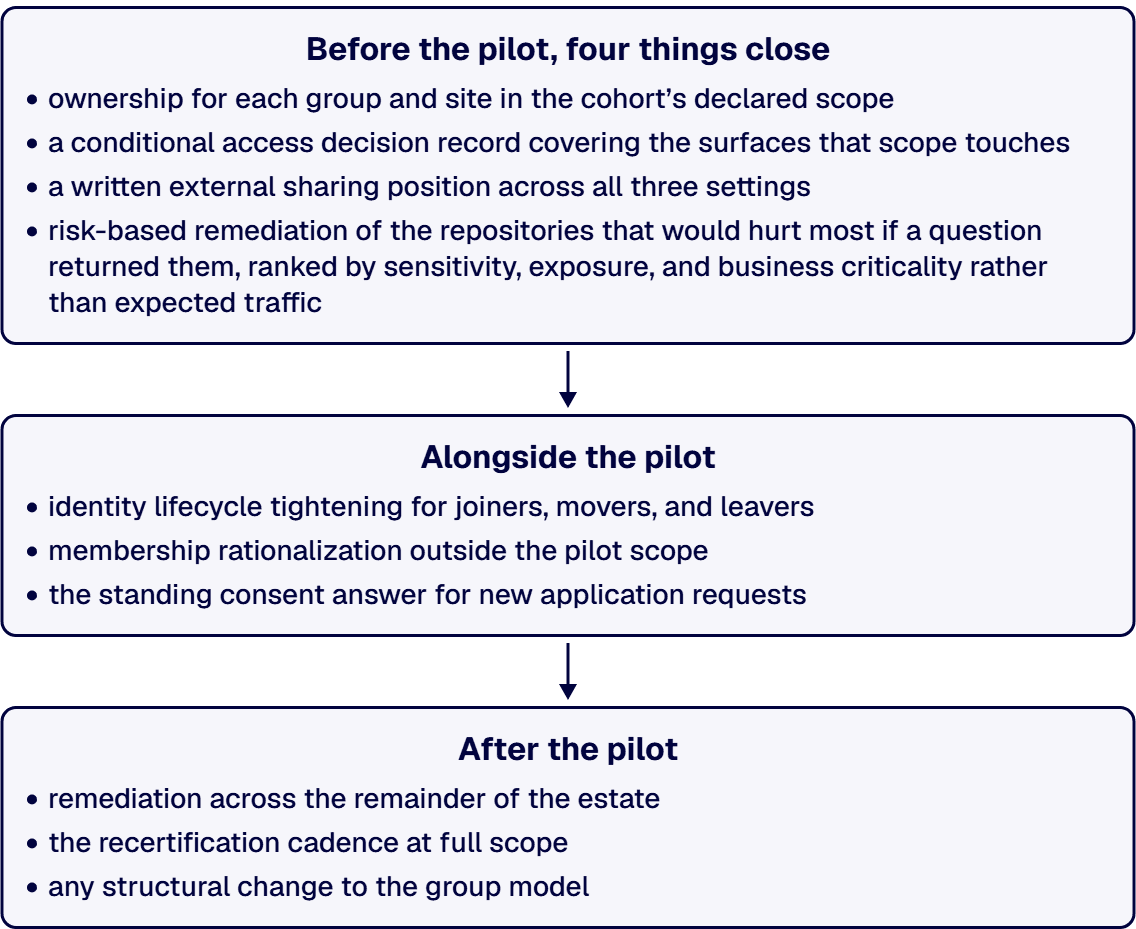
Before the pilot, four things close: ownership for each group and site in the cohort’s declared scope; a conditional access decision record covering the surfaces that scope touches; a written external sharing position across all three settings; and risk-based remediation of the repositories that would hurt most if a question returned them, ranked by sensitivity, exposure, and business criticality rather than expected traffic.
Alongside the pilot: identity lifecycle tightening for joiners, movers, and leavers; membership rationalization outside the pilot scope; and the standing consent answer for new application requests.
After the pilot: remediation across the remainder of the estate, the recertification cadence at full scope, and any structural change to the group model.
One rule holds the sequence together: no exception without an expiry date. Programs accrue exceptions during a rollout, which is normal, but an exception with no end date becomes the access model within two quarters.
Five patterns account for most stalls, each with an early tell.
A one-time cleanup treated as governance. A permission sweep run for a launch date produces a clean estate that date and a drifting one by the next quarter: the tell is a remediation task with no operating cadence behind it.
No named owners. Access decisions default to whoever answers the ticket, a person with no authority to say no: the tell is a governance document naming teams rather than people.
Guest and external access left out of scope. Guest entries and shared links accumulate across years of collaboration and are rarely counted before a rollout, so the pilot cohort finds the exposure before the program does.
Overcorrection with no business validation. A program that revokes access without checking what it was doing breaks operational work, and the escalation costs it authority.
Configuration published without environment review. A policy pattern copied from a public article into a live tenant, without review by the team that owns the estate, produces unpredicted outages.
Four situations argue against starting here, and naming them is cheaper than discovering them in a scoping call.
No Microsoft estate. If identity runs somewhere other than Entra ID and Microsoft 365 isn’t the environment in question, this framework doesn’t transfer cleanly.
A licensing question wearing a governance costume. If the open item is which subscription tier covers which capability, that’s procurement with a factual answer.
A security team that only needs to approve policy. Where the identity work is done and the remaining step is internal sign-off, an outside opinion adds a week and no clarity.
Access governance is not the blocker. An AI rollout can stall for reasons unrelated to identity: unstructured content, no adoption sponsor, a use case that doesn’t survive contact with the work. Access governance is a real gate, and it is not the only one.

Michael Branson co-founded i3solutions 30 years ago and brings executive, operational, and technical perspective to organizations working in complex, secure, and mission-critical environments. His insights focus on business process consulting, automation, data analytics, collaboration, secure operating models, and the operational discipline required to turn technology investments into practical business systems with measurable value.
Connect on LinkedInSeven areas, each needing a named owner rather than a policy statement. A named owner for each group and site. Identity lifecycle, so joiner, mover, and leaver changes reach access on the day the role changes, with memberships an owner can justify in a sentence. External access, which is three settings: guest admission to the directory, what each site permits to be shared outside it, and how shared links are issued and expired. Recurring recertification of high-risk access, run on the process our Entra ID Governance guide sets out. Then the three that are AI-specific: conditional access coverage recorded as an inventory of the surfaces an assistant appears in, marking covered, excluded, and unknown, then application permissions and consent, then the order those decisions are settled. Access governance before Microsoft Copilot is the governance the estate needed anyway, brought forward and given a deadline.
As part of the estate, at conditions your organization chooses rather than conditions the product sets. Four factors decide it. Coverage comes first: which target resources, users, and client experiences the policy set reaches, recorded as an inventory that marks its own unknowns and names who accepted the residual risk. Conditions come next, at parity with email or tighter on device state, location, and sign-in risk. Session controls settle which sessions warrant post-authentication constraint, with support uneven across clients and no hold on what a reader does with an answer on screen. Workload identities close it, governable under their own licensing and limits. A conditional access Copilot rollout decision record naming scope, conditions, and approver is the deliverable.
Count first, then set where consent sits, then set the review. The count separates delegated grants, which reach what the signed-in user reaches, from application permissions granted by an administrator, which act on the application's own behalf, and from sign-on-only federated applications, which can hold no API permissions and still get their service principals checked. The consent setting decides whether users consent freely, only to verified publishers and low-impact permissions, or not at all; the admin consent workflow is a request path layered on that choice rather than a separate mode. The review sets cadence, reviewer, and disposition, because grants outlive the projects that requested them. Do the count before writing policy, or the first rule blocks something operational. Add a standing answer for AI-adjacent plug-ins and connectors covering who requests, who approves, what evidence approval needs, and what happens when the answer is no.
Four, and they precede the pilot rather than accompanying it. Ownership for every group and site in the cohort's declared scope, because an unowned object cannot be reviewed by anyone with authority to remove access. A conditional access decision record covering the client experiences that scope touches, signed by the team that will defend it. An external sharing position across guest admission, site sharing, and link issuance. Risk-based remediation of the repositories that would hurt most if a question returned them, ranked by sensitivity and exposure. Skip the fourth and the failure mode is specific: a pilot user asks an ordinary question and gets back a salary file from a site no one had reviewed, and the program stops that afternoon.
A position on each of the three settings, owned by a person. External sharing governance before Copilot starts with counting what is already shared: guest accounts admitted to the directory, the sites permitting external sharing, and the links issued from them. Then decide the defaults, because tenant-wide permissiveness inherited by every new site is the pattern that produces surprises, and per-site positions are the alternative. Then decide the review, since guest access accumulates through ordinary collaboration rather than through mistakes, which means no single bad decision sits in an audit trail to explain it. This belongs before enablement because retrieval makes existing exposure legible in a way browsing never did. A sharing model that looked acceptable for a decade produces a different result once a cohort can ask a question and get an answer assembled from everything they are entitled to open.
CMMC levels, cloud environment boundaries, and data classification decide what an assessment covers long before an assessor arrives. i3solutions' senior governance advisors work with enterprise IT leaders who want those scoping decisions made deliberately.
Schedule a Governance Scoping Discussion
US-Based | Est. 1997
© i3solutions. All rights reserved.
US-Based | Est. 1997
© i3solutions. All rights reserved.


