
By Justin Bowen, Sr. Vice President, Delivery Services, i3solutions. Justin has spent more than 15 years at i3solutions and more than 25 years leading project, program, and product delivery across complex technology environments.
Short answer: The integration work created by an ERP or CRM migration is almost never owned by the ERP implementer. The system integrator brings the new platform up; the pressure lands on whoever owns the interfaces between it and the forty other things in your estate that still have to reconcile every night. In most enterprises nobody owns that seam, which is why integration is where migration budgets go to die. i3solutions takes that seam as a named deliverable, with the interfaces treated as owned, governed contracts rather than as glue.
If you are looking for the specific decisions rather than the reassurance, skip to the four decisions.
An ERP or CRM migration is not one project. It is a platform project that detonates a second, larger project inside every system that ever depended on the platform you are replacing.
The pattern repeats:
This is the pressure. It is structural, not a failure of anyone’s diligence, and the fix is to name an owner for the seam before the ERP partner is selected, not after.
Most pages answering this question are benefits copy. They will tell you that integrating ERP and CRM gives you a single customer view and better productivity. They will not name a single mechanism, price, or failure mode. That is not an answer, it is a brochure. Here is what actually connects, and where each option bites.
Microsoft’s dual-write is the out-of-box infrastructure connecting finance and operations apps with customer engagement apps through Dataverse. It is bidirectional and near real time: a change in Finance writes to Dataverse, and a change in Dataverse writes back to Finance.
Read Microsoft’s own description carefully, because it contains the risk: dual-write is “tightly coupled.” That is a design choice, not a criticism, and it has consequences your ERP partner may not raise:
Most ERP and CRM integration in a Microsoft estate ends up flowing through Power Platform connectors, and that is where governance is won or lost. Microsoft’s data policies classify connectors as certified, custom, virtual, or Model Context Protocol (MCP) connectors, and let an administrator block a connector or a specific action on it.
Two operational facts that decide whether your integration survives a policy change:
The governance question to settle before you build, not after: which connectors are your integration allowed to use, in which environment, and who signs the exception when the answer is no?
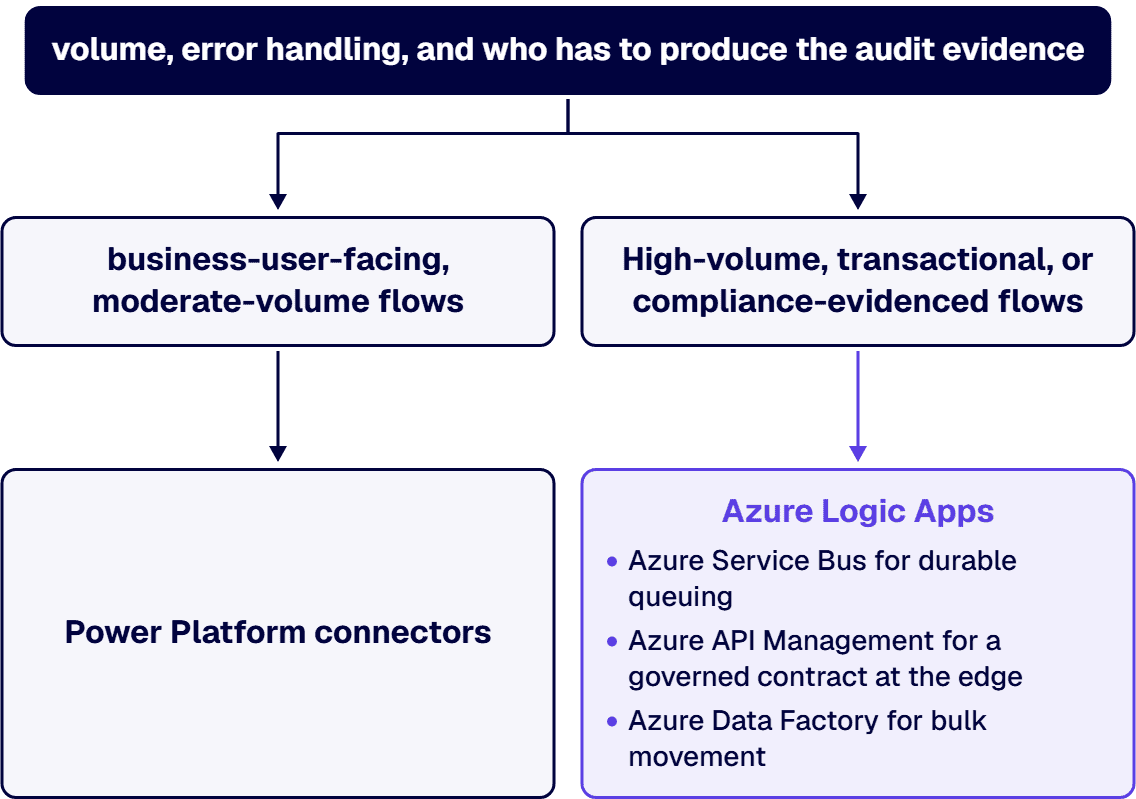
High-volume, transactional, or compliance-evidenced flows do not belong in a citizen-developer flow. That is when the estate moves to Azure Logic Apps, Azure Service Bus for durable queuing, Azure API Management for a governed contract at the edge, and Azure Data Factory for bulk movement. The decision is not ideological. It is about volume, error handling, and who has to produce the audit evidence.
Real numbers from our engagements, not ranges invented to look precise:
Notice the second number. It is the one that matters, because it is the one you can buy before committing to the migration, and it is the one that tells you whether the first number is $150K or $400K.
i3solutions has spent three decades on the Microsoft stack, and the integration seam is the part of the estate we are usually called into. The through-line in how we work: interfaces are contracts, they have owners, and they are governed.
Start with the dependency map. See our Microsoft integration services, our Microsoft integration architecture practice, or hire Microsoft integration developers directly. If your ERP pressure is specifically a Dynamics GP end-of-life clock, start with Dynamics GP to Business Central migration. If the ERP in question is SAP and the target is SharePoint, see who should do the SAP and SharePoint integration.
Usually nobody, until it is expensive. The ERP or CRM implementation partner scopes to the boundary of the new platform, and every interface crossing that boundary lands on the customer as an unowned change order in UAT. i3solutions takes that seam as a named deliverable: we map every dependency and give each interface a disposition of migrate, rebuild, or retire before the platform work starts. A Stabilization Protocol engagement (Phase 1 dependency mapping plus Phase 2 risk-sequenced triage) typically costs between $85,000 and $175,000 for enterprises running four to six Microsoft platforms with 40 to 120 integration touchpoints.
Name the owner of the interfaces before you sign the ERP statement of work, then buy the dependency map before you buy the migration. The sequence matters: a disposition list of every existing interface (migrate, rebuild, retire) is what turns an unbounded integration risk into a priced scope. In our experience a typical mid-enterprise integration project costs $150K-$400K to build, with $25K-$80K in annual operational costs over a 5-year lifecycle, and the spread inside that range is decided almost entirely by how many interfaces turn out to need a rebuild.
Dual-write is Microsoft’s out-of-box infrastructure providing near-real-time, bidirectional integration between Dynamics 365 finance and operations apps and customer engagement apps through Dataverse. Use it when Dynamics 365 is both your ERP and your CRM and you want a genuinely shared master. Understand first that Microsoft describes it as tightly coupled, that installing it introduces new concepts such as company and party into your Dataverse schema, that it offers an opt-in extension of currency precision to 10 decimal places, and that it adds date effectivity to Dataverse tables. If you have an existing Dataverse estate with custom apps, those schema changes arrive whether your apps expect them or not.
Because Microsoft’s data policies do not degrade an offending integration, they stop it. When a data policy is applied and an existing app or flow violates it, Microsoft puts the app or flow into a suspended or quarantine state and sets the connection to disabled, and anything running against it fails at runtime. Enforcement is also not instantaneous: Microsoft states policy changes usually take effect within an hour, and in extreme cases full enforcement takes up to 24 hours. Decide which connectors your integration is permitted to use, in which environment, and who approves exceptions, before you build on them.
It depends on volume, error handling, and audit evidence, not on preference. Power Platform connectors are appropriate for business-user-facing, moderate-volume flows, and they inherit Power Platform data policy governance. High-volume, transactional, or compliance-evidenced flows belong on Azure Logic Apps, with Azure Service Bus for durable queuing, Azure API Management for a governed contract at the edge, and Azure Data Factory for bulk movement. The wrong answer is to let the choice be made implicitly by whoever builds the first interface.
Before, and it is not close. The dependency map is the only artifact that converts integration from an unbounded risk into a scoped line item, and it is cheapest when it is not being produced under go-live pressure. Map every system that reads from or writes to the platform you are replacing, give each interface an owner and a disposition, and only then let the ERP partner price their statement of work. Buying the map after the ERP contract is signed means paying for the same discovery twice, once as a change order.

US-Based Microsoft System Integrator | Est. 1997
© i3solutions. All rights reserved.
US-Based Microsoft System Integrator | Est. 1997
© i3solutions. All rights reserved.


