Copyright i3solutions. All Rights Reserved.
Email aski3@i3solutions.com, Phone 703.652.8966
Privacy Policy | Sitemap
Power Platform ALM: Moving a Maker-Built Solution into Managed Production
By Michael Branson | August 25, 2026
Quick answer. Power Platform ALM moves a maker-built solution out of an unmanaged development environment and into managed production through solutions, source control, and a deployment path with its own test stage. It is a release practice for a working piece of software, not an admin setting somebody turns on.
The conversation starts with a sentence somebody says out loud in a meeting. The app works on my machine and not in the demo. We have no test environment, so the change went straight into the thing people use. Who deploys this, now that the person who built it has moved teams. An auditor wants the change record and nobody can produce one.
Those four sentences describe the same missing thing. A solution built inside a maker’s own environment, edited in place and shared with real users, has no release path behind it, so a change and a deployment are the same event. Power Platform ALM puts a release path there. This page states what that path contains, what Microsoft’s platform supplies, and what your organization still has to decide.
What This Page Decides, and What It Hands Off
One question is settled here: what has to exist between a maker’s development environment and a production environment before a Power Platform solution can be changed under control. That covers the solution artifact in both of its forms, its version record, the test before a release, the deployment that moves it, the recovery path when a release goes wrong, and the ownership that outlives the person who built it.
It does not design your governance framework. Which body approves an environment, which connectors are classified how, and how governance maps to a control framework are tenant-level questions, worked through in Designing a Power Platform Governance Framework That Holds Up in a Regulated Enterprise. Read that page for the policy structure a release practice sits inside; read this one for the practice.
Environments are handed off too. How many a tenant needs, what the default environment costs you, who may create one, and how environments are provisioned and retired belong to the companion guide Power Platform Environment Strategy. This page states what a release path requires of environments and stops.
Two more hand-offs, on purpose. Connector classification and data-loss-prevention policy design belong to Power Platform DLP Policy Administration for Regulated Enterprises, and where decision authority lives belongs to Power Platform CoE: Centralized vs Federated vs Hybrid Operating Models. Neither argument is restated here.
What Breaks Between a Maker’s Environment and Production
The expensive failure is rarely the app. Canvas apps and cloud flows that work in the environment they were built in are doing what they were built for. What breaks is what sits around them.
The change nobody can see. A solution edited directly in production produces no exported before-state to compare the change against. When the finance team says the calculation changed on Tuesday, there is no artifact to compare, no commit and no name on the edit. This is the missing audit trail of changes, and it is why the ordinary answer, restore the previous version, has nothing to restore.
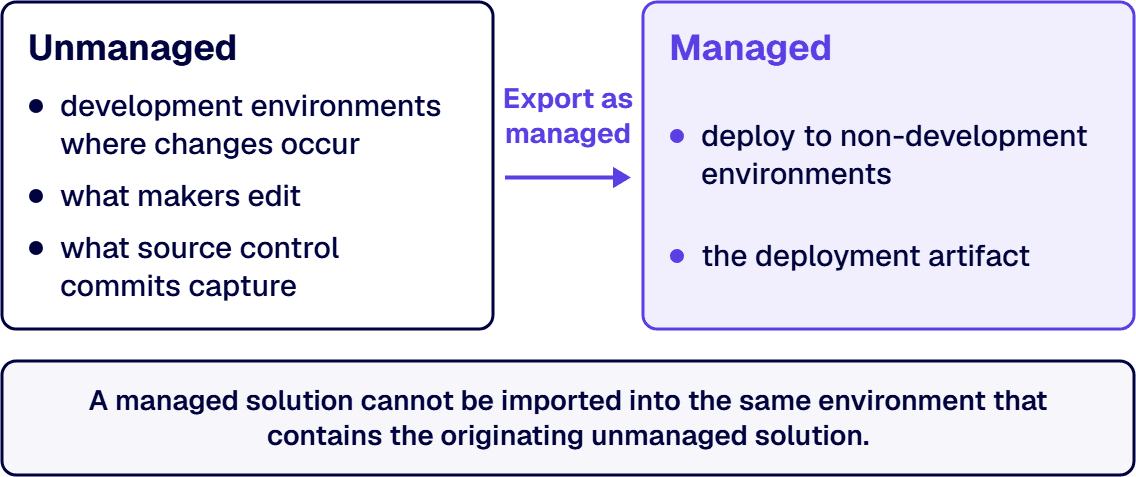
The environment that is also the office. A maker’s development environment holds the working copy and the running copy at once, so anything half-finished is live for whoever has the link. Microsoft draws this line in the artifact instead of in policy: Solution concepts states that unmanaged solutions are used in development environments while you make changes to your application, that managed solutions are deployed to any environment that isn’t a development environment for that solution, and that you can’t import a managed solution into the same environment that contains the originating unmanaged solution. To test a managed solution, the documentation says, you need a separate environment to import it into. So “we have no test environment” is not a maturity complaint. It says the release cannot be rehearsed on the artifact production will receive.
The dependency that only shows up on the way out. A flow reading a custom column, a security role scoped to a custom table, a canvas app pointing at a connection that exists only where it was built: fine there, missing where it lands.
The owner who left. A solution with one name behind it has a support model that ends when that person’s calendar clears. Ownership is the part the platform records but does not decide, which is why the handoff section treats it separately.
Large organizations feel all four harder, because solutions multiply faster than the people who understand them. That is the practical answer to what Power Platform ALM requires for a large company: the artifacts a small company needs, plus a way to run them without the original maker.
The Solution Lifecycle in Six Stages
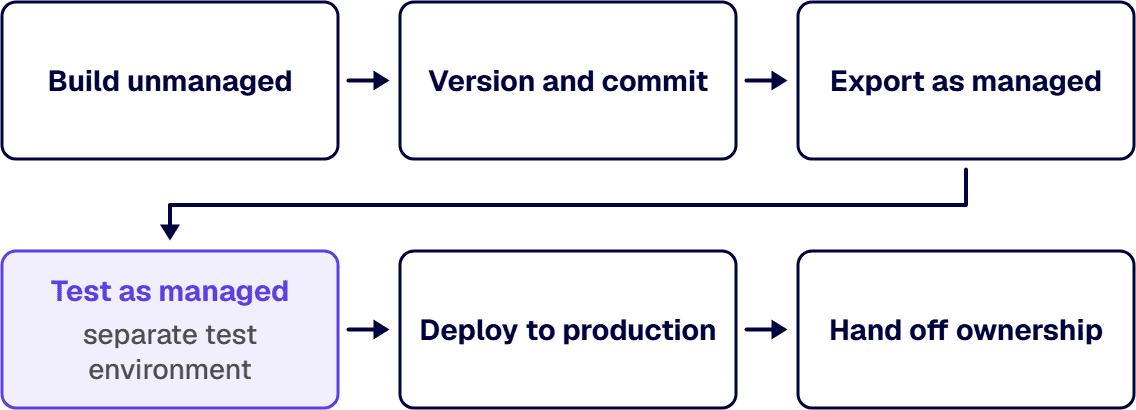
A release path is not a diagram. It is six stages, and each one produces a record somewhere that says it happened. The stages are Build unmanaged, Version and commit, Export as managed, Test as managed, Deploy to production, and Hand off ownership. The table names what moves and the surface that produces the evidence, because a stage whose result cannot be read somewhere is a stage you are trusting instead of running.
| Stage | What moves | Where the evidence is produced |
|---|---|---|
| Build unmanaged | Components collected into a named unmanaged solution in a development environment, under a publisher you created | The Solutions area of the maker portal, which lists the components the solution contains |
| Version and commit | The unmanaged solution exported, and the exported files checked into source control | The repository’s commit history, with the author, the timestamp and the diff against the previous export |
| Export as managed | The same solution exported again as managed; that file is the build artifact downstream environments receive | The exported file where your build process keeps artifacts, and, where pipelines run the export, the copy the pipelines host stores for every deployment |
| Test as managed | The managed solution imported into an environment that is not the development environment, and exercised there | The import result in the target environment, the solution checker summary email where enforcement is on, and the test log naming which paths were exercised against which solution version |
| Deploy to production | The same artifact, unmodified, imported into production with connections and environment variables supplied per environment | The deployment record in the pipelines host, which saves the customizations and audit log |
| Hand off ownership | A named business owner and technical owner accepting the solution, the runbook and repository access | The environment and app ownership records in the Power Platform admin center, read against the names your organization assigned, and the repository’s access list, where the runbook is committed |
The precedence is worth settling before a disagreement forces it. When the artifact in source control and the solution running in production do not match, production is the fact and source control is the claim: export what is live, diff it against the branch, and treat the difference as an unrecorded change to bring back under version control before anything else ships. When a test result and a delivery date disagree, the test result decides, because the alternative is a deployment whose outcome nobody has observed. Where a solution checker result and a business escalation collide, the enforcement setting your organization chose is the ruling.
Retrofitting these six stages behind a live solution costs more than designing them up front, and the order you build them in decides how much more. Source control first is usually the wrong opening move on a solution that is already running, because the reconciliation export has nowhere to be tested until a second environment exists to receive the managed artifact. Which stage to build first depends on which one your current release actually skips, and that is different for a solution edited in production than for one with no test environment. Settling the sequence is a scoping conversation rather than a proposal, and it happens before any tooling is bought. Talk to a senior Power Platform architect
Managed and Unmanaged: The Distinction the Rest of the Practice Rests On
Teams stall on one distinction, and until it is settled every other question about the release path gets answered twice, once for the copy being edited and once for the copy being shipped. The Solution concepts documentation cited earlier puts it plainly: a solution is either managed or unmanaged.
Unmanaged is what you develop in. The documentation says unmanaged solutions are used in development environments while you make changes to your application, and that exported unmanaged versions of your solutions should be checked into your source control system. That last clause is the one teams skip, which is what makes the source-control stage optional in practice while mandatory on paper.
Managed is what you deploy. Managed solutions are deployed to environments that are not the development environment for that solution: test, user acceptance testing, system integration testing and production. The constraint that shapes the practice is that you can’t export a managed solution, but you can export an unmanaged solution as managed. The managed file is therefore a build artifact and not a thing you edit; the documentation is explicit that you can’t edit components directly within a managed solution.
Why this answers “works on my machine”. The two forms are not two settings on one object. They are two states of the same components, and the platform holds the separation open structurally. A managed solution cannot be imported into the environment holding its originating unmanaged solution. A team without that second environment has never once run the artifact it intends to ship.
One further constraint shapes how solutions are organized rather than how they move: what a single solution is allowed to contain, decided before the components accumulate. Where the data layer is itself the open question, the trade between Dataverse and a dedicated relational database is worked through in Microsoft Dataverse vs SQL Server: Best Choice for Enterprise Architects. The release path binds one thing and only one, a Dataverse database in every participating environment, and the Overview of application lifecycle management with Microsoft Power Platform states it directly: to use the Power Platform features and tools available to manage ALM, all environments that participate in ALM must include a Dataverse database. That binds the environments, not where your business data sits.
Versioning, Change Control, and the Audit Trail of Changes
A team that increments the solution version on every export and files that as change control has a numbering habit, not an audit trail, and it usually discovers the difference in front of an assessor. Versioning here means two records kept together, and confusing them is how that discovery gets made the expensive way.
The solution version is the platform’s record. It travels with the artifact and tells the target environment what it is receiving. It is what the update, upgrade and patch operations act on, and those three are not interchangeable: the documentation states that an update is deployed to the parent managed solution and that you can’t delete components with an update, that an upgrade removes unused components and deletes components no longer included in the upgraded version, and that a patch carries only the changes for a parent managed solution. Choosing between them decides what you are willing to have removed.
The commit is your organization’s record. Source control holds the reviewable change, and it is the one of the two that can answer who changed this, when, and against which request. Microsoft’s position is unambiguous: source control should be your source of truth for storing and collaborating on your components. The auditor’s question about the audit trail of changes is answered from the commit history and the review record attached to it, not from the solution version number, which records that something changed without recording what or why.
Change control is the rule you attach to those two records. The rule reads: a version increments on every export that leaves the development environment, the commit carries a reference to whatever your organization uses to authorize work, and the release note names the version, the artifact and the approver. Those are rules your organization writes, not settings the platform supplies, and they are what an assessor reads. If you need a default to start from, use this one: a release into production requires a named approver who is not the person who built the change, and a release into a test environment requires none. That puts the approval load where the risk sits and nowhere else, and a team of four can keep it without a workflow tool.
The platform carries part of the record where deployments run through pipelines: the Overview of pipelines in Power Platform documentation states that customizations and audit log are saved automatically and are easily accessible, and that both managed and unmanaged solutions are automatically exported and stored in the pipelines host for every deployment. Read that as a floor under your record-keeping: the same documentation states that approvals for deployments are configurable, so the rule about which release needs one is yours to write.
What Testing Belongs Before a Power Apps Release
Three kinds of check sit between an export and a production import, answering different questions. Running one and calling it testing is the common shortfall.
The static check on the solution. Microsoft’s solution checker runs a static analysis of your solution objects against a set of best practice rules, and in a managed environment an administrator can have that analysis run at import time. The Solution checker enforcement in managed environments documentation sets out three enforcement settings: None turns the automatic validation off; Warn lets an import carrying highly-critical issues continue with a warning; Block cancels that import before it happens, so the failed attempt leaves the environment unchanged. Under Warn and under Block a summary email carries the validation details, unless an administrator has suppressed those emails. The boundary is worth stating plainly: the analysis looks for problematic patterns in solution components, so it says nothing about whether the approval logic matches business policy.
The deployment rehearsal. The release that fails on import rather than in testing is the one that burns a maintenance window and sends people home, and where releases run through pipelines the platform checks the move itself before that happens. The pipelines documentation states that solution deployments are prevalidated against the target environment to prevent mistakes and improve success rates, giving missing dependencies, the class that otherwise appears only on the way out, as its example of what surfaces before deployment, and that connections and environment variables are validated before the deployment begins. It also states that pipelines, or solutions in general, don’t contain data stored within Dataverse tables, so test data is your problem: a test environment with no representative data has rehearsed the import and none of the behaviour.
The functional pass a person runs. Somebody exercises the application in the test environment as a user would: the paths that write, the approval that routes, the integration that posts to the system of record, the permission a restricted user should not have. The pass produces a test log naming the version exercised, the paths run and the result of each. The static analysis and the deployment rehearsal do not test business correctness, so this is the pass that catches a calculation that is wrong rather than merely unsafe.
When two of the three disagree, the order is settled: a Block-level static failure stops the release whatever the functional test said, because the import will not complete anyway, and a passing static check never overrides a failed functional pass. A release with no functional pass is functionally untested, whatever the static check and the rehearsal returned.
Deciding which of the three your solutions need, and which environment each runs in, is the conversation this section usually starts. Which of the three a given solution genuinely needs depends on what it writes to and who it writes for, and that is a judgment about consequence rather than a policy anybody can hand you. Working it out takes an hour and settles the test stage before you build it, which is why it is worth doing as a scoping conversation and not after the pipeline exists. Talk to a senior Power Platform architect
Rollback, and What It Actually Costs to Undo a Release
Rollback is the stage that gets assumed instead of designed. In Power Platform it is not an undo button.
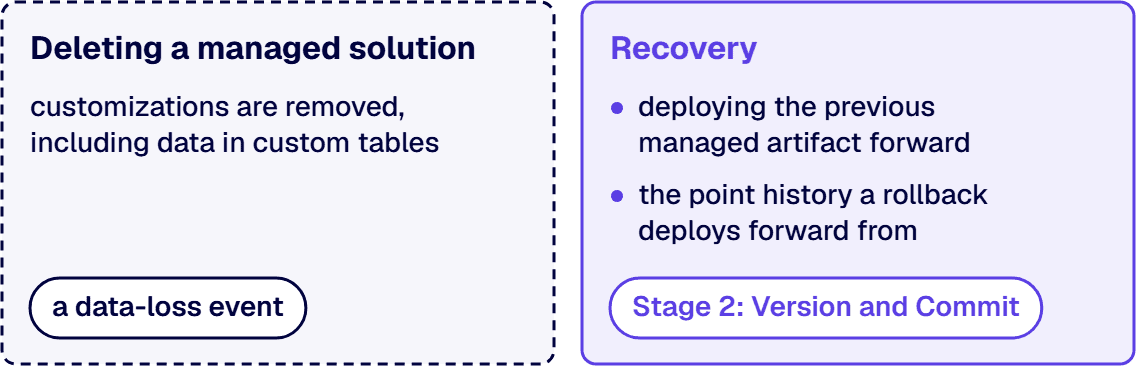
Uninstalling is not rolling back. The documentation is direct: when a managed solution is deleted, meaning uninstalled, all the customizations and extensions included with it are removed, and what is lost includes data held in custom tables belonging to that solution and in its custom columns on other tables. A team reaching for uninstall as recovery can remove the records the release was processing.
The working rollback is a forward deployment of the previous artifact. Because the managed file is a build artifact held outside the environment, the recoverable state is the previous managed artifact, imported the way the failed one was. That is the payoff for keeping the managed exports: an organization holding no managed artifact from the previous release has nothing to deploy, and the commit history names which version that was.
Dependencies decide the order and can block it. Where one managed solution builds on another, the documentation states that the dependent solution has to be uninstalled before the base solution can be, and that a managed solution can’t be uninstalled until an editing dependency against it is removed. A recovery plan naming a solution without naming what depends on it is incomplete. The scenario to write the plan against is the ordinary one: a shared managed solution holding the common tables and choice columns, three departmental solutions built on top of it, and a bad release in the shared one. The base cannot come out while any of the three is installed, so the only recovery is a forward deployment of the base’s previous managed artifact, and a plan that has not listed all three dependents will discover them at the worst moment.
Environment-level recovery is a separate control with a separate owner. Restoring an environment reaches past the solution to everything else in it, so it belongs to the Power Platform Environment Strategy companion. The release path owes something narrower: the previous artifact, the record of which version production is on, and an advance decision about which failures are repaired forward.
Handoff: Who Deploys This When the Maker Moves On
The maker who built it is not a support model, and “who deploys this” has a real answer only once four things have names.
Two owners, not one. A business owner answers whether the process the solution encodes is still the process the business wants. A technical owner answers for the solution, its connections and its releases. Collapsed into one person, they are a single point of failure with a calendar.
Deployment authority is a named right. Someone holds the ability to run a release into production, and a pipeline whose approvals nobody configured reaches the same place faster. The pipelines documentation records one requirement to design around: all other environments used in pipelines must be enabled as managed environments, the pipelines host and development environments being treated separately.
The repository outlives the person. Access to source control, and the knowledge that the exported solution lives there, is what makes the handoff real. A runbook naming the repository, the pipeline, the environments and the owners is a short document, and its absence is why solutions go unowned while still running.
Monitoring closes the loop, and its flow half lives elsewhere. A deployed solution that stops working quietly is the failure nobody notices until a person complains, and that story is owned in full, for the automation side, by When Power Automate Flows Fail Silently: Finding the Risk. The release path adds only this: the handoff is not complete until somebody is named to receive the signal.
i3solutions has been a Microsoft partner since 1997. Standing this up the first time is ordinary work carrying an unusual amount of context, because the platform’s constraints and the organization’s own authorization rules both bind the same release path.
When This Is Not the Work You Need
Three readers arrive here and belong elsewhere first.
Where the problem is an inherited estate rather than one solution, meaning dozens of apps and flows built by people who have since moved on, the first work is inventory and triage. Governing Citizen-Developer Power Apps IT Now Has to Own covers that takeover, and a release path becomes worth building for the solutions that survive it.
A prototype nobody has decided to promote is a different situation: building six stages behind it spends the platform’s main advantage, the speed of a first working version. Promotion is the earlier decision: someone prices the consequence of its failing and someone agrees to own it.
And where the tenant has no policy structure at all, meaning no agreed environments, no connector classification and no named decision body, a release path built under that vacuum is anchored to environments and connector rules the policy has not settled yet. The governance framework this page links to is the starting point.
What is left is the case this page was written for: a real solution, a real production environment, and a release path that has to exist before the next change goes in. The conversation starts from what you already run rather than from a target architecture, because the six stages are cheap to describe and the sequencing is the part that costs money. It is a scoping conversation rather than a proposal, so it is the one to have before committing to a pipeline build or a wider governance programme, and it is the one that gives an internal case its numbers. What comes out of it is your current estate mapped onto the six stages: which you already have, which are missing, and the order to build the missing ones in for the solutions that carry real work. Bring the solutions you have, the environments you have today, and the name of whoever presses the button. Talk to a senior Power Platform architect
Frequently Asked Questions
How do we move a maker-built Power Apps solution into managed production?
Through six stages, in this order: Build unmanaged, Version and commit, Export as managed, Test as managed, Deploy to production, and Hand off ownership. The maker’s components are collected into a named unmanaged solution under a publisher you created; that solution is exported and the export is checked into source control; it is exported a second time as managed, which is the file the downstream environments receive; the managed file is imported into an environment that is not the development environment and exercised there; the same unmodified artifact is then imported into production with its connections and environment variables supplied; and a named business owner and technical owner accept it with the runbook and repository access. Microsoft’s documentation states that you can’t import a managed solution into the same environment that contains the originating unmanaged solution, so the fourth stage requires a second environment and cannot be simulated in the maker’s own.
What does Power Platform ALM require for a large company?
The same artifacts a small company needs, plus the ability to run them without the original maker in the room. Concretely: a named solution carrying the application’s components instead of loose customizations, source control holding the exported unmanaged solution, a managed build artifact, an environment that is not the development environment to test it in, a deployment path that moves the same artifact without hand-editing, a recovery plan that names the previous artifact, and two named owners per solution. Microsoft states that to use the Power Platform features and tools available to manage ALM, all environments that participate in ALM must include a Dataverse database, which is a constraint on the environments a large tenant provisions. What scale adds is not new stages but repeatability: the practice has to work for the fortieth solution built by someone who has since changed jobs.
How should Power Platform solutions be versioned and deployed?
With two records kept together. The solution version travels with the artifact and tells the target environment what it is receiving; the commit in source control carries who changed what, when, and against which authorization. Microsoft’s guidance is that source control should be your source of truth for storing and collaborating on your components, and that exported unmanaged versions of your solutions should be checked into that system. Deployment moves the managed export, not the editable one. Where pipelines are used, the documentation states that the same solution artifact must pass through pipeline stages in sequential order and that the system prevents tampering or modification of the exported artifact, so the file imported into production is the file that was imported for testing. Increment the version on every export that leaves the development environment, and keep the release note that names the version, the artifact and the approver.
What testing should happen before a Power Apps release?
Three checks, answering three different questions. A static analysis of the solution: solution checker examines solution objects against a set of best practice rules, and in a managed environment an administrator can set enforcement to None, Warn or Block, where Warn allows an import carrying highly-critical issues to continue with a warning and Block cancels that import before it changes the environment, with a summary email sent under either setting unless an administrator has suppressed those emails. A deployment rehearsal: pipelines prevalidate a deployment against the target environment and surface missing dependencies before it runs, and validate connections and environment variables upfront. And a functional pass a person performs in the test environment, exercising the writes, the approvals, the integrations and the permissions a restricted user should not have. The static check finds unsafe patterns; only the functional pass finds logic that is simply wrong.
What does rollback actually remove in Power Platform?
Uninstalling a managed solution removes more than the word uninstall suggests, which is why it is the wrong recovery action. Microsoft’s documentation states that when a managed solution is deleted, meaning uninstalled, all the customizations and extensions included with it are removed, and that the data lost includes data stored in custom tables that are part of the managed solution and data stored in custom columns that are part of the managed solution on other tables that aren’t part of it. The working rollback is a forward deployment of the previous managed artifact, which exists only if the managed export was kept. Dependencies also constrain the order: a solution that another solution depends on cannot be uninstalled until the dependent one is, and a managed solution carrying an editing dependency cannot be uninstalled until that dependency is removed.
Our solution is already in production without a release path. Where do we start?
With reconciliation, not with tooling. Export what is running in production, put that export into source control as the first commit, and treat the difference between it and anything else you thought was current as an unrecorded change to be resolved rather than argued about. Then create or identify a development environment and a separate environment to test in, and rebuild the release as an export-and-import of a managed artifact rather than an edit in place. Retrofitting costs more than designing this at the start because the components already exist and their dependencies are already tangled, so sequence it by risk: the solution carrying the process the business would notice losing goes first.
Related Reading
- Enterprise Power Platform Development & Implementation Services for Governed Operations, the practice this release work belongs to
- Designing a Power Platform Center of Excellence That Holds Up in a Regulated Enterprise, the operating model that runs a release practice at tenant scale
About the Author
Michael Branson co-founded i3solutions and brings executive, operational, and technical perspective to organizations working in complex, secure, and mission-critical environments. His insights focus on business process consulting, automation, data analytics, collaboration, secure operating models, and the operational discipline required to turn technology investments into practical business systems with measurable value.