

Quick Answer
Legacy SharePoint modernization for regulated enterprises requires a governance-first approach, establishing control models, information architecture, and user adoption patterns before migrating content. This prevents the permission drift, ownership confusion, and audit gaps that emerge 6-12 months after traditional lift-and-shift migrations, while reducing IT support overhead by 40-60% through structured provisioning and automated governance controls.
Legacy SharePoint environments in regulated enterprises often become sprawling, ungoverned collections of sites, workflows, and permissions that create more problems than they solve. For IT leaders managing healthcare, government, or financial services organizations, the question is not whether to modernize but how to modernize in a way that establishes governance from day one rather than recreating the same problems in Microsoft 365.
Effective legacy SharePoint modernization requires more than content migration. It demands a governance-first approach that establishes control models, information architecture, and user adoption patterns before moving data. This approach prevents the permission drift, ownership confusion, and audit gaps that emerge 6-12 months after traditional lift-and-shift migrations.
The urgency around legacy SharePoint modernization rarely comes from platform failure. It comes from operational problems that compound over time until they become business risks. Organizations reach the modernization decision point when sprawl, workflow dependencies, or compliance gaps create more friction than the platform provides value.
Understanding these pressure points helps IT leaders build the business case for governance-first modernization rather than reactive fixes that preserve underlying problems.
Legacy SharePoint sprawl includes 300-500+ ungoverned site collections in mid-enterprise organizations, with ownership records that haven’t been updated in years. When users create sites without governance controls, the initial owner may leave the organization, change roles, or forget about the site entirely.
This ownership drift creates operational problems that compound over time. IT teams spend significant effort trying to determine who should approve access requests, whether content can be archived, or which sites contain sensitive data. Permission drift in legacy SharePoint can expose 20-40% more content than intended to unauthorized users, creating both security and compliance risks.
The problem becomes acute during audit cycles, when organizations must demonstrate data ownership and access controls. Without clear ownership records, IT teams resort to detective work across multiple systems, consuming resources that should focus on strategic initiatives rather than legacy cleanup.
SharePoint 2013 workflow retirement affects 60-80% of legacy business processes in enterprise environments, and it set a hard deadline for existing Microsoft 365 tenants, April 2, 2026, that Microsoft said it would not extend. These workflows often embed critical business logic for approval processes, document routing, and compliance tracking.
Unlike other technical debt that can be managed incrementally, workflow retirement forces organizations to make migration decisions within Microsoft’s timeline. SharePoint 2013 mainstream support ended in 2018, with extended support ending in 2023, creating firm deadlines for workflow modernization.
The complexity comes not from the technical migration itself, but from documenting and rebuilding business processes that may have evolved informally over years. Organizations that delay workflow modernization often discover they have incomplete documentation of current processes, making it difficult to determine what the replacement solution should accomplish. In regulated environments where approval workflows support compliance requirements, this project risk extends beyond IT into business operations.
Audit findings related to SharePoint access controls cost organizations $50,000-$200,000 in remediation effort, appearing years before the platform itself becomes unstable. These findings often focus on permission inheritance, external sharing policies, or retention gaps that accumulated as the environment grew without governance.
Privacy regulations (GDPR, HIPAA, and state privacy laws) create additional pressure around data location, retention, and access controls. Legacy SharePoint environments often lack the audit trails and automated controls needed to demonstrate compliance for content that has been modified or shared over multiple years.
The operational impact of these compliance gaps extends beyond audit costs. Organizations may need to restrict functionality, implement manual oversight processes, or limit external collaboration until governance controls can be established. These restrictions reduce productivity and create user frustration, often leading to shadow IT solutions that introduce additional risk.
The target state for legacy SharePoint modernization is not “SharePoint Online with the same structure.” It is a governed digital workplace where SharePoint Online, Teams, and OneDrive work together within defined boundaries, where users can find what they need without IT intervention, and where permissions and content lifecycle are predictable and auditable.
In our experience with regulated enterprises, the most successful modernizations establish clear architectural principles before migrating content. Organizations that skip this step recreate their legacy sprawl in the cloud, often within 12-18 months of go-live.
SharePoint Online should handle structured content, formal collaboration, and records that require retention policies. Teams should manage project-based collaboration and informal communication. OneDrive should store personal working files and drafts before they become shared content.
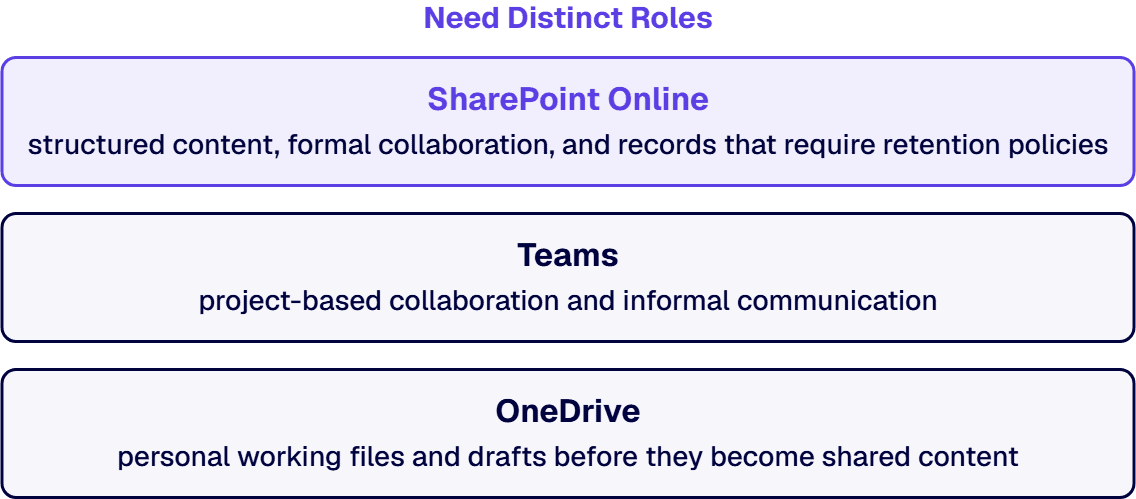
The governance model must define which content belongs where and enforce those boundaries through provisioning templates, retention policies, and user training. Without clear boundaries, users default to whatever tool is most convenient, which means everything ends up in Teams channels or email attachments.
In one recent healthcare modernization, we found that 60% of “SharePoint content” was personal working files that belonged in OneDrive, and another 25% was project communication that belonged in Teams. The actual structured content requiring SharePoint governance was less than 15% of total volume.
Legacy SharePoint environments often feature subsite trees that are 4-6 levels deep, with permissions inherited and modified at each level. This creates permission debt that becomes impossible to audit or maintain.
Hub sites in SharePoint Online provide a flatter, more scalable architecture. Each hub represents a business function or department, with associated sites that maintain their own permissions and lifecycle. Navigation and search work across the hub without requiring complex inheritance chains.
The hub model also supports governance at scale. Retention policies, sensitivity labels, and external sharing controls can be applied consistently across hub-associated sites without requiring site-by-site configuration. Hub sites architecture reduces site provisioning requests by 40-60% compared to deep subsite hierarchies, simplifying both user experience and administrative overhead.
The information architecture should make the right choice the obvious choice. Users should not need to decide between five different document libraries or guess which folder structure to use. Standardized site templates, consistent metadata schemas, and predictable navigation patterns reduce cognitive load and improve adoption.
Content types should be defined at the hub level and pushed down to associated sites, ensuring consistency without requiring local administration. In regulated environments, this consistency is not just about user experience: it is about audit readiness. When auditors review document retention and access controls, they need to see predictable patterns, not ad-hoc local variations.
i3solutions has delivered SharePoint development, migration, governance, and modernization services for enterprise organizations in regulated environments since 1997. Every engagement is staffed with senior, 100% US-based specialists who operate under the compliance and security standards these environments require.
Evaluate i3solutions' SharePoint Development ServicesSuccessful legacy SharePoint modernization requires a structured decision framework that evaluates every site, workflow, and content repository against business value and technical feasibility. The goal is not to migrate everything: it’s to migrate what should be preserved while retiring what no longer serves the organization.
The assessment phase must inventory every SharePoint site, workflow, custom solution, and permission structure to create a complete picture of the current environment. This inventory becomes the foundation for migration decisions and helps identify dependencies that could impact project timeline or user experience.
Most organizations discover 30-40% more sites and workflows than initially estimated during this phase. The inventory should document site ownership, last activity dates, content volumes, and business criticality to support retire-replace-rebuild-migrate decisions.
Environment Assessment Criteria
Evaluate each legacy component against these criteria to support retire-replace-rebuild-migrate decisions:
Each legacy component should be evaluated against consistent criteria: business value, technical complexity, compliance requirements, and user adoption. This creates a defensible framework for stakeholder communication and ensures resources focus on high-value modernization work.
The decision matrix reveals that 20-30% of legacy content can be archived immediately, reducing migration scope and ongoing governance overhead. Another 30-40% may be candidates for replacement with modern Microsoft 365 capabilities rather than direct migration.
Retire
Sites with no active users, outdated content, or no identifiable owner. Typically 20-30% of legacy inventory. Archive and document before deletion.
Replace
Workflows and solutions better served by modern Microsoft 365 capabilities: Power Automate instead of SharePoint Designer, Teams instead of legacy collaboration sites.
Rebuild
Custom solutions and complex workflows with high business value that require architectural redesign rather than direct migration. Document business logic first.
Migrate
Active, governed content with clear ownership and compliance requirements. These migrate into the new hub architecture with governance controls applied at intake.
Modernization should be phased to establish governance patterns with low-risk content first, then scale those patterns to more complex environments. This approach allows the team to refine processes and demonstrate value while minimizing disruption to business operations.
The pilot phase should include representative content types, user roles, and business processes to validate the governance model before full-scale rollout. Lessons learned from the pilot inform adjustments to provisioning templates, training materials, and support processes.
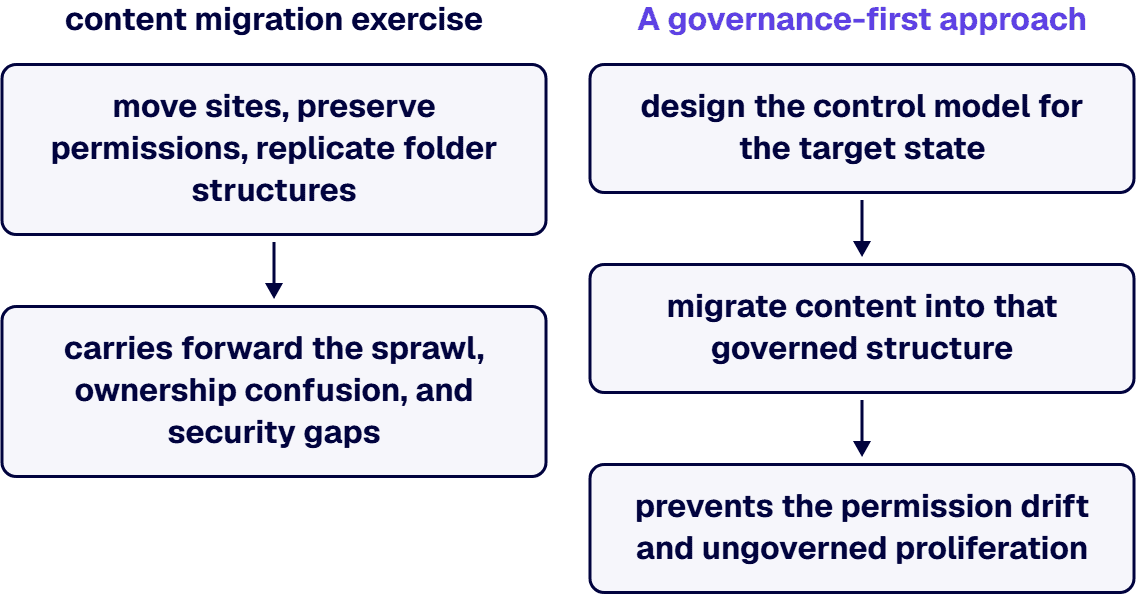
The difference between a successful SharePoint modernization and one that recreates the same problems in Microsoft 365 comes down to governance design. Most organizations approach modernization as a content migration exercise: move sites, preserve permissions, replicate folder structures. This carries forward the sprawl, ownership confusion, and security gaps that made the legacy environment problematic in the first place.
A governance-first approach inverts this logic. Instead of migrating what exists, you design the control model for the target state first, then migrate content into that governed structure. This requires more upfront architecture work, but it prevents the permission drift and ungoverned proliferation that emerge 6-12 months after go-live.
In a governed Microsoft 365 environment, site creation, naming conventions, and ownership assignment happen through controlled processes, not ad-hoc user requests. This means implementing site provisioning workflows that capture business justification, assign primary and secondary owners, apply naming standards, and set retention policies at creation time.
For regulated organizations, this control layer is not optional overhead: it is the foundation that makes audit trails possible. When auditors ask “who owns this data and why does it exist,” the answer should come from the provisioning record, not from detective work across multiple systems.
Site Provisioning Control Requirements
Implement these controls in your Microsoft 365 site provisioning process before migrating any content:
Legacy SharePoint environments often have inconsistent external sharing policies because controls were added reactively, after problems emerged. In the target Microsoft 365 environment, external sharing should default to the most restrictive setting that still supports legitimate business needs, with explicit approval workflows for exceptions.
In regulated environments, a failed SharePoint initiative creates audit exposure, compliance risk, and executive credibility damage that's difficult to reverse. i3solutions' SharePoint specialists bring 30 years of delivery experience in environments where the margin for error is narrow.
Hire US-Based SharePoint SpecialistsThis approach prevents the “shadow IT” problem where users work around restrictions by creating ungoverned external sharing arrangements. Clear policies, consistently applied, reduce both security risk and user frustration.
Microsoft 365 retention policies, sensitivity labels, and records management capabilities are more sophisticated than what was available in legacy SharePoint versions. The modernization program should implement these current-generation controls rather than trying to replicate legacy approaches.
This includes using retention labels for records classification, implementing data loss prevention (DLP) policies for sensitive content, and leveraging Microsoft Purview for compliance automation. These tools reduce the manual overhead that made governance difficult in legacy environments while providing the audit trails that regulated organizations require.
Successful SharePoint modernization depends on users adopting the new governance model. Without structured change management, even well-architected environments degrade as users create workarounds or revert to old patterns. The LMI engagement demonstrates this principle directly: their governance-first SharePoint and Microsoft 365 consolidation achieved 95% MFA adoption and reduced IT support requests by over 4,000 annually, largely because the change management program focused on role-specific training rather than generic platform overviews.
Generic “SharePoint training” fails because different roles need different capabilities. Site owners need provisioning and governance training. Content contributors need document management and collaboration workflows. End users need search and navigation patterns. Role-based training reduces cognitive load and increases retention.
For regulated environments, training should emphasize compliance boundaries: what external sharing is allowed, how retention policies work, and when to escalate governance questions. Training materials should be specific to your organization’s hub structure and naming conventions, not Microsoft’s generic examples.
During the initial 90-day rollout period, support requests spike as users encounter unfamiliar patterns. Fast response times prevent users from creating shadow IT workarounds. After rollout, support should transition to structured channels: self-service documentation for common tasks, escalation paths for governance questions, and regular office hours for site owners.
The LMI engagement reduced password-reset tickets by 40% through Okta SSO integration, demonstrating how architectural decisions reduce support burden over time rather than just shifting it.
Governance success metrics should focus on user behavior, not just compliance checkboxes. Track: time-to-provision new sites, external sharing request approval times, search success rates, and support ticket categories. If governance is working, users should find content faster and request help less often.
Monthly governance reviews should examine these metrics alongside compliance indicators to ensure the model remains sustainable as the organization grows. Governance-first migrations show 70-85% user adoption rates versus 30-50% for lift-and-shift approaches.
i3solutions approaches legacy SharePoint modernization as a governance-first program, not a technical migration. Our delivery model prioritizes decision clarity, architectural alignment, and measurable operational outcomes that reduce IT overhead while improving user experience.
Our assessment phase inventories every site, workflow, and permission structure to support retire-replace-rebuild-migrate decisions. We document current ownership patterns, identify compliance gaps, and map content to business functions. This creates a defensible roadmap that aligns with audit requirements and budget cycles. The assessment reveals 30-40% of legacy content can be archived, reducing migration scope and ongoing governance overhead before a single file moves.
We implement the target Microsoft 365 environment with governance controls built in from day one. Hub sites replace deep subsite hierarchies. Provisioning templates enforce naming conventions and ownership assignments. External sharing defaults to restrictive settings. Modern workflows replace legacy SharePoint 2013 processes before content migration begins. This prevents legacy sprawl patterns from carrying over into the new environment.
Our LMI engagement demonstrates the operational impact of governance-first modernization: 40% reduction in password-reset tickets, 4,000+ fewer annual IT support requests, and approximately $100,000 yearly helpdesk savings after SharePoint and Microsoft 365 consolidation. These operational improvements, not technical migration metrics, are what determine whether a modernization program delivered real value.
Vendor Evaluation Criteria for SharePoint Modernization Partners
When evaluating SharePoint modernization partners, require evidence of these capabilities before signing:

Scott Singleton has spent more than 19 years at i3solutions and more than 30 years designing, developing, migrating, and implementing enterprise technology solutions. His expertise is grounded in SharePoint architecture, large-scale migration, custom application development, workflow modernization, technical training, and hands-on delivery across Microsoft platforms, including SharePoint, SPFx, Power Apps, Power Automate, Power BI, and enterprise database systems.
View LinkedIn ProfileRequire a documented assessment methodology that inventories every site, workflow, and permission model in your current environment. The partner should deliver a decision matrix showing which content gets retired, migrated, or rebuilt, not a generic migration plan. Ask for references from similar regulated environments and proof of governance framework implementation, not just technical migration capability.
Implement provisioning controls and naming conventions before migrating any content. The governance model should restrict site creation, enforce consistent information architecture, and automate retention policies. Most organizations fail because they migrate the sprawl first and try to govern afterward. This approach preserves the problems you’re trying to solve.
Plan 12-18 months for enterprise environments with significant workflow dependencies and compliance requirements. The assessment and architecture phase takes 8-12 weeks, followed by phased migration that prioritizes high-value, low-risk content first. Organizations that try to compress this timeline usually end up with incomplete governance or user adoption failures.
Document the business logic first, then rebuild using Power Automate or Power Apps rather than trying to recreate the exact technical implementation. Many legacy workflows contain unnecessary approval steps or manual handoffs that can be simplified. The LMI modernization eliminated over 4,000 annual IT support requests by replacing complex SharePoint Designer workflows with streamlined Power Platform solutions.
Ensure your migration approach maintains audit trails for moved content and implements proper retention policies before go-live. External sharing controls must be restrictive by design, and any custom solutions need to support your specific regulatory requirements: HIPAA, SOX, ITAR, or CMMC. Document the governance model changes for compliance teams before implementation begins, not after.
Track helpdesk ticket reduction, user adoption metrics, and time-to-find-information before and after migration. The LMI engagement showed 40% reduction in password-reset tickets and approximately $100,000 in annual helpdesk savings. These operational improvements matter more than technical migration metrics. Measure whether users can complete common tasks faster in the new environment.


The longer an ungoverned or underperforming SharePoint environment stays in production, the harder and more expensive remediation becomes. i3solutions' SharePoint advisors work with enterprise IT leaders who have already identified the problem and need a structured path from diagnosis to scoped delivery.
Pressure-Test Your SharePoint Plan
US-Based | Est. 1997
© i3solutions. All rights reserved.
US-Based | Est. 1997
© i3solutions. All rights reserved.


