
By Michael Branson
Microsoft Purview governs Microsoft Fabric through controls that include sensitivity labels that Microsoft says can be set on all Fabric items, protection policies that turn a label into an access restriction, data loss prevention (DLP) policies for lakehouses, warehouses, databases and semantic models, the Purview audit log for Fabric activity, and the Unified Catalog for item metadata; each reaches only the items, triggers and tenants Microsoft documents, so the evidence you can show an auditor is as wide as each control’s reach and no wider. In a GCC High tenant, Microsoft’s page Microsoft Fabric for US Government GCC High customers (preview), last updated on 2026-09-02 and read on 2026-09-22, lists “Sensitivity label and share item” in its “Governance and security” row for the public preview and does not list the other controls, so plan GCC High evidence around labels and confirm each other control with Microsoft before promising it to an assessor.
If your lakehouses, warehouses and semantic models hold regulated data and an auditor’s request list is on its way, a platform diagram will not answer it. The auditor asks item by item: which items carry a label, who can open them, what stops data leaving, who did what, and what the catalog shows. Microsoft documents each Purview control for Fabric with its own item types, triggers and limits, and this checklist sets those limits beside each request.
If you need something to hand the team today, start with these requests, each answered in a section below:
If the first request is label coverage, begin with what Microsoft says a label reaches. Microsoft’s Use Microsoft Purview to govern Microsoft Fabric says “Sensitivity labels can be set on all Fabric items.” The capabilities table in Information protection in Microsoft Fabric, last updated on 2026-07-16, is more specific in its “Support status” column: manual labeling and programmatic labeling read “Supported for all Fabric items”; default labeling, downstream inheritance, and inheritance upon update and relationship changes read “Supported for all Fabric items, with limitations”; inheritance upon creation reads “Supported for all Power BI Fabric items. Supported for some non-Power BI Fabric items as described in the considerations and limitations”; inheritance from data sources reads “Currently supported for Power BI semantic models only”; and export reads “Currently supported for Power BI items in supported export paths.”
The table’s remaining row, mandatory labeling, is read with the same page’s considerations, which say “Mandatory labeling is currently supported for Power BI items only.” For lakehouses, pipelines and data warehouses they add that “mandatory labeling logic isn’t enforced. That means that the user can save the item without a label, unless the experience itself requires that a label be set.” A mandatory-label policy is therefore not evidence that every lakehouse, pipeline or warehouse carries a label.
On inheritance, the same page says “Downstream inheritance is on by default.” It lists downstream inheritance as supported from “Power BI item to Power BI item”, “Fabric item to Fabric item” and “Fabric item to Power BI item”, and not supported from “Power BI item to Fabric item”. It adds: “Autogenerated items from a lakehouse or data warehouse take their sensitivity label from their parent lakehouse or data warehouse. They don’t inherit the label from items further upstream.” Outside Power BI’s supported export paths, it says “Currently no other Fabric experience uses an export method that transfers the sensitivity label to the exported output.”
Labeling Power BI items has a license prerequisite of its own. Microsoft’s Information protection in Microsoft Fabric, read on 2026-09-22, says “To be able to apply labels to Power BI items, a user must have a Power BI Pro or Power BI Premium Per-User (PPU) license in addition to the licenses needed for Microsoft Purview Information Protection.”
For the coverage figures themselves, Microsoft’s Govern Fabric data page describes the Govern tab in the OneLake catalog, where the expanded report for Fabric admins has a tab that “includes information about sensitivity label coverage and data loss prevention policies activated and scanned across the various workspaces in the organization.” Its listed limitations include “Subitems such as tables aren’t supported and don’t appear in insights.” and that admin insights are “based on admin monitoring storage that refreshes once a day, there could be gaps between the data reflected and the actual state.” A coverage figure taken from the Govern tab is therefore item-level and can trail the tenant by a day.
If the auditor asks who can open a labeled item, the label alone does not answer it. Microsoft’s Information protection in Microsoft Fabric says labels apply access control in three cases: in the tenant where the labels were applied, through labels associated with Microsoft Purview protection policies; in Power BI Desktop (.pbix) files; and in supported export paths, the last two through labels associated with Microsoft Purview publishing policies. It then says: “Access control in all other scenarios is unsupported. This includes cross-tenant scenarios, such as external data sharing, where data is accessed from another tenant, or other export paths, such as export to .csv files or .txt files.” Its list of supported export paths includes “Export to Excel, PDF files, and PowerPoint.”
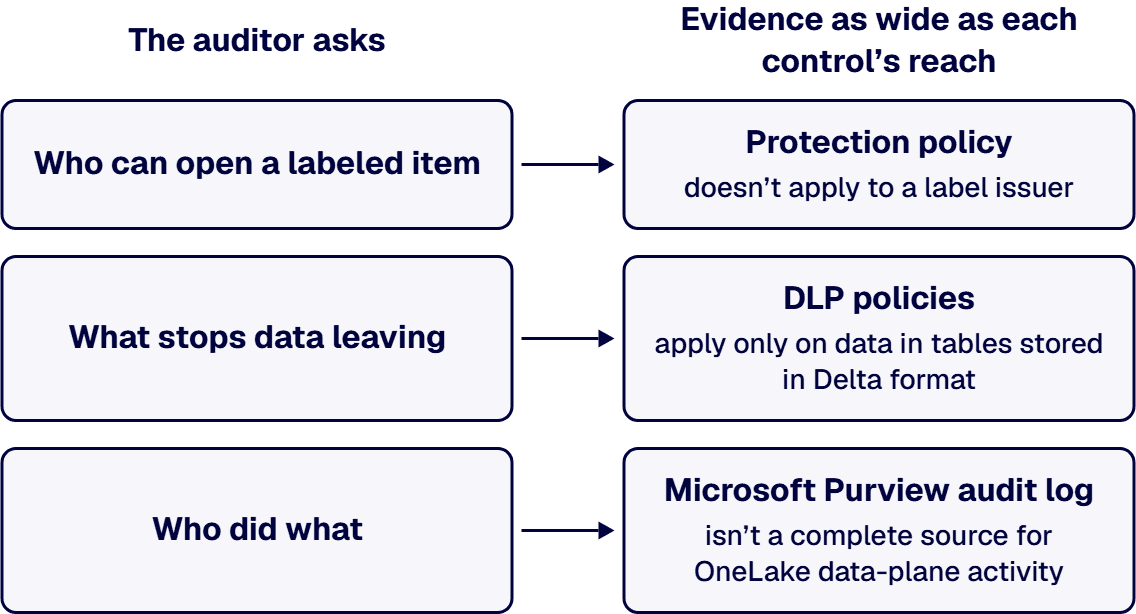
Inside the tenant, the control is a protection policy. Microsoft’s Protection policies in Microsoft Fabric says “Each protection policy for Fabric is associated with a sensitivity label. The policy controls access to an item that has the associated label by allowing users and groups specified in the policy to retain permissions they have on the item, while blocking access for everyone else.” It also says “A protection policy doesn’t apply to a label issuer.” The user who last applied the label keeps access even if the policy does not name them.
Its requirements, on Protection policies in Microsoft Fabric as read on 2026-09-22, start with “A Microsoft 365 E3/E5 license is required for sensitivity labels from Microsoft Purview Information Protection.” The label must have been scoped to “Files & other data assets” with protection settings that include “Control access”, and the Fabric tenant setting “Allow users to apply sensitivity labels for content” has to be on. On coverage, the page says “Protection policies are supported for all native Fabric item types, including lakehouses, notebooks, pipelines, and other core Fabric assets.” and “Additionally, protection policies are supported for Power BI semantic models. Other Power BI item types, such as reports and dashboards, aren’t currently supported.”
The considerations and limitations on Protection policies in Microsoft Fabric are six: “Up to 50 protection policies can be created.”; “Up to 100 users and groups can be added to a protection policy.”; “Protection policies for Fabric don’t support guest/external users.”; “Protection policies don’t integrate with Fabric CI/CD solutions. Deployment pipelines and Git integration use only workspace permissions, not item-level permissions from protection policy labels.”; “After a policy has been created, it can take up to 24 hours for it to start detecting and protecting items labeled with the sensitivity label that was associated with the policy.”; and, for native Fabric item types where the system applies a label automatically and “there is no designated label issuer, the user who created the artifact will not be restricted by protection policies.”
On the item itself, the evidence for who can open it is the Permissions tab. The same page says you can “select the Permissions tab to see the list of users and groups that have access to the item, including those restricted by a protection policy.” It adds that “The Permissions tab in the item’s details is visible to you if you have a role of Admin or Member in the workspace containing the item.”
If the auditor asks what stops regulated data leaving, the answer depends on the item type and the trigger. Microsoft’s Get started with data loss prevention policies for Fabric and Power BI, last updated on 2026-07-22, lists the supported item types as semantic models, lakehouses, warehouses, KQL databases, mirrored databases, SQL databases and Cosmos databases, and points to its considerations and limitations for exceptions.
For semantic models, the same page says DLP policies evaluate a semantic model on “Publish”, “Republish”, “On-demand refresh” and “Scheduled refresh”, and that the evaluation does not occur if “An account using service principal authentication initiates the event” or if “The semantic model owner is a service principal”. For other items it says “DLP policies evaluate a Fabric item, such as a lakehouse, SQL database, or Mirrored database, when the data within it changes.”
On a match, the page says DLP policies for Fabric and Power BI support three actions: “Notify the user through a policy tip”, “Generate an alert” and “Restrict access (preview)”. The third is in preview, and Microsoft describes it this way: “When you configure a policy with the restrict access action and a policy match occurs, the policy restricts access to the data owners or to members of the organization, depending on the policy configuration. All other users lose access to the item.”
The limitations the page lists include “Only workspaces hosted in Fabric or Premium capacities are supported.”; “DLP policies for Fabric aren’t supported for sample semantic models, streaming datasets, or semantic models that connect to their data source via DirectQuery or live connection.”; “DLP policies for Fabric apply only on data in tables stored in Delta format.”; and “Advanced classifiers, such as exact data match (EDM), trainable classifiers, credential classifiers, and named entities aren’t supported by DLP for Fabric.” Under billing, it notes “DLP evaluation workloads impact capacity consumption.”
For evidence of a match, the record is the alert. The same Get started page says “If you enable alerts in the policy, an alert records on the data loss prevention Alerts page in the Microsoft Purview portal.” On the Govern tab, Microsoft’s Govern Fabric data page says “The DLP selector shows the workspaces or data items evaluated by DLP policies, helping you identify policy violations and take action, such as applying a more restrictive label or removing sensitive information.”
If the auditor asks who did what, the record is the Microsoft Purview audit log, with one boundary Microsoft states. Microsoft’s Track user activities in Microsoft Fabric says “To access the audit logs, go to the Microsoft Purview portal.” and “You must be assigned the Audit Logs role in Exchange Online to access the audit log.”
Microsoft’s Operation list, last updated on 2026-09-08, lists the audit operations. Among them are “SensitivityLabelApplied”, “SensitivityLabelChanged” and “SensitivityLabelRemoved” for Power BI items, “SetLakehouseSensitivityLabel” for a lakehouse, and “DLPRuleMatch” for a DLP rule match.
Above that table, the same page says: “To audit OneLake data access and storage operations, use OneLake diagnostics. The Fabric audit log isn’t a complete source for OneLake data-plane activity.” For regulated data in OneLake, Microsoft’s named route for data access is OneLake diagnostics, beside the audit log.
How this record fits the wider audit trail a regulator asks for is covered in Embedding Governance into How the Enterprise Operates and Scales.
If the auditor asks what you hold and where it came from, the Microsoft Purview Unified Catalog is the view. Microsoft’s Use Microsoft Purview to govern Microsoft Fabric says the Unified Catalog lets you “automatically view metadata about your Microsoft Fabric items in the Microsoft Purview Unified Catalog with live view in Microsoft Purview.” Live view is in preview: Microsoft’s page is titled Live view in Microsoft Purview (preview), carries the notice “This feature is currently in preview.”, and its limitations for Microsoft Fabric include “Only Microsoft Fabric item level metadata are available in live view.”
For more than live view shows, a scan is the route. Microsoft’s Connect to your Microsoft Fabric tenant in the same tenant as Microsoft Purview says “Scanning a Fabric tenant brings in metadata and lineage from Fabric items including Power BI.” Its known limitations include “Currently for all Fabric items besides Power BI, only item level metadata and lineage can be scanned. For Lakehouse tables and files, sub-item level metadata scanning is available but sub-item level lineage isn’t supported.” and “Fabric with tenant-level or workspace-level private links aren’t supported.”
Walking that lineage back from a report to its source is covered in Data Pipeline Operations for Enterprise Microsoft Estates.
If your Fabric tenant is in GCC High, work from what Microsoft’s GCC High page lists, not from the general pages above. Microsoft’s Microsoft Fabric for US Government GCC High customers (preview), last updated on 2026-09-02 and read on 2026-09-22, carried the notice “This feature is in preview.” In its feature availability table, the “Governance and security” row listed “Sensitivity label and share item” under “Capabilities in public preview”. Among the limitations it listed for the public preview were “Private Link isn’t supported.” and “Customer-managed keys (CMK) aren’t supported.”; its October 1, 2026 update instead reads “Tenant-level private link is supported.” and lists “Workspace Private Link isn’t supported.” and “Customer-managed keys (CMK) aren’t supported.” among its current limitations. Its October 1, 2026 update no longer marks Fabric in GCC High as preview.
For Power BI, a separate Microsoft page, Power BI for US government customers, last updated on 2026-02-18, marks the rows “Data Loss Prevention policies” and “Data Protection (MIP labels)” in its GCC High column with the mark its key defines as “The feature is available in the environment, and any exceptions are defined in footnotes.” Those rows describe Power BI features, and that page was last updated before Microsoft’s GCC High page for Fabric.
Microsoft’s GCC High page for Fabric does not list protection policies, DLP for Fabric items, the Unified Catalog view or scan of Fabric, Purview Audit for Fabric activity, or the Govern tab. That absence is not a statement that they are unavailable in GCC High, and it is not a statement that they work there; the evidence plan for a GCC High tenant confirms each with Microsoft before anyone promises it to an assessor.
If labels and DLP on Fabric are being planned apart from the rest of your Purview program, bring them together first. Label and DLP rollout on Fabric follows the organization’s wider Purview readiness work, covered in Microsoft Purview Deployment Guide: A Readiness Playbook for Regulated Enterprises, and a decision about who owns labels in the analytics estate, covered in Enterprise Analytics Operating Model: A Governed Power BI and Fabric Framework. Whatever evidence the plan produces, your compliance and legal teams decide what each obligation requires.
If the label design, the protection policies, the DLP scope and the evidence plan sit across security, data and compliance teams with no single owner, an outside architect can scope each control to the items Microsoft says it reaches and write the evidence plan your team runs.
i3solutions maps governance to named control families, enforces it in the platform through Entra ID, Purview, and Azure Policy, and evidences it continuously rather than reconstructing it at audit.
Delivery is senior and US-based. i3solutions has delivered Microsoft Fabric work for clients. The Fabric services offer is described in Enterprise Microsoft Fabric Development & Integration Services for Unified, AI-Ready Analytics, and the wider integration and data practice in Unifying Enterprise Operations Through Microsoft System Integration & Data Management.
Through Purview applications that Microsoft lists as working with Fabric, which include the Unified Catalog, Information Protection with sensitivity labels and protection policies, data loss prevention, Audit and Insider Risk Management. Each reaches only what Microsoft documents: Microsoft says labels can be set on all Fabric items, a label restricts access only through a protection policy or, for Power BI Desktop files and supported export paths, a publishing policy, DLP supports a listed set of item types, and Microsoft says the Fabric audit log is not a complete source for OneLake data-plane activity.
Not by themselves. According to Microsoft, a protection policy associated with a label lets the users and groups it names keep their permissions on a labeled item and blocks access for everyone else, and a protection policy does not apply to the label issuer. Microsoft says access control through labels is unsupported outside the tenant where the labels were applied, Power BI Desktop files and supported export paths, including cross-tenant scenarios and export to .csv or .txt files.
According to Microsoft, DLP policies for Fabric and Power BI support semantic models, lakehouses, warehouses, KQL databases, mirrored databases, SQL databases and Cosmos databases. The exceptions Microsoft lists include semantic models that connect to their data source through DirectQuery or live connection, and data that is not in tables stored in Delta format; of the three actions it lists, the third is named “Restrict access (preview)”.
According to Microsoft’s Use Microsoft Purview to govern Microsoft Fabric page, “all Microsoft Fabric user activities are logged and available in the Microsoft Purview audit log.” You search it in the Microsoft Purview portal with the Audit Logs role in Exchange Online. For OneLake, Microsoft’s operation list says “The Fabric audit log isn’t a complete source for OneLake data-plane activity.” and names OneLake diagnostics as the route for auditing OneLake data access and storage operations.
According to Microsoft’s GCC High page for Fabric, last updated on 2026-09-02, Fabric in GCC High was in public preview (Microsoft’s October 1, 2026 update no longer marks it as preview), and the page’s “Governance and security” row lists “Sensitivity label and share item”; the page does not list protection policies, DLP for Fabric items, the Unified Catalog view of Fabric, Purview Audit or the Govern tab. According to Microsoft’s Power BI government page, last updated on 2026-02-18, Power BI data loss prevention policies and MIP labels are marked available in GCC High; those are Power BI rows, not Fabric items. Confirm each other control with Microsoft before promising it to an assessor.
On the Microsoft page Find your Fabric home region, last updated on 2026-08-05, Microsoft states that the home region is the Azure datacenter region linked to your Fabric tenant, chosen when your tenant was created. The same page says the value next to Your data is stored in, under the About link in the Help pane, is the default region where your data is stored. On the Microsoft page Multi-Geo support for Fabric, last updated on 2026-08-14, Microsoft states that a capacity created in another region remains in that region, and any workspaces created under it will have their content stored in that region. Compute and storage, including OneLake, are then in that region, yet some tenant metadata remains in the home region, including permissions and semantic model credentials. The same page says the data at rest is replicated to another region in the same Azure geography for disaster recovery if the Azure geography contains more than one region, and that data in transit might go back and forth between multiple geographies. For GCC High, the Microsoft page Microsoft Fabric for US Government GCC High customers, last updated on 2026-10-01, states that Fabric for GCC High is available only in the following regions: US Gov Virginia and US Gov Texas. Before moving data between regions, Microsoft says to confirm that any movement you initiate between regions follows all corporate and government compliance requirements prior to initiating data transfer.

US-Based | Est. 1997
© i3solutions. All rights reserved.
US-Based | Est. 1997
© i3solutions. All rights reserved.


