
Five phases, and the first one produces no automation at all. Phase 1 closes the default environment, authors a tenant data policy, and names owners, because Microsoft states the default environment “doesn’t provide any backup guarantees and shouldn’t be used for production workloads” and every licensed user already holds the maker role in it. Phase 2 runs a bounded pilot of three to five finance processes inside a managed production environment with a sandbox beside it. Phase 3 opens the maker programme behind that policy. Phase 4 is run-state: ownership records, request-limit headroom, and audit evidence. The guardrails are Microsoft product features rather than documents: data policies, managed environments, solution-based application lifecycle management, and Microsoft Purview audit. Sequence matters because a data policy authored after flows exist can suspend them, and Microsoft states that full enforcement of a Power Platform data policy takes up to 24 hours in the most extreme cases (Microsoft Learn, Data policies).
Most Power Automate rollout plans fail at the same place, and it is not phase 3. It is the week before phase 1, when nobody decided who owns an environment. Months later a finance team is running flows against general ledger extracts and payment approvals, some of them owned by people who have since changed roles, and the platform team is asked by an internal auditor to produce a list of what runs, who owns it, and where the data goes. That list does not exist, and reconstructing it costs more than the rollout did.
What follows is the sequence that keeps that list from going missing in a mid-sized finance organization. It names the Microsoft controls by their current product names, states what each phase produces, names the owner of each gate, and says plainly what breaks when a phase is skipped. Every Microsoft value below is quoted from Microsoft Learn or the Microsoft product pricing page; the source is named beside the value, and where that source was re-read for this page it carries the date it was read, so you can re-derive it rather than trust this page.
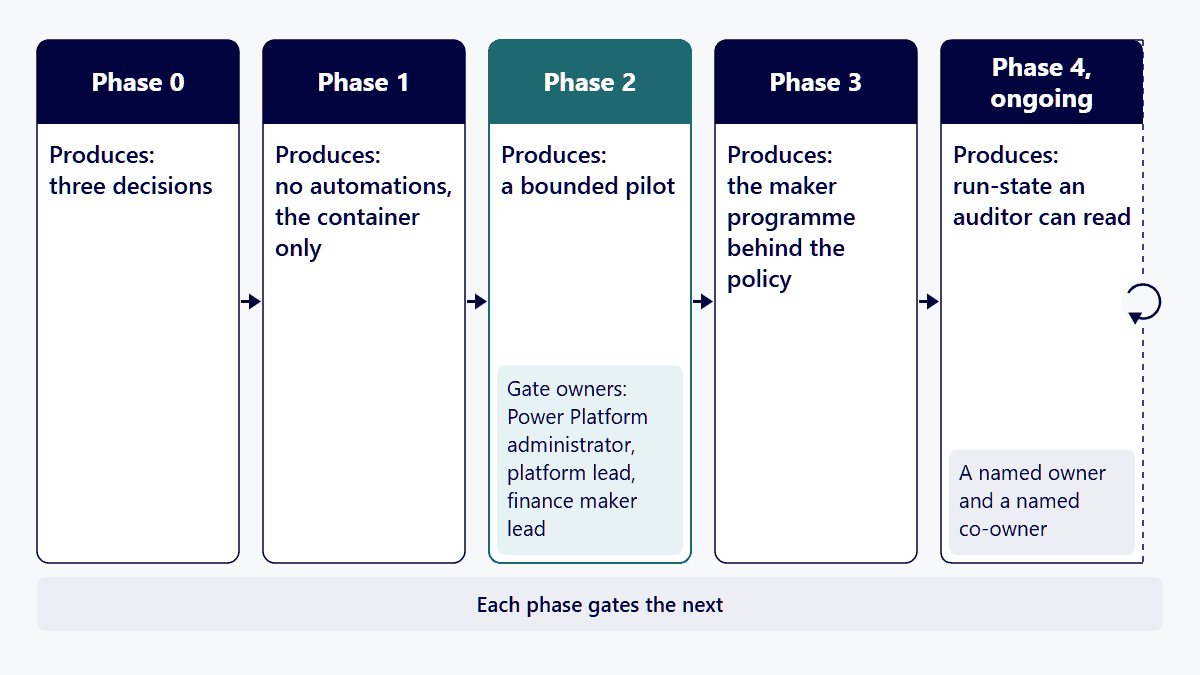
Phase 0 is three decisions a VP of IT can make without a discovery workshop. Each one blocks work downstream if it is deferred.
Decision one: who is the Power Platform administrator of record, and who is the Environment Admin for finance. Microsoft defines two built-in environment roles. The Environment Admin “can perform all administrative actions on an environment”, which Microsoft enumerates as adding or removing users from the Environment Admin or Environment Maker role, provisioning a Dataverse database, viewing and managing all resources created within the environment, and setting data loss prevention policies. The Environment Maker role “can create resources within an environment including apps, connections, custom connectors, and flows using Power Automate”. Those are two different jobs and they should be two different people, with the administrator sitting in IT and the maker lead sitting in finance. Source: Microsoft Learn, Power Platform environments overview, ms.date 2026-05-28, accessed 12 September 2026.
Decision two: what the tenant data policy classifies as business data. Microsoft’s data policy model has exactly three groups, and Microsoft describes them precisely: Business holds “connectors for sensitive data” and “connectors in this group can’t share data with connectors in other groups”; Non-business/Default holds “connectors for non-sensitive data” and “unassigned connectors show up here by default”; Blocked connectors “can’t be used where this policy is applied”. For a finance estate the substantive decision is which systems of record go into Business, because a connector in Business cannot share data with a connector outside it, and that single rule is what stops a payables approval flow from writing to a personal mail or file-sharing service. Source: Microsoft Learn, Manage data policies, ms.date 2026-04-07, accessed 12 September 2026.
Decision three: what happens to the default environment. Microsoft is unambiguous about it. “The default environment doesn’t provide any backup guarantees and shouldn’t be used for production workloads.” Microsoft also states that “whenever a new user signs up for Power Apps, they’re automatically added to the Maker role of the default environment”, that “you can’t delete the default environment”, and that “Microsoft 365 Power Platform administrators are no longer automatically assigned the Dataverse system administrator security role in the default environment”. Microsoft’s own recommended mitigation for that last point is to “assign the system administrator security role to a few trusted users without assigning those users the Power Platform administrator role”, to avoid an administrative lockout. Microsoft further suggests renaming it “to something more descriptive, such as Personal Productivity Environment that clearly calls out the intent of the environment”. Source: Microsoft Learn, Power Platform environments overview, ms.date 2026-05-28, accessed 12 September 2026.
Take that recommendation literally. In a mid-sized finance organization the default environment is where the shadow estate already lives, and renaming it is the cheapest signal you will ever send about what it is for.
Phase 1 produces zero automations. That is the point, and it is the phase most often compressed.
Create the environments. Microsoft’s application lifecycle management guidance is to keep development, test and production separate. In the Power Platform admin center the path is: in the navigation pane select Manage, in the Manage pane select Environments, then select New in the command bar. Build three for finance: a sandbox for development, a sandbox for test, and a production environment. Microsoft describes sandbox environments as “nonproduction environments, which offer features like copy and reset”, and notes that “converting from a production to a sandbox environment can’t be blocked”, which is worth knowing before you delegate environment creation.
Enable managed environments on production. Microsoft states the entitlement plainly: “Managed environments are included as an entitlement with standalone Power Apps, Power Automate, Microsoft Copilot Studio, Power Pages, and Dynamics 365 licenses.” If your finance users are being licensed on Power Automate Premium anyway, the governance surface is already paid for. Microsoft enumerates what it unlocks, and the names matter because they are what you will click: Environment groups, Limit sharing, Weekly usage insights, Data policies, Pipelines in Power Platform, Maker welcome content, Solution checker, IP Firewall, IP cookie binding, Customer Managed Key, Lockbox, Extended backup, Data policies for desktop flow, Export data to Azure Application Insights, Default environment routing, and Virtual Network support. The path is: in the navigation pane select Manage, in the Manage pane select Environments, select the ellipsis next to an environment, then select Enable Managed Environments. Source: Microsoft Learn, Managed environments overview, ms.date 2026-02-23.
Author the data policy, and author it now. The admin center path is: sign in to the Power Platform admin center, select Security in the navigation pane, in the Security pane under Settings select Data and privacy, in the Data protection and privacy screen select the Data policy section, then select + New Policy. Microsoft’s own walkthrough sets the default group for new connectors and recommends keeping it at Non-business, “to map any new connectors added to Power Platform by default”, because unassigned connectors land there and can be promoted after review. Note the asymmetry Microsoft documents: if you set the default to Blocked, “any new connectors that are unblockable are mapped to Non-business because by design they can’t be blocked”. Source: Microsoft Learn, Manage data policies, ms.date 2026-04-07, accessed 12 September 2026.
The reason this belongs in phase 1 and not phase 3 is enforcement behaviour.
Microsoft documents a seven-step process for what happens when a data policy is created or changed. The configuration is saved at the customer management level, cascaded down to each environment, and then “resources in each environment (such as apps, flows, and chatbots) periodically check for updated policy configurations”. When a change is detected, each app and flow is evaluated, and Microsoft states the consequence directly: “If a violation occurs, put the app, flow, or chatbot in to a suspended or quarantine state so that it can’t operate.” Connections are then scanned, and “if the policy blocks the whole connector, set the connection to a disabled state so that it can’t operate”. Finally, “any resources that are running and attempting to use an inactive connection, action, trigger, or MCP server that is blocked, fail at runtime”.
Then the timing. Microsoft states that the time it takes to implement a Power Platform data policy “varies from customer to customer based on their volume of environments and resources within those environments”, that “the more apps, flows, and chatbots a customer has, the longer it takes for policy changes to take full effect”, and that for a Power Platform data policy “for the most extreme cases, the latency for full enforcement is 24 hours. In most cases, it’s within an hour.” Source: Microsoft Learn, Data policies, ms.date 2026-04-07, accessed 12 September 2026.
Read those two passages together and the sequencing argument makes itself. Author the policy while the estate is small and nothing is suspended. Author it in month six and you have a window of up to a day during which finance flows quietly enter a suspended state, connections go disabled, and running flows fail at runtime, with no single moment of failure to point at. That is the week-3 outage that gets blamed on Power Automate and is actually a sequencing decision made in week 1.
The corollary is a test gate: before any policy change reaches production, apply it to the finance test environment first and let a full 24 hours elapse before you promote it. Microsoft’s tenant-level policy scope supports this directly, since the walkthrough’s own example excludes test environments from the policy so they can be used to stage changes.
Pick three to five finance processes, not twenty. The selection criteria are not business value, they are evidentiary: pick processes whose current control you can describe, whose data classification you already know, and whose failure is visible within a day. Typical candidates in a finance function are a payables approval routing, a month-end checklist with attestation steps, a vendor onboarding intake, and an exception queue that currently lives in a shared mailbox.
Build them in the finance development sandbox, inside a solution, and promote them through test to production. Solution packaging is the mechanism that makes ownership transferable later, and it is worth the extra step on day one rather than the rebuild later. i3solutions runs client Power Platform work on a multi-tenant Center of Excellence model with separate Dev, Test, UAT, and Production environments promoted through managed solutions, and i3solutions delivery pods use standardized environments, connection references, and solution packaging from day one. i3solutions delivery includes ALM practices with Power Platform pipelines or Azure DevOps integration, environment separation strategies, and change control processes.
The pilot has to prove four things before phase 3 opens, and each of them is a gate with an owner:
Two i3solutions delivery facts are worth stating here because they set expectations for what a pilot at this size looks like. A single i3solutions customer environment commonly runs 15 to 20 Power Automate flows, and by year-end, i3solutions client teams typically manage 15 to 25 production flows independently while maintaining the architectural patterns i3solutions established. That is the shape of a healthy finance estate: tens of flows, owned internally, not hundreds owned by nobody.
If you want that shape tested against the estate you actually have before you commit to a phase plan, that is a conversation to have first.
Phase 3 is where a rollout becomes a programme, and it is governed by two settings rather than by training.
Limit sharing. Managed environments include a sharing limit control, which is the mechanism that stops a single finance analyst’s flow from silently becoming a departmental dependency with no review. Set it before you invite makers, not after.
Maker welcome content. Managed environments let you present content to a maker at the moment they start building. Use it for the three things a finance maker actually needs to know: which environment to build in, which connectors are in the Business group, and who to ask for a connector review. This is the highest-yield governance artifact in the whole rollout because it arrives at the point of decision rather than in an onboarding deck.
Environment routing, if you price it first. Microsoft describes it plainly: “Environment routing is a premium governance feature.” Turned on, “the maker lands in their own personal developer environment instead of the default environment”, and “by default, all developer environments created through environment routing are managed”. The path is: in the navigation pane select Manage, in the Manage pane select Tenant settings, then select Environment routing. This is the real structural answer to shadow building, and the licence line is precise enough to matter: Microsoft states that “a premium license isn’t required for the creation or preview of an app or flow in a managed developer environment. However, a user or maker needs a premium license to run an app or flow in a managed developer environment.” So a finance analyst can experiment without a premium seat and cannot operate without one, which is usually the right boundary but is a budget line either way. Worth knowing before you enable it: Microsoft states the routed environments arrive with sharing limits “preconfigured to share with five individuals”, Solution Checker “set to Warn”, usage insights on, and no maker welcome message established. Source: Microsoft Learn, Environment routing, ms.date 2025-12-15.
Training belongs in this phase rather than earlier, because a maker programme opened before the policy exists produces flows you will have to suspend.
The rollout is not finished when the pilot is live. It is finished when four run-state facts are true and repeatable.
Every production flow has a named owner and a named co-owner. This is not hygiene, it is availability. Microsoft states what happens when an owner leaves: “The flow is downgraded to lower performance and all flow owners are notified and the flow is turned off in 14 days if no action is taken.” Microsoft states the same outcome when a premium licence is removed from the owner of a premium flow: “The flow is downgraded to lower performance. The system notifies all flow owners, and the flow is turned off in 14 days if no action is taken.” Microsoft’s own remedies are to change the owner on a solution-aware flow, have a co-owner add a non-solution-aware flow to a solution and then change the owner, or assign a Power Automate Process license to the flow. Source: Microsoft Learn, Power Automate licensing FAQ, ms.date 2026-08-14, accessed 12 September 2026. Fourteen days is the whole window, so a quarterly leaver review is too slow and a monthly one is marginal.
You know your request headroom. Microsoft publishes official Power Platform request limits per 24 hours: Power Automate Premium 40,000 per user, Power Automate Process 250,000 per licence, Power Automate Hosted Process 250,000 per licence, Power Automate Free 6,000 per user, Office 365 6,000 per user, Power Apps Premium 40,000 per user, and Dynamics 365 Team member 6,000 per user. There is also a five-minute ceiling: “The five-minute limit is 100,000 requests and it’s independent of a user’s license.” Microsoft counts more than you might expect toward these: for Power Automate, “all API requests to connectors, process advisor analysis, HTTP actions, and built-in actions from initializing variables to a simple compose action. Both successful and failed actions count toward these limits. Retries and requests from pagination also count as action executions.” Microsoft also notes that all organizations are currently in a transition period with higher limits, and advises: “Design your cloud flows for the per-user limits that take effect once the transition ends.” Source: Microsoft Learn, Requests limits and allocations, ms.date 2026-09-08.
The practical consequence for a finance estate: a month-end flow that loops a ledger extract row by row is the one that will hit a limit, and it will hit it on the day of the month when you can least afford it. Design that one for batching in phase 2, not after the first failure.
Activity is logged where a compliance team already looks. Power Automate and Power Apps activity flows into the Microsoft Purview audit log. Retention is the part to read carefully. Microsoft: “Audit records for all other activities are retained for 180 days by default or you can change the retention to a different duration using a custom retention policy.” And on licensing: “To retain an audit log for longer than 180 days (and up to 1 year), the user who generates the audit log (by performing an audited activity) must have an Office 365 E5 or Microsoft 365 E5 license or a Microsoft Purview Suite (formerly known as Microsoft 365 E5 Compliance) or E5 eDiscovery and Audit add-on license.” Source: Microsoft Learn, Manage audit log retention policies, ms.date 2026-06-19, accessed 11 September 2026. If your evidence period is longer than 180 days, that is a licensing line item in the rollout budget, and it is one that is almost always discovered late.
Someone owns the inventory. Which brings up a change many governance plans have not yet absorbed.
For years the standard advice was to install the Power Platform Center of Excellence Starter Kit and use it as the inventory and governance layer. Microsoft has changed that position, and the change is on Microsoft’s own page: “The Power Platform CoE Starter Kit is no longer actively maintained. Its core capabilities are part of the Power Platform admin center.” Microsoft continues: “Issues are no longer reviewed or addressed”, “the CoE Starter Kit is no longer receiving ongoing feature investments or updates”, and “The CoE Starter Kit remains available for existing and new deployments, but it will not be enhanced with new capabilities.” Microsoft names the in-product replacements by their experience names: Inventory, to “view and govern all apps, flows, and agents created across your tenant”; Usage, to “track adoption and identify top resources and their owners”; Monitor, to “track the operational health of heavily used resources”; and Actions, to “identify risks, enforce best practices, and take action on governance insights across your tenant”. Source: Microsoft Learn, CoE Starter Kit transition to Power Platform admin center, ms.date 2026-05-07.
This does not mean an existing kit deployment has to be torn out this quarter. It does mean that a rollout plan being written now should not take a new dependency on it for inventory, and that if you already run it, you now own it. i3solutions governs client Power Platform tenants with the Center of Excellence Starter Kit, tenant-level and environment-level DLP policies, and managed environment controls. That governance experience is exactly why the transition matters: the governance patterns carry over, the tooling underneath them is moving into the admin center, and the migration is a planned item rather than an emergency.
These are the four failures a finance rollout produces most reliably, with the mechanism rather than the symptom.
“We bought premium licences for people who only click approve.” You did not need to. Microsoft answers this directly in its licensing FAQ, for the exact scenario of a premium flow that sends approval requests and waits: “Users who respond to approval requests don’t need a Premium license.” In a finance organization where most people are approvers rather than builders, this is the single largest avoidable line in the licensing model. Current published list prices are Power Automate Premium at $15.00 user/month, paid yearly; Power Automate Process at $150.00 bot/month, paid yearly; and Power Automate Hosted Process at $215.00 bot/month, paid yearly. Sources: Microsoft Learn, Power Automate licensing FAQ, ms.date 2026-08-14, accessed 12 September 2026, and the Microsoft Power Automate pricing page, accessed 12 September 2026. Price the makers, the service accounts and the unattended processes; do not price the approvers.
“The flow stopped and nobody knows why.” Two candidate mechanisms, and they are distinguishable. If it stopped after a policy change, it is the suspension behaviour above, and Microsoft states that full enforcement of a Power Platform data policy can lag by up to 24 hours. If it stopped roughly two weeks after someone left or lost a licence, it is the 14-day Power Automate turn-off Microsoft documents for an orphaned or unlicensed flow. Both are documented Microsoft behaviours with a defined remedy, and neither is a platform defect. Sources: Microsoft Learn, Data policies, accessed 12 September 2026, and Microsoft Learn, Power Automate licensing FAQ, accessed 12 September 2026.
“Finance built it in the default environment.” Of course they did. Every licensed user holds the maker role there by default, and it is the path of least resistance. The fix is structural: rename it, apply the data policy to it, and give finance a real environment to build in during phase 1. Applying the policy without providing the alternative just moves the work somewhere you cannot see.
“The month-end run throttled.” Almost always a per-row loop against a large extract, colliding with the Power Platform five-minute ceiling of 100,000 requests or the Power Automate Premium daily allocation of 40,000 requests per user. This is a design review item in phase 2, and the cheapest place to catch it is the pilot’s test environment with production-shaped data volumes. Source: Microsoft Learn, Requests limits and allocations.
Under three conditions this plan is the wrong answer, and saying so plainly beats selling the phases into a situation they do not fit.
You have one regulated process and a hard date. If the driver is a single reporting obligation with a fixed deadline and no appetite for a maker programme, do not run a five-phase platform rollout. Build the one process as a governed, solution-packaged application in a production environment with an environment-level data policy scoped to it, and skip the adoption phases entirely. The test is what you are willing to own afterwards: a phased rollout leaves you with an environment strategy, a maker population and a policy to maintain, and if none of those three is wanted, they are overhead rather than governance. Note that Microsoft records an asymmetry here worth knowing before you scope down: “Environment-level data policies can’t override tenant-wide data policies”, so a single-process environment policy sits underneath whatever the tenant already enforces rather than replacing it.
The estate is already large and ungoverned. If finance already has scores of flows running in the default environment, phase 1 as written will suspend them, because a new policy evaluates every existing app and flow and puts violators into a suspended or quarantine state. The correct first move is an inventory and a remediation sequence, not a policy. Microsoft’s Inventory and Usage experiences in the admin center exist for exactly this, and the policy comes after you know what it will hit. The concrete inversion: count the flows and their connectors first, classify the connectors those flows actually use, stage the Power Platform data policy against a test environment and let a full 24 hours pass, then promote. Applying a tenant policy to an unmapped estate is how a governance programme starts by breaking payables. Source for the enforcement window: Microsoft Learn, Data policies, ms.date 2026-04-07, accessed 12 September 2026.
The real requirement is high-volume system-to-system integration. If the work is moving large volumes between a finance system and a data platform on a schedule, the request-limit arithmetic above is telling you something specific. A nightly reconciliation that touches ledger rows one at a time consumes one request per action, and Microsoft counts retries and pagination as actions too, so a single job of that shape can spend a Power Automate Premium user’s entire 40,000-request daily allocation before the batch completes (Microsoft Learn, Requests limits and allocations). That is integration architecture, and Power Automate may be the wrong runtime for the heavy path even where it is the right one for the human approval steps around it. i3solutions runs comparative platform-selection evaluations for clients, recommending among IAM platforms for hybrid estates and among workflow automation platforms against SOC 2 and HIPAA, rather than only implementing the Microsoft option.
Finance rollout content routinely asserts that Sarbanes-Oxley requires specific things of automated workflows. We checked the primary texts that govern this. The SEC rule that defines internal control over financial reporting, Exchange Act Rule 13a-15, 17 CFR 240.13a-15, paragraph (f), defines it as a process designed to provide reasonable assurance regarding the reliability of financial reporting, and the disclosure rule, Regulation S-K Item 308, 17 CFR 229.308, paragraph (a), requires management’s annual report on that control. The PCAOB standard for the auditor’s side, PCAOB AS 2201, An Audit of Internal Control Over Financial Reporting That Is Integrated with An Audit of Financial Statements, addresses information technology general controls in paragraph 47 as a risk factor, where “an automated control would generally be expected to be lower risk if relevant information technology general controls are effective”, and addresses automated application controls and off-the-shelf packaged software generically in paragraph 47 and Appendix B paragraphs B28 to B33. None of the three names a product category or a tool: in the texts we fetched on 12 September 2026, the words workflow, robotic, low-code, tool and product each occur zero times in AS 2201, in Rule 13a-15 and in Item 308. So this page does not tell you what an auditor will require, because those sources do not say.
What is verifiable is what the platform can evidence, and that is the useful half. Environment separation with promotion through solutions gives you a change-control record. Data policies give you an enforced statement of which connectors may touch financial data. Named flow owners and co-owners give you accountability that survives a leaver. Microsoft Purview audit gives you an activity record with a stated retention period you can extend by policy and licence. Take those four artifacts to your own control owners and external auditor and let them map them to your control framework. A partner who tells you what your auditor requires is guessing on your behalf.
i3solutions has been a Microsoft partner for 30 years and has delivered 1,500+ implementations across aerospace and defense, financial services, and health sciences. i3solutions Power Automate developers follow a three-phase delivery model designed to minimize risk while building internal capability. All i3solutions Power Automate developers and consultants are U.S.-based.
The delivery facts that bear on a finance rollout specifically: i3solutions has built and supports hundreds of production Power Automate flows across its client base. i3solutions workflow automation builds use standard and premium Power Platform connectors, custom API connectors published through Azure API Management, and hub-and-spoke approval patterns built on Dataverse tables or SharePoint lists. i3solutions delivers workflow automation and development inside customers’ SOC 2-audited environments, operating under the customer’s own controls, and knows how to operate in those regulated environments. i3solutions can state, from delivery experience, what staffing a client actually needs to run Power Automate day to day, including whether a dedicated IT team is required and what the alternative looks like.
On outcomes, two attested results from regulated estates: a financial services organization decreased repeat integration failures by 73% within 6 months through proactive monitoring of Power Platform and Dynamics 365 data flows, coming from identifying patterns in error conditions and implementing preventive measures. And one defense contractor client reduced monthly IT support tickets by 40% after implementing assessment recommendations that consolidated three separate approval workflows into a single Power Automate solution with proper governance controls. i3solutions runs a governed Power Platform for a federal defense agency supporting roughly 10,000 personnel across about 180 locations, which works because it is governed, not despite it.
On what the engagement is not: an i3solutions engagement does not produce managed-service ownership, a replacement for the internal team, open-ended scope expansion, or vendor lock-in. i3solutions typically takes ownership of architecture and governance first, while existing augmented teams continue execution inside the new standards.
On cost, so you can size the programme rather than guess at it: enterprise workflow automation consulting engagements typically range from $75,000 to $350,000 for Phase 1 assessment and pilot delivery, depending on process complexity, integration surface area, and compliance framework requirements. A typical regulated-enterprise Power Automate security consulting engagement at i3solutions runs in the $60,000 to $180,000 range, depending on environment scope and framework complexity.
This page answers one question: the sequence, the gates and the owners for a Power Automate rollout across a mid-sized finance organization. Four adjacent questions have their own pages.
Nobody has to approve a budget to start this. The three phase 0 decisions are yours to make and write down this week: administrator of record, Environment Admin for finance, and the Business group contents of the tenant data policy. Then open the Power Platform admin center, look at the Inventory experience, and count what is already running in the default environment. That count is the number that decides whether you are running phase 1 as written or running a remediation sequence first, and it takes an afternoon to get.
The honest answer is a sequence rather than a number, because elapsed time here is driven by decision latency rather than by build effort. The gates are what set the clock: phase 0 ends when the administrator of record, the finance Environment Admin and the Business group contents are written down; phase 1 ends when the environments exist, managed environments are on and the data policy is authored and staged; phase 2 ends when the bounded pilot has proved its four gates; phase 3 ends when the maker programme is open behind the policy. The two things that reliably extend it are an unmapped existing estate in the default environment, which forces an inventory and remediation pass first, and an unresolved connector classification, which stalls the data policy. For a sense of scale from a different programme shape, enterprise InfoPath migration engagements at i3solutions typically run 13 to 16 weeks elapsed time across four phases. We do not publish a week count for this rollout, because we have not measured one we could stand behind.
No. Microsoft answers this directly in the Power Automate licensing FAQ, for a premium flow that sends approval requests and waits for a response: “Users who respond to approval requests don’t need a Premium license.” In a finance organization this is usually the majority of the user population, so licence the makers, the service identities and the unattended processes rather than the approvers. Microsoft’s current published list prices are Power Automate Premium at $15.00 user/month, paid yearly, Power Automate Process at $150.00 bot/month, paid yearly, and Power Automate Hosted Process at $215.00 bot/month, paid yearly. Verify against the Microsoft Power Automate pricing page at the time you buy, since list prices change and this page states what was current as of 12 September 2026. Source for the approver answer: Microsoft Learn, Power Automate licensing FAQ, ms.date 2026-08-14, accessed 12 September 2026.
Microsoft states: “For the most extreme cases, the latency for full enforcement is 24 hours. In most cases, it’s within an hour.” The variable is the volume of environments and resources, so a larger estate takes longer. This matters more than the number suggests, because Microsoft also documents that when a policy change is detected, a violating app or flow is put “in to a suspended or quarantine state so that it can’t operate”, violating connections are “set to a disabled state”, and resources already running against a blocked connection “fail at runtime”. Stage every Power Platform data policy change through a test environment and allow a full 24 hours before promoting it, and author the first policy before the estate exists rather than after. Source: Microsoft Learn, Data policies, ms.date 2026-04-07, accessed 12 September 2026.
Microsoft states: “The flow is downgraded to lower performance and all flow owners are notified and the flow is turned off in 14 days if no action is taken.” The same outcome applies when a premium licence is removed from the owner of a premium flow. Microsoft’s documented remedies are to change the owner on a solution-aware flow, have a co-owner add a non-solution-aware flow to a solution and then change the owner, or assign a Power Automate Process license to the flow. The operational consequence is that a leaver review has to run more often than monthly, and that every production flow in a finance estate should carry a named co-owner from the day it is promoted. This is also the strongest practical argument for building inside solutions from day one, because ownership on a solution-aware flow can simply be reassigned. Source: Microsoft Learn, Power Automate licensing FAQ, ms.date 2026-08-14, accessed 12 September 2026.
Not as a new dependency for inventory. Microsoft’s own documentation now states: “The Power Platform CoE Starter Kit is no longer actively maintained. Its core capabilities are part of the Power Platform admin center”, along with “Issues are no longer reviewed or addressed” and “it will not be enhanced with new capabilities”. Microsoft names the in-product replacements as the Inventory, Usage, Monitor and Actions experiences in the Power Platform admin center. An existing deployment can keep running, and the governance patterns it encoded remain sound, but a rollout plan written now should target the admin center experiences and treat any existing kit deployment as a migration item with an owner rather than as a permanent fixture. Source: Microsoft Learn, CoE Starter Kit transition to Power Platform admin center, ms.date 2026-05-07.
Not in the SEC rules that define the obligation or in the PCAOB standard that governs its audit. Exchange Act Rule 13a-15, 17 CFR 240.13a-15, paragraph (f), defines internal control over financial reporting, and Regulation S-K Item 308, 17 CFR 229.308, paragraph (a), requires management’s annual report on it; neither names a tool. PCAOB AS 2201 addresses information technology general controls in paragraph 47 and automated application controls in Appendix B paragraphs B28 to B33, generically, and names no product category or tool: the words workflow, robotic, low-code, tool and product occur zero times in its text as fetched on 12 September 2026, and zero times in the two SEC rules. Any page telling you what your auditor will demand of Power Automate specifically is asserting something those instruments do not say. What you can do is produce the artifacts: environment separation with promotion through solutions as a change-control record, data policies as an enforced statement of which connectors may touch financial data, named owners and co-owners for accountability, and Microsoft Purview audit for the activity record, retained for 180 days by default and longer with a custom retention policy and the licences Microsoft specifies. Take those to your control owners and your external auditor. Retention source: Microsoft Learn, Manage audit log retention policies, ms.date 2026-06-19.
Tens, not hundreds, if it is governed. A single i3solutions customer environment commonly runs 15 to 20 Power Automate flows, and by year-end, i3solutions client teams typically manage 15 to 25 production flows independently while maintaining the architectural patterns i3solutions established. A count in the hundreds usually indicates duplication across the default environment rather than genuine automation coverage, and it is the signature of a rollout that opened a maker programme before it authored a policy. Count the flows in the Inventory experience before you plan a rollout, because the number changes which plan you should be running.
Enterprise workflow automation consulting engagements typically range from $75,000 to $350,000 for Phase 1 assessment and pilot delivery, depending on process complexity, integration surface area, and compliance framework requirements. A typical regulated-enterprise Power Automate security consulting engagement at i3solutions runs in the $60,000 to $180,000 range, depending on environment scope and framework complexity. Licensing sits on top of that and is driven by the maker and unattended-process count rather than by headcount, since approvers do not need a premium licence. The two costs most often missed at budget time are audit-log retention beyond the 180-day Microsoft Purview default, which carries a licence requirement, and the request-limit headroom for month-end processing.

US-Based | Est. 1997
© i3solutions. All rights reserved.
US-Based | Est. 1997
© i3solutions. All rights reserved.


