Copyright i3solutions. All Rights Reserved.
Email aski3@i3solutions.com, Phone 703.652.8966
Privacy Policy | Sitemap
Workflow Error Handling and Recovery: Designing What Happens When a Step Fails
By Michael Branson | August 25, 2026
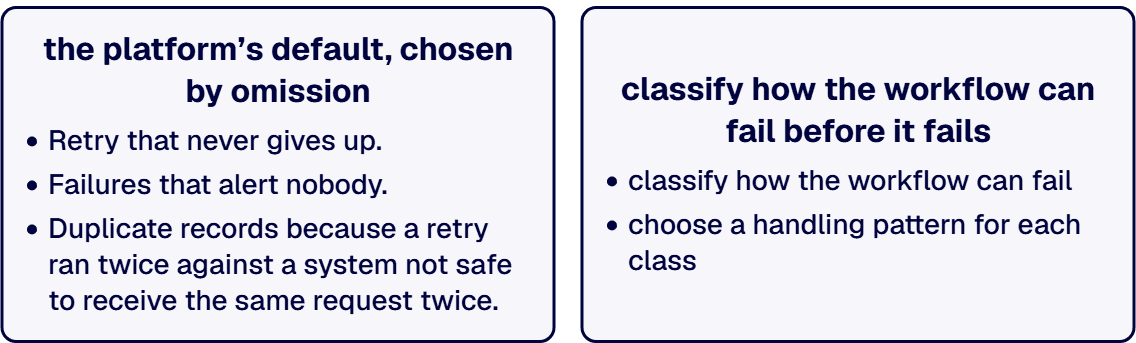
Quick answer. Workflow error handling and recovery is a design-time decision: you classify how a workflow can fail, then choose a handling pattern for each class. A workflow with no designed failure path still has one, and it is whatever the platform does by default.
Automated workflows get specified for the day everything works. Someone writes down what should happen when the invoice arrives and the record updates, and the build matches the specification. Then a connector times out at 4pm on a Friday, the design has no opinion about what happens next, and the platform’s default becomes the design by omission.
That is the subject here: how this workflow is allowed to fail, what happens to the work in flight, who hears about it, and how somebody puts the business back into a correct state afterwards without retyping anything.
What This Page Designs, and What the Other Pages Own
The symptom half of this subject is already worked in full. If your immediate problem is that flows are failing today and you cannot say which ones or for how long, start at When Power Automate Flows Fail Silently: Finding the Risk, which covers finding what you actually have, classifying it by business impact, and building detection somebody answers. That page is about an estate you inherited. This one is about the workflow you have not built yet.
Two more boundaries. The operating model for flows already in production, meaning monitoring coverage, ownership after go-live, the support model, and lifecycle management, is the subject of a forthcoming guide, Power Automate Production Support; the nearest live territory today is Microsoft Integration Monitoring and Observability for Enterprises and Workflow Automation Support Services and Continuous Improvement. The pre-development questions behind a cross-system integration, such as which system is the source of truth, belong to a companion guide, Power Automate API Integration: Questions Before Development, also not yet published; treat that ruling as an input this page does not make. How the workflows get built is the territory of Power Automate Development.
The Failure Taxonomy: Five Classes, and What Each One Needs
Error handling gets designed badly because it gets designed as one thing. A team adds a retry, adds a failure email, and considers the subject closed. Retry is the correct treatment for one class of failure and an active hazard for two others, refusal and partial completion, so the first move is to split failure into classes needing different handling. Five classes cover the failures a workflow that writes outside the platform can produce, named in this order everywhere on this page: transient failure, poison input, refusal, partial completion, false success.
| Failure class | What it looks like | Handling pattern | Where the evidence lives |
|---|---|---|---|
| Transient failure | A timeout, a throttle, a service blip: the call would have worked a minute later | Retry with an exponential interval, then give up and escalate | The action’s retry attempts in the flow’s run history, per run in Power Automate |
| Poison input | An item that fails every attempt: a malformed record, a missing required field, a deleted reference | Stop retrying after a bounded count, park the item in a failure store, notify the data owner | The parked row itself, in the list or table the design nominates as the failure store |
| Refusal | The downstream system worked and said no: a business rule rejected the write, an approval was declined | Route to a human queue as a business exception, never retry | The rejection payload captured into the failure store, plus the run’s outputs in run history |
| Partial completion | Step three succeeded, step four failed, and the record exists in one system and not the other | Compensate what landed, or record the gap for reconciliation, then stop | The compensation record written by the flow, alongside the run in run history |
| False success | The run finished green and the work did not happen: a filter that matched nothing, a write that no-oped | Verify the outcome inside the flow, and reconcile against the destination on a schedule | The verification step’s output in run history, and the reconciliation report the scheduled flow writes |
The rightmost column names, in the same row, the surface a reader can open to see the evidence, because a handling pattern whose result nobody can look at is an intention. The classes are not equally likely: transient failure is the class everybody designs for, and false success is the class a green run hides.
When two classes are in play at once, the handling that does not repeat the work wins. If an item might be transient and might be poison, and at the moment of failure you often cannot tell, retry a bounded number of times, then treat it as poison. The same test settles every other pair a live failure can present: retry loses to any handling that stops, and where both candidate classes stop, the item is recorded for a person rather than closed by the flow.
Retry: What It Repairs, and What It Multiplies
Retry is the cheapest correct answer to exactly one class in that table. Microsoft’s guidance on error handling puts it plainly: a retry policy helps workflows recover from transient failures that occur because of temporary or intermittent problems with a network or service, retry is configured per action at either fixed or exponential intervals, and exponential intervals are preferred because they extend the retry period over time. The two settings that matter at design time are the initial interval before the first retry and the maximum retry count, and they are a decision rather than a default to accept quietly: half an hour of retries is correct for a nightly reconciliation and wrong for a step a person is waiting on, because the person will have given up and started a duplicate before the retries finish.
The hazard is what retry does to a step that is not transient. Retrying a write that already succeeded, on a connector that reported a timeout after the write landed, produces the duplicate records the finance team finds later. So the rule that makes retry safe is the one in the next section: retry only steps designed to be safe to repeat, and catch the failure on the rest. Microsoft’s guidance names the two mechanisms for that catch. Run after settings specify what should happen if an action fails, times out, is skipped, or is successful, which lets a flow take a different path instead of stopping. Related actions can also be grouped into scopes and handled collectively with a try-catch pattern: main actions in a Try scope, a Catch scope for error handling. A workflow past a handful of actions gets the second one, because per-action failure branches multiply until nobody can read the flow.
Two platform limits are worth designing around instead of discovering. Microsoft’s published Limits of automated, scheduled, and instant flows record that a cloud flow with a trigger or actions that fail continuously is turned off after 14 days, and that run retention in storage is 30 days. A workflow failing quietly for a month is turned off partway through, and the earliest of its runs have aged out of the retention window.
Where the retry policy for a step is a live argument between the platform team and the process owner, that is a conversation worth having with an architect on neither side of it. Talk to a senior workflow automation architect
Idempotency: Designing So a Repeat Is Not a Duplicate
Idempotency is a plain idea wearing an intimidating word. An operation is idempotent when running it twice leaves the same state as running it once. Adding a row is not. Setting a row’s status to Approved is. The distinction matters because retry, resubmission, a scheduled reconciliation, and an operator clicking the button again are all ways of running something a second time.
The trigger side comes first. Microsoft’s documentation for the Dataverse trigger, Trigger flows when a row is added, modified, or deleted, records that when multiple updates occur to a single row, Power Automate evaluates the trigger for each update, even where the updated values are the same as the previous update, and warns against including columns that always exist on update, such as the primary key, because that can cause all updates to trigger the flow. The design response is a column filter and, where the rule is more specific than a column list, a filter expression, which the same page describes as running the flow only when the expression evaluates to true after the change is saved.
On the action side the design is yours, not the platform’s. Four techniques do the work:
- Write a correlation key. Give every unit of work an identifier from the source data instead of from the run, such as an invoice number or a hash of the defining fields, and carry it into the destination record.
- Check before you write. Look the key up in the destination and branch: create when it is absent, update when it is present. One extra call per item removes the duplicates a replay would create, and it does not remove the duplicates concurrent runs create, because the check and the write are separate operations.
- Prefer upsert to insert. Where the destination supports a keyed update-or-insert operation, use it, because it moves the decision to the system that owns the record.
- Make the state change an assertion. Setting a field to a target value repeats safely; incrementing a counter does not.
When two of these disagree, so that the key check says the record is absent while the upsert reports a conflict, the destination system’s answer stands, because it is the system that will be audited, and the mismatch is a refusal rather than a transient failure to retry through.
The honest limit: nothing in the platform rolls back a write to system A when the write to system B fails. That is what the next two sections are for, and for a genuinely transactional process the answer may be that the work does not belong in a flow at all, as Event-Driven Integration on Azure for Regulated Enterprises sets out.
Compensation and Reconciliation: Recovery Without Rekeying
Partial updates generate expensive human work, because the recovery usually happens in a spreadsheet: somebody exports what landed, exports what should have landed, compares them by eye, and rekeys the difference. Two mechanisms design that work away.
Compensation undoes or neutralizes the steps that already succeeded when a later step fails. It is the compensation inventory: for each step that changes something outside the flow, write down what the reversal is. Deleting a draft record the flow created moments earlier is a clean reversal. An email that has already been read is not, and the honest compensation there is a record and a notification rather than a pretence of undo. A blank row in that inventory is a decision to leave the state inconsistent, and it should be a visible one.
Reconciliation is the scheduled comparison that catches what the flow missed, including the false-success class, which no in-flow error handler can see, because there was no error. A reconciliation flow reads a defined slice of both sides, compares them on the correlation key from the previous section, and writes the differences to a report. It is the only mechanism here that runs after the fact, so it is what finds the failures a verification step inside the flow did not catch. Three decisions separate a useful reconciliation from a decorative one: it runs on a cadence tied to how long an inconsistency can be tolerated, which is a business input; it compares a bounded window instead of all history, so its cost stays flat as the data grows; and it produces a report a named person receives, with the differences enumerated and a route to fix each one.
The payoff is what buyers describe as recovery without rekeying: when a workflow half-completes, the missing work is identified by the design, listed as specific items, and replayed down the idempotent path the first run took, with nobody opening a spreadsheet.
Dead-Letter Handling: Where a Failed Item Waits
An item that cannot be processed has to go somewhere. If the design nominates no place, the place is the Power Automate run history, a debugging surface where a work queue is needed: organized by run instead of by item, not assignable, and held for the 30 days of run retention in storage that Microsoft’s Limits of automated, scheduled, and instant flows documentation records.
A failure store is modest to build. One list or table, one row per failed item, and five fields that make the row actionable: the correlation key, the failure class from the taxonomy above, the error payload as returned, the timestamp, and a status the operator can move. Where the flow already writes to Dataverse or SharePoint, the store lives there rather than in a new system, and the design still names which operators read and update a parked row.
The exit path is what separates a failure store from a log. Each row has one of three futures, decided by its failure class, because the store holds the three classes that leave an item stuck: a partial completion is resolved by its compensation record and a false success is found by reconciliation rather than parked. A transient failure that exhausted its retry count is resubmitted, and the correlation key is what makes that resubmission safe. A poison input is fixed at source and replayed on the same idempotent path. A refusal goes to the human queue and is closed by a business decision. Design the reprocessing route from the start: a failure store with no way out becomes an archive of things nobody fixed.
Notification Design: Who Gets Told, and What They Can Do
The buyer question is short: who gets notified. Notify nobody past the flow’s owner and the workflow failed silently for the people who could act. Notify everybody about everything and the alerts get filtered into a folder, which is the same outcome by a slower route.
Power Automate is not silent by default. Microsoft’s error-handling guidance records an email alert to flow owners on common or critical failures, and names a broken connection and a throttling issue as its examples. That floor is owner-shaped: it reaches whoever owns the flow, sometimes a person who has changed teams.
Four decisions make up a notification contract, each written down per workflow at design time:
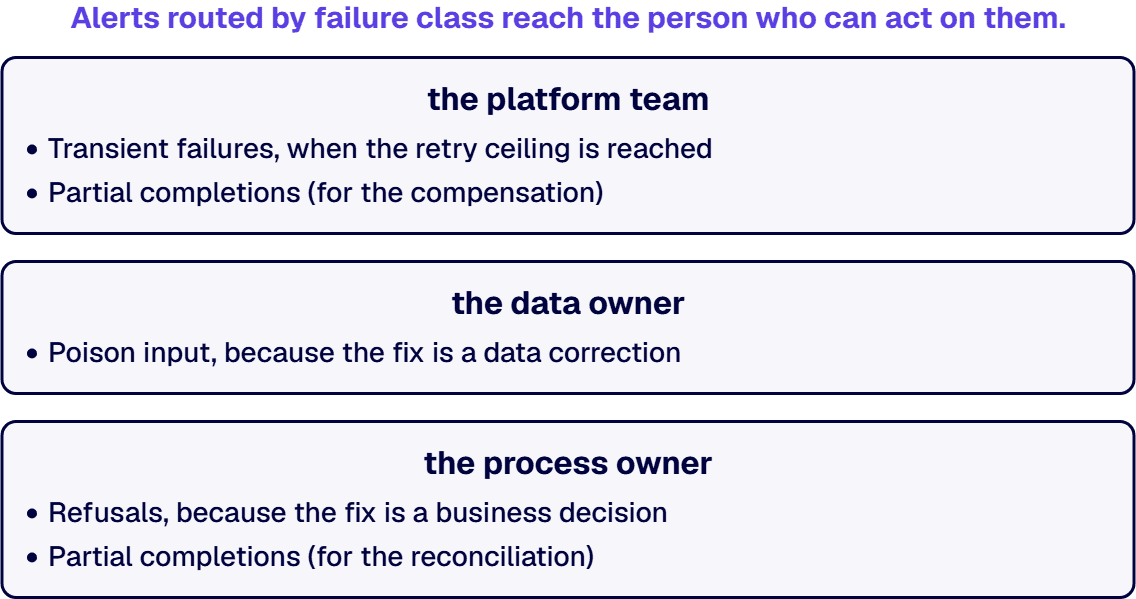
- Recipient by class, not by workflow. A transient failure that exhausted retries goes to whoever owns the platform. A poison input goes to whoever owns the data. A refusal goes to whoever owns the business process. A partial completion goes to whoever owns the process the gap sits inside. A false success found by reconciliation goes to whoever owns the outcome. One workflow therefore has several recipients.
- A message that names the item. The correlation key, the failure class, the error as returned, and a link to the run. Microsoft’s guidance describes composing a direct link to the flow run for this purpose, and attaches a caution: overuse can lead to an anti-pattern, where frequent alerts and actions degrade the efficiency and effectiveness of the workflow. Both halves are the design.
- A stated action. Every notification says what the recipient is being asked to do, and where. An alert that reports a state and requests nothing is a log entry that found its way into an inbox.
- A threshold and a digest. Single failures notify; a run of failures notifies once and points at the failure store, and the design says at what count individual messages stop.
If your alerting already exists and the problem is that nobody answers it, the design question and the ownership question have come apart, and that separation is worth an outside read. Talk to a senior workflow automation architect
Testing the Failure Paths
The failure paths are the part of a workflow easiest to leave untested, because testing them means breaking things on purpose and the happy path is what the demo shows. A design that names five failure classes and never exercises any of them has documentation, not behavior.
Power Automate has a design-time check built into the designer. Find and fix errors with flow checker describes a checker that is always active in the designer’s command bar, opens automatically on save when there are errors or warnings, and identifies the actions where each occurs. Run it and clear it, then be exact about what it did: it reads the design. It does not exercise what your flow does when a downstream system refuses a write, so clearing it is a starting line.
Five tests cover the taxonomy, and each one is read from a surface the design already nominates, meaning run history, the failure store, the compensation record, or the reconciliation report:
- Transient failure. Point the action at an endpoint that times out, and confirm from run history that the retries fired at the configured interval and that escalation happened after the last one.
- Poison input. Feed in a record with a required field missing, and confirm the failure store holds the item with its key, class and payload, and that the retry count did not run away.
- Refusal. Submit a record the downstream system’s business rules reject, and confirm the rejection payload is in the failure store and that no retry fired.
- Partial completion. Break the second of two writes, read the destination systems directly, and confirm from the compensation record in run history that the reversal ran, or that the gap was recorded. Reading the two systems is the test; the flow reporting success is not.
- False success. Give the workflow a filter that matches nothing, let it complete green, and confirm the reconciliation report names the missing item on its next scheduled run.
Keep the inputs. A stored set of failure cases turns those five tests into a regression check the next person can run before a change ships, and it is what lets somebody say whether a new behavior is a regression. Where the destination systems make a real test unsafe, record that the path is untested rather than assuming it away.
When This Is Not the Work You Need
Some readers should not build any of this, and saying so is cheaper than selling it.
If your workflow moves an approval between two people inside Microsoft 365 and touches no external system, most of what is above is over-engineering. Configure run after so a failure sends a message naming the item, give the flow a named owner, and stop. The taxonomy earns its cost when a workflow writes outside the platform.
Where flows already in production are failing and nobody knows which ones, the sequence runs the other way: find and classify what you have first, using the silent-failures work linked above, then design the failure architecture for the ones you rebuild.
If the process genuinely cannot tolerate a partial update, because money moves or a regulator counts the records, the question is not which error handling to add to the flow. It is whether the transaction belongs in a workflow engine at all, and the routing for that case is in the Azure event-driven guide linked above.
And if the workflow spans systems whose ownership is unsettled, the reconciliation cannot be designed yet, because it needs a source of truth nobody has picked.
What is left is the organization this page was written for: workflows that cross system boundaries, a process owner who has been surprised by a partial update at least once, and a design decision about to be made by default unless somebody makes it deliberately. i3solutions has been a Microsoft partner since 1997, and the first move is to write the five classes against the workflow you are building and see which rows are still blank. Talk to a senior workflow automation architect
Frequently Asked Questions
How should enterprise workflows handle errors and retries?
Handle them by class, not with one mechanism. Split the ways the workflow can fail into transient failure, poison input, refusal, partial completion and false success, then give each class its own treatment: retry with an exponential interval for the transient case, a bounded retry count and a failure store for poison input, a human queue for a refusal, compensation or a recorded gap for partial completion, and a scheduled reconciliation for false success. Retry is the correct treatment for one of those five and an active hazard for two of them, refusal and partial completion, because retrying a write that already landed is what produces duplicate records. Configure retry per action, set the initial interval and the maximum retry count deliberately, and group actions into a Try scope with a Catch scope so the failure path is readable.
How do we design automation that does not fail silently?
Two designs, because there are two ways to be silent. The first is a failure nobody hears: the Power Automate service sends email alerts to flow owners for common or critical failures such as broken connections or throttling, and a design adds to that floor a notification contract that names the recipient by failure class, carries the item’s correlation key and the error as returned, states the action being requested, and sets a threshold above which individual messages become a digest. The second is a run that reports success and did nothing, which no in-flow error handler can catch because there was no error. That one needs a verification step inside the workflow and a scheduled reconciliation against the destination system, which is what catches the work the verification step did not.
What is idempotency and why does it matter in Power Automate?
Idempotency means a second run leaves the same state as the first, and it matters because every recovery mechanism is a second attempt: a retry, a resubmission from a failure store, a scheduled reconciliation, or an operator running the flow again. Without it, recovery creates duplicate records. Four techniques do the work: carry a correlation key that comes from the source data rather than from the run; check the destination for that key and branch between create and update; prefer a keyed upsert where the destination offers one; and express state changes as assertions rather than increments. The trigger side needs attention too, because Power Automate evaluates the Dataverse row trigger for each update even where the values are unchanged, so column filters and a filter expression are what stop repeated saves from firing repeated runs.
How do we recover a failed workflow without duplicating data?
Recovery has three parts and the correlation key is what makes all three safe. Compensation undoes what already landed when a later step failed, and the reversal for each step is written down at design time, including the steps whose honest reversal is a record rather than an undo. A failure store holds each failed item as its own row with its key, its failure class, the error payload, the timestamp and a status, so the item can be fixed at source and reprocessed through the same idempotent path the original attempt used. A scheduled reconciliation compares a bounded window of both systems on the correlation key and reports the differences to a named person. Because the reprocessing path checks the key before writing, replaying an item that partially succeeded updates it instead of creating it again.
What belongs in an error notification, and who should receive it?
The recipient is decided by failure class, not by workflow: an exhausted transient failure to the owner of the platform, a poison input to the owner of the data, a refusal to the owner of the business process, a partial completion to the owner of the process the gap sits inside, and a false success to the owner of the outcome. One workflow therefore has several recipients. The message carries the correlation key so the recipient knows which item, the failure class so they know what kind of problem it is, the error as the system returned it, and a link to the flow run. It also states the action being requested and where to take it. Microsoft’s own guidance attaches a caution to heavy custom logging and alerting, warning that overuse degrades the workflow, so the contract also sets the count above which individual messages stop and a digest pointing at the failure store starts.
How do you test a workflow’s failure paths before go-live?
Break things deliberately and read the result at the destination instead of from the flow’s status. Run flow checker first, which is always active in the designer and reports errors and warnings in the design, and treat clearing it as the starting line, because it does not exercise what happens when a downstream system refuses a write. Then run five tests: point an action at a timing-out endpoint and read run history to confirm the retries ran at the interval you set and escalated after the last one; feed in a record with a required field missing and confirm the item landed in the failure store with its key, class and payload; submit a record the downstream business rules reject and confirm the rejection payload reached the failure store with no retry fired; break the second of two writes and read both destination systems directly to confirm compensation ran or the gap was recorded; and let a filter that matches nothing complete green, then confirm the next scheduled reconciliation names the missing item. Keep the inputs so the same five tests become a regression check.
What is the difference between error handling design and production support?
Error handling design decides, before a workflow is built, how it is allowed to fail: the failure taxonomy, the retry and idempotency rules, the compensation inventory, the failure store, the notification contract and the failure-path tests. Production support is the standing function that keeps workflows running afterwards: monitoring coverage across the estate, ownership after go-live, the response rota, and the lifecycle process for changes. They fail in different ways, too. A workflow with no failure design breaks in ways nobody planned for; an estate with no support model breaks in ways nobody owns. Design work makes support cheaper because a workflow that classifies its own failures and stores its own failed items hands the support function a queue instead of a mystery.
Related Reading
- Integrating Automated Workflows with SharePoint, Teams, Dynamics 365, and ERP, where cross-system handoffs break and what a workflow integration effort has to cover at the system boundary
- Power Automate Consulting Services for Regulated Enterprises, what a Power Automate engagement covers in an environment with compliance obligations
- Enterprise-Grade Workflow Automation for Scale, Control, and Reliability, the workflow automation practice this guide belongs to
About the Author
Michael Branson co-founded i3solutions and brings executive, operational, and technical perspective to organizations running complex, secure, and mission-critical Microsoft estates. He works with enterprise teams on the architecture decisions that determine whether an automation investment holds its value.