

Copilot integration architecture decides which of four paths a use case needs: out-of-box grounding, Copilot connectors, declarative agents, or custom engine agents. Each path after the first assumes the reach earlier ones supply, so readiness sets the sequence and decides which path a use case can reach.
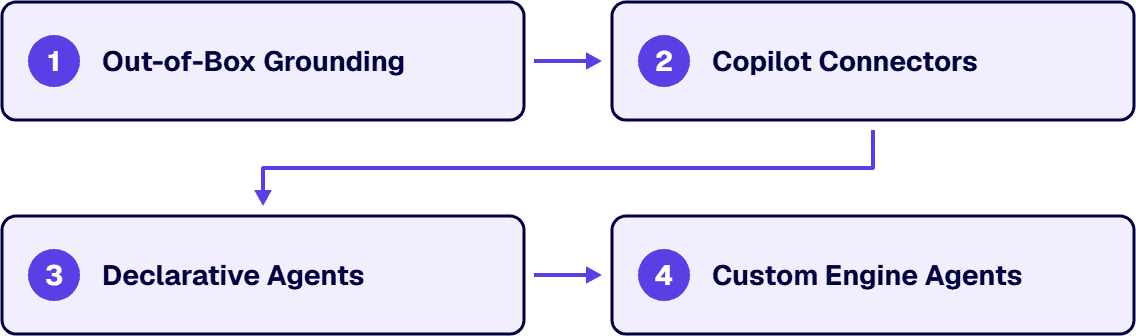
Copilot integration architecture is about which path a use case needs and what has to be true before it. It is not readiness (which comes before), not governance (which decides what an agent is allowed to be once it exists), not a build method, and not the Power Apps and Azure hybrid boundary. Those decisions have their own pages. This one names the path and its preconditions.
A use case that reaches for the fourth path while the first is still broken buys a longer version of the same complaint. The order is the substance here.
The vocabulary is worth getting exact, because two of these four are routinely called by the other’s name in the same meeting.
Copilot reasoning over what Microsoft Graph already holds. Nothing is built and nothing is connected. Microsoft describes the scope as the organizational data Copilot grounds its responses in: emails, files, meetings, calendars, teams, and organizational relationships, reached through Microsoft Graph and scoped by each user’s permissions. The assumption underneath is that the answer the user wants is already inside content the tenant holds and the user is allowed to open. Note that on Copilot Chat Basic or Microsoft 365 Copilot Basic, this path is not available without uploading content or using a pay-as-you-go agent; the Microsoft 365 Copilot Premium license is what unlocks Graph reach. Also worth confirming before declaring content unreachable: Work IQ, the intelligence layer that enables agents to reason over organizational data, can be turned off, and its documented off-state is that Copilot responses are not grounded in Microsoft Graph.
The mechanism that widens what Microsoft Graph holds. Microsoft describes two shapes with a real difference: synced connectors index external data by ingesting items into the Microsoft Graph index, and federated connectors connect to data in real time and leave content in the source. A synced connector ingests each item with content, metadata, and an access control list that enforces permissions. A federated connector has no index. The assumption underneath both is that the answer exists as findable content somewhere, and that the source system can say who is allowed to read each piece of it.
Copilot pointed at a job. Microsoft’s guidance describes the parts: instructions, actions, and knowledge to tailor Copilot for business scenarios. The knowledge is the estate the agent is allowed to read, and declarative agents can use enterprise data from SharePoint, OneDrive, Copilot connectors, and uploaded files. The actions are how the agent reaches a system it cannot read its way into: enterprises can extend declarative agents by using plugins to retrieve data and run tasks on external systems. The assumption underneath is that the knowledge the agent needs is already reachable, because an agent’s knowledge shapes and directs access it has been given.
You supply the machinery. Microsoft’s Agents for Microsoft 365 Copilot page sets the two approaches against each other: the declarative approach uses your instructions, knowledge, and actions with Copilot’s orchestrator and models; the custom engine approach means you bring your own orchestrator and models to create a fully tailored agent. The consequences are stated on the same page. On hosting, declarative agents use Copilot’s orchestrator and foundation model with no additional hosting required, while custom engine agents require additional hosting outside of Microsoft 365, typically with cloud services such as Azure, at additional cost. On compliance and security, a declarative agent inherits Microsoft 365 compliance, RAI, and security standards, where the custom engine row puts your own compliance, RAI practices, and security measures on your organization.
Two things follow from reading those four together, and they are what make this a sequence instead of a menu. First, each path after the first inherits the dependencies of the reach it is built on: a permission problem in a line-of-business database does not stay in the database once a connector indexes it, it becomes an answer in a chat window. Second, the paths get more capable and less inherited as you go. The last one adds behavior by taking the platform’s controls off and handing you the obligation, in the vendor’s own words. That is a real trade and it is worth making deliberately, once, at the top of a project.
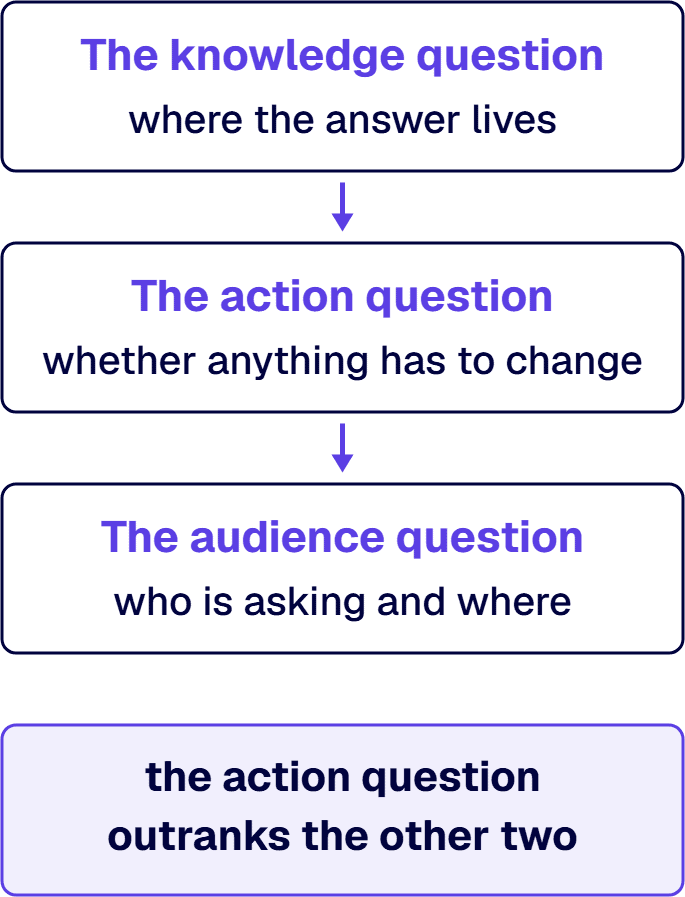
Three questions decide it, asked in this order.
The knowledge question is where the answer lives. If the content that answers the user’s question is already in mail, files, meetings, or chats, the knowledge question passes and out-of-box grounding is the whole job unless the action or audience question says otherwise. If the answer lives in a system Microsoft Graph does not hold, the knowledge question has failed and a connector is the smallest thing that fixes it.
The action question is whether anything has to change. A connector makes content findable. It does not make anything happen. Microsoft states the limit on the federated shape without qualification: federated connectors are read-only. A use case that has to create the ticket, update the record, or start the approval has an action requirement, and actions arrive with agents and plugins.
The audience question is who is asking and where. A single team asking a narrow set of questions inside Copilot chat is a declarative agent’s shape. A workflow that has to start without a person typing anything is not, and Microsoft’s comparison table says so directly: proactive interactions are not supported by declarative agents, while custom engine agents can trigger actions automatically without direct user input.
When two of these three point at different paths, the action question outranks the other two. A knowledge gap has two available fixes; an action requirement has no equivalent, because federated is read-only and synced writes to the Graph index rather than the source. A use case that fails the knowledge and action questions at once is an agent question that also needs a connector wherever the source can be indexed.
i3solutions has governed Microsoft estates since 1997 and brings that platform depth to Copilot, agents, and AI integration for regulated enterprises, with senior, 100% US-based teams.
| Path | What it assumes is already true | What makes it available | Where the evidence lives |
|---|---|---|---|
| Out-of-box grounding | The answer is inside content the tenant holds and the person asking is allowed to open it | Copilot is deployed and the tenant work behind it is finished | Whether the content the question needs comes back in Microsoft Search for the person who is asking, run by that person under their own account |
| Copilot connectors | The answer exists as findable content in a source system, and that system can say who is allowed to read each item | A synced connector is configured for the source, or a federated connector is enabled for it | The connections list in the Microsoft 365 admin center, where admins configure and manage synced connections and where default federated connectors appear as Ready |
| Declarative agents | The knowledge the agent needs is already reachable, through the tenant or through a connector, and any system it must act on exposes an interface a plugin can call | The knowledge sources and actions are defined, and the agent is distributed to its users | Whether the knowledge the agent will use already comes back in Copilot or Microsoft Search for a member of its intended audience, plus the declarative agent distribution controls in the Microsoft 365 admin center |
| Custom engine agents | Something about the use case exceeds Copilot’s own orchestrator or models, and your organization can carry the compliance obligation that comes with replacing them | An orchestrator, one or more models, and their hosting exist and are paid for | The resource and cost inventory in the cloud subscription hosting the orchestrator and models, plus the entry in your organization’s own compliance or risk register for them |
Read the table downward once and a specific failure becomes visible. A project can stall on the precondition of a path below the one it chose, and that precondition goes unchecked when it is assumed to be somebody else’s finished work.
When the sequence and the ambition disagree, the sequence wins, with one named exception. A use case that fails a precondition does not get to skip the path that supplies it, because an agent built over a source with no working permission model produces confident answers from content the asker should not have seen, and the agent is not the defect. The exception is a source that will never be indexable. There the connector path is genuinely unavailable, the use case moves to an action-shaped design against the system’s own interface, and that decision is recorded as a deliberate skip with its reason.
Four pieces, two unconditional and two that apply only where the source calls for them.
The permission answer. A synced connector ingests each item with an access control list that enforces permissions, and the effect at query time is that search and Copilot only show items to users who have access in the source system. The source’s own permission model is therefore the thing being imported, and it is imported whether it is good or not. Per source, establish that the system can answer the question of who may read a given item, and that its answer is one the business would defend. This is not cleansing and it is not modeling.
The item boundary. A connector indexes items, so a source has to have them: a record, a document, a case, a page. A source whose content only exists as rows joined at query time has to be given an item shape before it can be indexed, and that shaping decision is a design step with an owner.
The custom-connector build applies only when no prebuilt connector fits. Microsoft is specific about the work: building a custom connector requires a developer to define a schema, register the connection in Microsoft Entra ID, and write code to pull and push data. Microsoft is equally specific about when to accept the cost: use prebuilt connectors when possible, and reserve custom development for unique or critical sources.
The on-premises indexing component applies where the source has not moved to the cloud. Microsoft’s term contains the word agent and means something unrelated to the two agent types above: the Microsoft Graph connector agent securely indexes local content.
What is deliberately absent is a general data quality program. Copilot integration does not require the whole estate to be tidy; it requires the specific sources a use case names to have owners, readable permissions, and item boundaries.
“Connect Copilot to our systems” is one sentence covering three connection decisions: whether the content is copied or fetched, whose identity the connection carries, and what the connection is permitted to do. They are decided independently. Before any of the three is argued, there is a cheaper first move: Microsoft offers over 100 prebuilt connectors for popular services, grouped into named categories including enterprise apps and databases. Read that list before designing anything.
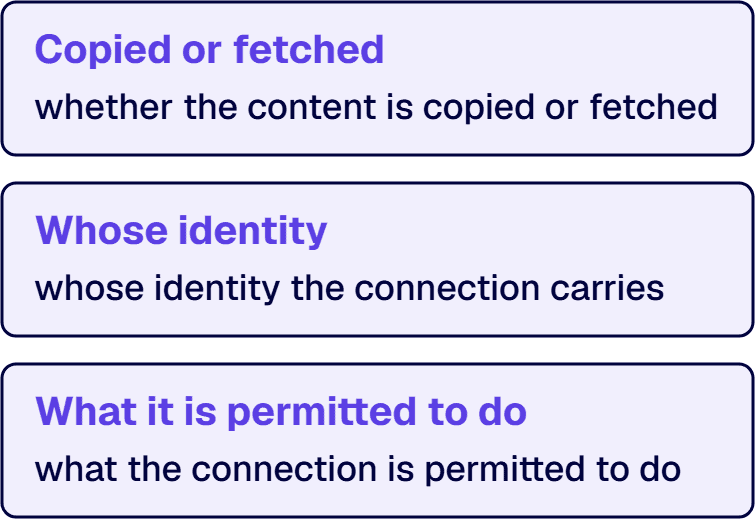
Copied or fetched is the synced-versus-federated choice. A synced connector indexes into Microsoft Graph. A federated connector uses an approach where data remains in the source system and the connector fetches responses in real time. A source that must not be indexed is a federated candidate, and Microsoft names that as its use case: sensitive, dynamic, or live data sources.
Whose identity is a different plane. On a self-serve synced connection, the connector connects using the user’s own identity, credentials, and consent, not admin credentials, and enforces the source system’s permissions. On a tenant-configured synced connection, an administrator sets it up and the platform still respects source permissions. A source whose permissions are wrong in the source system does not become safe because an administrator configured the connector.
What it is permitted to do is the smallest of the three connection decisions and the one that settles an argument fastest. Federated connectors are read-only. A request to have Copilot update the case record is not answered by either connector shape; it moves to the action side of the design.
Two habits keep this from being relitigated on the next use case. Record, beside each connected source, which shape it uses, whose identity the connection carries, and whether the source’s permission model was reviewed or inherited. Treat a source’s own access review as the gate on connecting it.
If Copilot is not deployed or the tenant gates behind it are unfinished, this decision is premature; the readiness work is the whole job. Where the real problem is that people inside the tenant can already see too much, the answer is a remediation program, not a connector. If the argument in the room is about what an agent is allowed to do once it exists, that is governance and it has its own frame. Where the use case needs a service, a scheduled job, or a data store that a maker platform will not hold, the decision has become a hybrid architecture question. And if nobody can yet name the source system, the item, and the person who owns the permission model on it, the sequencing decision has nothing to sequence, and the first move is that naming rather than a platform choice.

Michael Branson co-founded i3solutions 30 years ago and brings executive, operational, and technical perspective to organizations working in complex, secure, and mission-critical environments. His insights focus on business process consulting, automation, data analytics, collaboration, secure operating models, and the operational discipline required to turn technology investments into practical business systems with measurable value.
Connect on LinkedInWhen the answer a user wants lives in a system Microsoft Graph does not hold. Microsoft describes what first-party Copilot reasons over as content in Microsoft Graph, so a case management system, a policy engine, or a scheduling database that never reaches Microsoft Graph is invisible to out-of-box Copilot no matter how the prompt is written. Copilot connectors are the mechanism that widens the reach. Custom integration is a narrower answer to a narrower failure: it is needed when no prebuilt connector fits the source, or when the use case has to change something in that system instead of reading from it. Reading is a connector problem. Writing is an agent and plugin problem, because federated connectors are read-only.
Four paths exist and they answer different failures: out-of-box grounding, Copilot connectors, declarative agents, and custom engine agents. Out-of-box grounding fits when the answer is already in tenant content the asker may open. Copilot connectors fit when the answer exists as findable items in a source system that can say who may read each one. Declarative agents fit when a defined audience needs Copilot shaped to a job. Custom engine agents fit when something exceeds Copilot's own orchestrator or models. The order matters because each path after the first assumes the reach earlier ones supply, and the fit question is answered by the earliest path that satisfies the use case's knowledge, action, and audience requirements at once.
By separating three connection decisions that arrive as one sentence: whether content is copied or fetched, whose identity the connection carries, and what the connection is permitted to do. Microsoft records that an organization can either index external data by using synced connectors or connect to data in real time by using federated connectors. On identity, a self-serve synced connector connects using the user's own identity, credentials, and consent. On what a connection may do, federated connectors are read-only. The safety of the result rests on the source system's own permission model, because a synced connector ingests each item with an access control list that enforces permissions, and Copilot then shows items only to users who have access in the source system.
Four pieces, and a general data quality program is not one of them. First, the permission answer per source. Second, the item boundary, since a connector indexes items and a source whose content exists only as rows joined at query time has to be given an item shape before it can be indexed. Third, the custom-connector build, only where no prebuilt connector fits. Fourth, the on-premises indexing component where the source has not moved to the cloud.
Out-of-box grounding assumes the answer is inside content the tenant holds and the asker may open it. Copilot connectors assume the answer exists as findable items in a source that can express per-item permissions. Declarative agents assume the knowledge is already reachable and any system to be acted on exposes an interface a plugin can call. Custom engine agents assume something exceeds Copilot's own orchestrator or models and that the organization can carry what comes with replacing them, which Microsoft states as additional hosting outside of Microsoft 365 and an obligation that puts your own compliance, RAI practices, and security measures on your organization. A use case that fails a precondition does not skip the path that supplies it.
Copilot integration architecture answers which of the four paths a use case needs and what has to be true first. Copilot governance answers what the thing on that path is then allowed to be: what a single agent is allowed to reach, who authorizes an action, whose identity it runs under, what a release test proves, and when it retires. They fail differently. A sequencing mistake produces a project that stalls on a precondition nobody checked, and it is visible early because nothing works. A governance gap produces a system that works and that nobody can account for, and it is visible late, usually to somebody outside the team.
A defensible AI program names its owners, its boundaries, and its evidence. i3solutions' senior AI advisors work with enterprise IT leaders who are accountable for that answer and want the governance model scoped by people who have built it.
Request an AI and Copilot Scoping Discussion
US-Based | Est. 1997
© i3solutions. All rights reserved.
US-Based | Est. 1997
© i3solutions. All rights reserved.


