
The metering model is the same in GCC, GCC High, and DoD as it is commercially: three meters for database, file, and log, entitlements that accrue at the tenant level, and add-on capacity sold in one gigabyte increments. What changes is how you buy it and which overage routes exist. Microsoft sells government subscriptions and add-ons through Volume Licensing for GCC High and DoD, and the pay-as-you-go plan that a commercial tenant uses to absorb Dataverse overage is listed as not available in both. The per gigabyte figures Microsoft publishes are commercial ones, described in its own licensing guide as USD ERP and subject to change, so the number a government program actually pays comes off a channel price sheet rather than a public page. Size the capacity first, then price it through the channel that serves your cloud.
The question usually arrives with a spreadsheet attached. A program office models three years of Dataverse growth for a GCC High tenant using the per gigabyte rates on Microsoft’s public pages, finance signs off, and the reseller quote comes back on a different basis. Or the tenant crosses its entitlement, an administrator goes looking for the pay-as-you-go switch the commercial documentation describes, and the option is not there. Or auditing was turned on across every environment for compliance reasons, log storage started accruing on day one, and nobody modeled it. Or someone assumes the capacity bought under the commercial tenant covers the government one. None of these are billing errors. They are what happens when a metering model that really is identical across clouds gets bought through a channel that is not.
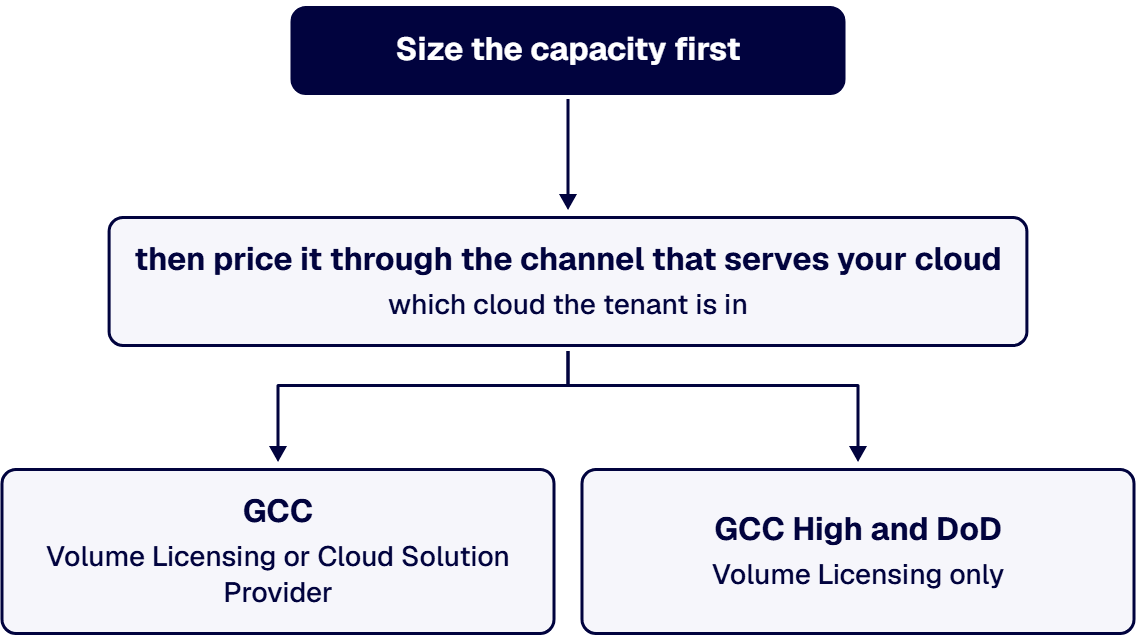
That order matters, because the two halves fail differently. A sizing error compounds quietly for a year. A channel error surfaces at purchase, when the quote you budgeted against turns out not to be the quote you can buy.
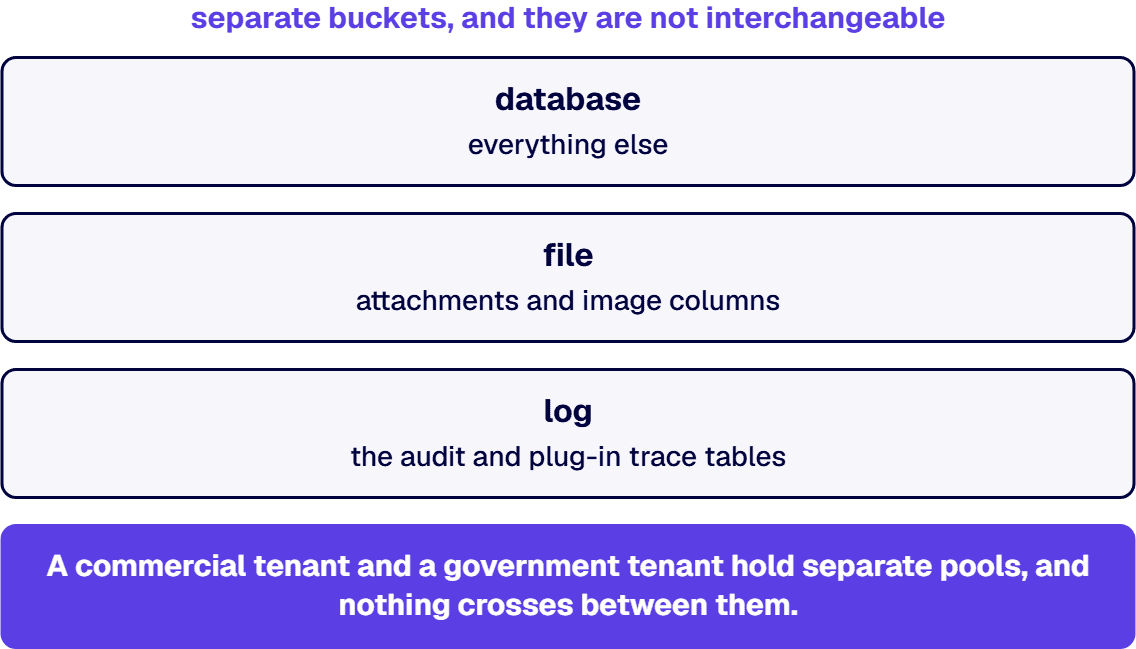
Dataverse capacity is measured in three separate buckets, and they are not interchangeable. Microsoft’s Dataverse capacity documentation splits usage into database, file, and log, with file storage holding attachments and image columns, log storage holding the audit and plug-in trace tables, and the database holding everything else. Entitlement is a licensing construct rather than a technical ceiling. Microsoft states it directly: “There’s no technical limit on the size of a Dataverse environment. The limits mentioned on this page are entitlement limits based on product licenses you purchase.”
Capacity arrives in three ways before a single add-on is purchased.
All of it pools at the tenant. The licensing guide is explicit that “Dataverse Database and Dataverse File capacity entitlements accrue at the tenant level,” and Microsoft’s capacity add-on documentation says the same thing about purchased capacity: “Microsoft Dataverse storage capacity add-ons don’t require allocation at an environment level because all storage capacity add-ons accrue to tenant-level storage entitlements.” A tenant is the unit of account. A commercial tenant and a government tenant hold separate pools, and nothing crosses between them.
There are two published paths to buy storage beyond entitlement, and they are priced differently from each other before any cloud is considered.
Prepaid add-ons, sold by subscription. The Power Platform Licensing Guide of August 2026 prices the three meters in one gigabyte increments: the database add-on at “$40/month” per gigabyte, a database tier 2 add-on at “$30/month” with a minimum quantity of 1,000, the file add-on at “$2/month”, and the log add-on at “$10/month”, all marked billed annually. Microsoft’s published database rate is twenty times its published file rate, which is why a document heavy solution that stores attachments as database rows rather than file columns costs far more than the same data held in file columns.
Consumption, through pay-as-you-go. Microsoft’s pay-as-you-go meter documentation publishes the consumption rates for environments linked to an Azure subscription: “For usage above 1 GB for database: $48 per GB/month”, $2.40 per gigabyte per month for file, and $12 per gigabyte per month for log. Those environments get a one gigabyte database and one gigabyte file allowance each and no log allowance at all, so as Microsoft puts it, “Log storage is utilized only if auditing is enabled for the environment.”
Both sets of numbers are commercial list figures, and Microsoft labels them as such. The licensing guide states that “All pricing is USD ERP and subject to change.” The meter page attaches the same caveat to its own worked example: the prices shown “are illustrative only. Your organization’s pricing may vary based on your contract with Microsoft.” That sentence is the honest answer to half of the pricing question, in Microsoft’s own words, and it applies to commercial buyers too.
The documented differences are about who you buy from and which routes exist, not about a different rate.
Two caveats belong with that list, because both surfaces move. Microsoft states that it “strives to maintain functional parity between our commercially available service and those enabled through our US Government clouds,” while also stating plainly that “There are exceptions to the principle of maintaining product functional parity within the US Government clouds.” The availability summary that enumerates those exceptions says of itself that “This information is updated and published every 4-6 weeks and represents our projections at that time.” Cite it with its date, and re-read it before a renewal rather than trusting a copy in a slide deck. Read the current edition rather than a remembered one: the May 2026 edition lists “Capacity management for Dataverse environment” as available in IL2 US GCC, IL4 US GCC High and IL5 US DoD, so per environment capacity allocation is not ruled out by the parity list even though it is often assumed to be.
We looked for a published government cloud rate per gigabyte of Dataverse capacity and did not find one. Because “we could not find it” and “it does not exist” are different sentences, here is the search space and what each source returned.
So the accurate answer to the pricing half of the question is: government pricing exists, it is set in the government program channels, and it is not published on the public surfaces where the commercial rates are. Anyone quoting you a specific government per gigabyte figure sourced from a public Microsoft page is quoting a commercial rate. Ask which price sheet it came from and what date it carries.
The surprises in a federal tenant are usually not the database meter. They are the two nobody modeled.
Log storage, because auditing is not optional for you. Log capacity accrues from no license, is entitled at 2 GB for the tenant in the Power Platform Licensing Guide, and is consumed only when auditing is on. In a regulated tenant, auditing is on everywhere by policy, so a meter that many commercial customers never touch becomes a standing line item on day one. Under consumption billing there is no per environment log allowance at all.
File storage that landed in the database. Microsoft’s capacity documentation is specific about which tables bill to file and which to database: attachments, annotations and file or image columns bill to file storage, and everything else counts against the database. At the published add-on rates of $40 per gigabyte per month for database against $2 per gigabyte per month for file, a design decision made by a maker two years ago can be the largest single input to a capacity forecast.
Microsoft warns before the ceiling rather than at it. Its capacity documentation states that notifications fire when any of the three capacities has “less than 15% remaining capacity or exceed capacity after cross capacity-type borrowing is applied,” a second warning at less than 5%, and environment lifecycle operations such as creating, copying, and restoring are affected once the tenant is over. And the levers that reclaim space, long term retention policies and bulk deletion, are governance decisions with a records retention dimension in a federal context, not a cleanup task to be handed to an administrator on a Friday.
The work this question implies is a scoped capacity and licensing review, sized in weeks, ahead of a renewal or a program milestone. It produces three artifacts: a per meter forecast for each environment with the auditing assumption stated, a purchasing path that matches your cloud and its channel, and a written list of the parity exceptions that apply to your allocation model. It is not a migration, and it is not a managed service.
It also needs someone who has worked inside the accredited boundaries rather than reading about them. i3 installs and helps configure applications inside IL4 and IL6 government cloud environments and other government networks. i3 deployed Power Platform across a federal defense intelligence command spanning 10,000 personnel and 180 locations, which is enterprise scale by any measure. i3solutions is a Microsoft Partner with 30 years of delivery experience.
No. The three meters, the tenant level pooling, the per license accruals, and the one gigabyte add-on increments are the same constructs Microsoft documents for commercial tenants. What differs is the purchasing channel and the availability of the consumption billing route.
Microsoft’s Business Applications US Government feature availability summary of May 2026 lists the pay as you go licensing model as not available under IL4 US GCC High and IL5 US DoD, and available under IL2 US GCC. A separate Power Apps row in the same document is marked available in GCC High, so the document does not agree with itself and the answer for your tenant belongs in writing from your account team. In GCC High and DoD, plan the overage as a prepaid purchase through Volume Licensing instead of assuming a consumption meter will absorb it.
Through the channel Microsoft lists for your cloud: Volume Licensing or Cloud Solution Provider for GCC, and Volume Licensing only for GCC High and DoD, because the Cloud Solution Provider program is not currently available for GCC High customers. Add-ons accrue to the tenant level entitlement, so they do not need to be allocated to a specific environment to take effect.
No. Entitlements accrue at the tenant level, and a government cloud environment can only be created by a US Government associated organization, so a government tenant carries its own pool. Model the two separately, including the one time default entitlement each one received.
Usually one of three things: auditing turned on estate wide, which starts the log meter that no license accrues capacity for; attachments stored as database rows rather than file columns, which bills at the database rate; and an environment count that grew faster than the entitlement, since each production environment draws on the same tenant pool.

US-Based | Est. 1997
© i3solutions. All rights reserved.
US-Based | Est. 1997
© i3solutions. All rights reserved.


