
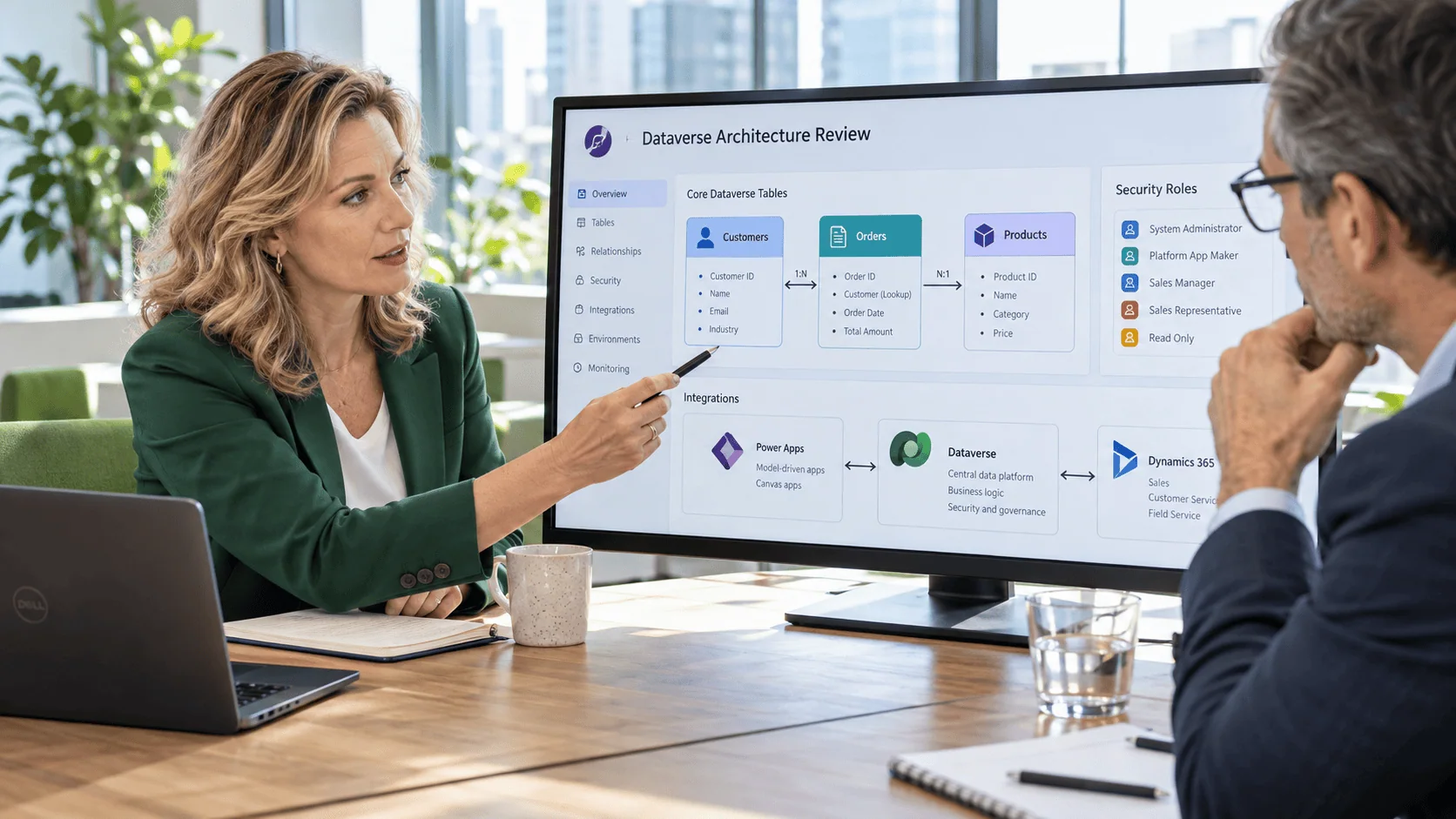
Modern enterprises are continually searching for data management solutions that offer both flexibility and scalability. However, with so many options available, it’s common for CTOs, IT Managers, and Digital Transformation Leaders to wonder: Is moving to Dataverse a good strategy for my business? And how can Dataverse consulting help you make the right decision?
The short answer is-it depends on your specific needs, existing environment, and ultimate objectives. In this blog, we’ll provide a comprehensive view of Microsoft Dataverse within the broader Microsoft Power Platform ecosystem. We’ll explain what Dataverse is, the primary advantages it holds over traditional data solutions, and how Dataverse consulting can help organizations maximize potential.
Before we dig into the details, let’s clarify the context: you might be dealing with outdated legacy databases, siloed information, or the inability to quickly build and deploy business apps. If any of these challenges ring a bell, then Dataverse-combined with the entire Microsoft Power Platform-could be a path to modernization. But like any strategic decision, it requires careful evaluation.
As a trusted IT consulting and software development firm, i3solutions has successfully supported B2B companies with custom software development, digital transformation, system integration, and IT staffing. Our mission is to help organizations leverage best-in-class technologies-including Dataverse-to drive real, transformative change.
Microsoft Dataverse is a cloud-based data platform at the core of the Power Platform. It provides a unified and standardized schema for storing and managing data, enabling rapid development of apps, workflows, and analytics-particularly when combined with tools like Power Apps, Power Automate, and Power BI.
Dataverse is designed to work seamlessly within Microsoft 365 and supports low-code application development to accelerate digital transformation.
Key Features of Dataverse
Microsoft Dataverse provides a secure, scalable, and integrated data management platform that empowers businesses to build, automate, and scale applications efficiently. Its native integration, low-code capabilities, built-in security, enterprise scalability, and unified data model make it an ideal choice for organizations looking to modernize their data strategy while staying within the Microsoft ecosystem.
If you’re coming from a background in SQL Server or other relational databases, Dataverse may seem like a simplified or even “hands-off” approach. However, there’s more to it than meets the eye:
Security is a core feature of Dataverse, offering enterprise-grade security and compliance to safeguard sensitive business data. Key security features include:
Built on Microsoft Azure, Dataverse is optimized for enterprise-scale workloads and high-volume data processing. Whether handling thousands or millions of records, Dataverse ensures high availability, performance optimization, and automatic scaling to meet growing business demands. It supports complex relationships, large datasets, and real-time processing, making it ideal for businesses with multi-terabyte databases and global operations.
Dataverse follows the Common Data Model (CDM), a standardized schema that ensures consistency and interoperability across applications. This eliminates data silos and simplifies data integration between systems like Dynamics 365, Azure, and third-party applications. By adopting a unified data model, organizations can streamline reporting, analytics, and AI-driven insights while maintaining data integrity across business processes.
Key Advantages Over Traditional Databases
Unlike traditional SQL-based databases, Dataverse provides a low-code, cloud-native approach that simplifies data management and integrates seamlessly with the Power Platform. Organizations that struggle with siloed data, manual processes, and slow development cycles can benefit from Dataverse to ensure a smooth transition and optimized implementation.
If your organization is already deeply invested in Microsoft technologies, Dataverse’s out-of-the-box connectors and integrations drastically reduce friction. Dataverse is designed to work seamlessly within the Microsoft ecosystem, ensuring smooth interoperability with Microsoft 365, SharePoint, Teams, Outlook, Power BI, Power Automate, and Power Apps. This deep integration allows businesses to leverage existing Microsoft tools without the need for complex connectors or third-party integrations. For example, organizations can easily embed Dataverse-stored data into SharePoint lists, automate workflows in Power Automate, and visualize real-time insights in Power BI.
Dataverse significantly reduces the need for traditional software development by providing a low-code/no-code environment through Power Apps. This allows business users, citizen developers, and IT professionals to rapidly build prototypes or full applications and automate processes without extensive programming knowledge. The platform supports drag-and-drop UI elements, predefined data schemas, and AI-assisted development, accelerating application delivery and reducing development costs.
One of the key benefits of Microsoft Dataverse is its fully managed cloud-based architecture, which significantly reduces the burden on IT teams. Unlike traditional on-premises databases that require constant manual updates, patching, and server maintenance, Dataverse is automatically maintained and updated by Microsoft, ensuring businesses always have access to the latest features, security enhancements, and performance improvements-without any manual intervention.
Microsoft continually enhances the Power Platform with advanced features-like Copilot for Power Apps, AI Builder improvements, and extended Power Virtual Agents capabilities. Such advancements can help you tap into predictive analytics or create conversational interfaces without starting from scratch. As these features evolve, Dataverse remains at the center of data storage, ensuring consistent access and security.
For those seeking deeper insights into the mechanics of Dataverse, let’s explore how everything ties together from an architectural standpoint.
Entities, Tables, and Relationships
Dataverse organizes data in tables (sometimes called “entities”), much like a relational database. This structure is flexible enough to handle complex data relationships across different business domains-accounts, contacts, opportunities, etc.
Security & Role-Based Access
In Dataverse, you can define user roles and business units, allowing for detailed control over who can access, edit, or delete data. This capability helps maintain data integrity and reduces unauthorized changes-particularly important when dealing with sensitive or mission-critical information.
Power Platform Integration
By aligning these components, you essentially create a robust “digital operating system” for your enterprise. And because the platform is inherently extensible, you can integrate it with other third-party systems or Azure services.
Even if your technical team recognizes the potential of Microsoft Dataverse, business leaders often have critical concerns that influence executive decisions. Through strategic Dataverse consulting, organizations can overcome common hurdles that may stall digital transformation efforts.
Cost Overruns & Budget Concerns
Ungoverned environments, app sprawl, and undocumented automations don't plateau. They accelerate. i3solutions delivers senior-level Power Platform development, governance, and modernization services built for enterprise environments where platform complexity has already outpaced internal capacity.
Assess i3solutions Power Platform ServicesMaintaining on-premises infrastructure can be expensive-licensing, patching, hardware, and overhead costs add up. A shift to Dataverse typically follows a subscription model, which can streamline operational expenses. However, understanding your total cost of ownership is essential.
Stalled Digital Transformation
Many enterprises embark on digital transformation but struggle with execution due to complexity, resistance to change, or unclear implementation strategies. With enterprise-grade Dataverse consulting, i3solutions provides a structured, phased migration roadmap, ensuring seamless Dataverse adoption while securing stakeholder buy-in. Our approach helps organizations unlock early wins, drive user adoption, and align transformation efforts with business goals.
Data Silos & Fragmentation
Disconnected systems result in siloed data, inconsistent reporting, and conflicting KPIs, leading to misinformed decision-making. With enterprise Dataverse solutions, organizations can centralize their data into a unified schema, ensuring seamless integration across departments and applications. This enables real-time insights, more accurate analytics, and improved collaboration across business units.
Skill Gaps
Lack of in-house Dataverse expertise can hinder an organization’s ability to leverage its full potential. Without the right technical skills, businesses may struggle with data modeling, automation, and governance. Through specialized Dataverse consulting, i3solutions provides custom software development and technical staffing support, equipping teams with the expertise needed to accelerate success and maximize ROI on Power Platform investments.
You’re Already a Microsoft-Focused Shop
Organizations heavily invested in Microsoft 365, Azure, or Dynamics 365 will likely see immediate benefits. The streamlined data integration strategies for complex infrastructures that Dataverse offers align perfectly with Microsoft’s broader ecosystem.
You Need Faster App Development
Startups and established enterprises alike benefit from delivering new solutions faster. If your backlog of applications is growing, or you need quick prototypes, a Dataverse migration strategy plus the Power Platform can expedite time-to-market.
When Governance & Security Are Paramount
While we won’t delve into cybersecurity specifics, robust governance is integral to any enterprise platform. Dataverse’s role-based security and compliance measures can help protect data without stifling innovation.
You’re Planning a Phased Cloud Transition
A complete cloud migration can be overwhelming. Dataverse supports hybrid scenarios-allowing you to move certain data sets to the cloud while retaining others on-premises during a transitional period.
App sprawl, ungoverned environments, and brittle automations don't get fixed by adding more contractors. They get fixed by senior specialists who understand enterprise Power Platform architecture, governance, and compliance. i3solutions provides senior-level, 100% US-based Power Platform specialists experienced in regulated-industry delivery.
Hire i3solutions Power Platform SpecialistsIf you’re unsure where to being when considering a move to Dataverse, i3solutions can help. Our Dataverse consulting services help organizations develop a custom migration strategy, to ensure a smooth transition with minimal disruption while optimizing data architecture, governance, and scalability.
Transitioning to Dataverse is about more than just flipping a switch. A systematic approach can help you maximize ROI through strategic Dataverse consulting services.
Step 1: Assessment & Discovery
Step 2: Proof of Concept (PoC)
Step 3: Phased Implementation
Step 4: Optimize & Scale
The Pressure to Modernize
Enterprises worldwide face growing pressure to modernize their technology stack to stay competitive. Cloud-based solutions are now the standard, yet many organizations still rely on on-premises systems that are costly to maintain and difficult to scale. The challenge intensifies when businesses need to rapidly build applications, integrate data across multiple departments, and ensure seamless operations across regions. This is where Dataverse consulting becomes essential-helping businesses navigate these complexities and implement a scalable, future-proof solution.
Avoiding Strategic Missteps
Choosing the wrong data platform can lead to wasted budgets, missed market opportunities, and internal inefficiencies. If data is siloed, inaccessible, or prone to errors, business agility suffers, making it harder to innovate or respond to changing demands. With expert Dataverse consulting, organizations can:
Harnessing Low-Code/No-Code Innovation
The rise of low-code platforms like Microsoft Power Apps has transformed how enterprises build applications. Traditional enterprise app development requires specialized coding skills and long lead times, slowing innovation. In contrast, low-code solutions allow businesses to quickly develop and deploy applications with minimal IT intervention. Dataverse consulting ensures that organizations maximize this potential-helping teams optimize workflows, improve data governance, and scale solutions efficiently.
The stakes are high. Choosing a modern platform like Microsoft Dataverse, which integrates seamlessly with Power Apps, Power Automate, and Power BI, can be the game-changer your business needs to overcome legacy system challenges and drive innovation.
At i3solutions, we specialize in Microsoft Dataverse consulting, delivering enterprise-scale Dataverse solutions across multiple industries. Our team works closely with clients to develop a custom Dataverse migration strategy, ensuring smooth transitions from legacy databases with minimal downtime and maximum business impact.
But we do more than just implement technology-we provide end-to-end digital transformation consulting, including:
Every organization faces unique challenges, and our Dataverse consulting approach begins with an in-depth assessment to uncover pain points, future objectives, and quick wins. By leveraging proven methodologies, best practices from the Microsoft ecosystem, and a deep understanding of business strategy, we create solutions that are tailored, scalable, and built for success.
Struggling to align your existing systems with modern data needs? Our Dataverse consulting experts can guide you. Schedule a personalized consultation today and unlock the full potential of your data platform.

Matt Lawson has spent more than 14 years at i3solutions guiding complex enterprise technology work from scope and system design through development, acceptance, and long-term support. His expertise spans technical oversight, solution architecture, SharePoint and Microsoft 365 delivery, Power Platform implementation, business intelligence, enterprise search, and the practical application of AI to solve real business and operational challenges.
View LinkedIn Profile


The faster Power Platform adoption scales, the faster ungoverned environments, undocumented apps, and unmanaged connectors become enterprise liabilities. i3solutions' senior Power Platform delivery advisors work with IT leaders who already know the environment has outgrown its controls and need a structured approach to regaining operational command.
Talk to a Power Platform Delivery Advisor
US-Based | Est. 1997
© i3solutions. All rights reserved.
US-Based | Est. 1997
© i3solutions. All rights reserved.


