
Michael Branson, Founder / COO, i3solutions. LinkedIn
Michael Branson co-founded i3solutions 30 years ago and brings executive, operational, and technical perspective to organizations working in secure and compliance-bound environments, including CMMC-scoped and defense supply-chain programs.
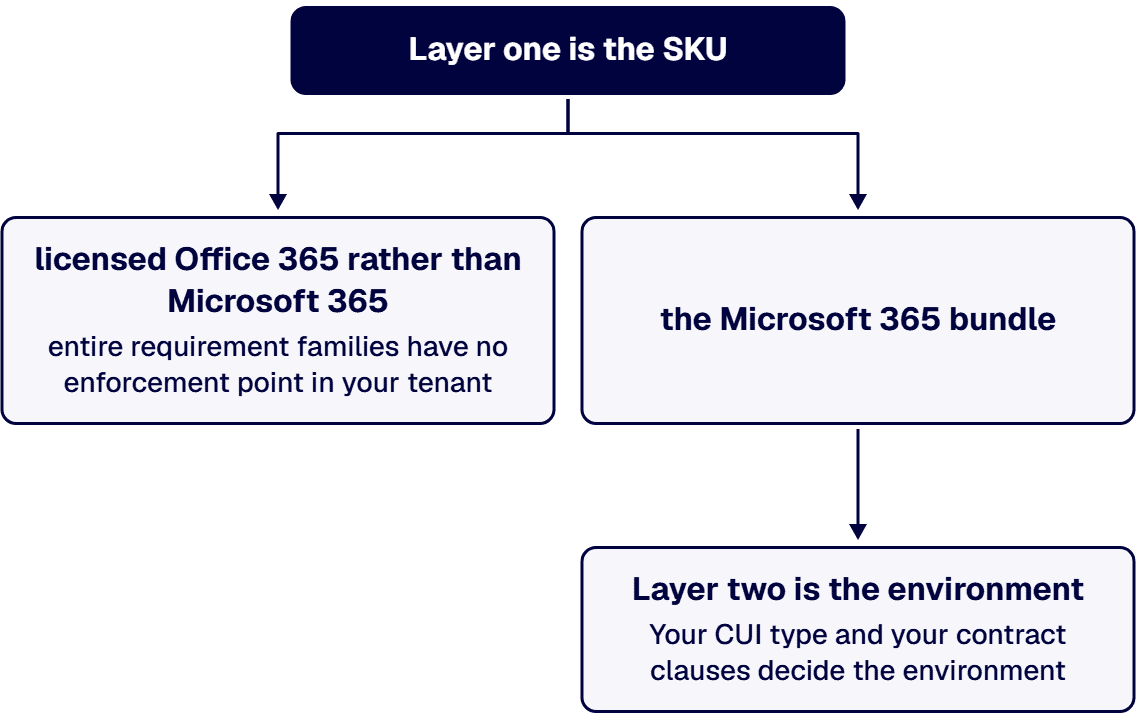
Short answer. No. Office 365 is not CMMC compliant, and it cannot be, because CMMC certifies organizations, not products. But the useful answer has two layers, and almost every article collapses them into one. Layer one is the SKU. Office 365 is not Microsoft 365. Microsoft’s own plan table reads “Microsoft 365 E3 (includes Office 365 E3)”: Microsoft 365 is the superset. Office 365 is the productivity layer, Exchange Online, SharePoint Online, OneDrive, Teams and the Office apps. The endpoint and identity layer that carries a large share of the 110 CMMC Level 2 requirements, Microsoft Intune, Microsoft Entra ID P1 or P2 for Conditional Access, and Microsoft Defender for Endpoint, is what the Microsoft 365 bundles add on top. If your tenant is licensed Office 365 E3 or E5 rather than Microsoft 365 E3 or E5, entire requirement families have no enforcement point in your tenant at all, and moving that same Office 365 SKU to GCC High does not create one. Layer two is the environment, and the binding rule there is not CMMC. It is DFARS 252.204-7012.
This page is written for the person who has to defend the answer to a C3PAO assessor. Every requirement number, licensing rule, and clause citation below is sourced to Microsoft’s published service documentation, to the CMMC rule at 32 CFR Part 170, or to the DFARS clause itself.
CMMC assesses an Organization Seeking Assessment, not software. A vendor can tell you its product is FedRAMP authorized, or that it runs at a given DoD Impact Level, and that can be true and verifiable. None of it makes the product “CMMC compliant,” and none of it transfers to you.
Microsoft says this itself: “CMMC compliance depends on customer configuration, implementation, and operational controls, as well as the use of qualified assessors and partners. Microsoft cloud services provide capabilities that can help support these requirements.” Note the verb. Microsoft services support requirements. They do not satisfy them.
So the question worth answering is narrower and more useful: which of the 110 CMMC Level 2 requirements can Office 365 actually carry, which can it never carry, and what do I have to buy or build for the rest?
The CMMC Program rule at 32 CFR Part 170 took effect on December 16, 2024. CMMC Level 2 is the 110 security requirements of NIST SP 800-171 Revision 2, incorporated by reference; 32 CFR 170.14 states that “the security requirements in CMMC Level 2 are identical to the requirements in NIST SP 800-171 R2.” NIST organizes them into fourteen families. Once the license question is settled, the directory that authenticates CUI users is the next call, covered in Active Directory or Entra ID for CMMC Level 2.
Two traps, both common in the Office 365 content that currently ranks:
Scoring: the rule conditions a POA&M on the assessment score divided by the total number of Level 2 requirements being greater than or equal to 0.8, which yields a Conditional CMMC Status, with all NOT MET requirements closed and verified by a POA&M closeout assessment within 180 days. Six requirements are ineligible for a POA&M and must be MET at assessment: AC.L2-3.1.20, AC.L2-3.1.22, CA.L2-3.12.4, PE.L2-3.10.3, PE.L2-3.10.4, and PE.L2-3.10.5.
This is the layer nobody covers, and it decides the answer before the environment ever comes up. Microsoft’s plan-options table is unambiguous. It lists the enterprise family as “Microsoft 365 E3 (includes Office 365 E3)” and “Microsoft 365 E5 (includes Office 365 E5).” Microsoft 365 contains Office 365. They are not synonyms, and the difference is not cosmetic.
The Office 365 service family is the productivity and collaboration layer:
Microsoft’s own Intune licensing documentation makes the same point from the other direction: organizations get Intune “as part of a Microsoft 365 bundle (such as Microsoft 365 E3, E5, or E7).” It names Microsoft 365 bundles. It does not name Office 365 plans.
The practical consequences are blunt:
Check your actual SKU before you do anything else. “We have Office 365 E5, so we have Microsoft’s security stack” is one of the most expensive sentences in this market, and it is wrong. And note the trap that follows from it: buying Office 365 GCC High rather than Microsoft 365 GCC High moves the same incomplete SKU into a government cloud. The environment changes. The missing control planes do not appear.
The clause that binds you is DFARS 252.204-7012, and it is contractual, not technical. Three paragraphs do the work:
Read those last two again, because no SKU discharges them. The 72-hour report and the 90-day media preservation are obligations on you. There is no Office 365 licence that files a DIBNet report or holds forensic images for you. This is the part buyers consistently under-scope, and it is why the evidence burden, not the configuration, usually drives the schedule.
The environment decision itself, Commercial versus GCC versus GCC High, turns on your CUI type and your contract clauses, not on CMMC directly. We treat it as its own decision, and it should be settled before any of the design work below: see Microsoft 365 GCC vs GCC High and Does CMMC require GCC High?
Office 365 is not useless here. It is the enforcement point for a real, if narrow, set of requirements, all of them about content rather than endpoints. The requirement text is NIST’s. The enforcement point and evidence columns are i3solutions’ implementation mapping, not a Microsoft claim of coverage.
Look at the shape of that table. Office 365 covers content: what is stored, what is shared, what is logged, what is encrypted. It covers almost nothing about the machine the CUI is opened on. In a CMMC Level 2 assessment, the machine is at least half the conversation.
There are only three honest ways to hold CUI in a Microsoft estate. Pick deliberately.
Be clear-eyed about what option three is. The overlay pattern works by routing CUI around Office 365, not through it. It shrinks your assessment boundary by taking Office 365 out of the CUI path. That can be a legitimate and cost-effective architecture, and for a small contractor with narrow CUI flows it often is. But notice what it concedes: a vendor selling you an enclave because “Microsoft 365 Commercial does not meet CMMC or DFARS requirements” has answered the question in this page’s title, and answered it no. Their own architecture is the proof. Buy it with your eyes open, and understand that your users now live in two systems, that the boundary between them is the thing an assessor will probe hardest, and that every CUI flow which leaks back into Office 365 is a finding.
An assessor is not impressed that you own Office 365. Per requirement, they want the policy, the scope, and the proof it is in effect:
Microsoft Purview Compliance Manager ships a CMMC v2 Level 2 assessment template; use it as the scaffold for improvement actions and the evidence register, but do not mistake its score for an assessment result. It measures the actions you have recorded, not the ones a C3PAO will accept.
The failure mode i3solutions sees most often on the Office 365 side is a CUI boundary that is drawn on a slide but not in the tenant: a SharePoint site marked as the CUI enclave, with inheritance still intact from a parent site, external sharing still enabled at the tenant level, and a Teams channel quietly writing to a different site. That is one finding on the diagram and three in the tenant.
i3solutions plans and runs governed Microsoft 365 and Azure work for compliance-bound organizations, and maintains dedicated compliance specialists who understand CMMC, HIPAA, SOC 2, and financial services regulations within Microsoft environments, providing audit trail documentation and access control frameworks that reduce audit preparation time by 60 percent.
Two patterns from our delivery work shape how we scope this. First, under DFARS 252.204-7012 cybersecurity incident reporting, the artifact set expands roughly 30 percent versus commercial scope, so the evidence burden, not the configuration, drives the schedule. Second, regulated-industry SharePoint modernization carries roughly 25 to 35 percent cost overhead versus commercial work for equivalent scope, driven by control mappings, audit-trail discipline, and zero-downtime cutover patterns. Anyone quoting you a commercial SharePoint number for a CUI boundary has not scoped the compliance work.
We do this at scale. i3solutions runs a governed Power Platform for a federal defense agency supporting roughly 10,000 personnel across about 180 locations, which works because it is governed, not despite it, and has unified identity and automated provisioning across systems for 125,000 users by treating the interfaces as owned, governed contracts.
On cost: a CMMC Level 2 implementation for a defense contractor with a defined CUI boundary typically ranges from $45,000 to $75,000, covering the Compliance Manager baseline assessment, Conditional Access redesign, DLP policy build and testing, Purview Audit Premium configuration, and post-implementation documentation. Where SharePoint customizations come with you, full migration project cost for defense contractors with SharePoint customizations and CMMC compliance scope typically lands in the $100,000 to $300,000 range.
Microsoft does not publish a public per-user list price for GCC High. It carries a licensing premium over Commercial Microsoft 365 and is sold through Microsoft agreements and authorized partners, so any per-user GCC High figure you have been quoted came from a partner price sheet, not from Microsoft. Commercial pricing is public: Microsoft 365 E3 lists at $39.00 per user per month on an annual commitment.
If you are building the internal case before committing, start with the boundary, not the licence: our CMMC technology readiness assessment establishes the CUI boundary, tests what an assessor will actually test, and produces the evidence register your committee needs to approve the spend. You can also hire senior Microsoft architects who run CMMC readiness.
No. CMMC certifies organizations, not products, so no software can be CMMC compliant. Beyond that, Office 365 is only part of the stack: Microsoft’s plan table reads “Microsoft 365 E3 (includes Office 365 E3),” meaning Microsoft 365 is the superset. Office 365 gives you Exchange Online, SharePoint Online, OneDrive and Teams, and it can carry content-side requirements such as AU.L2-3.3.1 on audit logs and SC.L2-3.13.16 on protecting CUI at rest. It does not include Microsoft Intune, Microsoft Entra ID P1 or P2 for Conditional Access, or Microsoft Defender for Endpoint, so the Configuration Management family and most endpoint access control have no enforcement point in an Office 365 tenant.
Microsoft 365 contains Office 365 and adds the control planes CMMC leans on. Microsoft’s plan-options table lists the enterprise family as “Microsoft 365 E3 (includes Office 365 E3)” and “Microsoft 365 E5 (includes Office 365 E5).” The additions that matter are Microsoft Intune for device management and configuration baselines, Microsoft Entra ID P1 or P2 for Conditional Access and MFA enforcement, and Microsoft Defender for Endpoint. Microsoft’s Intune licensing documentation says organizations get Intune “as part of a Microsoft 365 bundle,” and it names Microsoft 365 plans, not Office 365 plans.
Treat that as a contractual question, not a product one. DFARS 252.204-7012(b)(2)(ii)(D) requires that any external cloud service provider used to store, process or transmit covered defense information “meets security requirements equivalent to those established by the Government for the FedRAMP Moderate baseline,” and paragraphs (c) and (e) put the 72-hour DIBNet reporting duty and the 90-day media preservation duty on you regardless of environment. Your CUI type and your contract clauses decide the environment. Many contractors who assume they need GCC High do not, and some who assume Commercial is fine are wrong.
No, for the same reason: no product is. And there is a specific trap here. Buying Office 365 GCC High rather than Microsoft 365 GCC High moves the same incomplete SKU into a government cloud. The environment changes; the missing control planes do not appear. If you are migrating for CMMC, confirm you are buying the Microsoft 365 bundle.
Content-side ones. Office 365 is a genuine enforcement point for parts of Audit and Accountability (AU.L2-3.3.1, AU.L2-3.3.2 via Microsoft Purview Audit), protecting CUI in transit and at rest (SC.L2-3.13.8, SC.L2-3.13.16), collaboration-layer access control (AC.L2-3.1.1, AC.L2-3.1.2 via SharePoint and Teams permissions and sensitivity labels), and malicious-code protection for mail and collaboration (SI.L2-3.14.2 via Defender for Office 365). It cannot carry removable-media control (MP.L2-3.8.7), the Configuration Management family, or endpoint protection, all of which are device controls.
Not necessarily, and it is worth understanding what that pattern does. An encrypted enclave overlay achieves compliance by routing CUI around Office 365 rather than through it, shrinking your assessment boundary by taking Office 365 out of the CUI path. For a small contractor with narrow CUI flows that can be legitimate and cost-effective. It is not the only option: Microsoft 365 GCC High and Microsoft 365 GCC with documented compensating controls are the other two. The trade you are making is a second system for your users and a boundary an assessor will probe hard, because any CUI that leaks back into Office 365 is a finding.
i3solutions plans and runs governed Microsoft 365 and Azure work for compliance-bound organizations, with dedicated compliance specialists covering CMMC within Microsoft environments. A CMMC Level 2 implementation for a defense contractor with a defined CUI boundary typically ranges from $45,000 to $75,000. Where SharePoint customizations are in scope, full migration project cost for defense contractors with SharePoint customizations and CMMC compliance scope typically lands in the $100,000 to $300,000 range.

US-Based Microsoft System Integrator | Est. 1997
© i3solutions. All rights reserved.
US-Based | Est. 1997
© i3solutions. All rights reserved.


