
Power Apps Canvas vs Model-Driven: How to Choose the Right App
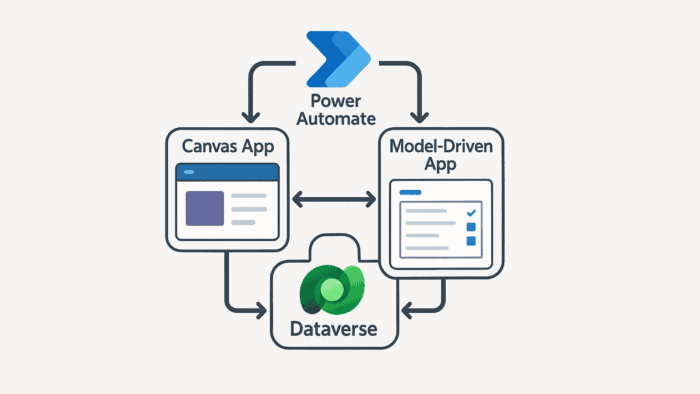
Power Apps canvas vs model driven apps represent two distinct development paradigms within Microsoft Power Apps — and choosing the wrong one for your enterprise use case creates rework, adoption failure, and governance debt. Canvas apps offer pixel-perfect design freedom and broad data connectivity. Model-Driven apps deliver enterprise-grade governance, security, and Dataverse-native consistency. In many enterprise scenarios, the most effective approach combines both. Among these platforms, Microsoft Power Apps stands out for its deep integration with the Microsoft ecosystem — Power Automate, Power BI, and Azure services included.
Key Takeaways
- Canvas apps are the right choice when you need to connect multiple data sources outside Dataverse, require a custom or branded user interface, need offline capabilities for field users, or are building a task-specific or role-specific application for a focused workflow.
- Model-Driven apps are the right choice when all your data lives in Dataverse, you require enterprise-grade security with row-level and field-level permissions, complex business logic and automated workflows are central, or compliance, audit trails, and governance are non-negotiable requirements.
- The hybrid approach — using both together — is the most effective pattern for most enterprise scenarios: Model-Driven apps manage structured back-end data and governance while Canvas apps provide tailored front-end experiences for different user roles.
- Embedding Canvas apps inside Model-Driven forms using the Custom Page feature allows organizations to deliver custom interfaces without sacrificing Dataverse governance — the foundation of enterprise hybrid deployment.
- Dataverse acts as the single source of truth in hybrid implementations — no matter which interface users access, all information remains in sync, and security policies apply consistently across both app types.
- The hybrid pattern is especially valuable in regulated industries — healthcare organizations use Model-Driven apps for HIPAA-compliant patient data while field staff use Canvas apps for intake; defense contractors apply the same approach for CMMC-compliant record-keeping alongside mobile inspection workflows.
Quick Answer
Power Apps canvas vs model driven: Canvas apps are best for custom UI, multiple data sources, offline field scenarios, and branded experiences. Model-Driven apps are best when data lives in Dataverse, compliance and audit trails are required, and complex business logic governs the process. In most enterprise scenarios, the strongest approach combines both — Model-Driven for governed back-end data, Canvas for purpose-built front-end experiences per user role.
Power Apps Canvas vs Model Driven: When to Use Each
The decision comes down to three criteria: where your data lives, how much UI customization you need, and whether compliance and audit trails are non-negotiable.
- You need to connect multiple data sources outside Dataverse (SharePoint, SQL, REST APIs, 1,200+ connectors)
- A custom or branded user interface is required — pixel-perfect layouts, specific color schemes, drag-and-drop design
- Offline capabilities are needed for field users in low-connectivity environments
- You are building a task-specific or role-specific application for a focused, contained workflow
- All your data lives in Dataverse — the data model drives the application structure
- Enterprise-grade security with row-level and field-level permissions is required
- Complex business logic and automated workflows are central to the solution
- Compliance, audit trails, and governance are non-negotiable — regulated industries, CRM, ERP, end-to-end enterprise processes
Your enterprise needs structured, governed back-end data management with tailored front-end experiences for different user roles. Model-Driven apps manage the Dataverse data model, security, and business logic. Canvas apps deliver purpose-built interfaces for specific roles — field technicians, executives, external partners — that connect to the same Dataverse tables.
Not sure which approach fits your organization? Talk to an i3solutions Power Apps architect →
Recap: Canvas Apps vs Model-Driven Apps
Before diving into the hybrid approach, here is a side-by-side summary of the core differences. For a more detailed standalone comparison, see: Model-Driven Apps vs. Canvas Apps: What Are They and When Should They Be Used?
Canvas: Multiple sources — SharePoint, SQL, APIs, Dataverse, and 1,200+ connectors
Model-Driven: Dataverse only — data model drives the application structure
Canvas: Pixel-perfect, fully custom — drag-and-drop every element, Excel-like formula language
Model-Driven: Structured and consistent — auto-generated from the data model
Canvas: Connector-dependent — security managed at the data source level
Model-Driven: Row-level and field-level Dataverse security — audit trail built in
Canvas: Task-specific, role-based, mobile-first, branded experiences
Model-Driven: End-to-end solutions, CRM/ERP, compliance-heavy processes
Canvas: Optional — can connect to many data sources without Dataverse
Model-Driven: Yes — mandatory; Dataverse is the exclusive data layer
Canvas: Yes — supported for field scenarios with sync on reconnection
Model-Driven: Limited — requires connectivity for Dataverse access
Canvas Apps Overview
Canvas Apps offer a drag-and-drop environment akin to crafting a presentation in PowerPoint. This visual freedom makes Canvas Apps excellent for consumer-facing or brand-centric scenarios, as well as for mobile and tablet use cases requiring custom UI elements. The logic behind Canvas Apps mimics Excel formulas, reducing the learning curve for citizen developers and expediting prototyping. While Canvas Apps can leverage Microsoft Dataverse, they also integrate with external data sources like SharePoint, SQL Server, or various REST APIs through built-in and custom connectors.
Model-Driven Apps Overview
Model-Driven Apps revolve around Microsoft Dataverse. You define tables, fields, and relationships first, and the system automatically generates standard forms, views, and dashboards. This data-centric model enforces consistency and helps maintain relational integrity. Because they sit atop Dataverse, Model-Driven Apps allow for advanced security configurations including row-level and field-level permissions — dramatically simplifying governance for compliance-driven environments. Model-Driven Apps share the same underpinnings as many Dynamics 365 modules (CRM, Customer Service), making them the go-to choice for businesses already invested in the Microsoft ecosystem.
Why Combine Canvas and Model-Driven Apps?
If you run a mid-to-large enterprise, you are likely familiar with sprawling data landscapes and varied user needs. Some departments prioritize strong data governance, while others require a slick, branded interface to engage end-users effectively. Merging the strengths of Canvas and Model-Driven Apps addresses these divergent needs without requiring separate platforms.
Complex enterprise scenarios. Model-Driven functionality ensures that critical data is standardized and secure across all lines of business. Yet certain users — field technicians or executives — may need a streamlined or visually rich experience accessible on the go. Canvas Apps with tailored interfaces serve that need while connecting to the same Dataverse back-end.
Benefits of a hybrid approach: Enhanced user adoption because users gravitate to well-designed, intuitive screens; centralized governance because core data in Dataverse maintains strict controls over data access and integrity; and flexible integration because Canvas Apps connect to external data sources while Model-Driven ensures enterprise data remains consistent and compliant.
Real-world example: A manufacturing firm needs a back-end system for production data and compliance logs — a Model-Driven App houses all production and compliance records. Field operators require a simple, tablet-friendly UI for quick data input — a Canvas App serves that need with offline capabilities. By syncing the Canvas front-end with the Model-Driven back-end through Dataverse, every department gets exactly what they need without data fragmentation.
Technical Methods to Integrate Canvas and Model-Driven Apps
Embedding Canvas Apps into Model-Driven Forms
One popular strategy is to embed a Canvas App within a Model-Driven form or dashboard using the Custom Page feature. The underlying data remains under Dataverse’s robust governance while a specific part of the screen showcases advanced visualizations or specialized data inputs. For instance, a Model-Driven CRM system for sales might use a Canvas App section to create an interactive quote builder with drag-and-drop line items and real-time cost calculations.
Using Canvas Apps as Standalone Portals
Another approach is to maintain a fully standalone Canvas App — often for mobile or kiosk use — that reads and writes data to the same Dataverse tables used by the Model-Driven App. This works best when certain user roles require a drastically different interface or limited features, or when external audiences (partners or customers) need restricted access with a tailored experience.
Dataverse as Your Single Source of Truth
Regardless of how you combine the two, Dataverse acts as a central repository. No matter which interface users access, all information remains in sync. Beyond basic fields, Dataverse supports complex relationships, security roles, and logic hooks through Power Automate — ensuring the governance layer applies consistently regardless of which app surface is used.
Power Automate Integration
Automating business processes often involves synchronizing actions across different environments. Power Automate bridges this gap with event-driven flows. For example: a Canvas App user presses “Submit” to finalize an inspection form; Power Automate creates a new record in the Model-Driven system, assigning tasks to relevant departments automatically. This orchestration layer ensures the two app types operate as a unified system, not separate tools.
Best Practices for Successful Hybrid Deployment
Governance and Security
Separate development, testing, and production environments to maintain isolation and control. Enforce Data Loss Prevention (DLP) policies across your tenant to ensure sensitive data does not inadvertently move to unmanaged services. Use Model-Driven access roles for data governance while controlling feature visibility in Canvas screens through role-based security.
UI/UX Consistency
Even when embedding a Canvas App into a Model-Driven environment, maintain consistent styling, navigation, and branding. Shared color schemes, fonts, and coordinated navigation ensure users do not feel like they are jumping into an entirely different system when moving between app surfaces.
Performance and Scalability
Filter data in Canvas Apps to reduce load times and network usage, especially on mobile connections. If your workforce operates in low-connectivity zones, implement offline features in Canvas Apps — the Model-Driven side receives data updates once a connection is reestablished. Monitor Dataverse storage usage as high-volume logs or attachments can expand capacity requirements significantly.
Testing and Quality Assurance
Ensure that triggers in Canvas Apps properly generate or update records in the Model-Driven environment through end-to-end testing. Collect feedback from real-world users — especially those in the field — through User Acceptance Testing to refine UI and data workflows before full deployment.
Real-World Use Cases of Canvas and Model-Driven Apps Integration
Sales and Marketing Integration. A B2B company uses a Model-Driven CRM for lead management and advanced reporting with standard data models for leads, opportunities, and pipeline stages. An embedded Canvas App provides a drag-and-drop quote builder within the CRM interface, allowing sales reps to email professional-looking quotes in seconds. The result: higher close rates, improved brand presentation, and no system toggling.
Field Service and Compliance. A financial services firm tracks compliance data in a Model-Driven app with robust security roles and a complete audit trail. Field agents use a mobile Canvas App to capture data, images, and signatures on tablets with offline capabilities — syncing to the Model-Driven environment when connectivity is restored. Auditing is simplified, data errors decrease, and compliance officers have immediate visibility into new records. This hybrid pattern applies equally in healthcare (Model-Driven for HIPAA-compliant patient data, Canvas for field intake) and defense contracting (Model-Driven for CMMC-compliant record-keeping, Canvas for mobile inspection workflows).
Integration with the Broader Power Platform and Azure
A significant advantage of the Power Platform is its modular nature. Power BI can visualize data from both Canvas and Model-Driven systems in real time — a sales manager opens a Model-Driven dashboard showing pipeline statistics while a Canvas-based analytics page provides detailed charts for individual territories. Power Automate knits everything together: when a marketing manager updates product pricing in the Model-Driven system, Power Automate instantly refreshes the Canvas-based quote builder, eliminating manual re-entry and reducing costly errors. Azure services extend the platform further — Cognitive Services can add AI-driven text analysis or vision processing to Canvas-based mobile apps with all data feeding back into Model-Driven records, while IoT integration can connect physical devices that feed telemetry into Dataverse, triggering Model-Driven workflows or updating Canvas-based dashboards for real-time monitoring.
ROI and Business Value of a Combined Strategy
Adopting a hybrid strategy with Canvas and Model-Driven Apps is not just about technical elegance — it delivers real-world ROI across four dimensions. Cost savings come from leveraging the same Dataverse environment, reducing data duplication and license overhead by reusing core components while tailoring experiences for different user segments. Time-to-market advantages come from Model-Driven Apps speeding up form creation, data modeling, and security configuration while Canvas Apps enable rapid prototyping — this dual approach can cut development cycles dramatically. Scalability means starting with a pilot project for a specialized team and expanding by adding Model-Driven modules as organizational needs grow. And competitive edge comes from eliminating friction for internal teams and external customers, freeing resources to focus on higher-level strategic initiatives.
From Frustration to Function: Why Hybrid Apps Work
As IT leaders, you are tasked with delivering solutions that balance robust data governance, user-focused design, and lightning-fast delivery. While Canvas and Model-Driven Apps each excel in different domains, combining them often yields the best of both worlds: the enterprise-scale security and data consistency of a Model-Driven framework, coupled with the visual flexibility and custom UI capabilities of Canvas. A well-planned hybrid environment can significantly accelerate app development cycles, elevate user satisfaction, and ensure compliance across departments.
Frequently Asked Questions: Power Apps Canvas vs Model Driven
When should you use model-driven apps instead of canvas apps?
Use model-driven apps when all data lives in Dataverse, enterprise-grade security with row-level permissions is required, or compliance and audit trails are non-negotiable. Use canvas apps when you need custom UI, multiple external data sources, offline capability, or task-specific mobile experiences.
What is a significant limitation of model-driven apps compared to canvas apps?
The most significant limitation is restricted UI customization. Because the interface is auto-generated from the Dataverse data model, pixel-perfect designs or highly branded layouts are not achievable. Model-driven apps also require Dataverse as the exclusive data source — they cannot connect directly to SharePoint, SQL Server, or external APIs without additional configuration.
Can you use canvas app pages in a model-driven app?
Yes. Power Apps supports embedding canvas apps within model-driven forms and dashboards using the Custom Page feature. This allows a custom canvas interface to display within a model-driven environment while keeping all data in Dataverse under model-driven governance — the foundation of the hybrid deployment pattern that enterprise organizations use to combine tailored user experiences with structured back-end governance.
What is the difference between canvas apps and Power Apps?
Power Apps is the platform. Canvas apps and model-driven apps are the two types of applications you build within it. Canvas apps offer custom UI design and broad data connectivity. Model-driven apps are data-first, built on Dataverse, with auto-generated interfaces. Power Apps is the platform; canvas and model-driven are the two paradigms within it.
When should you use both canvas and model-driven apps together?
When different user roles need different experiences for the same underlying data. A model-driven app manages structured back-end data and complex workflows; a canvas app provides a tailored, mobile-friendly interface for field staff or specific departments. Both share the same Dataverse data — governance is maintained, user experience is optimized per role.
Ready to Get Started?
Whether you are struggling with disjointed app experiences, slow development cycles, or inconsistent data governance, i3solutions can help you move forward with confidence. With decades of experience in Microsoft technologies and enterprise solution architecture, we specialize in designing hybrid environments that combine the strengths of Power Apps canvas and model-driven apps to deliver intuitive interfaces backed by robust data infrastructure.
Our Power Apps developers work closely with your teams to assess your needs, optimize your Power Platform strategy, and accelerate time-to-value with scalable, secure, and user-friendly applications. From architecture planning and app development to integration with Power Automate, Power BI, and Azure services, we help you build solutions that deliver real business impact. Explore our wide range of services to discover how i3solutions can help you architect a next-generation digital ecosystem, and see our work to learn how we have transformed organizations through innovative software solutions. Contact us today to build a future-proof environment where Canvas and Model-Driven Apps work in harmony.
Scot co-founded i3solutions nearly 30 years ago with a clear focus: US-based expert teams delivering complex solutions and strategic advisory across the full Microsoft stack. He writes about the patterns he sees working with enterprise organizations in regulated industries, from platform adoption and enterprise integration to the operational decisions that determine whether technology investments actually deliver.