Copyright i3solutions. All Rights Reserved.
Email aski3@i3solutions.com, Phone 703.652.8966
Privacy Policy | Sitemap
Power Automate Connection References and Flow Ownership: What Breaks When the Owner Leaves
By Michael Branson | August 25, 2026
Quick answer. Power Automate connection references decide whether a flow outlives the person who built it, because the credential a flow runs on is stored outside the flow. A connection holds one authentication; a connection reference points at it, so the pointer stays and the credential behind it can be replaced.
The story arrives the same way. A finance analyst called Bob built a flow four years ago that moves approved invoices from a SharePoint library into the ERP system. Nobody calls it a system. It runs every night, it has never failed, and it is load-bearing. Bob takes a job somewhere else, IT closes his account on his last Friday, and on Monday morning the invoices stop moving. The helpdesk ticket says the ERP integration is down. There is no ERP integration. There is a flow that authenticated as Bob.
What follows is the mechanics of that, at the layer where it actually happens: the connection. Not the monitoring program that would have told you sooner, and not the support model that decides who answers the ticket. The question here is narrower and it is a build-time decision: which identity the flow’s connections carry, whether the flow’s shape allows that identity to be changed later, and what a data policy does to the connection while you are trying to repair it.
What This Page Decides, and What the Other Pages Own
If flows are already failing across your estate and the problem is that nobody can say which ones or for how long, the sequence runs the other way and the first work is detection. That is covered in full at When Power Automate Flows Fail Silently: Finding the Risk, which sets out finding what you actually have, classifying it by business impact, and building an ownership program that survives the author. That page is about an inherited estate and the program that governs it. This one is about one connection and the identity behind it.
Four more boundaries, because this decision sits next to several that are not it. The security posture of Power Automate as a whole, meaning the threat surface and the control families an assessor maps against, is worked at Securing Power Automate in Regulated Enterprises. Data policy design, meaning which connectors sit in which data group and how a policy is scoped and evidenced, belongs to Power Platform DLP Policy Administration for Regulated Enterprises and to a forthcoming guide, Power Platform DLP Policy Design. The production operating model and the support model belong to two further forthcoming guides, Power Automate Production Support and Power Platform Support Model and Ownership RACI. Identity across the whole estate, meaning joiner-mover-leaver automation and privileged access, is a different control plane and is treated at Establish Identity as a Governed Enterprise Capability. How the flows get built is the territory of Power Automate Development & Integration Services for Enterprises.
One more, because it answers the same buyer question on a different plane. “What happens when the owner leaves” has a licensing answer as well as a credential one: a premium entitlement attached to a person is reclaimed with that person, and that half is worked at Power Automate Premium vs Process. The two are independent, so a repair that fixes the credential and leaves the entitlement question open has fixed half the problem.
Connections, Connection References, and the Difference That Decides Continuity
The vocabulary is worth getting exact, because the whole decision turns on a distinction that sounds like a synonym.
A connector is the proxy in front of an API. A connection is what Microsoft’s documentation calls “a stored authentication credential for a connector, for example OAuth credentials for the SharePoint connector”. So a connection is not a setting. It is a saved credential belonging to whoever signed in when it was created, held in the environment, and the data policy documentation puts it the same way: these connections “represent a saved credential and are stored within the environment that hosts the app or flow”.
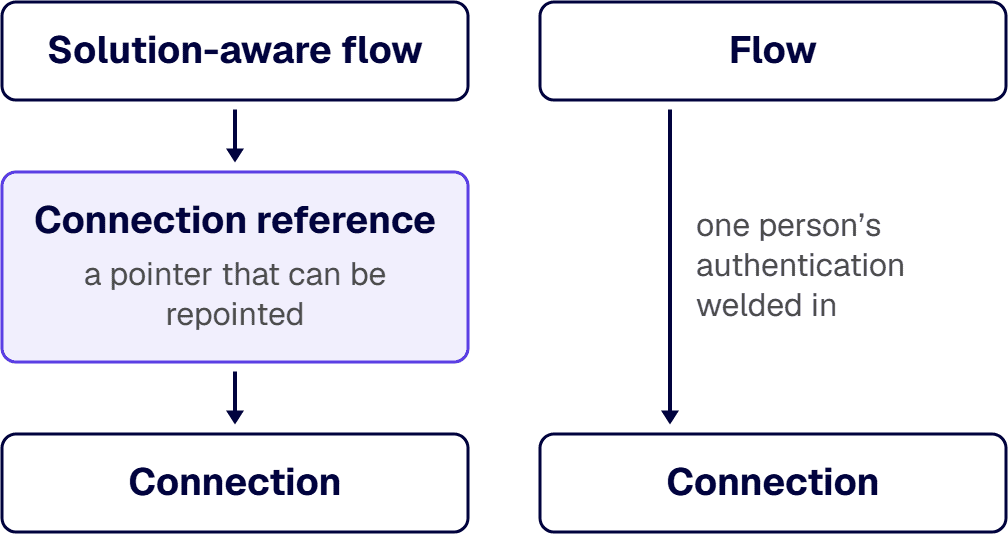
A connection reference is the third thing, and it carries the continuity decision. Microsoft’s guidance on Use a connection reference in a solution with Microsoft Dataverse defines it as “a solution component that contains a reference to a connection about a specific connector”, and records that “both solution-aware canvas apps and operations within a solution-aware flow bind to a connection reference instead of directly to a connection”. The flow points at the reference; the reference points at the credential. The credential can be swapped underneath without touching the flow.
Two consequences follow, and they are the reason this decision belongs at build time rather than in a cleanup.
The first is deployment. The same source records that during solution import into a target environment, “a connection is provided for all the connection references so any referencing flows can be turned on automatically after the import completes”. A flow built with connection references moves between environments as a component, with the credential supplied on arrival. A flow built without them binds directly to its author’s connection, which is stored in one environment and does not travel with it.
The second consequence is the one that decides the Monday morning. A flow that binds directly to a connection has one person’s authentication welded into it. A flow that binds to a connection reference has a pointer, and a pointer is repointable. That is the mechanism, and stating it plainly matters: the fix costs almost nothing at build time and an unplanned update afterwards.
Binding is not the same as permission, and the distinction catches teams out. The same guidance records that “if a user other than the flow owner provides the connections on a flow, then the flow needs to be turned on by the owner of those connections or the connections need to be shared with the user who is turning on the flow”, and that once it has been turned on by the owner of the connections, “from that point on, any co-owner of the flow can turn on the flow”. Somebody has to authenticate, and again whenever the flow is edited to add an action on a new connection. The design decides who that somebody is, and whether it is a person who can resign.
Which Identity the Connection Should Carry
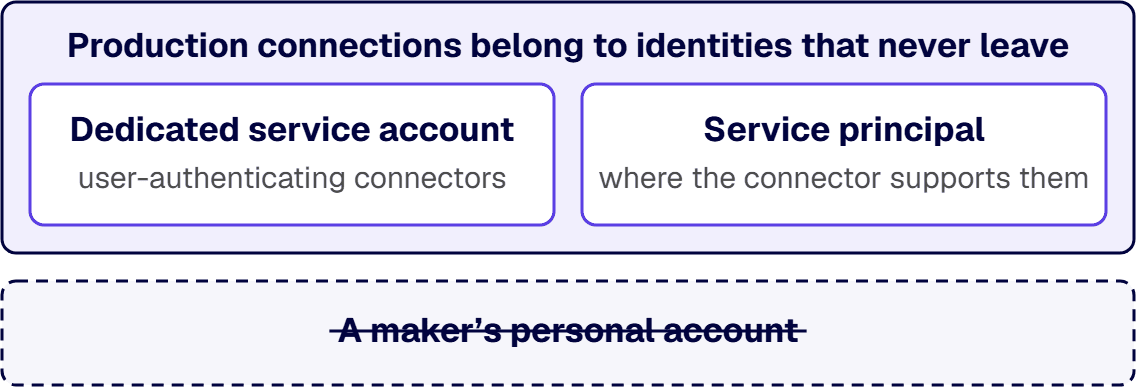
The buyer question is usually phrased as whether business-critical flows should run on service accounts. The honest answer is that the identity behind a production connection should be one nobody offboards, and that “service account” covers three different arrangements with different limits.
A named user account is the default, because it is what happens when a maker signs in. It is the right identity for a flow that automates one person’s own work and the wrong identity for anything the business depends on, for the reason the opening scenario gives.
A dedicated account used as a service account is a user account that no human signs in with day to day, with a documented owning team and a credential held where the team can reach it. It is the arrangement that fits wherever the connectors a flow uses authenticate as a user. It has a real cost: it is still a licensed account with a password and an authentication posture, so it inherits the conditional access and multifactor decisions made for user accounts, and those decisions are made outside this flow.
A service principal is an application identity rather than a person. Microsoft’s connection-reference guidance records one limit here that is worth reading closely before designing around it: “OAuth connections can only be explicitly shared with a user representing a service principal.” Connector support is the constraint that decides whether this option is available at all for the connectors your flow uses, and it is checked per connector at design time in the flow itself, not assumed from the pattern.
The decision rule when two of these are arguable is short: the identity that no leaver takes with them wins, and where two candidates both survive a departure, the one with the narrower permission set wins. A flow that is business-critical and has to run as a person is a flow with a known, written-down dependency on that person, and writing it down is the minimum, because the alternative is discovering it from a helpdesk ticket.
Where the platform team and the process owner read that choice differently, and each has a defensible reason, the disagreement is worth a read from someone outside both of them. Talk to a senior workflow automation architect
What a Departure Actually Breaks
A departure does not break a flow in one way, and treating it as one failure is what produces a repair that works on some flows and does nothing on others. Four failure modes are worth naming, and the framework table and the FAQ name them in the same order: orphaned ownership, broken connection, unrepointable flow, policy-blocked repair.
Start from what Microsoft’s guidance on Share a cloud flow actually says, because it is narrower than the folklore. “If the shared flow still has an active owner, the flow continues to run.” The flow does not vanish with the person. What the same source records next is where the damage sits: “if the flow uses any active or embedded connections that belong to the user who left the organization, those specific actions might fail.” The unit of failure is the action, and the cause is the credential behind it.
| Failure mode | What it looks like | What it needs | Where the evidence lives |
|---|---|---|---|
| Orphaned ownership | No active owner remains, so no one can edit, turn on, or hand over the flow | Change the owner before the flow can be edited or handed over | The owner list in the flow’s properties in Power Automate, and the flow’s owner column in the Power Platform admin center flow list |
| Broken connection | The flow still runs and specific actions fail, because those actions use a connection that belonged to the departed person | Update the credentials on that connection, or point the connection reference at a new one, noting that an owner cannot modify the credentials on a connection another owner created | The connection’s status in the environment’s connections list, and the red exclamation point on the flow details page that the connection-reference guidance describes when a connection reference shows as invalid |
| Unrepointable flow | The flow is not solution-aware, so it has nothing to repoint and its ownership cannot be changed in place | Recreate the flow under a new owner, add it to a solution and update it to use connection references before it is repointed | Whether the flow appears inside a solution in the maker portal’s Solutions area, and the flow’s own details page |
| Policy-blocked repair | The repair itself fails, because the connector the replacement connection uses is blocked by a data policy | Settle the policy question first, then repair the connection | The data policy list in the Power Platform admin center, and the design-time error the maker sees when updating the connection |
In the evidence column, each row names the surface somebody can open to confirm that failure mode, because a failure mode nobody can look up is a story. Note that the four are not a sequence of events. They are four independent things a single departure can produce, and one business-critical flow can present more than one of them at once.
The third row is the expensive one and it is worth quoting the source rather than paraphrasing it. Microsoft records that you change the ownership of a solution-aware cloud flow by editing its details, and that “to change the ownership of a non-solution-aware cloud flow, you must create a new flow via export/import, Save as , or Send a copy”, because “in-place ownership change for non-solution-aware cloud flows isn’t available because the owner is part of the flow identity”. That sentence is the cost of the build-time decision, stated by the vendor: a flow built outside a solution cannot have its owner changed in place, only recreated under a new one.
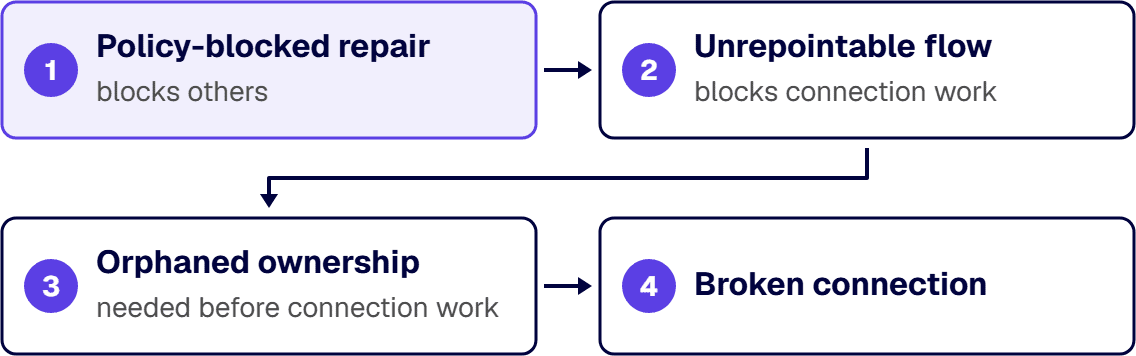
When two failure modes are live at once, the one that blocks the others goes first. Policy-blocked repair outranks the other three, because a connector a policy has disabled cannot be re-authenticated while the policy stands. Unrepointable flow comes next, because a flow that cannot be repointed is not repaired by supplying a credential. Orphaned ownership comes before broken connection, because the connection work needs somebody with rights on the flow, and the same guidance records that “you must be the creator or owner to add or remove owners from a cloud flow”. The order is the reverse of the order they are usually discovered in, which is why a repair that starts with the credential stalls on the rights it needs before it reaches the policy.
One more distinction from the same source, because it changes who is exposed. Connections used in a cloud flow “fall into two categories”, embedded connections that the flow uses and other connections that are defined but unused, and the list of connections “appears under the list of owners in a cloud flow’s properties”. Reading the owner list without reading the connection list underneath it answers half the question, and it is the half that looks reassuring.
Data Policy at the Connection Layer
Data policies are usually met as a governance subject: which connectors are business, which are non-business, which are blocked. At the connection layer the same policy is a much more concrete thing, and it is the reason a repair sometimes fails for a reason the person repairing it cannot see.
Microsoft’s Data policies documentation describes what happens to a running flow: “any resources that are running and attempting to use an inactive connection, action, trigger, or MCP server that is blocked, fail at runtime.” And it describes what the policy does to the connection itself: where the policy blocks the whole connector, the platform sets “the connection to a disabled state so that it can’t operate”. The failure the operator sees is a flow error. The cause is a disabled credential.
The part that catches a repair is the design-time half. The same page records that when the maker “attempts to update their connection to fix it, they get an error in the design-time experience that the connector is blocked by policy”. So the person handed the ticket, who is doing exactly the right thing, is stopped by a control they may not know exists and cannot change from where they are standing.
Enforcement can also reach backwards, which matters when a policy changes after a flow is built, and reaching a connection that a whole-connector block has not already disabled is a step an administrator takes. Microsoft’s Manage data policies guidance carries it as an optional step, and states that “enforcing data policies disable existing connections that violate any data policies and enable any previously disabled connections that no longer violate any data policies”. Both halves are the design: an existing connection is in scope, and the effect reverses when the violation goes away. A connection disabled by a policy is not a corrupted credential and does not need to be rebuilt.
Two design consequences follow for a business-critical flow. The connectors a flow depends on are a policy dependency and belong in whatever record names the flow’s owner, so a policy change can be read against the flows it will reach before it is enforced. And the person who will be asked to repair a connection needs a route to whoever administers the policy, because otherwise the ticket bounces between two teams, each correctly saying the problem is not theirs.
If your repair path already stalls at a control the repairer cannot see, the gap is between two functions rather than inside either one, and that separation is worth an outside read. Talk to a senior workflow automation architect
Remediating a Personally-Owned Flow
The flows that need this work are the ones already running under somebody’s name, and the remediation is a short sequence with one branch in it.
Confirm the failure mode first, using the evidence column above, and establish whether the flow appears inside a solution in the same pass, because the last step of the sequence that follows is only available on a flow that has connection references. Then, in order: settle any policy block, because the connection work cannot be done while the connector is disabled; add a second owner while the current one is still employed, since the owner list is what gives anyone rights on the flow; establish the connection under the identity the flow should carry, remembering that the owner of a connection is the one who turns the flow on before a co-owner can; and repoint the flow’s connection references at that connection.
The branch is the third row of the table. A solution-aware flow takes the sequence above. A flow that is not solution-aware has no connection references to repoint, so it is moved inside a solution and updated to use them first. Microsoft documents that update as an action on the flow checker warning on the flow details page, which removes the connections so connection references can be added, and as the effect of exporting the flow in an unmanaged solution and importing it again. It is a change to the flow’s connections with a test cycle behind it, not a fresh build. That cost is the argument for making the decision at build time on the next flow, whatever you decide about this one.
Two habits keep the work from recurring. Record, beside each business-critical flow, the identity its connections carry and the connectors it depends on, so a leaver report and a policy change can both be read against it. And treat a maker’s departure as a scheduled event with a named handover, because a departure date is known in advance and a broken invoice run is not.
When This Is Not the Work You Need
Some readers should stop here, and saying so is cheaper than selling the work.
If a flow automates one person’s own task and nothing downstream depends on it, leaving it on that person’s connection is the correct call, and the only thing owed is knowing that it will stop when they do.
If flows are already failing across the estate and nobody can name which, the ordering is different: find and classify what you have first, using the detection work linked above, and bring the connection decision to the flows you keep.
If the argument in the room is about cost rather than continuity, the question is a licensing one and belongs on the licensing comparison linked above, because moving a flow onto a dedicated account or a service principal settles the credential question and leaves the entitlement question exactly where it was.
And if the flows in question sit in an estate with hundreds of unowned apps and no registry, the connection decision is downstream of an inventory nobody has run yet.
What is left is the organization this page was written for: a handful of flows the business depends on, each running under somebody’s name, and a build decision about to be repeated on the next one unless somebody makes it deliberately. i3solutions has been a Microsoft partner since 1997, and the first move is to list the flows that would stop if their author resigned and read the owner list and the connection list underneath it for each one. Talk to a senior workflow automation architect
Frequently Asked Questions
What happens to Power Automate flows when their owner leaves?
Less than the folklore says, and in a more awkward place. Microsoft’s guidance is explicit that if the shared flow still has an active owner, the flow continues to run; what fails is narrower, because if the flow uses active or embedded connections that belonged to the user who left, those specific actions might fail. So a departure produces up to four separate problems: orphaned ownership, where no active owner remains and nobody can act on the flow; broken connection, where the flow runs and specific actions fail on a dead credential; unrepointable flow, where the flow is not solution-aware and its connections cannot be repointed; and policy-blocked repair, where a data policy has disabled the connector the fix depends on. A flow with a co-owner and a connection reference whose connection belongs to a dedicated account or a service principal survives the first three; the fourth turns on the data policy, not on how the flow was built. A single-owner flow built outside a solution on one person’s credential meets three of them at once.
Should business-critical flows run on service accounts?
The identity behind a production connection should be one nobody offboards, and a dedicated account used as a service account is the arrangement available for connectors that authenticate as a user. It is not free: it stays a licensed account with a password and an authentication posture, and it inherits the conditional access decisions made for user accounts elsewhere. A service principal is the stronger option where the connectors involved support it, and Microsoft’s connection-reference guidance records the constraint that OAuth connections can only be explicitly shared with a user representing a service principal, so connector support is checked per connector at design time instead of assumed. Where a business-critical flow has to run as a named person, that is a written-down dependency on that person, not a neutral default.
What are connection references and why do they matter?
A connection is a stored authentication credential for a connector, in Microsoft’s own words. A connection reference is a solution component that contains a reference to a connection, and solution-aware flows bind to the reference instead of binding to the connection. The difference decides two things. It decides deployment, because on solution import a connection is provided for all the connection references so the referencing flows can be turned on automatically. And it decides continuity, because a flow bound to a reference has a pointer whose target can be replaced, while a flow bound to a connection has one person’s authentication welded into it. The cost of using them is a build-time choice; the cost of not using them is an update to a flow already running in production.
How do we fix flows running under personal credentials?
Confirm which failure mode is present, out of orphaned ownership, broken connection, unrepointable flow and policy-blocked repair, then work in the order that unblocks: settle any policy block first, because a disabled connector cannot be re-authenticated until the policy question is settled; add a second owner while the current one is still employed, because you must be the creator or owner to add or remove owners on a cloud flow; create the connection under the identity the flow should carry, noting that the owner of the connection turns the flow on before a co-owner can; and repoint the connection references. The branch is whether the flow is solution-aware. If it is not, in-place ownership change is not available because the owner is part of the flow identity, so the flow is recreated under a new owner, added to a solution and updated to use connection references before any of this applies to it.
Does a shared mailbox or a generic account count as a service account?
Only if it is governed like one. What makes a dedicated account usable for a production connection is that no human signs in with it day to day, a named team owns it, its credential is held somewhere that team can reach, and its authentication posture is a deliberate decision rather than an inherited one. A generic account that three people know the password to fails the last two of those and produces a different problem: a credential that survives departures and that nobody is accountable for. The test is not what the account is called. It is whether an offboarding run could disable it by accident, and the account’s sign-in log is what shows whether a person is behind it.
What does a data policy actually do to a connection?
It acts on the credential, not on the flow. Where a policy blocks the whole connector, the platform sets the connection to a disabled state so that it cannot operate, and any resources running and attempting to use an inactive or blocked connection fail at runtime. The part that surprises a repairer is the design-time half: when the maker attempts to update their connection to fix it, they get an error that the connector is blocked by policy. An administrator can also enforce a policy against connections that already exist, which disables the ones that violate a policy and enables previously disabled connections that no longer violate one. A connection a policy disabled is not corrupted and does not need rebuilding; it needs the policy question settled.
Where does this decision stop and production support begin?
This decision is made once per flow, before or at build: which identity the connections carry, whether the flow is solution-aware so those connections can be repointed, and which connectors it depends on. Production support is the standing function that runs afterwards: monitoring coverage, who answers when a run fails, and the lifecycle process for changes. They fail differently. A flow with the wrong connection identity breaks on a date somebody could have predicted from an HR calendar; an estate with no support model breaks in ways nobody owns. The connection decision makes support cheaper, because a flow whose identity outlives its author hands the support function a monitored dependency instead of a rediscovery.
Related Reading
- Power Automate Security Consulting for Regulated Enterprises, what a security engagement covers when the connector and identity work has to close against a compliance deadline
- Power Platform App Sprawl Governance Risk Explained, what an estate looks like when apps and flows accumulate with no registry and no documented owner
About the Author
Michael Branson co-founded i3solutions and brings executive, operational, and technical perspective to organizations running complex, secure, and mission-critical Microsoft estates. He works with enterprise teams on the architecture decisions that determine whether an automation investment holds its value.