
By Michael Branson
As of September 2026, the build belongs in your tenant. A partner works in a Power Platform Developer environment inside your own tenant, and the finished agent reaches production as a managed solution through Power Platform pipelines. Microsoft’s own pipelines documentation states plainly: “Can pipelines deploy to a different tenant? No. We recommend using Azure DevOps or GitHub for this scenario.” An agent built in the partner’s own tenant instead arrives as a manual import, with every connection, connection reference and environment variable rebuilt on your side. Keep a partner-owned tenant only for pre-contract demos with no customer data in scope. If your policy keeps every external identity out of the production tenant, a separate development tenant your organization owns works too, and promotion then runs through Azure DevOps or GitHub instead of pipelines, matching what your own vendor-governance page already recommends.
A business unit has picked a partner to build a Copilot Studio agent, and the first real question is not the agent’s design. It is where the partner sits while they build it. The partner’s own tenant is the fastest way to start: no new accounts to provision, no access request to route through security. But the security team has already said no guests in production, and this reader owns the answer either way. Get it wrong toward speed, and controlled data sits in a tenant nobody here can audit or revoke. Get it wrong toward caution with no plan for handoff, and go-live turns into a rebuild, by hand, of everything the partner already built somewhere else. The question this page answers: can a partner build a Copilot agent in a workspace inside your own tenant, and then move it into production?
There are three places this workspace can sit, and only two of them are workable for anything beyond a demo.
The partner’s own tenant is the fastest to stand up and the one a partner will usually ask for first, because it costs them nothing to configure. It is also the option that puts your data somewhere your own security team cannot see, log, or revoke on your own schedule. This is the right choice for exactly one situation: a pre-contract or early-stage demo that uses no real customer data. The moment real data or a production-bound artifact is in scope, this option is closed.
A Power Platform Developer environment inside your own tenant is the default answer for everything else. It is a single-user environment, licensed under the Power Apps Developer Plan, that lives inside your tenant’s own boundary from the first day of work. The partner’s engineers reach it as guests in your directory, not as employees of a tenant you cannot see into, and it is created and destroyed on your own schedule, not theirs.
The third option is a separate development tenant your organization owns, promoted through Azure DevOps or GitHub instead of Power Platform pipelines, for one specific policy position: an organization whose security posture keeps every external identity, full stop, out of anything that touches production. This is not a workaround this page invented. It is the same shape your own Microsoft Vendor Risk Management for Embedded Teams page already recommends for embedded external teams generally: “dedicated development tenants” with “network-level isolation” so external teams “work productively without touching production systems.” The cost of this option is that it gives up Power Platform pipelines entirely for this agent, because pipelines cannot cross a tenant boundary, and the promotion work moves onto a general-purpose CI/CD tool instead of a native one.
Which of the two workable options fits is a policy call this page does not make for you: it is a question about how your organization treats external identity, not a question about Copilot Studio.
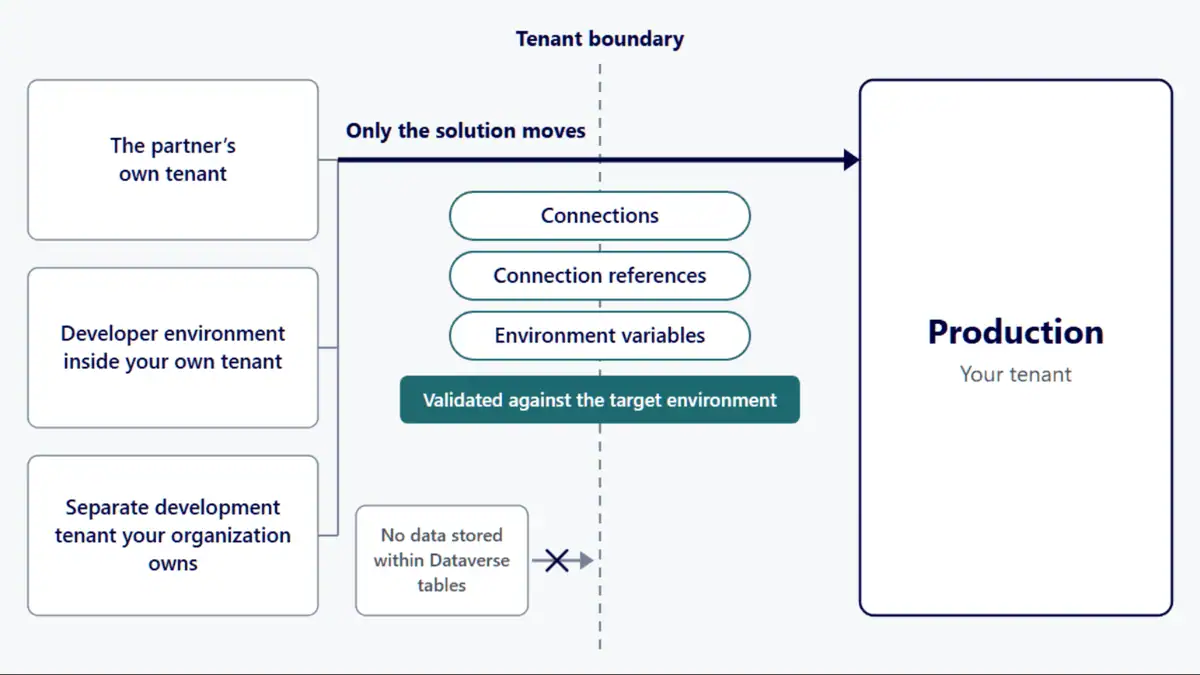
Whichever tenant the build happens in, promotion to production is a solution moving between environments, and only the solution moves. Microsoft’s pipelines FAQ is specific about the payload: “Pipelines deploy solutions as well as configuration for the target environment such as connections, connection references, and environment variables… Pipelines, or solutions in general, don’t contain data stored within Dataverse tables.” Read that twice if the plan on the table assumes test conversations, transcripts or any Dataverse-held content travels with the agent. It does not. Every connection, connection reference and environment variable is validated against the target environment before the deployment runs, which is what catches a missing dependency before it becomes a production incident rather than after.
The practical consequence for a first agent: build inside a solution from the start, not inside whatever the environment hands you by default. The Power Platform ALM basics documentation is explicit that “a single default environment is automatically created for each tenant and shared by all users in that tenant,” and that solutions, not the environment itself, are “used to transport apps and components from one environment to another.” A shared default environment is not where a production-bound Copilot agent belongs even during the build; the agent’s solution is created before the agent is, so the first version already has a home a pipeline can move.
What this section does not cover, because it belongs to a sibling page, is how solution versioning, rollback, and the upgrade-without-overwrite behavior actually work once an agent has shipped more than once, which Power Platform ALM: Maker Solution to Managed Production owns in full; this page assumes the general mechanics and states only what is specific to a Copilot Studio agent’s first promotion.
Inside the workable options, a partner’s engineers typically work in your tenant as B2B guests, and are switched off at handoff. That access is scoped, not blanket. Microsoft Entra’s cross-tenant access settings let you configure organization-specific settings that “take precedence over default settings,” and within those settings you can “scope access to specific users, groups, and applications” rather than trusting an entire partner organization by default. Scoping this way to named users and named applications requires a Microsoft Entra ID P1 license, which the same documentation states directly: “you need a Microsoft Entra ID P1 license. The license is required on the tenant that you configure.”
Revocation is a directory action, not a Copilot Studio setting: remove the guest accounts, or narrow the organizational settings for that partner, and the access that settings scoping granted is gone. Inside the Developer environment itself, a Dataverse security role scoped to that one environment is what actually lets a partner’s engineer build anything at all; that role is assigned when the engagement starts and removed when it ends, independent of whatever the directory-level guest status is doing.
This is an access decision, not a governance program. What auditors expect to see, how approval workflows are tiered, and what a vendor contract has to specify are covered in full on Microsoft Vendor Risk Management for Embedded Teams, and are not repeated here. Guest access for people who will use a finished app, as opposed to engineers building one, is a different question with its own answer on Power Apps for External Users: Architecture and Governance.
A handful of tenant-level conditions have to be set before the first Copilot Studio agent is worth building, and missing one of them is what turns a planned promotion into a support ticket.
Pipeline target environments have to be managed environments. Microsoft’s pipelines documentation states that “all other environments used in pipelines must be enabled as managed environments” beyond the development and pipelines-host environments, and that “licenses granting premium use rights are required for all managed environments,” which is a licensing consequence worth budgeting for before the first agent, not after. The same page carries a dated change worth planning around now: “Starting in October 2026, the admin deployment page notifies admins when pipelines deploy to unmanaged target environments.” Review and enable managed environments for your pipeline targets before that notice appears.
Whoever manages the promotion path needs the right role. The pipelines documentation names it directly: “If the user has the ‘Deployment Pipeline Administrator’ security role the ‘Manage pipelines’ button will be enabled.” Assign this role deliberately, to a named admin, rather than discovering after the fact that nobody on the team can open the pipeline configuration app.
What this page does not cover, rollback behavior, solution versioning, and the general managed-environment premium licensing model beyond this one pipeline-target consequence, lives on Power Platform ALM: Maker Solution to Managed Production and Power Platform Environment Strategy: The Four Decisions, linked here rather than restated.
Getting an agent into a production environment is not the same as getting it in front of the people who are supposed to use it, and Copilot Studio treats those as separate steps. Microsoft’s own publishing documentation describes publishing an agent to channels such as Teams, Microsoft 365 Copilot, a custom website, or SharePoint, and notes that “the latest published content only becomes available after a new session starts,” or after up to an hour otherwise.
For an agent meant to reach the whole organization rather than a small shared group, the documented path is to submit it “for admin approval to be featured in the Built for your org section of the Teams app store,” which also reaches the Microsoft 365 Agent Store’s equivalent section. This is an admin approval workflow, not an automatic rollout: Microsoft’s documentation does not publish a fixed timeline for how long that approval or the resulting org-wide propagation takes, so this is a step to plan into a go-live date with your own admin, not a number this page will invent for you. A smaller, informally shared agent (the “Built with Power Platform” section, available only to explicitly shared users) is a different, narrower distribution path and is not the same as an enterprise-wide release.
The tenant rule above does not change in a sovereign cloud: the build still belongs in your own tenant, or in a separate development tenant you own, for the same reasons. What changes is the cross-tenant mechanics if a partner’s identities sit in a commercial tenant while yours sits in a government cloud. Microsoft’s own documentation states that “Microsoft cloud settings let you collaborate with organizations from different Microsoft Azure clouds,” naming “Microsoft Azure commercial cloud and Microsoft Azure Government, which includes the Office GCC-High and DoD clouds” as one supported pairing, while also noting plainly that “B2B direct connect isn’t supported for collaboration with Microsoft Entra tenants in a different Microsoft cloud.” Cross-cloud B2B collaboration has to be enabled on both sides before a commercial-tenant partner can be invited into a GCC High or DoD tenant at all, and Copilot Studio agent availability in a given sovereign cloud is its own separate question, confirmed with your Microsoft account team before scoping any of this work.
Whether a given CUI, ITAR, or export-controlled data set may sit in this Developer environment at all is a determination your own contracting officer and your contract’s own clauses make, not a determination this page or Microsoft’s product documentation makes for you.
A partner-owned tenant is the right call, not a compromise, in one situation: a pre-contract or early-stage demo with no customer data in scope. Loading controlled data into a partner’s tenant to save a week of setup time is the trade this page warns against directly, and it is never worth making.
If your organization’s policy keeps every external identity out of anything that touches production, full stop, that is a legitimate position, and the answer is the separate development tenant your organization owns, promoted through Azure DevOps or GitHub, not a forced exception to let a partner into your production tenant’s directory. Accept that trade with its eyes open: you give up the native Power Platform pipelines path for this agent, and someone on your side owns a CI/CD pipeline instead of a built-in one.
Yes. The workplace is a Power Platform Developer environment created inside your own tenant, where the partner’s engineers work as scoped Microsoft Entra B2B guests. Deployment back into your primary tenant runs through Power Platform pipelines as a managed solution, because that promotion never has to cross a tenant boundary in the first place; the build and the production environment share the same tenant from day one.
Not as a route to production. The Microsoft 365 Developer Program gives eligible members a sandbox that Microsoft Learn’s page Microsoft 365 Developer Program FAQ calls “a fully pre-configured tenant,” and the same FAQ says “A Microsoft 365 enterprise or production subscription and a Microsoft 365 Developer Program sandbox are separate subscriptions and environments.” So the sandbox is a separate tenant from your production one. Microsoft Learn’s page Set up a Microsoft 365 developer sandbox subscription says the subscription “includes 25 user licenses and lasts for up to 90 days, depending on your activity,” and the FAQ adds: “Developer tenants are intended for development and testing purposes only and are short-lived by design. Microsoft may require tenants to be recreated every 90 days. Do not use a developer tenant for production workloads or long-term data storage.”
Anything built in a sandbox has to cross a tenant boundary to reach yours, and Microsoft Learn’s page Overview of pipelines in Power Platform says Power Platform pipelines do not deploy to a different tenant and recommends Azure DevOps or GitHub for that scenario. If a partner prototypes in a sandbox, plan the move to your tenant as an Azure DevOps or GitHub promotion, and keep the agent you intend to run in production in a Developer environment inside your own tenant, as described earlier on this page.

US-Based | Est. 1997
© i3solutions. All rights reserved.
US-Based | Est. 1997
© i3solutions. All rights reserved.


