How to Evaluate a Microsoft Staff Augmentation Partner

When evaluating a Microsoft staff augmentation partner for enterprise environments, the selection decision directly determines project outcomes. Organizations with complex Microsoft ecosystems spanning Power Platform, Dynamics 365, SharePoint, and Azure require teams that understand not just individual products, but the intricate relationships between them. The challenge for IT Directors and Digital Transformation leaders lies in distinguishing between vendors who claim Microsoft expertise and those who possess the operational knowledge to navigate enterprise-grade implementations, and to do so without creating audit exposure, governance gaps, or the kind of rework that compounds delivery debt.
Key Takeaways
- Organizations switching from generalist staffing firms to Microsoft specialists report 35-50% reduction in rework and integration issues during Power Platform rollouts, reflecting the tangible impact of platform-specific expertise over generic development capacity.
- Regulated enterprises working with Microsoft-focused partners achieve production deployment 20-30% faster due to pre-built governance frameworks and compliance patterns that generalist firms develop through trial and error at your expense.
- Microsoft-specialist augmentation partners typically maintain 85-95% team continuity versus 60-70% for generalist firms in complex enterprise environments, because practitioners find the work intellectually engaging and career-advancing rather than viewing it as a temporary assignment.
- Technical evaluation should focus on demonstrated experience with enterprise Microsoft scenarios, not just product certifications or surface-level platform knowledge. Partners who cannot describe specific architectural decisions they have made likely lack the depth required for enterprise environments.
- Partners without regulated industry experience often underestimate governance overhead and propose architectures that create compliance risks requiring expensive remediation, a pattern that surfaces during audits, not during initial development.
- Effective Microsoft partners understand platform interdependencies and can navigate complex integration scenarios across Power Platform, Dynamics 365, SharePoint, and Azure while maintaining the security boundaries and audit trails that regulated enterprises require.
Quick Answer
Evaluating a Microsoft staff augmentation partner requires testing platform-specific depth beyond basic certifications, assessing experience in regulated environments, and verifying the ability to work within enterprise governance frameworks. The right partner demonstrates cross-platform expertise across Power Platform, Dynamics 365, SharePoint, and Azure while understanding the compliance requirements that shape architectural decisions in enterprise environments.
Why Microsoft-Specific Depth Matters for Enterprise Programs
Platform Nuances That Generalists Miss
Microsoft’s enterprise stack contains platform-specific patterns that directly impact delivery velocity and long-term maintainability. Power Platform development in enterprise environments requires understanding of environment strategies, solution packaging, and connection reference management – concepts that extend far beyond basic app building. Teams without this depth typically create solutions that work in development but fail governance reviews or break during production deployment.
Dynamics 365 customizations demand knowledge of solution layering, plugin registration contexts, and business process flow dependencies. Generalist developers often underestimate the complexity of maintaining customizations through Dynamics updates, leading to technical debt that compounds over time. SharePoint modernization projects present their own specialized requirements, from site collection architecture to managing hybrid scenarios with on-premises systems. Azure integration adds another layer, requiring knowledge of service principals, managed identities, and network security groups that generalist teams typically learn through trial and error at your expense.
Integration, Security, and Governance Patterns That Generalists Miss
Security boundary management requires understanding how Power Platform data loss prevention policies interact with Azure conditional access and SharePoint information barriers. These intersections create operational constraints that experienced Microsoft teams navigate efficiently, while generalist teams discover through costly rework cycles.
Compliance frameworks add another dimension of complexity. In regulated industries, requirements for retention policies, sensitivity labels, and audit logging across the Microsoft stack demand teams who understand how these controls interact across platforms. Generalist teams often implement solutions that meet functional requirements but fail compliance reviews, forcing expensive remediation cycles. Regulated enterprises working with Microsoft-focused partners achieve production deployment 20-30% faster precisely because these governance and compliance patterns are already understood before the first sprint begins.
Core Evaluation Dimensions for Microsoft Staff Augmentation Partners
Technical Depth and Cross-Platform Experience
Technical evaluation should focus on demonstrated experience with enterprise Microsoft scenarios, not just product certifications. Strong partners can describe specific challenges they have solved across Power Platform ALM, Dynamics 365 solution layering, SharePoint hybrid scenarios, and Azure integration patterns. They understand how these platforms interact and where integration points typically create complexity.
Cross-platform experience becomes critical when evaluating partners for complex modernization initiatives. A partner working on SharePoint modernization should understand how Power Platform can extend SharePoint capabilities, how Dynamics 365 customer data integrates with SharePoint document libraries, and how Azure services can provide scalable backend processing. Teams with deep Microsoft ALM experience reduce environment management overhead by 40-60% compared to generalist developers learning on the job, enabling organizations to maintain multiple concurrent Microsoft initiatives without overwhelming internal resources.
Experience in Regulated and Compliance-Heavy Industries
Regulated enterprises require partners who understand the operational realities of working under compliance frameworks like ITAR, CMMC, SOC 2, or HIPAA. This experience manifests in practical ways: understanding why certain Azure regions are required for specific data types, knowing how to implement Power Platform solutions that support audit requirements, and recognizing when architectural decisions will create compliance gaps before they surface in production.
Enterprises in aerospace and defense industries see 50-70% fewer security review cycles when working with partners experienced in ITAR and controlled environment requirements, reflecting the value of compliance-focused expertise. Partners familiar with regulated industries understand the approval processes, documentation requirements, and testing protocols that ensure solutions meet both functional and regulatory requirements – without requiring your internal teams to explain the regulatory context from scratch at the start of every engagement.
Team Structure, Seniority Mix, and Continuity
Enterprise Microsoft environments benefit from senior-heavy team structures that can navigate complex architectural decisions without extensive oversight. Microsoft-specialist augmentation partners typically maintain 85-95% team continuity versus 60-70% for generalist firms because practitioners find enterprise Microsoft work intellectually engaging and career-advancing rather than viewing it as a temporary placement.
Seniority mix becomes particularly important in Microsoft environments where architectural decisions made early in the project have long-lasting implications. Senior architects who understand Microsoft licensing optimization, environment strategies, and integration patterns guide projects toward sustainable, scalable solutions. Junior developers working without this guidance often create solutions that work initially but become maintenance burdens as the organization scales.
Key Questions to Ask a Prospective Microsoft Staff Augmentation Partner
Questions About Platform Experience
Technical depth evaluation requires questions that go beyond basic platform functionality to test integration knowledge and enterprise deployment patterns. Ask candidates to walk through a scenario where a Power Platform application must integrate with existing SharePoint document libraries while maintaining Dynamics 365 data consistency.
Describes service principal authentication, data loss prevention policies, environment-specific connection management, solution layering strategies, dependency mapping, change impact assessment, role mapping, permission inheritance patterns, and compliance obligations – without being prompted.
Focuses on individual platform features without addressing enterprise security and governance requirements. Cannot describe solution layering strategies or dependency mapping. Provides generic answers that could apply to any technology platform rather than the Microsoft ecosystem specifically.
Platform versioning and lifecycle management questions reveal operational experience. Ask: “How do you manage Power Platform solution dependencies when SharePoint site structures change or Dynamics 365 schemas evolve?” Experienced partners describe solution layering strategies, dependency mapping, and change impact assessment processes that protect production environments from upstream changes.
Questions About Governance, Security, and Environment Strategy
Ask candidates to describe their approach to implementing data loss prevention policies across Power Platform, SharePoint, and Dynamics 365 environments. Strong responses address sensitivity label application, conditional access integration, and cross-platform policy enforcement rather than describing policies for each platform in isolation.
Security boundary questions reveal enterprise architecture understanding: “How do you ensure that Power Platform applications respect existing SharePoint security groups while maintaining Dynamics 365 record-level security?” Experienced partners describe role mapping strategies, permission inheritance patterns, and audit trail maintenance that satisfy both functional requirements and compliance obligations.
Environment management questions should test operational discipline. Strong partners describe how they maintain environment consistency across development, testing, and production while supporting multiple concurrent projects. They understand that environment drift in Microsoft platforms can create deployment failures, security gaps, and governance violations that affect entire enterprise deployments – not just the immediate project.
Questions About Delivery Model, Metrics, and Communication
Delivery model evaluation should focus on how partners integrate with existing enterprise processes, not just their internal methodologies. Ask about their approach to working within established change control processes, architecture review boards, and security approval workflows.
Ask: “How do you provide visibility into project progress, technical decisions, and risk factors for both technical and executive stakeholders?” Strong partners describe multi-tier reporting approaches that satisfy architect-level technical reviews and executive-level risk management requirements simultaneously. Ask for specific metrics they track – not just development velocity, but platform health, governance compliance, and user adoption metrics that matter for long-term success.
Evaluating Fit for Your Enterprise Environment
Alignment with Your Architecture, Tooling, and Change Management
Enterprise architecture alignment requires partners who understand that Microsoft platform decisions must fit within broader technology strategies, not drive them. Strong partners ask about existing Azure DevOps configurations, SharePoint information architecture, and Dynamics 365 customization standards before proposing technical approaches – not after.
Change management process alignment reveals enterprise maturity. Strong Microsoft partners understand that technical excellence means nothing if changes cannot be deployed through existing approval workflows, security reviews, and business acceptance processes. They describe how their delivery approach accommodates enterprise change control requirements without sacrificing development velocity.
Ability to Work with Internal CoEs and Architecture Boards
Center of Excellence integration requires partners who can contribute to governance frameworks rather than work around them. Ask candidates to describe their experience presenting technical recommendations to architecture review boards and addressing concerns from security, compliance, and business stakeholders. Partners must understand that technical decisions in large organizations require consensus-building, documentation, and approval processes that extend beyond immediate project requirements.
Knowledge transfer planning distinguishes partnership thinking from pure staff augmentation. Strong Microsoft partners describe how they document architectural decisions, create governance playbooks, and transfer platform expertise to internal teams throughout the engagement – not just at the end of it.
Red Flags to Watch For
Vague Microsoft Experience or Over-Reliance on Certifications
Partners who cannot provide specific examples of complex Microsoft implementations often lack the depth required for enterprise environments. When partners describe their Microsoft experience in abstract terms (“We have extensive Power Platform expertise” without concrete examples), this signals insufficient depth for complex enterprise requirements.
Certification-heavy responses without project context indicate partners who understand Microsoft technologies theoretically but lack experience applying them in production environments with real constraints. Enterprise environments require partners who understand the gap between Microsoft’s recommended practices and the compromises required when working with legacy systems, existing security frameworks, and regulatory requirements.
Inability to Describe Work in Regulated or High-Control Environments
Partners without regulated industry experience often underestimate the governance overhead and compliance requirements that shape technical decisions. Warning signs include unfamiliarity with common compliance frameworks, inability to describe how regulatory requirements influence architectural choices, or assumptions that compliance can be addressed after solution deployment.
Inexperienced partners often propose technical approaches that create compliance risks or require extensive remediation before production deployment. They may suggest architectures that violate data sovereignty requirements, integration patterns that bypass required approval processes, or development practices that fail to maintain audit trails required for regulatory review.
How i3solutions Approaches Microsoft Staff Augmentation
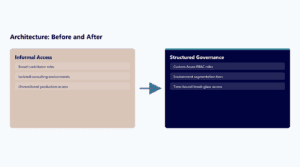
i3solutions structures its staff augmentation approach around senior-level Microsoft expertise embedded within client teams, rather than traditional body shop models that prioritize billable hours over outcomes. The augmentation model emphasizes senior practitioners who make complex architectural decisions without extensive oversight – reducing the management overhead that enterprise IT leaders face when working with traditional staffing firms.
The embedded team approach ensures knowledge transfer occurs naturally through daily collaboration rather than formal handoff processes. i3solutions practitioners work alongside internal developers, architects, and business analysts, sharing decision-making context and architectural rationale that enables internal teams to maintain solutions after engagement completion.
In one defense manufacturing environment, the embedded team supported a three-phase SharePoint modernization while simultaneously developing Power Platform solutions for quality management processes, maintaining compliance with ITAR requirements throughout both initiatives. A financial services partnership illustrates the value of long-term Microsoft expertise: the augmentation team supported Dynamics 365 implementations while modernizing legacy SharePoint environments and developing Power Platform solutions for regulatory reporting – all while maintaining the governance posture required for regulatory examination. Organizations working with Microsoft specialists report 40-60% improvement in code quality metrics and maintainability scores, reflecting the impact of experienced practitioners who understand enterprise Microsoft environments at an architectural level.
Frequently Asked Questions: Evaluating a Microsoft Staff Augmentation Partner
What operational risks arise when working with generalist staffing firms versus Microsoft specialists?
Generalist firms create significant rework cycles and integration failures because they lack understanding of Microsoft platform interdependencies and enterprise governance requirements. Organizations report 35-50% more rework with generalist teams who learn platform nuances during your project rather than bringing proven experience. Microsoft specialists reduce environment management overhead by 40-60% because they understand ALM pipelines, solution layering, and security boundary management from day one.
When is a Microsoft-focused staff augmentation partner the right fit?
Microsoft-focused augmentation works best when you have complex multi-platform initiatives spanning Power Platform, Dynamics 365, SharePoint, and Azure that require deep integration knowledge and regulatory compliance experience. It is particularly valuable in regulated industries where compliance frameworks shape technical decisions and require partners who understand both Microsoft technologies and industry-specific requirements. Avoid this approach if your needs are primarily around basic development tasks or single-platform implementations that do not require enterprise-grade governance.
What does the first 30 days look like when engaging a Microsoft-focused augmentation partner?
The initial period focuses on architecture review, governance alignment, and integration with existing enterprise processes rather than immediate development work. Partners conduct detailed assessments of current Microsoft environments, security frameworks, and compliance requirements to ensure their approach aligns with established enterprise standards. Microsoft specialists reduce time-to-productivity from 4 to 6 weeks to 1 to 2 weeks because they understand enterprise Microsoft patterns and can quickly identify integration points, security boundaries, and governance constraints.
What artifacts and deliverables prove value in Microsoft-focused staff augmentation?
Effective partners produce governance documentation, architectural decision records, and environment management playbooks that strengthen internal capabilities beyond immediate project outcomes. Deliverables include solution architecture diagrams mapping platform interdependencies, security boundary documentation satisfying compliance requirements, and ALM pipeline configurations supporting ongoing development. Microsoft specialists also provide knowledge transfer artifacts – governance frameworks, integration pattern libraries, and troubleshooting guides – that enable internal teams to maintain solutions after engagement completion.
How do you ensure continuity and knowledge transfer when augmentation team members rotate?
Microsoft-focused partners maintain 85-95% team continuity versus 60-70% for generalist firms because practitioners find enterprise Microsoft work intellectually engaging. When transitions occur, the embedded model ensures knowledge transfer happens through daily collaboration rather than formal handoff processes. Comprehensive documentation including solution architecture diagrams, integration pattern libraries, and troubleshooting guides enables internal teams to maintain solutions independently.
Can an embedded specialist build our application and mentor our in-house team at the same time?
Yes, when mentoring is scoped as a deliverable rather than a hope. i3solutions structures staff augmentation around senior-level Microsoft expertise embedded within client teams, and specialists typically embed in the client team within two to four weeks of engagement start. At the outset we agree who is mentored and on which builds. The specialist leads the first builds with your developers working alongside, and your people take on progressively more of the work on each build that follows. The split between delivery and teaching is agreed per engagement and revisited as your team grows in skill. Knowledge transfer is one of the four phases of our Expert Delivery Model, with explicit exit criteria, and the engagement does not replace your internal team or create vendor lock-in.
Partner evaluation goes faster in a live conversation: thirty minutes covers how we staff, govern, and hand over.