
Power Apps and ServiceNow are not competing for the same job, and an evaluation run as a feature bake-off usually picks the wrong one. ServiceNow is a system of record for service delivery: its own product page describes ITSM as a way to “Unify incident, change, problem, and service request management on one platform” and to “Consolidate incidents, changes, problems, and requests on one CMDB” (servicenow.com). Power Apps is an application layer over data an organization already owns, which Microsoft documents as giving licensed users the ability to “create and run apps, bots, flows, and custom websites across multiple data sources that extend beyond Microsoft 365” (Microsoft Learn). The deciding question is therefore not which product automates a workflow better. It is whether the process needs a service-management data model underneath it, or needs an application on top of a Microsoft 365 estate you already license. One disclosure before any of the detail: i3solutions is a Microsoft firm with no ServiceNow delivery record, so every ServiceNow statement below is a quotation from ServiceNow’s own published pages rather than a report of our experience.
We build on the Microsoft stack. i3solutions has built and supports hundreds of production Power Automate flows across its client base. We have no ServiceNow implementations, no ServiceNow migration record, and no benchmark comparing the two in production. Pretending otherwise would be the easiest way to make this page useless to the person reading it.
So the page is built asymmetrically on purpose. Anything asserted about ServiceNow is quoted from ServiceNow’s published product documentation and linked at the point of use, so you can check it against the vendor rather than against us. Anything asserted about Power Apps is either quoted from Microsoft Learn or drawn from delivery work we can stand behind. Where we have no evidence, the page says so and stops.
Every row above resolves to the same underlying split. ServiceNow arrives with a service-management data model and the processes that run on it, and the automation tooling is how you extend what is already there. Power Apps arrives with no process content at all, and the automation tooling is how you build what does not exist yet. That is why the comparison feels slippery when it is run feature by feature: one product is selling you a finished domain model, the other is selling you the means to express your own.
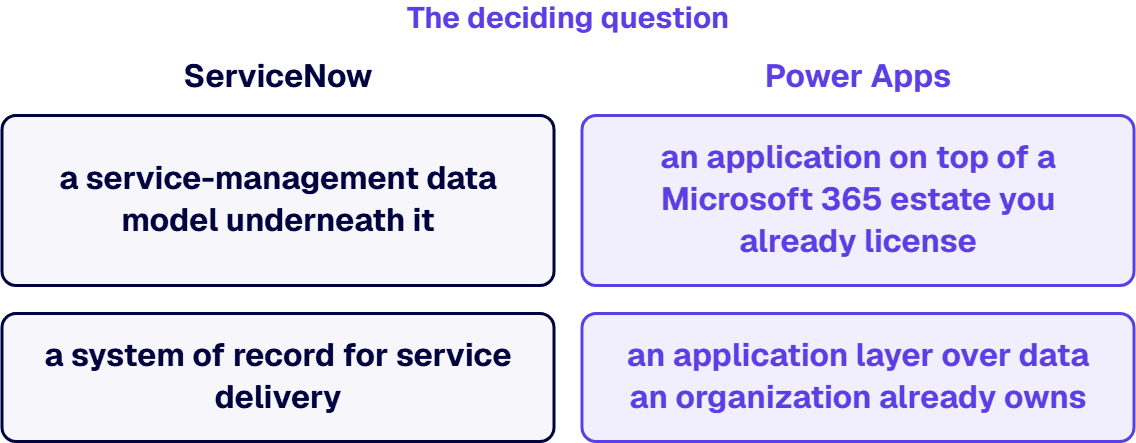
The practical consequence lands on the estate you already run. Microsoft’s position is that Power Apps and Power Automate for Microsoft 365 “enable users to extend and customize the Office experience: with these productivity apps, users can create applications and flows based on Microsoft 365 data” (Microsoft Learn). An organization whose approvals, documents, forms and identity already live in Microsoft 365 has a shorter distance to travel with Power Apps than the raw feature comparison suggests. An organization running a service desk against a CMDB has a much shorter distance with ServiceNow, for the same reason pointed the other way.
On the Microsoft side the primary control is the connector. Policy is written against what a maker is allowed to connect to, and Microsoft documents connectors as “strongly typed representations of RESTful application programming interfaces” that administrators then permit or block (Microsoft Learn). Managed environments layer tenant-scale administration on top of that, and neither control configures itself.
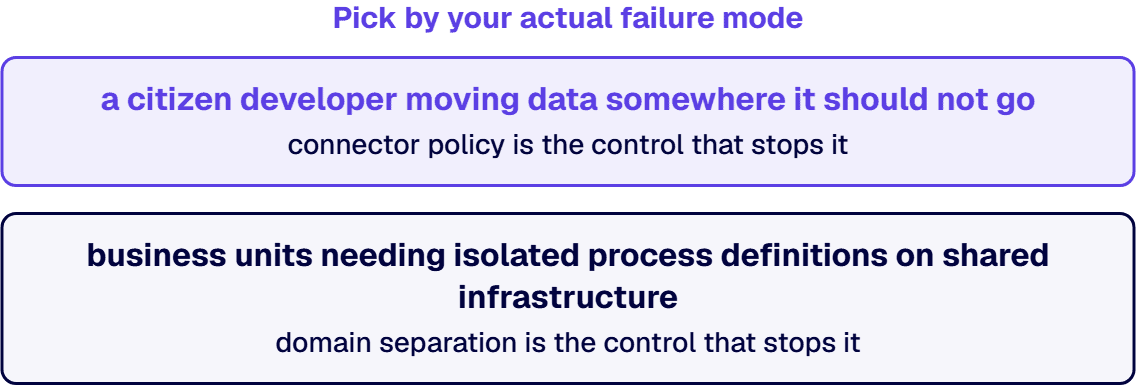
ServiceNow’s published control in the same space is structural rather than connector-based, separating flows and actions by domain for multitenant operation (servicenow.com). Pick by your actual failure mode rather than by the product. If the thing that worries you is a citizen developer moving data somewhere it should not go, connector policy is the control that stops it. If it is two business units needing isolated process definitions on shared infrastructure, domain separation is the control that stops it, and connector policy will not substitute.
Governance features and licence tier are not independent choices on the Microsoft side. The licensing-tier consequences are worked through in our comparison of Power Apps Premium and per-app licensing.
Power Apps development work ranges from $50,000 to $350,000 per project, depending on size, complexity and length. That band is our own attested figure and it is deliberately wide, because those three variables move it. We publish no midpoint and no typical figure, since a single number would mislead anyone whose project sits at either end.
i3solutions implements Power Platform licensing across Power Apps per-app and per-user plans, Power Automate per-flow and per-user plans, and the Microsoft 365 default entitlements where app complexity is low. What we will not do on this page is attach a dollar figure to any of those tiers. Microsoft owns those prices, they change, and a licensing number copied into a comparison page is stale the week after it is published. Read them from Microsoft, or ask Power Apps licensing consultants to model your specific user mix.
We quote no ServiceNow price at all. ServiceNow does not publish per-seat pricing on the product pages cited above, and inventing a figure to fill the other column of a comparison table is exactly the failure this page exists to avoid. Get that number from ServiceNow or from a ServiceNow partner.
One engagement is worth naming because it is the shape of problem this comparison usually starts from: an organization sitting on aging Microsoft forms infrastructure, deciding whether to modernize in place or move the whole process onto a different platform. Replacing 32 outdated InfoPath forms with Power Apps reduced maintenance demands by 40%, saving an estimated $150K-$200K annually in IT labor and support. The full engagement is written up in our Wisconsin National Guard InfoPath modernization case study.
Note what that outcome is and is not. It is evidence that a forms-and-approvals estate can be rebuilt on Power Apps with a measurable drop in maintenance load. It is not a comparison against ServiceNow, because no ServiceNow alternative was evaluated in that engagement and we would have no standing to score it if it had been.
Teams that reach question five and find both answers plausible usually have two separate problems wearing one name. The related decision between workflow-automation tooling specifically, rather than platforms, is worked through in our comparison of Power Automate and Workato, and the wider set of product-versus-product decisions sits in our service comparisons library.
The build side of that decision is what we do. Our Power Platform development services cover architecture, environment strategy, Dataverse design and the governance configuration that keeps a citizen-developer programme from turning into an unmanaged sprawl of apps. For staffing an existing programme rather than starting one, see hire Power Apps developers.
For a line-of-business workflow, frequently. For IT service management, you would be rebuilding process content that ServiceNow ships, since ServiceNow states that its ITSM product “aligns with ITIL standards to manage access and availability of services, fulfill service requests, and streamline services” (servicenow.com). Power Apps has no equivalent out of the box. Where the work is forms, approvals and departmental process rather than service management, replacement is realistic. Replacing 32 outdated InfoPath forms with Power Apps reduced maintenance demands by 40%, saving an estimated $150K-$200K annually in IT labor and support.
The platform that already holds the records your process runs on. ServiceNow positions Flow Designer to “Automate any process, from simple productivity to complex transformation, in a no-code environment” (servicenow.com), and Microsoft documents Power Apps and Power Automate as letting licensed users “create and run apps, bots, flows, and custom websites across multiple data sources that extend beyond Microsoft 365” (Microsoft Learn). Both statements are true and neither settles anything. What settles it is whether your process needs a service-management data model underneath it or an application on top of an estate you already license.
No. i3solutions is a Microsoft firm with no ServiceNow delivery record, no ServiceNow migration experience and no production benchmark comparing the two platforms. Every ServiceNow statement on this page is quoted from ServiceNow’s own published product pages and linked at the point of use so you can verify it against the vendor. If ServiceNow is the right answer for your process, go to a ServiceNow partner.
Power Apps development work ranges from $50,000 to $350,000 per project, depending on size, complexity and length. We publish no typical or midpoint figure, because the three variables in that sentence move a project from one end of the band to the other. Licensing is a separate line: i3solutions implements Power Platform licensing across Power Apps per-app and per-user plans, Power Automate per-flow and per-user plans, and the Microsoft 365 default entitlements where app complexity is low. Current per-seat prices should be read from Microsoft rather than from a comparison page.
They solve different risks. Microsoft’s primary control is the connector, and Microsoft states that “Power Platform admin center data policies allow administrators to control access to these connectors in various ways to help reduce risk in your organization” (Microsoft Learn), with managed environments described as “a suite of premium capabilities that allow admins to manage Power Platform at scale” (Microsoft Learn). ServiceNow’s published control in this area is structural, offering domain-separated flows that “Create flows and actions in multitenant environments, a feature ideal for MSPs and large enterprises” (servicenow.com). Connector policy addresses data leaving where it should not; domain separation addresses business units needing isolated process definitions.

US-Based | Est. 1997
© i3solutions. All rights reserved.
US-Based | Est. 1997
© i3solutions. All rights reserved.


