Microsoft Dataverse vs SQL Server: A Decision Guide for Enterprise Architects


By Scot Johnson, President & CEO at i3solutions
Choosing the appropriate storage solution is an important choice for any business, now more than ever, where everything is digital. IT leaders working within the Microsoft ecosystem often find themselves weighing two key options: Microsoft Dataverse vs SQL Server. While both platforms offer powerful data management capabilities, they serve different purposes and cater to different business needs.
For organizations building enterprise applications, analytics pipelines, or using Azure software development tools for cloud-based solutions, selecting the right data platform can have a huge impact on scalability, security, integration, and cost efficiency. A wrong choice could lead to performance issues, compliance challenges, or unexpected costs.
- Use Microsoft Dataverse when: you are building Power Platform applications (Power Apps, Power Automate, Dynamics 365) that need governed, managed data with built-in security, audit trails, and workflow automation — without managing database infrastructure.
- Use SQL Server when: you need maximum performance, complex T-SQL logic, high-volume transactional processing, advanced analytics, or a general-purpose database for custom application backends outside the Power Platform ecosystem.
- Use both together when: Dataverse handles your operational business data and Power Platform workflows, while SQL Server powers your analytics, reporting pipelines, or high-volume integrations requiring custom backend processing.
We will take a closer look at the key differences, strengths, and limitations of Microsoft Dataverse and SQL Server, helping your teams make better choices for your business. We’ll also explore common challenges, scalability considerations, security features, data governance capabilities, and cost implications that will help you pick the right tool for your business.
What Are Dataverse and SQL Server?
IT teams in the Microsoft ecosystem must choose between Microsoft Dataverse and SQL Server for data storage, management, and security. Understanding their differences helps IT leaders build, scale, and maintain applications effectively.
Microsoft Dataverse: A Modern, Cloud-Based Data Platform
Microsoft Dataverse is a cloud-native, fully managed data platform designed for business applications within Microsoft Power Platform, Dynamics 365, and Microsoft 365. It simplifies data storage, management, security, and integration, enabling low-code and no-code development.
With a structured approach using tables, relationships, and business logic, it helps teams build apps, automate workflows, and connect Microsoft services. While ideal for process automation and business applications, it’s unsuitable for complex transactional processing or advanced database tuning.
SQL Server: A Powerful, Traditional Relational Database
SQL Server is a strong, enterprise-grade Relational Database Management System (RDBMS) offering deep customization, high-performance processing, and advanced querying for transactional systems, analytics, and mission-critical applications. However, it requires active management, database expertise, and ongoing maintenance, especially for on-premises or self-hosted deployments.
The choice between Dataverse and SQL Server depends on business needs, technical expertise, and scalability requirements.
- Cloud-Native vs. Traditional RDBMS: Dataverse is fully managed and cloud-native, whereas SQL Server follows a traditional RDBMS approach that can be deployed on-premises, hybrid, or in the cloud.
- Low-Code vs. Deep Customization: Dataverse is designed for rapid development using Power Apps and low-code tools, whereas SQL Server allows advanced customization and database engineering for complex applications.
- Managed vs. Self-Hosted: Dataverse is a managed service, so Microsoft handles maintenance, updates, and security. While available in managed cloud versions (like Azure SQL), SQL Server is often self-hosted, requiring hands-on database administration.
Is Microsoft Dataverse a Relational Database?
This is one of the most common questions IT architects ask — and the answer is both yes and no.
Dataverse is built on top of Azure SQL Database at its core, which means it uses a relational engine under the hood. However, Dataverse is much more than a database. It is an abstraction layer that sits above Azure SQL and adds a full business application platform on top of it — including role-based security, business rules, workflow triggers, audit logging, and native Power Platform connectors — all managed by Microsoft.
The practical implication for IT leaders:
- Dataverse gives you relational data structure (tables, relationships, foreign keys) without requiring you to manage the underlying SQL infrastructure.
- Dataverse adds a business logic layer that SQL Server alone does not have — validation rules, calculated fields, and approval workflows are native to the platform.
- Dataverse’s SQL endpoint is read-only. If your application requires write-heavy direct SQL access, complex stored procedures, or custom T-SQL logic, SQL Server is the right tool.
- Dataverse is not designed for high-volume transactional workloads. Platform request limits and throttling can affect high-volume integrations in ways that a well-tuned SQL Server instance would not.
For IT Directors making the platform decision: Dataverse is the right choice when your data lives within the Power Platform ecosystem. SQL Server is the right choice when you need direct database control, maximum performance, or a general-purpose backend for custom applications.
Key Differences Between Dataverse vs SQL Server
| Dimension | Microsoft Dataverse | SQL Server |
|---|---|---|
| Deployment | Cloud-native, fully managed by Microsoft | On-premises, cloud (Azure SQL), or hybrid |
| Primary Use Case | Power Platform apps, Dynamics 365, workflow automation | Custom backends, analytics, high-performance transactional systems |
| Development Model | Low-code / no-code — Power Apps, Power Automate | Full SQL — stored procedures, triggers, custom T-SQL |
| Security Model | Role-based + field-level security, managed by Microsoft | Granular custom security — requires active DBA management |
| Audit Trail | Built-in — who changed what, when, at row and field level | Configurable — requires custom setup and monitoring |
| Performance Ceiling | Moderate — platform request limits apply at scale | High — indexing, partitioning, and tuning available |
| Infrastructure Overhead | Zero — Microsoft manages everything | Significant — patching, backups, scaling require DBA resources |
| Power Platform Integration | Native — no connectors needed | Via premium connector — additional configuration required |
| Pricing Model | Subscription-based — included in Power Apps per-user plan | Per-core or CAL licensing + infrastructure costs |
Deployment and Architecture
Microsoft Dataverse is a cloud-native, fully managed data platform that seamlessly integrates with Microsoft technologies. It eliminates the need for server provisioning, infrastructure maintenance, and database tuning, making deployment faster and with fewer issues. It is also ideal for low-code applications and business automation.
SQL Server, in contrast, is a traditional RDBMS supporting on-premises, cloud (Azure SQL), and hybrid deployments. It offers full control over database architecture, storage, and performance tuning, making it better suited for high-performance applications and complex configurations. However, this flexibility requires active management, security updates, and scaling strategies, whereas Dataverse prioritizes automation and ease of use.
Scalability and Performance
Dataverse is designed for business applications, automation, and cloud-based scalability, making it suitable for moderate data workloads and structured data relationships. However, it lacks deep performance tuning options and struggles with high-volume transactional processing.
SQL Server, on the other hand, excels in handling large datasets, complex queries, and high-performance workloads, thanks to its indexing, partitioning, and optimization capabilities. While Dataverse offers auto-scaling and managed resources, SQL Server requires careful resource planning but delivers superior performance for data-intensive applications.
Security and Compliance
Both platforms offer enterprise-grade security, but their approaches differ. Dataverse automates security management, enforcing role-based access, field-level security, and encryption within Microsoft’s compliance framework (GDPR, HIPAA, etc.), making it easier to manage. SQL Server provides more granular control over security policies, including database encryption, custom access controls, and network configurations, making it a better choice for organizations with strict internal compliance needs.
However, managing SQL Server security (especially in self-hosted or on-premises setups) requires continuous monitoring, patching, and policy enforcement, whereas Dataverse offloads these responsibilities to Microsoft.
Integration and Capabilities
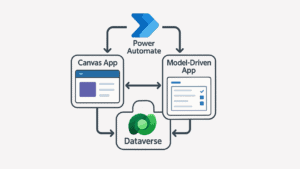
Dataverse is deeply integrated with Power Apps, Power Automate, Dynamics 365, and Microsoft 365, making it the best choice for organizations that rely on Microsoft’s ecosystem for low-code app development and workflow automation. It provides pre-built connectors and APIs for easy data exchange, simplifying integration without extensive coding.
SQL Server, on the other hand, is designed for custom applications, enterprise systems, and third-party integrations. It supports advanced ETL (Extract, Transform, Load) processes, complex queries, and business intelligence tools like Power BI, making it ideal for data warehouses, analytics, and large-scale enterprise applications. Unlike Dataverse, SQL Server requires manual integration efforts but offers greater flexibility for connecting to various systems.
Data Storage and Structure
Dataverse organizes data into tables with relationships, business rules, and security layers, making it ideal for structured business applications. It provides predefined schema options, role-based access, and simplified data modeling, reducing the need for database expertise. However, it is not designed to handle massive datasets or high-performance transactions.
SQL Server stores data in a highly optimized relational structure, supporting complex joins, indexing, partitioning, and transactional integrity. It excels in handling large datasets, high-speed queries, and complex relationships, making it a better fit for data-intensive applications, reporting, and analytics. Unlike Dataverse, SQL Server allows full control over schema design and performance optimization.
Customization and Development Flexibility
Dataverse is built for low-code and no-code development, enabling users to create applications and workflows with minimal programming. It limits deep customization but simplifies development by offering prebuilt tables, business logic, and tools to automate business processes within the Power Platform.
SQL Server provides complete flexibility, allowing developers to use custom queries, stored procedures, and database triggers to improve performance and personalize applications according to business needs. It supports multiple programming languages, extensive customization, and third-party integrations, making it the preferred choice for organizations that require complex data processing and solutions suited for their needs.
Cost Considerations
Dataverse follows a subscription-based pricing model, where costs are determined by storage, API requests, and the number of users. It reduces infrastructure and maintenance costs since Microsoft manages everything, but expenses can scale up based on data volume and usage.
SQL Server costs vary depending on the licensing model, deployment type, and infrastructure requirements. On-premises installations require hardware, licensing, and ongoing maintenance costs, while Azure SQL offers managed options with pay-as-you-go pricing. While SQL Server offers greater control and scalability, it often requires higher upfront investment and dedicated database management resources.
When to Choose Dataverse vs SQL Server: A Decision Framework for IT Leaders
For IT Directors and Enterprise Architects, the platform decision is rarely just technical — it is a governance, scalability, and risk management decision. Use this framework to evaluate which platform fits your project requirements across six key dimensions:
| Decision Dimension | Choose Dataverse | Choose SQL Server |
|---|---|---|
| Development Speed | Need rapid prototyping with low-code Power Apps or Power Automate | Need full developer control, stored procedures, or custom T-SQL logic |
| Governance & Compliance | Need built-in audit trails, role-based access, and GDPR/HIPAA compliance managed by Microsoft | Need granular custom security policies, network isolation, or on-premises data residency |
| Performance Volume | Moderate transactional volume — typical business process workflows | High-volume processing, complex joins, real-time analytics, or large dataset operations |
| Team Expertise | Business analysts and Power Platform makers can manage the platform | Dedicated DBA or data engineering team available to manage the database |
| Ecosystem Integration | Primary integration is within Microsoft 365, Teams, Dynamics 365, or Power Platform | Need to connect to ERP, PLM, CRM, or non-Microsoft line-of-business systems |
| Long-Term Cost | Lower infrastructure cost — included in Power Apps per-user subscription | Higher upfront — hardware or Azure SQL licensing + DBA resources — but predictable at scale |
If three or more dimensions point to the same platform, that is a strong signal. If they split evenly, the hybrid approach below is likely the right architecture.
Dataverse vs SQL Server for Regulated Industries: Governance and Audit Considerations
For organizations in aerospace & defense, financial services, healthcare, or government, the platform decision carries compliance weight that generic comparison articles never address. The question is not just “which platform performs better” — it is “which platform produces a defensible audit record and supports our regulatory posture.”
Where Dataverse wins in regulated environments:
- Built-in audit trail at row and field level: Every change to a Dataverse record is logged automatically — who changed it, when, and what the previous value was. This is native to the platform, not a feature you need to build or configure. For HIPAA, ITAR, and SOX environments, this is a significant compliance accelerator.
- Field-level security: Unlike SQL Server where access is controlled at the table or view level, Dataverse allows you to restrict specific columns from specific users — critical for HR records, defense project data, or financial information that should only be visible to certain roles.
- Microsoft-managed compliance certifications: Dataverse inherits Azure’s compliance certifications (FedRAMP, DoD IL2/IL4/IL5 via GCC High, HIPAA BAA, SOC 2). Your team does not need to certify the infrastructure independently.
- Entra ID integration: Security roles map directly to Azure Active Directory groups — simplifying governance and reducing the risk of orphaned permissions during employee transitions.
Where SQL Server is the stronger compliance choice:
- When data residency requirements mandate on-premises storage that cannot be cloud-hosted under any circumstances.
- When your organization requires custom encryption key management (Bring Your Own Key) not available in Dataverse’s managed model.
- When existing compliance tooling (SIEM, SOAR, custom audit systems) is already integrated with SQL Server and re-integration with Dataverse’s API-based audit export would create gaps.
Why a Hybrid Strategy with Dataverse and SQL Server Might Be the Best Fit
In many cases, businesses don’t have to choose between Dataverse or SQL Server — they can get the best of both. A hybrid strategy lets organizations take advantage of Dataverse’s low-code agility and seamless integration with Power Platform, while still leveraging SQL Server’s raw power, performance tuning, and enterprise-scale capabilities.
For example:
- Use Dataverse to manage data for internal applications built with Power Apps, supporting rapid development and automation.
- Use SQL Server to handle large-scale analytics, complex transactions, or external-facing systems that demand high performance and custom architecture.
- Sync data between the two platforms using Power Automate, Azure Data Factory, or custom APIs, enabling real-time reporting and unified workflows across business units.
This hybrid approach balances flexibility with control — making it easier to innovate without sacrificing performance, compliance, or scale.
Dataverse vs SQL Server: The Real Cost Comparison for Enterprise Teams
Licensing cost is often the first question in the decision conversation — but it is rarely the most important one. Total cost of ownership includes infrastructure, DBA resources, integration effort, and the cost of governance gaps discovered after go-live.
| Cost Dimension | Microsoft Dataverse | SQL Server |
|---|---|---|
| Licensing | Included in Power Apps per-user plan (~$20/user/month). Storage add-ons apply at scale. | Per-core or CAL licensing. Azure SQL Managed Instance adds infrastructure cost on top. |
| Infrastructure | Zero — Microsoft manages all infrastructure | On-prem: hardware + OS + SQL license. Cloud: Azure SQL compute + storage costs. |
| DBA / Admin Resources | Minimal — Power Platform admins manage environments | Dedicated DBA required for performance tuning, security patching, and backups |
| Development Cost | Lower — low-code tools reduce pro-developer dependency | Higher — requires senior SQL developers and database architects |
| Scale Economics | Costs rise with users and storage — can become expensive at very large scale | More predictable at large scale with proper sizing — but upfront investment is higher |
| Hidden Cost Risk | Platform request throttling at high volume — may require capacity add-ons | Governance and audit trail development if not planned from day one |
Avoid These Common Mistakes When Choosing Between Dataverse and SQL Server
Selecting the wrong data platform can lead to serious long-term challenges ranging from performance bottlenecks to unexpected costs or rework. Here are some of the most common mistakes organizations make when choosing between Dataverse and SQL Server:
- Choosing Based on Familiarity, Not Fit: Many teams default to SQL Server simply because they’ve used it before without evaluating whether their current needs could be better served by a low-code platform like Dataverse.
- Underestimating Future Scalability Needs: Some choose Dataverse for speed, only to realize later it can’t handle their growing volume of complex data processing. Planning for scale from the beginning is critical.
- Overengineering Simple Use Cases: Using SQL Server for basic internal apps or workflow automation can add unnecessary complexity and overhead when Dataverse would have delivered faster results with less effort.
- Ignoring Integration Requirements: Not all data platforms integrate equally well with existing tools and workflows. Failing to consider Power Platform, Dynamics 365, or external systems can create friction down the road.
- Overlooking Governance and Compliance: Both platforms support strong security, but the implementation differs. Choosing without aligning to your org’s compliance policies can create audit gaps or maintenance burdens.
How i3solutions Helps You Implement the Right Data Strategy
As a top Microsoft System Integrator, i3solutions has deep expertise in both Microsoft Dataverse and SQL Server, helping organizations choose the right platform based on their business needs, scalability goals, and technical requirements. Many businesses struggle with deciding between a low-code managed platform like Dataverse vs SQL server with a fully customizable RDBMS. Our team ensures that Dataverse implementations are optimized for security, scalability, and seamless integration with Power Platform so businesses can build applications efficiently without worrying about infrastructure or performance limitations.
For SQL Server, we design and implement high-performance, secure, and cost-efficient database architectures across on-premises, cloud, and hybrid environments. SQL Server offers full control over data management, performance tuning, and advanced analytics, but without proper expertise, businesses may face bottlenecks, security risks, and high maintenance costs. We also help organizations connect Dataverse and SQL Server for hybrid data strategies, ensuring smooth data flow, governance, and compliance. This is essential for businesses needing both low-code agility and enterprise-grade data control.
Choosing a partner with expertise in both Dataverse and SQL Server is crucial because many organizations operate in mixed environments that require smooth and easy data integration, performance optimization, and security best practices. With real-world experience supporting mid to large enterprises, i3solutions architects Microsoft-based data solutions that balance agility with enterprise-scale demands, helping businesses make the most of their data strategy while avoiding costly missteps.
Dataverse vs. SQL Server: The Right Choice, The Right Strategy with i3solutions
Dataverse vs SQL Server serve distinct yet complementary roles within the Microsoft ecosystem. Dataverse excels in low-code development, app integration, and rapid deployment, making it perfect for Power Apps and business automation. SQL Server, on the other hand, is built for high-performance processing, advanced queries, and deep customization, powering enterprise applications, analytics, and transactional workloads.
For many organizations, a hybrid approach offers the best of both worlds: Dataverse for application data and workflow automation and SQL Server for analytics, reporting, and complex data operations. But selecting the right platform isn’t just about features; it’s about aligning with your long-term IT strategy to ensure scalability, security, and cost efficiency as your business grows.
Not sure which platform is right for your environment — or whether a hybrid architecture is the right path? i3solutions helps IT teams at mid-to-large enterprises assess which data platform fits their Power Platform footprint, compliance requirements, and existing infrastructure — without committing to a full implementation before the architecture decision is validated. Contact us now, and let’s create a Digital Transformation roadmap that works for everyone, ensuring your data strategy is secure, scalable, and built for the future.
Frequently Asked Questions: Microsoft Dataverse vs SQL Server
What is the main difference between Microsoft Dataverse and SQL Server?
Dataverse is a fully managed, cloud-native data platform built for Power Platform applications (Power Apps, Power Automate, Dynamics 365) — with built-in security, audit trails, and workflow automation managed by Microsoft. SQL Server is a traditional relational database engine that gives teams full control over schema design, performance tuning, and custom T-SQL logic — best suited for high-performance transactional systems, analytics, and custom application backends.
Is Microsoft Dataverse a relational database?
Yes and no. Dataverse is built on top of Azure SQL Database at its core, so it uses a relational engine under the hood. However, it is much more than a database — it adds a full business application layer including security roles, business rules, workflow triggers, and audit logging on top of the relational engine. Unlike SQL Server, Dataverse’s SQL endpoint is read-only, meaning direct write access via T-SQL is not supported.
When should you use Dataverse instead of SQL Server?
Use Dataverse when you are building applications within the Microsoft Power Platform ecosystem — Power Apps, Power Automate, or Dynamics 365 — and need a managed data platform with built-in governance, field-level security, and workflow automation without managing database infrastructure. Dataverse is also the right choice when your team lacks dedicated DBA resources or when rapid deployment is a priority.
When should you use SQL Server instead of Dataverse?
Use SQL Server when you need maximum performance for high-volume transactional workloads, complex T-SQL stored procedures, advanced indexing and partitioning, or a general-purpose database backend for custom applications outside the Power Platform ecosystem. SQL Server is also the right choice when your organization requires on-premises data residency or custom encryption key management not available in Dataverse’s managed model.
Can Dataverse and SQL Server be used together?
Yes — and for many enterprise organizations, a hybrid architecture is the right approach. Dataverse handles operational business data within Power Platform applications, while SQL Server powers analytics pipelines, complex backend processing, or high-volume integrations. Power Automate or Azure Data Factory can sync data between the two platforms in real time.
What are the limitations of Microsoft Dataverse?
Dataverse has platform request limits that can throttle high-volume integrations, a read-only SQL endpoint that prevents direct write access via T-SQL, and licensing costs that scale with users and storage — potentially becoming expensive at very large scale. It is also not designed for complex stored procedures, advanced performance tuning, or workloads requiring custom database engine configuration.
Is Dataverse more expensive than SQL Server?
It depends on scale and context. Dataverse is included in the Power Apps per-user plan and eliminates infrastructure and DBA overhead, making it cost-effective for many organizations already in the Microsoft ecosystem. SQL Server requires licensing plus infrastructure costs plus DBA resources — but becomes more cost-predictable at very large scale. The real cost comparison should include total cost of ownership: infrastructure, administration, development, and compliance setup — not just licensing.
Does Dataverse support compliance with HIPAA, ITAR, or SOX?
Yes. Dataverse inherits Azure’s compliance certifications and supports HIPAA, GDPR, SOC 2, and FedRAMP. For defense and government workloads requiring higher data classification, GCC High environments offer DoD IL2, IL4, and IL5 compliance. Built-in audit trails, field-level security, and Entra ID integration make Dataverse a strong compliance accelerator for regulated industries — features that require custom development to replicate in SQL Server.
What is the difference between Dataverse and Azure SQL?
Azure SQL is Microsoft’s cloud-hosted relational database service — it is SQL Server in the cloud, giving teams full T-SQL access, schema control, and performance tuning. Dataverse is built on top of Azure SQL but adds an abstraction layer: business rules, security roles, Power Platform integration, and audit logging are all native to the platform. You interact with Dataverse through its API and Power Platform tools, not directly through SQL queries.
Leave a Comment