
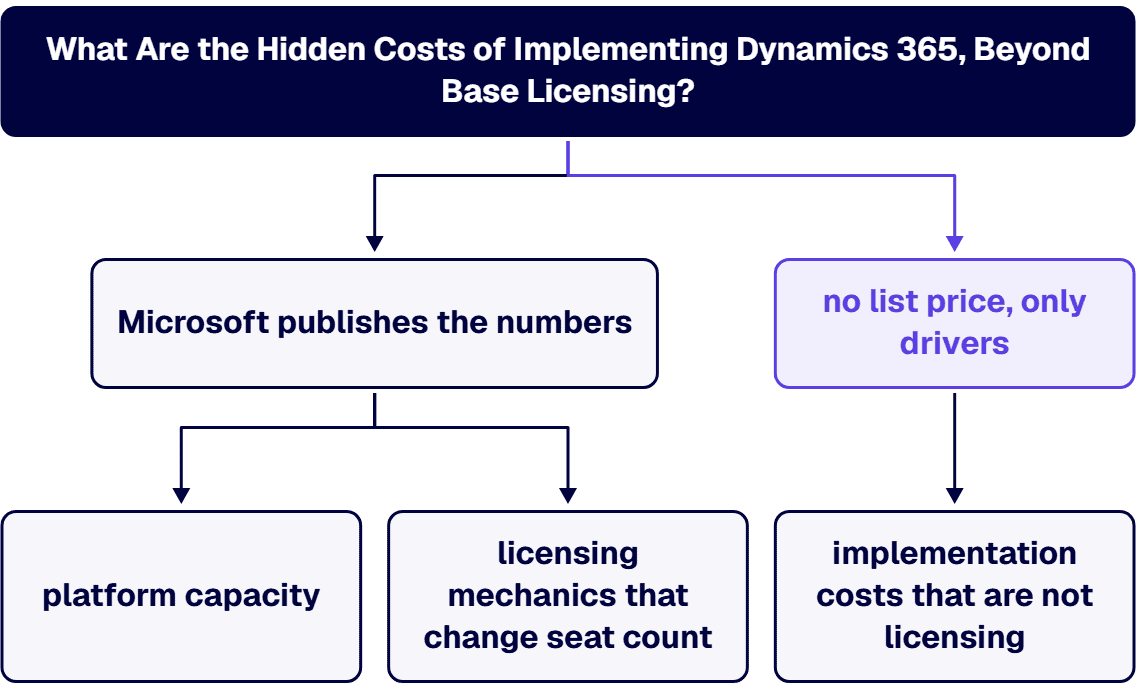
They fall into three groups, and only the first is genuinely hidden inside the licensing model. First, platform capacity: Dataverse and Operations database, file, and log storage are metered separately from seats, accrue at the tenant level, and are bought as add-ons priced per gigabyte per month, with Microsoft’s Power Platform Licensing Guide of August 2026 listing the Dataverse Database capacity add-on at “$40/month” per gigabyte and the Dataverse File capacity add-on at “$2/month” per gigabyte, a twenty to one gap. Second, licensing mechanics that change the seat count after the design is finished: base and attach pricing requires the most expensive application to be the base license, multiplexing rules mean an integration or a portal does not reduce the number of licenses you owe, and Team Members licenses accrue no storage entitlement at all. Third, the implementation and operating costs that are not licensing in the first place: integration surface, data migration and data condition, nonproduction environments beyond the ones your subscription includes, training, change management, and year-one support. Microsoft publishes the numbers for the first two groups. The third group has no list price, only drivers: interface count, data condition, environment count, how tightly the customization boundary is governed, and how much of year one is funded.
Twelve months after go-live the run rate is higher than the board approved, and the gap is rarely one dramatic line item. It is a storage meter nobody modeled, a sandbox that turned out to be an add-on rather than an inclusion, a group of read-only users who needed full licenses after all because of how the integration was built, and a change-management effort scoped as training that turned out to be a program. The budget that missed all four was built the way most are built: user count times a per-seat price copied off a public pricing page, plus an implementation estimate from a partner. None of the four is a surprise to Microsoft. All of them are written down in Microsoft’s own licensing documents, in tables a seat-count spreadsheet never reaches.
The rest of this page walks the three groups in that order, with Microsoft’s own documents cited at each number, and ends with what to require in a quote so the variance shows up in the estimate instead of in the renewal.
Dynamics 365 stores its data in Microsoft Dataverse, and in the case of the finance and operations applications, in a separate Operations database. Both are metered, both are entitled by license, and neither is the unlimited storage a subscription implies.
Microsoft’s Dataverse capacity documentation is direct about what the limit actually is: “There’s no technical limit on the size of a Dataverse environment. The limits mentioned on this page are entitlement limits based on product licenses you purchase.” In other words, nothing stops the data growing. What stops is your entitlement, and the consequences arrive as a purchase order.
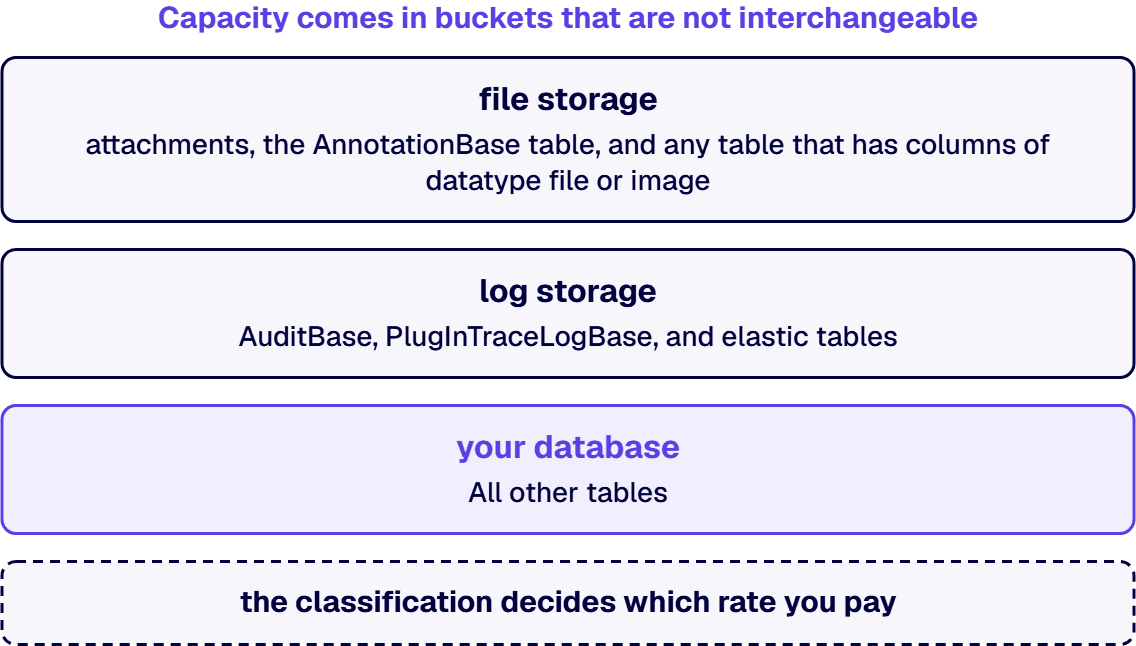
Capacity comes in three buckets that are not interchangeable, and the classification decides which rate you pay. The same capacity documentation lists them explicitly: attachments, the AnnotationBase table, and “Any custom or out-of-the-box table that has columns of datatype file or image (full size)” bill against file storage; AuditBase, PlugInTraceLogBase, and elastic tables bill against log storage; and “All other tables count for your database.”
Here is why that classification is a budget item rather than a technical footnote. The Power Platform Licensing Guide of August 2026 prices the capacity add-ons in one gigabyte increments: the Dataverse Database capacity add-on at “$40/month”, a Dataverse Database capacity Tier 2 add-on at “$30/month” with a minimum quantity of 1,000, the Dataverse File capacity add-on at “$2/month”, and the Dataverse Log capacity add-on at “$10/month”, all marked billed annually. Microsoft’s published database rate is twenty times its published file rate. A solution that writes documents into database rows rather than into file columns costs twenty times as much to store, and that decision gets made mid-build by a developer choosing a column type, not by anyone holding the budget.
Three further mechanics in the same documents move the number in ways a per-user model cannot see.
What happens when you go over is not a soft warning. Microsoft’s capacity documentation states that notifications fire when any of the three capacities “have less than 15% of capacity available after cross capacity-type borrowing is applied,” a further warning at less than 5%, and that a specific list of environment lifecycle operations becomes unavailable when the required capacity type is exhausted, including creating a new environment, copying an environment, restoring an environment, recovering an environment, and adding a Dataverse database to an environment. It also states the commercial position plainly: “If you use more than your documented entitlements or usage limits, you must buy more licenses,” and that if consumption exceeds entitlements “Microsoft might suspend use of the online service.” A capacity overage is therefore a program risk as well as a cost. It arrives at the moment a project wants to spin up a test environment, which is the moment before a go-live.
The second reliable surprise is the assumption that development, test, training, and staging environments are free because production is licensed. They are not, and Microsoft states exactly how many you get.
For the finance and operations applications, the Dynamics 365 Licensing Guide of August 2026 lists the included environments for Commerce, Finance, Project Operations, and Supply Chain Management as one AOS production environment and one Tier 2 sandbox per tenant. Anything beyond that is an Operations sandbox add-on, and the guide enumerates the tiers: Tier 2 for “User acceptance, integration testing, and training,” Tier 3 for “Large scale user acceptance testing, integration testing, and training,” and Tiers 4 and 5 for performance, load, and staging work, each carrying 10 GB of included database capacity per environment, with Tiers 4 and 5 accruing an additional 128 MB of Operations database and file capacity for each full user license.
A regulated program that needs a validated test environment, a training environment, an integration environment, and a performance environment is therefore buying three add-ons before anyone writes code. That is a real number and it is knowable at scoping time, but it is absent from any budget built off the per-user pricing page, because that page prices seats and says nothing about environments.
On the Business Central side the same Dynamics 365 Licensing Guide records that “Additional environments are available in Business Central with one license providing 1 production environment, 3 sandbox environments and 4GB of Business Central Database Capacity,” and its capacity table shows Business Central Essentials and Premium including 80 GB of database capacity per tenant with 3 GB and 5 GB accruing per user license respectively.
For the Dataverse-based applications, Microsoft’s environments documentation describes production environments as creatable by an administrator or anyone with a Power Apps license “provided there’s 1 GB available database capacity,” and sandbox environments as “nonproduction environments, which offer features like copy and reset” used “for development and testing, separate from production.” The capacity documentation then says which of them consume your entitlement: “Default, production, and sandbox environments count for consumption. Trial, preview, support, and developer environments don’t count.” It also answers the question capacity models get wrong: “Yes. All environments consume 1 GB, regardless of whether they have an associated database.”
Environment strategy and capacity strategy are therefore one decision, not two. Every additional environment a governance model requires draws on the same tenant pool that production draws on, and an estate that grows environments faster than entitlement will hit the lifecycle restrictions above at the worst possible time.
Seat cost is not hidden. What is hidden is that the design decisions made during implementation can move the seat count, and they move it upward.
Base and attach is a rule about ordering, not a discount. The Dynamics 365 Licensing Guide states that “When purchasing multiple Dynamics 365 applications for a single user, the first application license must be the highest priced license (a.k.a. base license) for the named user. Every full-access user must have a base license.” Attach licenses “may only be assigned to users with an appropriate qualifying base license,” and the guide is explicit that “Attach licenses do not include additional platform entitlements. They are licensed to access the platform entitlements included with the assigned base license.” So a multi-application user population priced off attach rates without a correctly assigned base license is priced off a rate that cannot be bought, and the capacity entitlements a spreadsheet may have counted per license do not accrue from attach licenses at all.
Multiplexing means an integration does not reduce what you owe. It is expensive because the decision that triggers it is an architecture decision, and the licensing consequence lands after the architecture is built. The same guide defines multiplexing as “your use of hardware or software to pool connections, reroute information, or reduce the number of devices or users that directly access Dynamics 365,” and then states the rule in capitals of its own: “Multiplexing does NOT reduce the required number of licenses of any type. Any user or device that accesses Dynamics 365, whether directly or indirectly, must be properly licensed or otherwise granted access.” It adds that “The number of tiers of hardware or software between Dynamics 365 and the ultimate user or devices does not affect the number of licenses required.” A middleware layer, a service account, a reporting portal, or a custom front end built to keep a large user population off Dynamics 365 licenses does not achieve that outcome under Microsoft’s terms.
Power Apps front ends have a boundary. The guide states that Power Apps users with a Power Apps license “may use custom applications to access (that is, create, read, update or delete) any Dynamics 365 non-restricted table in the Dataverse,” but that “Power Apps users and devices that need to create, update, or delete data in Dynamics 365 restricted tables must be properly licensed for Dynamics 365.” Whether a given design lands inside or outside that boundary is a question to settle at design time, in writing, because settling it after go-live means either a rebuild or a licensing true-up.
External users are defined narrowly. The Dynamics 365 Licensing Guide defines external users as those who are not employees, and not “contractors or agents that typically work for Customer or its Affiliates for more than 30 hours on average per week,” and not contractors or agents who typically work onsite each working day. It then states that the graphical interfaces for Business Central, Sales, Customer Service, Field Service and Project Operations “may not be accessed by external users,” and points to Power Pages as the licensed route for external access. An extended-enterprise scenario planned around unlicensed external access needs that route priced, not assumed.
Team Members licenses accrue no storage. Microsoft’s capacity documentation notes that “the Team Member license doesn’t give any per-user database, file, or log entitlement.” A deployment that controls seat cost by pushing a large population onto Team Members licenses is also, by the same move, choosing not to accrue the storage that population’s activity generates. The full comparison of what a Team Members license does and does not permit is a separate question with a long answer, and our Dynamics 365 licensing cost guide works through the per-user rates, the base and attach mechanics, and which license each role actually needs.
Three further meters sit outside both the seat count and the storage pool, and each has its own overage behavior. The Dynamics 365 Licensing Guide covers all three in its capacity section.
All of the figures quoted on this page are Microsoft’s published list rates. The Power Platform Licensing Guide states of its own tables that “All pricing is USD ERP and subject to change,” and the Dynamics 365 Licensing Guide carries the same caveat, directing readers to Microsoft’s pricing pages “for actual pricing.” What your organization actually pays comes off an Enterprise Agreement or a partner price sheet, and those are not public. Anyone quoting you a specific figure sourced from a public page is quoting a list rate. Ask which price sheet it came from and what date it carries.
The largest number in year one is usually not a Microsoft invoice. It is the implementation, and it has no list price because it is priced against your systems rather than against a SKU. We do not publish a range for it here, because a range quoted before discovery is a guess dressed as a number. What we can state is which drivers actually move it, in the order we see them move it.
For the implementation number itself, broken down by module and scenario, our Dynamics 365 implementation cost guide covers enterprise scale, and there are dedicated guides for Business Central and for Finance and Supply Chain Management. What a partner charges to run it, and how to evaluate one, is in our Dynamics 365 implementation partner cost guide.
If the deployment sits in a government cloud or under a compliance framework, several of the costs above change shape rather than simply scaling.
Auditing moves from optional to mandatory, which turns the log meter from a rounding error into a standing line item. Environment counts rise, because validated release processes need separated environments and each one draws on the same tenant pool. Documentation becomes a deliverable rather than a byproduct, because the control evidence has to survive an audit rather than a steering committee. And personnel constraints on who may touch the data change the delivery model itself. The compliance deltas specific to a defense program, including which applications are available in GCC High and what CMMC and DFARS scaffolding actually costs, are worked through in our Dynamics 365 implementation cost guide for defense contractors.
i3solutions is a Microsoft Solutions Partner. We approach Dynamics 365 as engineers rather than as a license reseller: the license and capacity mix falls out of the role and integration design, not the other way around. All i3solutions Dynamics 365 developers and consultants are U.S.-based. i3solutions has completed more than 20 Dynamics 365 integration engagements. i3solutions has delivered Dynamics 365 integration engagements for regulated enterprises across healthcare, defense manufacturing, and financial services. i3solutions recently stood up two brand-new Dynamics 365 instances. That is the situation where the capacity and environment decisions above are still open and cheapest to get right.
The integration side is where most of the licensing surprises originate, so it is worth being specific about the mechanisms rather than the adjectives. i3solutions builds Dynamics 365 integrations using named Microsoft mechanisms including Dataverse, dual write, virtual tables, Azure Logic Apps, Azure Service Bus, and Power Automate connectors. Each of those has a different licensing and capacity consequence, and choosing between them on architectural grounds alone is how a program ends up with a multiplexing problem it did not price.
On scope, we state the boundary rather than leaving it to be discovered. An i3solutions engagement does not produce managed-service ownership, a replacement for the internal team, open-ended scope expansion, or vendor lock-in. If you need our engineers to work alongside an existing partner or an in-house team rather than replace either, you can hire Dynamics 365 developers from us directly, and our broader Dynamics 365 development services cover the build and integration work itself.
Storage capacity, followed closely by nonproduction environments. Dataverse and Operations storage are metered separately from seats and accrue at the tenant level, and the published Dataverse Database capacity add-on rate of $40 per gigabyte per month in Microsoft’s Power Platform Licensing Guide of August 2026 is twenty times its published file rate of $2 per gigabyte per month. A design that stores documents as database rows rather than in file columns therefore costs twenty times as much to hold. On environments, Microsoft’s Dynamics 365 Licensing Guide of August 2026 lists one production environment and one Tier 2 sandbox per tenant as included for Commerce, Finance, Project Operations, and Supply Chain Management; every additional test, training, or performance environment is a purchased add-on.
No. Microsoft’s Dynamics 365 Licensing Guide defines multiplexing as using hardware or software to pool connections or reduce the number of users who directly access Dynamics 365, and states that “Multiplexing does NOT reduce the required number of licenses of any type,” adding that the number of tiers of hardware or software between Dynamics 365 and the ultimate user does not affect the number of licenses required. Any user or device that accesses Dynamics 365 data, directly or indirectly, must be licensed or otherwise granted access under the terms. This is worth settling in writing at design time, because discovering it after go-live means either a rebuild or a licensing true-up.
Microsoft’s Dataverse capacity documentation states that notifications are triggered when any of the three capacity types has less than 15% available after cross capacity-type borrowing is applied, with a further warning below 5%. Environment lifecycle operations become unavailable when the required capacity type is exhausted, including creating a new environment, copying an environment, restoring an environment, recovering an environment, and adding a Dataverse database to an environment. The same documentation states that if you use more than your documented entitlements you must buy more licenses, and that Microsoft might suspend use of the online service if consumption exceeds entitlements. The practical risk is timing: the restriction usually bites when a project wants a new test environment, which tends to be shortly before a go-live.
They are separate work with separate owners. Training teaches people the new screens. Change management renegotiates who owns which process, which approvals move, and which reports the business will trust, and in a regulated environment it also produces the documentation an auditor expects to see. A budget that funds the build but not the first year of adoption work pays for a system that works and not for the work of getting people onto it. We do not publish a range for either, because both scale with the size of the affected user population and the number of processes changing, and a range quoted before that is known is a guess.
Because the variables that dominate the number are not the ones the estimates hold constant. User count scales licensing linearly and moves implementation cost far less than buyers expect. What moves it is module footprint, the number and complexity of integrations, the condition of the data being migrated, how tightly the customization boundary is governed, and whether the deployment carries regulated or government cloud requirements. Two organizations with identical headcount can differ by a multiple on all five. That is also why any figure quoted before someone has looked at your integration inventory and your data should be treated as a starting hypothesis rather than an estimate.

US-Based | Est. 1997
© i3solutions. All rights reserved.
US-Based | Est. 1997
© i3solutions. All rights reserved.


