
By Michael Branson
As of September 2026, Microsoft’s timeline for SharePoint Online has two dates: beginning March 1, 2027, no tenant can create new classic publishing sites or activate the classic publishing feature, and beginning October 1, 2028, classic user-created pages in existing tenants become read-only and the ability to add or update custom scripts is disabled by default. Tenants created on or after March 1, 2027 get the page and script restrictions from that date, and Microsoft Learn says “These changes don’t delete or modify existing classic page content.” and “Affected pages remain available for viewing but become read-only when the applicable phase takes effect.” Microsoft states that the classic user-created page changes apply across its environments including Microsoft 365 Government (GCC, GCC High, and DoD), and its first step is an inventory with Microsoft Purview Audit and the Microsoft 365 Assessment Tool.
When a message-center notice or a forwarded note says Microsoft is turning off classic SharePoint, the first two questions in the room are what in the tenant is classic and which date is ours. This guide reads Microsoft Learn as served on September 24, 2026, sorts the change by the tenant it binds, and turns Microsoft’s own assessment steps into an inventory and a first modernization wave you can fund against the right date. Microsoft’s main page on the change, Upcoming changes to classic publishing sites, classic pages, and custom scripting in SharePoint Online, was last updated August 28, 2026.
If your planning assumes one deadline for everything, split it first, because Microsoft binds different changes to different tenants. Microsoft’s page says “The change rollout begins on March 1, 2027, and continues on October 1, 2028.” Under its heading for changes to all tenants, it lists “Creation of new classic publishing sites will be disabled for both site collections and subsites.”, “Activation of classic publishing feature will be disabled for both site collections and subsites.” and “The AllowClassicPublishingSiteCreation tenant setting will be enforced as False and cannot be changed.” Under its heading “Additional changes for new tenants created on or after March 1, 2027”, Microsoft lists “Users can no longer create new classic pages.”, “The ability to add or update custom scripts will be disabled by default.” and “The DenyAddAndCustomizePages site setting will be enforced as True and cannot be changed.” For the second date, the page says “The Phase 1 page and scripting restrictions will extend to all remaining existing tenants:” and lists “Classic user-created pages become read-only. Users can no longer create or edit classic pages.”, the same custom script line and the same DenyAddAndCustomizePages line.
The planning rule for an existing tenant follows from that table: its publishing-site deadline is March 1, 2027, and its page and custom script deadline is October 1, 2028. A summary that says custom scripts are switched off for everyone on March 1, 2027 is not what Microsoft’s page says; that date carries the script change only for tenants created on or after it.
When the inventory starts, the first dispute is usually over which pages count, so settle it from Microsoft’s list rather than from the look of a page. Microsoft’s page says the read-only change applies to these classic user-created page types:
It then says “Other classic experiences, including list and library views and list form pages, aren’t in the current scope. However, custom scripts embedded in those experiences are subject to the changes to custom script creation and updates.” For publishing sites, its FAQ says that beginning March 1, 2027 you can’t create site collections or subsites from the publishing-related templates it lists: Publishing Portal Site, Publishing Site, Publishing Site Blank, Enterprise Wiki, Enterprise Search Center, Site Directory, News Home Site, Product Catalog, Report Center and Topic Area Template. The same answer says “Other classic templates aren’t affected by this change.”
Nothing is deleted on either date. Microsoft Learn says “These changes don’t delete or modify existing classic page content.” The governance and information-architecture decision that sits above page modernization, including whether to modernize in place or with a migration, is covered in Governance-First SharePoint Modernization for Regulated Enterprises; this guide stays with the dated change.
If script-enabled sites have been treated as a design convenience, read what Microsoft says a site owner can do with them. Microsoft’s Allow or prevent custom script page says “If you allow custom script, all users who have Add and Customize Pages permission to a site or page can add any script they want.” Its Security considerations of allowing custom script page says “When you allow users to run custom script, you can no longer enforce governance, scope the capabilities of inserted code, block specific parts of code, or block all custom code that has been deployed.” It adds that if you’ve allowed custom script and later change the setting, “you can’t block the execution of script that has already been inserted.”
Today, allowing script is already temporary. Microsoft’s Allow or prevent custom script page says “Changes to allow custom scripts are overridden to Not allowed within 24 hours.” It also describes what breaks when script is blocked: for SharePoint Framework web parts that have the requiresCustomScript value set to true, “Every instance of a web part that was added to a page when custom scripts were previously allowed no longer surfaces in those pages.”, and its table of affected features lists, for publishing sites, “Can’t create or edit master pages and page layouts”.
Microsoft’s direction is stated plainly on the security page: “Instead of allowing custom script, we recommend using the SharePoint Framework.” A tenant that wants the block before the dates can use the setting Microsoft’s Baseline security mode settings page describes: “This setting permanently removes the ability to add new custom scripts in OneDrive and SharePoint sites.”
If a rebuild is funded before anyone has counted, the estimate is a guess, and Microsoft’s own advice is to measure first: “Start assessing your environment and planning modernization now.” Microsoft’s deprecation page names two instruments. It says “Use the Microsoft Purview Audit SharePoint Classic Activities category and the ClassicPageCreated, ClassicPageEdited, and ClassicPageViewed events to understand current usage.” and “Run the Microsoft 365 Assessment Tool to identify classic pages, Web Parts, customization patterns, and modernization feasibility.”
Two conditions on the assessment matter before it is run. Microsoft’s Requirements for the classic pages assessment page says “The classic pages component assesses SharePoint Online. It doesn’t assess SharePoint Server or another on-premises source.” The same page tells you to configure the tool’s settings for tenants in GCC High and DoD, among other environments it lists.
For custom script, the SharePoint admin center already holds a list. Microsoft’s custom script page says “The Custom script allowed sites view is also available to provide easy access to all sites where custom script is enabled” and warns “These views show which sites are configured to allow custom scripts, even if they don’t actually use custom scripts.” A site on that list is a site to check, not a confirmed dependency.
Turn the results into a register before any estimate:
If the register comes back empty, Microsoft’s page says “If your assessment finds no classic publishing sites, classic user-created pages, or affected custom scripts, no action is required for these changes.”
When the register is long, the failure mode is a program that converts everything at the same priority, and Microsoft’s advice points the other way. Its deprecation page says “Start with frequently edited, high-traffic, or business-critical pages.” and, in its FAQ, “Modernize pages that must remain editable after the applicable date.” Microsoft’s Modernize your classic SharePoint sites page says “we recommend that you transform only the pages that are frequently used.”
Decide per page class, in three ways:
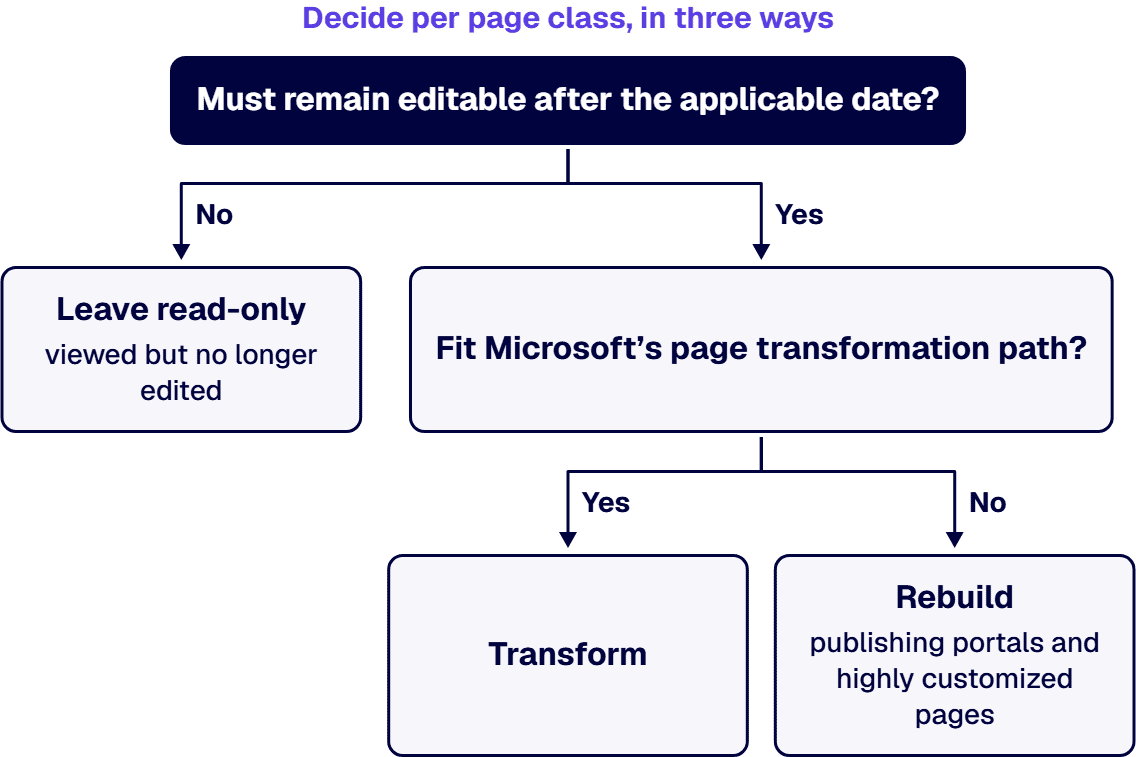
The transformation tooling carries conditions a regulated change process has to weigh. Microsoft’s Transform classic SharePoint pages to modern pages page says “Publishing pages, Blog pages, pages outside SitePages, home pages, and SharePoint Server sources require separate advanced procedures and aren’t accepted by the page wave scripts.” and “The page transformation engine is part of the open-source PnP Framework and doesn’t have a Microsoft support SLA.” Microsoft’s deprecation page points to PnP PowerShell for deterministic page transformation and to the open-source SharePoint Page Migration Agent (preview) for complex pages, and says in the same passage “Preview and community tools might not fully automate complex scenarios and don’t have a Microsoft support SLA.”
Plan to replace script-based customizations rather than re-allow them: Microsoft recommends the SharePoint Framework, and a publishing site with script blocked cannot create or edit master pages and page layouts, according to Microsoft’s custom script page. Validate each wave before the next one starts, the way Microsoft’s transformation page validates each generated page before a larger wave.
If your tenant sits in a government cloud, check Microsoft’s cloud line before assuming a separate clock. Microsoft’s deprecation page says “The changes to classic user-created pages apply across all Microsoft 365 environments, including:” and its list includes “Microsoft 365 Government (GCC, GCC High, and DoD)”. That sentence names the classic user-created page change; for the publishing-site and custom script changes in a government cloud, confirm the timing with Microsoft rather than infer it. The assessment itself is configured for GCC High and DoD tenants, according to Microsoft’s requirements page.
For a regulated tenant, the pages to inventory first are the ones that must stay editable after the date: policy libraries, regulated notices, controlled procedures and records-facing pages. Which of them your security, records and compliance owners require to remain editable is their determination; the inventory gives them the list to decide on.
If classic content still lives on SharePoint Server, Microsoft’s deprecation page says “Beginning March 1, 2027, classic publishing sites can’t be migrated as-is to a newly created classic publishing site in SharePoint Online because creation of those sites is disabled.” and “Script-based page elements and other customizations might not be preserved.”, and its assessment requirements page says the classic pages component doesn’t assess SharePoint Server. Leaving SharePoint Server is its own decision, covered in Our SharePoint Server Is Reaching End of Life: How Do We Migrate Off On-Premises to Microsoft 365?.
If the assessment finds nothing in scope, the work is smaller than this guide suggests, and Microsoft says no action is required for these changes. Other cases where a full program is the wrong answer:
When you bring in help for the inventory or the waves, hold every proposal to the same criteria:
When the inventory has to be read and the waves planned before either date, i3solutions scopes it as a project: the Purview Audit and Assessment Tool read, a per-page date and decision map, communication-site rebuilds for publishing portals, page transformation waves, SharePoint Framework replacements for script-based customizations, validation, and handover. Embedded specialists can join your own team where it needs them during the waves.
All i3solutions SharePoint developers, architects, and consultants are 100% U.S.-based. An i3solutions SharePoint consulting engagement produces named deliverables: a governance documentation package, architecture artifacts, and runbooks.
Experience sits behind the method. i3solutions has been a Microsoft Partner with 30 years of enterprise technology delivery experience and has delivered 1,500+ Microsoft engagements across aerospace and defense, financial services, and health sciences. An i3solutions engagement does not produce managed-service ownership, a replacement for the internal team, open-ended scope expansion, or vendor lock-in. The wider service line is described on Enterprise SharePoint Development & Integration Services Built for Scale and Governance.
No. Microsoft Learn says “These changes don’t delete or modify existing classic page content.” and “Affected pages remain available for viewing but become read-only when the applicable phase takes effect.” It also says “For all remaining existing tenants, classic user-created pages that haven’t been modernized become read-only beginning October 1, 2028.”
Not for an existing tenant on that date, and what Microsoft lists is a change to adding or updating custom scripts. Microsoft Learn lists “The ability to add or update custom scripts will be disabled by default.” under its additional changes for new tenants created on or after March 1, 2027, and the same line again among the changes that extend to all remaining existing tenants beginning October 1, 2028.
Yes, for classic user-created pages. Microsoft Learn says “The changes to classic user-created pages apply across all Microsoft 365 environments, including:” and its list includes “Microsoft 365 Government (GCC, GCC High, and DoD)”. That sentence names the page change; confirm the timing of the publishing-site and custom script changes in a government cloud with Microsoft.
No. Microsoft Learn says “Creation of new classic publishing sites will be disabled for both site collections and subsites.” and “The AllowClassicPublishingSiteCreation tenant setting will be enforced as False and cannot be changed.” It also says “Other classic templates aren’t affected by this change.”
Start in the SharePoint admin center. Microsoft Learn says “The Custom script allowed sites view is also available to provide easy access to all sites where custom script is enabled” and “These views show which sites are configured to allow custom scripts, even if they don’t actually use custom scripts.” It also says “Run the Microsoft 365 Assessment Tool to identify classic pages, Web Parts, customization patterns, and modernization feasibility.”

US-Based Microsoft System Integrator | Est. 1997
© i3solutions. All rights reserved.
US-Based Microsoft System Integrator | Est. 1997
© i3solutions. All rights reserved.


