
Michael Branson
As of October 2026, Microsoft says that starting February 2027 a Power Apps app will not open for a user who lacks an appropriate license, and according to Microsoft Learn’s Power Apps licensing FAQs the rule reaches apps used in managed environments, model-driven apps and custom apps used outside a Dynamics 365 environment context, not managed environments alone. Citizen developers have built Power Apps across the tenant that IT now has to license, and Microsoft’s enforcement date turns that cleanup into a deadline. According to Microsoft Learn, the licenses that satisfy it include Power Apps Premium, Power Apps per app plans and the Power Apps per app pay-as-you-go meter, and in a managed environment a Power Automate Premium license or a Dynamics 365 Enterprise license that gives premium Power Apps usage rights also qualifies. According to Microsoft’s New pricing for Power Apps Premium announcement, Power Apps Premium moves from $20 to $22 a user a month, and the 2,000-seat minimum plan from $12 to $14, for new purchases, renewals and co-terminations with a term beginning on or after January 1, 2027, a month before enforcement, while existing subscriptions keep their current price through the end of their subscription term.
[DIAGRAM: SIGNED-DIAGRAM-73199-R2-C121-R87]
The first administrator notice about Power Apps licensing arrived in the Microsoft 365 Message center months ago, and it is easy to file as next year’s problem. According to Microsoft Learn’s Licensing requirements for managed environments, “Administrator notifications began in March 2026, ahead of the June 2026 end user notifications, and continue ahead of the February 2027 change.” What moves it onto this quarter’s plan is the order of two dates: the Premium list price changes on January 1, 2027, per Microsoft’s pricing announcement, and enforcement follows in February 2027, so a license whose term begins on or after January 1, 2027 is bought at the new list price. This guide sets out what changes, which users the rule reaches, which licenses satisfy it, how to find the users who are short, what the price change does to the decision, and what to do with an app that cannot justify a license.
If a user without a qualifying license opens an app in a managed environment after the date, the failure is not a warning banner; the app does not open. Microsoft Learn’s Licensing requirements for managed environments states: “Starting February 2027, an appropriate license is strictly required for a user to open an app in a managed environment.” The same page adds: “If an appropriate license isn’t assigned to the user, the app doesn’t open” and says users are “blocked from opening apps in the managed environment after receiving the final notification stage.”
Licensing an app estate is one decision inside Power Apps development work, and the data platform under each app is weighed in the Dataverse versus SQL Server comparison.
The notices escalate before that point. According to Microsoft Learn, the last in-app state reads: “Action required: This app requires a valid Power Apps license. Request a license from your admin for continued access.” Nothing is deleted when access stops. Microsoft Learn states: “Apps aren’t removed from the environment, and access resumes after an appropriate license is detected.”
Microsoft does not present this as a new rule. Its Power Apps licensing FAQs say: “This requirement isn’t new.” What changes in February 2027 is that the requirement is enforced where it was previously applied leniently, and Microsoft’s own advice on the managed environments licensing page is direct: “Reviewing your users and assigning licenses ahead of February 2027 is the most reliable way to keep your users from losing access to their apps.”
An inventory that starts and stops at the list of managed environments will miss users, because Microsoft’s own FAQ names more than one trigger. According to Microsoft Learn’s Power Apps licensing FAQs: “Starting February 2027, areas where the licensing requirement was applied leniently, including but not limited to scenarios such as apps used in managed environments, use of model-driven apps, and use of custom apps used outside a Dynamics 365 environment context, require users to have an appropriate premium license.” The same FAQ adds: “Users who don’t have one can’t open and use the app until an appropriate license is assigned.”
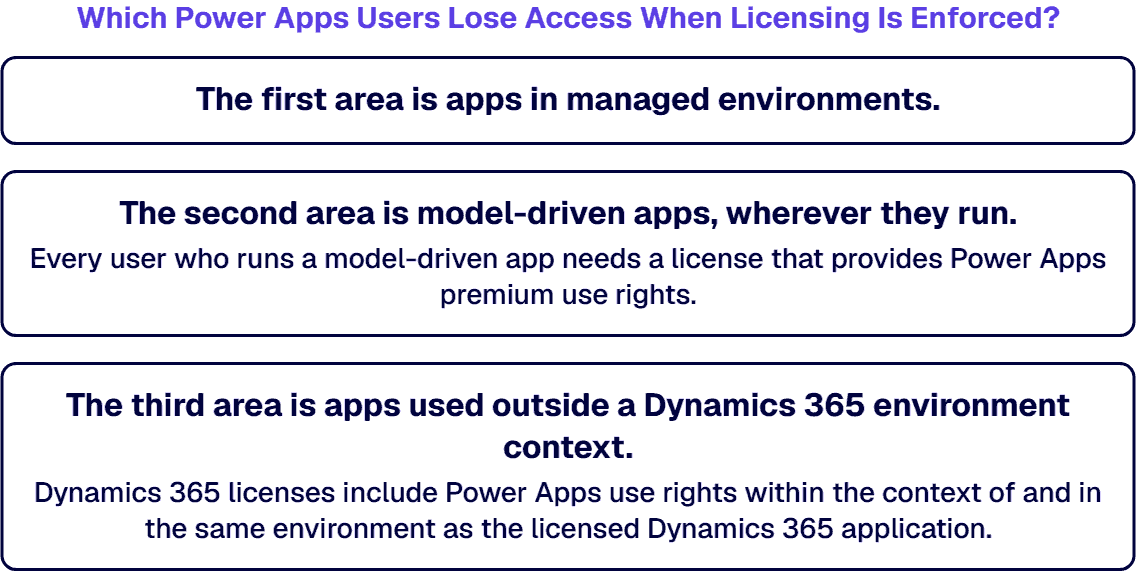
The Power Apps licensing FAQs describe each of the three areas separately:
The planning rule this guide adds, which is its own and not Microsoft’s, is to inventory all three areas as separate lists and to treat a user who appears on more than one as one licensing decision, not two. The FAQ’s own words, “including but not limited to”, mean the three areas are the ones Microsoft names, not a promise that nothing else is covered.
If a user already holds the right license, they need nothing new, and the avoidable cost is buying a second license for someone the first one already covered. For a managed environment, Microsoft Learn’s Licensing requirements for managed environments states: “Every user running an app in a managed environment must have one of the following licenses: a Power Apps Premium, a Power Automate Premium license, or a Dynamics 365 Enterprise license that gives premium Power Apps usage rights” and “Either a Power Apps Premium or a Power Automate Premium license satisfies the premium licensing requirement for that user.” The same page lists which Dynamics 365 licenses carry those rights.
Across all three areas, Microsoft’s Power Apps licensing FAQs state: “While Power Apps Premium, Power Apps per app plans, and the Power Apps per app pay-as-you-go meter that give premium Power Apps usage rights satisfy the requirement generally, use rights differ by license and by the context the app runs in.” A Microsoft 365 license is not among the licenses Microsoft Learn lists for a managed environment, so a user whose only Power Apps rights came with Microsoft 365 is the user this rule catches. For edge cases, Microsoft Learn’s own instruction is: “For the complete and current list of qualifying licenses, refer to the Microsoft Power Platform Licensing Guide.”
The guesswork ends when an administrator downloads the report Microsoft built for this. According to Microsoft Learn’s Power Apps licensing FAQs: “As an administrator, you can identify users who require a license by downloading the Power Apps licensing reports in the Power Platform admin center.” For managed environments, Microsoft Learn’s Licensing requirements for managed environments names the report Users requiring licenses in Managed Environments and states: “The report lists users who accessed at least one app in any managed environment without an appropriate license.”
Two details on that page decide how the report should be read. Microsoft Learn states: “The report excludes users who didn’t launch an app in the selected month.” It also states: “If a user was assigned an appropriate license but didn’t launch any app since then, they continue to show in the report until they launch an app.” This guide’s own rule, which Microsoft does not state, is to pull the report across several lookback months before deciding, so a user who runs an app only at quarter end is not missed, and not to read a name on the report as proof that a license is still missing.
The same managed environments licensing page describes automatic assignment: “To benefit from automatic license assignment for active users, enable the auto-claim policy in the Microsoft 365 admin center.” Microsoft Learn states a condition beside it: “Ensure you have sufficient license capacity in the tenant.” Turning it on is a spending decision as much as a technical one, so it belongs after the inventory, not before it.
A license whose term begins on or after January 1, 2027 is bought at the new list price, so the math for the February 2027 date has to use the new figures. According to Microsoft’s New pricing for Power Apps Premium announcement: “Effective January 1, 2027, both Premium plans will increase by $2 USD per user, per month”. Its price table lists Power Apps Premium at $20 before January 1, 2027 and $22 as of that date, and the 2,000-seat minimum plan at $12 and then $14, per user per month on annual billing. The same announcement states: “Only the two plans listed above are affected.”
The change does not reach every contract on the same day. Microsoft’s pricing announcement states: “Existing subscriptions will retain their current price through the end of their subscription term.” It also states: “The new list price applies to new purchases, renewals, and co-terminations with a term beginning on or after January 1, 2027.” On Microsoft 365 and Dynamics 365, it says that entitlement in Dynamics 365 plans and the Microsoft 365 entitlement are “not affected by this change”, which is a statement about price, not about whether those entitlements satisfy the February 2027 requirement.
For government buyers, the same announcement answers a price question only: “In accordance with applicable regulations, U.S. Government list price increases are capped at 10% annually. Where the full increase exceeds that cap, it will be phased over two years.”
The planning rule this guide adds, which is its own and not Microsoft’s, is to price any licensing decision whose term begins on or after January 1, 2027 at the new list prices, and to price a decision that lands on an existing term at that term’s price until it renews. The break-even between Power Apps Premium and per app licensing at today’s prices is set out in the Power Apps Premium versus per app comparison; this guide does not re-derive it.
Whether the per app plan is still open to you depends on how your organization buys the license, and Microsoft treats each channel differently. According to Microsoft’s Power Apps per app license sales end notice: “Effective January 2, 2026, the Power Apps per app SKU is no longer available for purchase by new customers.” The same notice states: “Existing Enterprise customers using this license will see no disruption and can continue to use and renew this SKU after their current agreement ends.” It adds that during the term of an Enterprise Agreement, customers may add or adjust users, with the changes reconciled through the standard annual true-up rather than individual purchase orders.
For other agreement types, the per app sales end notice is specific. “For existing MPSA customers, the SKU will no longer be offered. Their agreements will remain active, and they can continue using the Power Apps per app license until the agreement ends. After that, they will have a 60-day window to migrate to an alternative solution.” And: “Existing and new CSP customers will not be impacted. They can continue to purchase, use, and renew their Power Apps per app subscription.” The notice also says “the SKU will be available for purchase again starting in early April”; it does not say whether that happened, and this guide does not assume it did.
The planning rule this guide adds, which is its own and not Microsoft’s, is that an Enterprise Agreement customer settles the per app users at the next annual true-up, an MPSA customer needs a replacement plan before the agreement ends, and a CSP customer’s per app path is unchanged by the notice. Confirm which of the three your own agreement is before modeling anything.
When an app is not worth a license for every user who opens it, the decision for each one is license it, move it, or retire it. For the managed-environment area alone, Microsoft Learn’s Licensing requirements for managed environments states: “Only environments that you enable as managed environments are in scope.” Moving a canvas app to an environment that is not managed takes it out of that area; it does nothing for a model-driven app, which according to Microsoft Learn’s Power Apps licensing FAQs needs a premium license wherever it runs.
Moving is not free. A managed environment carries governance controls, and an app that leaves it leaves those controls behind; whether to keep a managed environment at all is a governance decision, not a licensing one. The planning rule this guide adds, which is its own and not Microsoft’s, is to record for each app the users it serves, the license it would need, and who signed off on moving or retiring it, so the choice can be defended later.
If your tenant is federal or defense, you need a date to plan against, and Microsoft’s own pages do not give one for government clouds. Microsoft Learn’s Licensing requirements for managed environments and its Power Apps licensing FAQs name no cloud: neither page mentions GCC, GCC High, DoD or Azure Government. Microsoft’s New pricing for Power Apps Premium announcement answers a government question about price only. Microsoft Learn’s Power Platform licensing FAQs mention GCC, GCC High and DoD only in a note about Customer Lockbox, a different feature.
Whether the February 2027 enforcement applies on the same date to a GCC, GCC High or DoD tenant is therefore unconfirmed by Microsoft Learn and Microsoft’s licensing pages as read in October 2026. The planning rule this guide adds, which is its own and not Microsoft’s, is not to assume the date matches or differs, to watch the Microsoft 365 Message center and the Power Platform admin center notices for your own tenant, and to ask your Microsoft account team for the date in writing.
A licensing review is wasted effort in a tenant the rule does not touch, and there are four cases where this guide is the wrong place to start. Each is read against the three areas in Microsoft Learn’s Power Apps licensing FAQs:
Whoever does this work with you should be able to show the following, measured against Microsoft Learn’s Power Apps licensing FAQs and Microsoft’s pricing announcement:
No firm or product is named or compared in that list.
When your team needs support with this deadline, i3solutions works as a project, with embedded specialists where your team needs them, that inventories the three areas, runs the licensing reports, decides license, move or retire for each app with its owners, and implements and documents the change. Delivery is senior and US-based. i3solutions implements Power Platform licensing across Power Apps per-app and per-user plans, Power Automate per-flow and per-user plans, and the Microsoft 365 default entitlements where app complexity is low. i3solutions governs client Power Platform tenants with the Center of Excellence Starter Kit, tenant-level and environment-level DLP policies, and managed environment controls. i3solutions has been a Microsoft Partner with 30 years of enterprise technology delivery experience and has delivered 1,500+ Microsoft engagements across aerospace and defense, financial services, and health sciences. i3solutions runs a governed Power Platform for a federal defense agency supporting roughly 10,000 personnel across about 180 locations, which works because it is governed, not despite it.
This guide is one part of the wider Power Platform development services practice.
i3solutions is a Microsoft Partner with 30 years of enterprise technology delivery experience and 1,500+ Microsoft engagements across aerospace and defense, financial services, and health sciences. Delivery on regulated work is US-based and senior.
According to Microsoft Learn, starting February 2027 an appropriate license is strictly required for a user to open an app in a managed environment, and a user without one is blocked from opening the app after the final notification stage. According to Microsoft Learn, apps aren’t removed from the environment, and access resumes after an appropriate license is detected.
No. According to Microsoft Learn, starting February 2027 the requirement also covers model-driven apps and custom apps used outside a Dynamics 365 environment context. According to Microsoft Learn, every user who runs a model-driven app needs a license that provides Power Apps premium use rights.
According to Microsoft Learn, Power Apps Premium, Power Apps per app plans and the Power Apps per app pay-as-you-go meter can satisfy the requirement, and in a managed environment a Power Automate Premium license or a Dynamics 365 Enterprise license that gives premium Power Apps usage rights also qualifies. Microsoft Learn notes that use rights differ by license and by the context the app runs in.
According to Microsoft Learn, an administrator can identify users who require a license by downloading the Power Apps licensing reports in the Power Platform admin center. For managed environments, Microsoft Learn names the report Users requiring licenses in Managed Environments, and the report excludes users who didn’t launch an app in the selected month.
According to Microsoft’s pricing announcement, new purchases, renewals and co-terminations with a term beginning on or after January 1, 2027 take the new Power Apps Premium list price, while existing subscriptions keep their current price through the end of their subscription term. According to Microsoft Learn, enforcement starts in February 2027, so a license whose term begins on or after January 1, 2027 to meet that date is priced at the new list price.
According to Microsoft Learn, Power Apps per app plans satisfy the February 2027 requirement, but Microsoft’s per app notice says the SKU has been unavailable to new customers outside CSP since January 2, 2026 and its October 2026 licensing guide lists the plan as End of Sale. The plan and break-even detail are covered in a separate Power Apps Premium versus per app comparison.
The date is unconfirmed. Microsoft Learn’s managed environments licensing page and its Power Apps licensing FAQs name no government cloud, and Microsoft’s pricing announcement addresses government customers only on price. Confirm the date for your tenant with your Microsoft account team rather than assuming it matches or differs.

US-Based Microsoft System Integrator | Est. 1997
© i3solutions. All rights reserved.
US-Based Microsoft System Integrator | Est. 1997
© i3solutions. All rights reserved.


