
By Michael Branson
When the gateway in front of a partner portal still answers requests, it is easy to read silence as safety. That is the gap this guide is about: a V1 gateway that still works is not a V1 gateway that is supported. It sets out what Microsoft says happens to V1 gateways now, how the migration to V2 runs and how long Microsoft says to plan for, what changes in the Web Application Firewall, what the migration scripts do not carry over, and what Microsoft states about DoD regions. It makes no statement about any regulation or framework; that determination stays with the organization’s security office.
If a V1 gateway is still in production, the risk is present tense. Microsoft’s Migrate from Application Gateway V1 to V2 page records both dates: “Microsoft announced the deprecation of Azure Application Gateway V1 on April 28, 2023.” and “Application Gateway V1 retired on April 28, 2026, and Microsoft no longer supports V1 resources.” It then states the consequence plainly: “There’s no service-level agreement (SLA) for V1 resources.” and “As Microsoft decommissions the hardware that supports V1, traffic passing through remaining V1 resources can’t be guaranteed.”
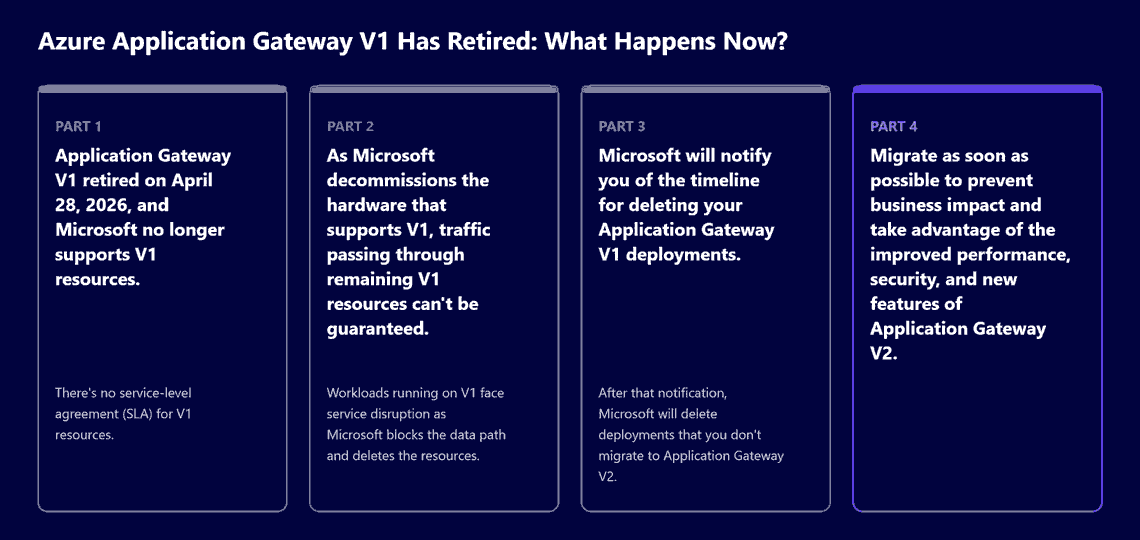
Microsoft’s Application Gateway V1 retirement FAQ says the same in terms an operations team can put in a risk register: “After April 28, 2026, Microsoft will no longer provide patches, support, or SLA coverage for active V1 resources.” and “Workloads running on V1 face service disruption as Microsoft blocks the data path and deletes the resources.”
Deletion comes with a notice first. The retirement page says “Microsoft will notify you of the timeline for deleting your Application Gateway V1 deployments.” and “After that notification, Microsoft will delete deployments that you don’t migrate to Application Gateway V2.” Its required action is one line: “Migrate as soon as possible to prevent business impact and take advantage of the improved performance, security, and new features of Application Gateway V2.”
Treat an unsupported gateway with no SLA in production as a live risk now, whether or not a deletion notice has arrived. Find out who in the organization receives Azure service notices for each subscription, so a deletion timeline is not read for the first time after the date it names.
If the plan is a weekend cutover, check it against Microsoft’s own planning figure first. Microsoft’s Migrate Azure Application Gateway and Web Application Firewall from V1 to V2 guide says “Migration has two stages: configuration migration and traffic migration.” and “You can use the enhanced cloning script (recommended) or the legacy cloning script to clone your V1 gateway configuration to a new V2 gateway, and then redirect client traffic with minimal downtime.” It also says “V1 gateways aren’t automatically upgraded to V2.”
The work is the customer’s to do. The retirement FAQ says “No, Microsoft can’t migrate your data for you.” and “You must migrate your data by using the self-serve options.” It gives the reason: “Application Gateway V1 is built on legacy components, and Azure deploys gateways in many ways. That’s why your involvement is required for migration.” The cloning scripts cover the configuration stage. The FAQ says “No, the Azure PowerShell script only migrates the configuration.” and “You’re responsible for, and in control of, actual traffic migration.” For the traffic stage, Microsoft’s guide describes a separate public IP retention script, covered in the public IP item of the section on what the migration scripts do not carry over.
On duration, Microsoft gives a planning figure, not a promise: “The time required for migration depends on the complexity of your deployment. Plan for the migration to take up to a couple of months.”
Budget the migration as a project with a named owner, a test window for the new V2 gateway and a separate change for the traffic move. The configuration stage and the traffic stage each need their own sign-off.
When a V1 gateway runs the Web Application Firewall tier, a migrated gateway is not the same as a migrated rule set. Microsoft’s migration guide says, for both cloning scripts, “Web Application Firewall V2 is configured to use Core Rule Set (CRS) 3.0 by default.” and “Because CRS 3.0 is on the path to deprecation, upgrade to the latest rule set after migration: Default Rule Set (DRS) 2.2.”
The configuration mode depends on the script. For the enhanced cloning script (recommended), the guide lists an optional parameter, WafPolicyName, described as the “Name of the Web Application Firewall policy that will be created from the Web Application Firewall V1 configuration and attached to the Web Application Firewall V2 gateway.” For the legacy cloning script, its caveats say “The Web Application Firewall V2 instance is created in the old Web Application Firewall configuration mode.” and “Migration to the Web Application Firewall policy is required.”
Verify three things on every migrated WAF gateway before traffic moves: that a WAF policy is attached, which rule set and version that policy runs, and whether the move from CRS 3.0 to DRS 2.2 that Microsoft’s guidance recommends has been tested against the application behind it. Test the rule-set change with the application owner, not only the network team.
If a runbook line says to clone the gateway, it hides a list of things that are rebuilt, not cloned. Microsoft’s FAQ and migration guide name them.
Microsoft’s migration guide also carries a caveats section for each script; read it against the estate before the configuration stage is scheduled. Treat every listed item as a line in the rebuild checklist, with an owner and a test, rather than as something the script handles.
If the migration has to be justified to a budget holder, Microsoft’s own list of V2 benefits is the place to start. The migration guide’s list includes:
For internal applications whose backends use NTLM or Kerberos authentication, the FAQ answers the question directly: “Application Gateway V2 supports proxying requests with NTLM or Kerberos authentication.” Plan the Key Vault certificate arrangement and the monitoring alerts as part of the migration, so the new gateway is not rebuilt a second time to add them.
If the V1 gateway sits in a government-cloud subscription, check the target region before anything else. Microsoft’s What is Azure Application Gateway v2? page says “Currently, the Standard_v2 and WAF_v2 SKUs aren’t available in the following regions:” and lists:
That is the only Application Gateway statement about a government region this guide found in Microsoft’s documentation. Microsoft’s Compare Azure Government and global Azure page does not mention Application Gateway, so this guide states no availability, positive or negative, for any other Azure Government region. Confirm the target region’s V2 availability with Microsoft before the migration plan is approved.
A V1 migration is a narrower job than moving a workload estate between clouds. For a team weighing that larger move, it is covered in Azure Government migration.
Some questions arrive naming a gateway or a WAF when the decision behind them is a different one.
Whether the work sits with an outside team or your own, the same questions separate a plan from a guess.
When a regulated IT team takes this on, it needs a project with an end date: the inventory, the migration plan for both stages, the WAF policy and rule-set review with its testing, the rebuild of logging, subnets and certificate validation, and the traffic move, with embedded specialists where the internal team needs more hands for a period. i3solutions plans and runs governed Azure and Microsoft 365 migrations with senior, U.S.-based engineers. i3solutions has been a Microsoft Partner with 30 years of enterprise technology delivery experience and has delivered 1,500+ Microsoft engagements across aerospace and defense, financial services, and health sciences. An i3solutions engagement does not produce managed-service ownership, a replacement for the internal team, open-ended scope expansion, or vendor lock-in. This work sits within i3solutions’ Azure Development Services.
It runs without support, and it can be disrupted and then deleted. According to Microsoft’s Application Gateway V1 retirement FAQ, “Workloads running on V1 face service disruption as Microsoft blocks the data path and deletes the resources.” Microsoft also says “Microsoft will notify you of the timeline for deleting your Application Gateway V1 deployments.”
Microsoft no longer supports it. According to Microsoft’s V1 retirement page, “There’s no service-level agreement (SLA) for V1 resources.” It adds that “traffic passing through remaining V1 resources can’t be guaranteed.”
The migration runs in two stages, and the customer does the work. According to Microsoft’s migration guide, “Migration has two stages: configuration migration and traffic migration.” and “V1 gateways aren’t automatically upgraded to V2.” Microsoft’s retirement FAQ adds “No, Microsoft can’t migrate your data for you.” The enhanced cloning script is Microsoft’s recommended option for the configuration stage.
According to Microsoft’s Application Gateway V1 retirement FAQ, “The time required for migration depends on the complexity of your deployment. Plan for the migration to take up to a couple of months.”
It carries over only in part. According to Microsoft’s migration guide, the enhanced cloning script can create a WAF policy “from the Web Application Firewall V1 configuration”, while with the legacy cloning script “The Web Application Firewall V2 instance is created in the old Web Application Firewall configuration mode.”
Microsoft states only an exclusion. According to Microsoft’s Application Gateway v2 overview, “Currently, the Standard_v2 and WAF_v2 SKUs aren’t available in the following regions:” and the list names US DOD East and US DOD Central, as well as China East and China North. Microsoft’s Azure Government comparison page does not mention Application Gateway, so this guide states nothing about other Azure Government regions.

US-Based Microsoft System Integrator | Est. 1997
© i3solutions. All rights reserved.
US-Based Microsoft System Integrator | Est. 1997
© i3solutions. All rights reserved.


