
Michael Branson
As of October 2026, the Justice Department’s Title II rule at § 35.200 Requirements for web and mobile accessibility requires a public entity with a total population of 50,000 or more, other than a special district government, to bring the web content and mobile apps it provides to WCAG 2.1 Level AA by April 26, 2027, and a public entity under 50,000 or any special district government to do so by April 26, 2028, and ADA.gov’s State and Local Governments: First Steps Toward Complying with the Americans with Disabilities Act Title II Web and Mobile Application Accessibility Rule gives a utility district as an example of a special district government. In a Microsoft estate that reaches the public SharePoint pages, Power Pages portals, Power Apps and posted PDF, Word, PowerPoint and Excel files the public uses, subject to the five exceptions in § 35.201 Exceptions (archived web content, preexisting documents no longer used to reach a service, content posted by an unaffiliated third party, individualized secured documents, and preexisting social media posts), and the third-party exception does not cover content a vendor or contractor posts for the entity. Microsoft’s Accessibility in Power Pages article says “Power Pages conforms to the WCAG 2.2 accessibility standard” and, in the same article, “When you customize your Power Pages site, you’re responsible for meeting accessibility standards”, and its Web Content Accessibility Guidelines page says “Your organization is wholly responsible for ensuring compliance with all applicable laws and regulations”, so the templates, forms, apps and documents the entity built are its own remediation list, and which date and which exceptions apply to a given entity is its counsel’s determination.
If you keep only a few points, these summarize the rule text at § 35.200 Requirements for web and mobile accessibility and the sources cited throughout this guide:
The ADA coordinator’s email asks IT two things: which Title II date applies to the utility, and the number of documents in the SharePoint libraries that have to be fixed before it. The extension the Justice Department granted this year bought time, and much of it has been used. You suspect the public website is the easy part. The hard part is the document estate: rate schedules, service and outage forms, board packets, patient forms and billing notices posted as PDF, Word and PowerPoint files, a Power Pages portal where customers or patients sign in, and a few Power Apps the public uses. Go wrong one way and the team leans on the exceptions and on Microsoft’s platform statements, the date passes, and a complaint lands on a bill-pay form or a portal page the team customized. Go wrong the other way and the budget goes to remediating every file ever posted, including archived and individualized documents the rule excepts, and runs out before the portal and the forms are fixed.
This guide describes how the rule and the Justice Department’s own guidance are structured, and what Microsoft’s documentation does and does not cover. Whether a given entity is covered, which date applies and whether a document qualifies for an exception are determinations for the entity’s counsel and ADA coordinator.
Before your budget is set, the first question is which date the entity answers to, and the rule splits on population and on the form of the entity, not on the number of people it employs. Under § 35.200 Requirements for web and mobile accessibility, “Beginning April 26, 2027, a public entity, other than a special district government, with a total population of 50,000 or more shall ensure that the web content and mobile apps that the public entity provides or makes available, directly or through contractual, licensing, or other arrangements, comply with Level A and Level AA success criteria and conformance requirements specified in WCAG 2.1”, and the same sentence continues with a condition for an entity that can demonstrate that compliance would result in a fundamental alteration of a service, program or activity or in undue financial and administrative burdens. The next paragraph of the section reads “Beginning April 26, 2028, a public entity with a total population of less than 50,000 or any public entity that is a special district government shall ensure” the same standard, under the same condition.
Those are not the dates the rule first carried. The Justice Department’s interim final rule, Extension of Compliance Dates for Nondiscrimination on the Basis of Disability; Accessibility of Web Information and Services of State and Local Government Entities (91 FR 20902, April 20, 2026), states “The compliance date for State and local government entities with a total population of 50,000 or more is extended from April 24, 2026, to April 26, 2027.” It also said “The Department invites public comment on the updated compliance dates included in this IFR.” and the comment period closed on June 22, 2026. The same document says “While this IFR is limited to extending the 2024 final rule’s compliance dates, the Department plans to engage in future rulemaking processes related to the substantive requirements of the 2024 final rule.” As of October 2026, the Federal Register lists no later Justice Department document amending, delaying or rescinding the rule, and the dates quoted from § 35.200 are the ones in the Code of Federal Regulations.
ADA.gov’s guidance names the kinds of entity the rule reaches without deciding any particular one. Its Fact Sheet: New Rule on the Accessibility of Web Content and Mobile Apps Provided by State and Local Governments lists public hospitals and public healthcare clinics among its examples of state and local government entities, and its first-steps guide says a special district government “Might be, for example, a mosquito abatement district, utility district, transit authority, water and sewer board, zoning district, or other similar state or local government entity that has a specific function.” Under § 35.104 Definitions, a public entity includes any department, agency, special purpose district or other instrumentality of a state or local government, and a special district government is a public entity, other than a county, municipality, township or independent school district, that state law authorizes to provide one function or a limited number of functions, with enough administrative and fiscal autonomy to be a separate government, and whose population the Census Bureau does not calculate. A department of a city or county is part of that government; a special district government is on the April 26, 2028 date whatever its size. Headcount does not move either answer, and the first-steps guide’s own example says “The number of employees does not determine the parks and recreation department’s population for the rule.”
Two neighboring rules are separate questions from the Title II rule and its § 35.104 Definitions. A public hospital that receives financial assistance from the Department of Health and Human Services may also answer to Section 504, a separate HHS rule with its own dates that this guide does not cover. Federal agencies answer to Section 508 under a different standard; this guide covers state and local public entities. Whether an organization is a public entity at all, what its total population is, and whether it is a special district government are determinations for its counsel, not for this guide.
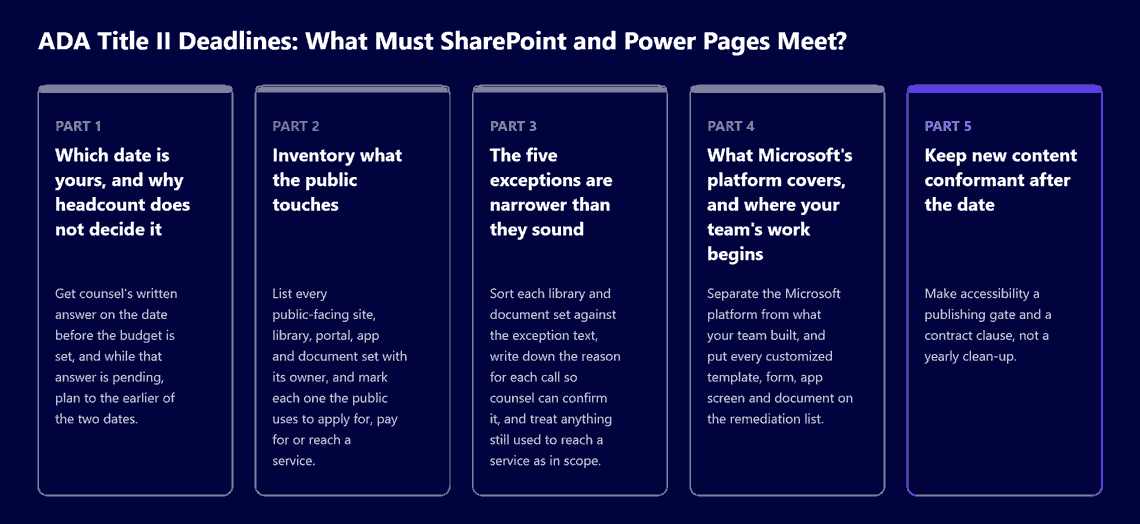
Get counsel’s written answer on the date before the budget is set, and while that answer is pending, plan to the earlier of the two dates.
Remediation budgets go wrong first at the inventory, because the rule reaches more than the site the communications team maintains. § 35.200 Requirements for web and mobile accessibility applies to the web content and mobile apps a public entity “provides or makes available, directly or through contractual, licensing, or other arrangements”, and ADA.gov’s State and Local Governments: First Steps Toward Complying with the Americans with Disabilities Act Title II Web and Mobile Application Accessibility Rule says “Your public entity needs to make sure that any content or mobile apps a vendor or contractor provides or posts on its behalf complies with WCAG 2.1 Level AA.” That guide’s own first steps run in this order:
In a Microsoft estate, that inventory is a planning list the entity builds, not a list the Justice Department wrote:
An inventory of this kind can run long. i3solutions assessment engagements routinely find 20 to 40 percent more SharePoint sites during Phase 1 than the client internal inventory lists. That finding is about SharePoint site inventories in general, not about accessibility; it is a reason to build the list from the tenant rather than from memory.
Leave the employee intranet off this list until counsel rules on it. The rule’s text and ADA.gov’s guidance speak to web content and mobile apps an entity provides or makes available; whether an employee-only intranet falls under this rule is not stated there, and is a question for counsel.
List every public-facing site, library, portal, app and document set with its owner, and mark each one the public uses to apply for, pay for or reach a service.
If your remediation budget is misread anywhere, it is at the exceptions, in both directions. § 35.201 Exceptions sets out five kinds of content the requirements do not reach:
Archived content has to meet all four conditions in § 35.104 Definitions: it was created before the entity’s compliance date, or reproduces paper documents or other physical media created before it; it is kept only for reference, research or recordkeeping; it is not altered or updated after it is archived; and it is kept in a dedicated area clearly identified as archived. ADA.gov’s first-steps guide is direct about the label: “Just putting content into an archive isn’t enough to make the content qualify for this exception.”
A second condition can decide the status of a SharePoint library that holds older documents. § 35.201 Exceptions excepts “Conventional electronic documents that are available as part of a public entity’s web content or mobile apps before the date the public entity is required to comply with this subpart, unless such documents are currently used to apply for, gain access to, or participate in the public entity’s services, programs, or activities.” A rate schedule posted years ago that customers still use to choose a service, or an intake form a patient still downloads, is the kind of document to put in front of counsel under that condition.
Individualized documents are excepted; the pages around them are not. ADA.gov’s Fact Sheet: New Rule on the Accessibility of Web Content and Mobile Apps Provided by State and Local Governments gives the example: “A PDF version of a water bill for a person’s home that is available in that person’s secure account on a city’s website would probably fall under the exception.” It then adds: “However, the exception does not apply to the city’s website itself.” For a public hospital, the first-steps guide says “The public hospital generally needs to make sure that its password-protected portal and any html content in it meets WCAG 2.1 Level AA.”
Third-party content is excepted only when no arrangement stands behind it. § 35.201 Exceptions reads “Content posted by a third party, unless the third party is posting due to contractual, licensing, or other arrangements with the public entity.” Social media posts are excepted only if they were posted before the entity’s compliance date.
Sort each library and document set against the exception text, write down the reason for each call so counsel can confirm it, and treat anything still used to reach a service as in scope.
When your team reads a Microsoft platform statement as a finished answer, Microsoft’s own pages say otherwise. Microsoft’s Accessibility in Power Pages article states “Power Pages conforms to the WCAG 2.2 accessibility standard.” and “The controls included in basic forms are built to follow WCAG 2.2.” The same article says “When you customize your Power Pages site, you’re responsible for meeting accessibility standards.” and “The person making the changes to the Liquid templates and Content snippets is responsible for ensuring that the content they add is accessible.” For reports embedded in a portal, it adds that “as a Power BI report and dashboard author, you should make sure your Power BI reports and dashboards are accessible.”
The rule’s standard is WCAG 2.1 Level AA. Microsoft’s statement describes the Power Pages platform; it does not say, and this guide does not say, that an entity’s customized site conforms to anything. Microsoft’s Web Content Accessibility Guidelines compliance page says “Microsoft publishes WCAG reports that reflect the complete product or service.” and “Your organization is wholly responsible for ensuring compliance with all applicable laws and regulations.”
Canvas apps draw the same line in a different place. Microsoft’s Create accessible canvas apps article says “Power Apps themes are designed to meet accessibility standards.” and then describes the maker’s side: “AccessibleLabel property defines what the screen reader will announce.” It also says “Use the Accessibility Checker to help review potential accessibility issues in your app.” and covers keyboard-only use, tab order, headings set through the Role property, captions through ClosedCaptionsUrl, and a typed alternative to a drawn signature.
For SharePoint pages, Microsoft’s support article Make your SharePoint site accessible to people with disabilities says “Headings are meant to be scanned, both visually and with assistive technology.” Its Applies To line reads SharePoint Server 2013 Enterprise, although the article also carries a tab for the modern experience, so read its checks as general practice rather than as a statement about a particular SharePoint version: built-in heading styles in web parts, alt text on images, enough contrast in section backgrounds, descriptive link text, and no tables used for layout.
The documents themselves get the same instruction. Microsoft’s Improve accessibility with the Accessibility Checker article says “Before you send an Outlook email message or share a Word document, Excel spreadsheet, PowerPoint presentation, or OneNote notebook, run the Accessibility Checker to make your content easier for people to read and edit.”
Where the public portal is built on Power Pages, the build side is described on Power Pages development services. Separate the Microsoft platform from what your team built, and put every customized template, form, app screen and document on the remediation list.
If your only evidence is a clean automated report, it is a false comfort. ADA.gov’s State and Local Governments: First Steps Toward Complying with the Americans with Disabilities Act Title II Web and Mobile Application Accessibility Rule says “You won’t be able to use automated testing tools alone, because those tools can’t test for all aspects of accessibility, so you’ll want to use some combination of automated and manual assessments.” Microsoft’s Accessibility in Power Pages article recommends its own checks for a portal:
For canvas apps, the Create accessible canvas apps article adds keyboard-only use, headings, captions and a typed alternative to a drawn signature. These are Microsoft’s recommendations for its own products; none of them is a conformance test for the rule.
Fix in the order the public depends on the content: first the forms, portal pages and documents people use to apply for, pay for or reach a service, such as bill pay, starting and stopping service, outage reporting, patient intake and patient billing; then the highest-traffic pages; then the rest of the library content.
After the date passes, a remediation push with no publishing control behind it starts to slip with the next posting. ADA.gov’s Fact Sheet: New Rule on the Accessibility of Web Content and Mobile Apps Provided by State and Local Governments says “After this time, state and local governments must continue to make sure their web content and mobile apps meet WCAG 2.1, Level AA.”
A publishing step closes that gap. In SharePoint, a library that feeds the public site can route new documents through an approval flow in Power Automate, with the author running the Accessibility Checker in Word, Excel or PowerPoint before submitting and an owner reviewing before the file reaches the public library. Canvas apps get the same treatment with the Power Apps Accessibility Checker before each publish. This is a design for the entity to adopt, described in this guide as planning.
Contracts carry the rest. Content a vendor or contractor posts for the entity is the entity’s to answer for, as the first-steps guide says, so the requirement belongs in the contract. Where content cannot be made accessible directly, § 35.202 Conforming alternate versions allows a conforming alternate version “only where it is not possible to make web content directly accessible due to technical or legal limitations.”
Make accessibility a publishing gate and a contract clause, not a yearly clean-up.
If your team hopes to plan around the rule’s safety valves, the text makes each one a decision the entity has to prove. Each date in § 35.200 Requirements for web and mobile accessibility carries its fundamental-alteration and undue-burden condition, and § 35.204 Duties says that decision is made by the head of the public entity or a designee after considering all resources available, and “must be accompanied by a written statement of the reasons for reaching that conclusion.” Even then, the entity takes any other action that avoids the alteration or burden while still giving people with disabilities the benefits or services to the maximum extent possible.
§ 35.205 Effect of noncompliance that has a minimal impact on access treats an entity as meeting the requirements only “in the limited circumstance in which the public entity can demonstrate that the noncompliance has such a minimal impact on access” that people with disabilities can still get the same information, interactions, transactions and services with substantially equivalent timeliness, privacy, independence and ease of use. Whether either provision applies is counsel’s call.
Do not build the budget around these provisions.
Some readers arrive with a different question, and this guide would mislead them if they read on. It follows the definitions in § 35.104 Definitions, and it does not fit these cases:
Whether your team does the work or brings in an outside team, hold it to the same evidence, set against the rule’s text in § 35.201 Exceptions and ADA.gov’s guidance:
i3solutions designs and builds Power Pages sites with senior, US-based engineers and the table-permission, web-role, and governance model an external site requires. i3solutions builds secure external Power Pages portals for regulated enterprises, owning authentication, role-based access, data protection, and audit evidence rather than handing over a template. On this rule, the work is a project, with specialists embedded in your team where it needs them: inventorying the public SharePoint, Power Pages and Power Apps estate, building and reworking the Microsoft-side templates, forms and apps the entity is responsible for, and setting up the publishing path that routes documents through the Accessibility Checker. An i3solutions SharePoint consulting engagement produces named deliverables: a governance documentation package, architecture artifacts, and runbooks. The determinations stay with the entity: whether it is covered, which date applies, which exceptions hold and whether its content meets the standard are for its counsel and ADA coordinator. i3solutions has been a Microsoft Partner with 30 years of enterprise technology delivery experience and has delivered 1,500+ Microsoft engagements across aerospace and defense, financial services, and health sciences. Delivery is senior and US-based. Ongoing operation after the handover is a separate Application Managed Services engagement with its own scope; the accessibility remediation work itself does not replace the internal team, run open-ended, or create vendor lock-in. For how this fits a wider SharePoint program, see SharePoint development services.
According to the eCFR text of the Justice Department’s rule, “Beginning April 26, 2028, a public entity with a total population of less than 50,000 or any public entity that is a special district government shall ensure that the web content and mobile apps that the public entity provides or makes available, directly or through contractual, licensing, or other arrangements, comply with Level A and Level AA success criteria and conformance requirements specified in WCAG 2.1”. According to the Justice Department’s definitions, a department of a city or county is part of that government. Whether a particular utility is a special district government is a determination for its counsel.
Yes. According to the Justice Department’s interim final rule in the Federal Register, the compliance date for entities with a “total population of 50,000 or more is extended from April 24, 2026, to April 26, 2027”. The same Federal Register document says “The compliance date for public entities with a total population of less than 50,000, or any special district government, is extended from April 26, 2027, to April 26, 2028.” The Federal Register document says “Written comments must be submitted on or before June 22, 2026.” It also says “While this IFR is limited to extending the 2024 final rule’s compliance dates, the Department plans to engage in future rulemaking processes related to the substantive requirements of the 2024 final rule.”
Not always, and not by age alone. According to the Justice Department’s exceptions, a document posted before the entity’s compliance date is excepted unless it is currently used to apply for, gain access to, or participate in the entity’s services, programs, or activities, and archived content qualifies only if it meets all four conditions of the definition, including storage in a dedicated area clearly identified as archived. According to ADA.gov, putting content into an archive is not enough by itself. Which documents qualify is a call for counsel.
According to ADA.gov’s fact sheet, an individualized document in a person’s secure account can fall under an exception, but the website around it does not. A public hospital that receives HHS funding may also answer to a separate HHS rule with its own dates.
Not on that statement alone. According to Microsoft Learn, “Power Pages conforms to the WCAG 2.2 accessibility standard”, and the same article says that when you customize your Power Pages site, you are responsible for meeting accessibility standards. According to Microsoft Learn, the organization is “wholly responsible” for compliance with all applicable laws and regulations. According to the eCFR text of the Justice Department’s rule, web content and mobile apps must “comply with Level A and Level AA success criteria and conformance requirements specified in WCAG 2.1”, and whether a customized portal meets it is a question for testing and for counsel.
No, not alone. According to ADA.gov’s first-steps guide, automated testing tools cannot test for all aspects of accessibility, so a public entity will want some combination of automated and manual assessments. According to Microsoft Learn, Microsoft’s own recommended checks for Power Pages add testing with Narrator and zooming to 400 percent to its scans.

US-Based Microsoft System Integrator | Est. 1997
© i3solutions. All rights reserved.
US-Based Microsoft System Integrator | Est. 1997
© i3solutions. All rights reserved.


