
As of September 2026, Dynamics 365 connects to Microsoft 365 through five integrations, Teams collaboration on records, Outlook and Exchange server-side synchronization of email, contacts, tasks and appointments, SharePoint document management, Power Apps built on the same Dataverse data, and Entra security groups and Conditional Access, and each one is configured, licensed and, in practice, kept in one tenant, per Microsoft Learn. In the government clouds, according to Microsoft Learn, Teams integration with Dynamics 365 isn’t available for Government GCC environments, and Microsoft’s May 2026 parity table lists the Dynamics 365 app for Teams collaboration experiences and Teams chat in Sales Hub as Not Available in GCC, GCC High and DoD, while creating and joining a Teams meeting from an appointment is Available in all three; separately, according to Microsoft Learn, Microsoft deprecated linking records to Teams channels effective May 2026 and adding Teams chat messages to records effective January 2026, in every cloud. Microsoft Learn publishes no government-cloud status for the Dynamics 365 App for Outlook or server-side synchronization, so confirm those with Microsoft for your cloud, and license the Microsoft 365 service behind each integration you switch on, because Dynamics 365 is licensed under its own licensing guide.
Every fact below is drawn from Microsoft Learn, Microsoft’s May 2026 parity document and its Dynamics 365 Licensing Guide, all re-read on drafting day, except where a line says it is this guide’s own rule:
The rollout plan promised sellers they would work Dynamics 365 records from Microsoft Teams, and the training was built on the demo. Then the tenant turned out to sit in GCC High, or a notice on Microsoft’s Removed or deprecated features in Dynamics 365 Sales page took the feature away for everyone, and the plan had to be rewritten after it was approved. The business had been told that Dynamics 365 works with Microsoft 365 out of the box. What that sentence hides is configuration: a server profile and mailbox approval for email, a SharePoint site in the same tenant, a security group on each environment, a Conditional Access policy that has to reach the right resource, and a licence behind each one. This guide takes the five integrations in turn, says what each does and needs, names what Microsoft retired in 2026, and lays Microsoft’s own government-cloud statuses beside them, saying plainly where Microsoft publishes none.
The question usually arrives from finance, when someone asks why the Microsoft 365 agreement did not already pay for the CRM. Dynamics 365 is licensed on its own terms: Microsoft’s Dynamics 365 Licensing Guide opens with the line “Use this guide to understand how to license Microsoft Dynamics 365 intelligent business applications.” In its Dynamics 365 Customer Service section, the Entitlements table lists Microsoft 365 interoperation, with Outlook, Exchange, Excel, OneDrive/SharePoint and OneNote, among that licence’s entitlements.
Interoperation is not the Microsoft 365 service itself. Microsoft’s Connect to Exchange Online page states: “To use Exchange Online with customer engagement apps, you must have an Exchange Online subscription that either comes as part of a Microsoft 365 subscription or can be subscribed to separately.” And Microsoft’s Manage your documents using SharePoint page states: “The document management feature isn’t supported for users with Power Apps for Microsoft 365 licenses.”
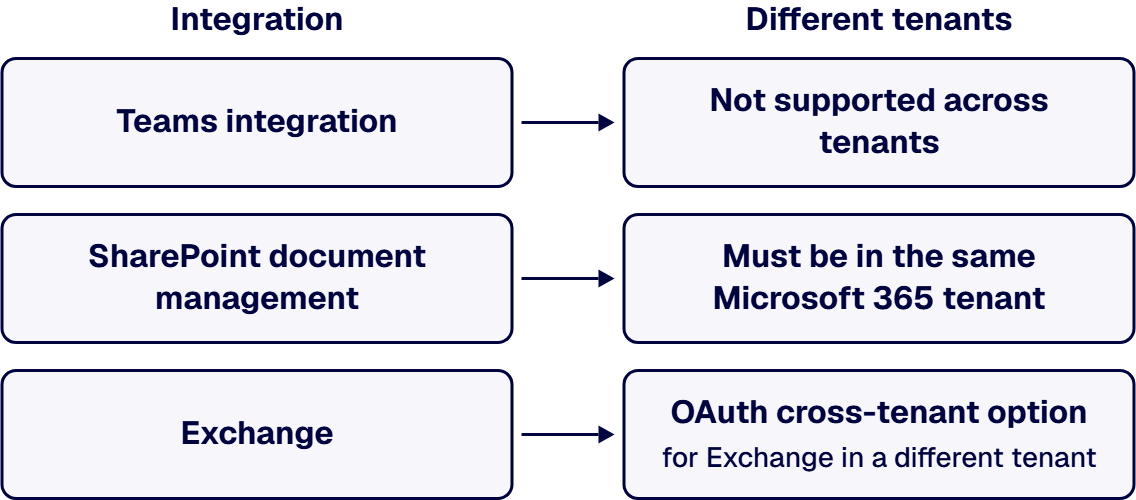
The integrations also assume one tenant. Microsoft’s Overview of Microsoft Teams integration lists Dynamics 365 and Microsoft Teams in different tenants among the configurations where Teams integration is not supported. SharePoint document management checks the same thing; Microsoft’s Set up customer engagement apps to use SharePoint Online page states: “The URL is checked for being a valid SharePoint online site and for existing in the same Microsoft 365 tenant as your organization.” Exchange is the exception: according to Microsoft Learn’s Connect to Exchange Online page, the server-to-server option is for Exchange in the same tenant as Dynamics 365, and an OAuth cross-tenant option is for Exchange in a different tenant.
This guide’s planning rule, not Microsoft’s: license the Microsoft 365 service behind every integration you switch on, and after a merger treat a second tenant as a blocker for Teams integration and SharePoint document management until the tenant decision is made.
Sellers who keep a deal moving in a Teams chat want to know whether the record can come with them. Microsoft’s Overview of Microsoft Teams integration page states: “Dynamics 365 and Microsoft Teams integration allows you to speed up the flow of work, enabling anyone in an organization to view and collaborate on Dynamics 365 records, from within the flow of work with Teams.” The same page sets its limits: Microsoft Teams integration is not available for guest users, and mobile devices and separate tenants are among the configurations it does not support.
Two parts of that integration are now gone for everyone, in every cloud. Microsoft’s Removed or deprecated features in Dynamics 365 Sales page states: “Effective May 2026, the ability to link Dynamics 365 records to Microsoft Teams channels is deprecated.” The same page states: “Effective January 2026, the ability to add chat messages from Microsoft Teams to Dynamics 365 records is deprecated.” Microsoft’s Teams overview page still describes files moving between a record and a linked Teams channel; the deprecation notice is the later word, so this guide treats record-to-channel linking, and the channel file view that rests on it, as retired.
This guide’s planning rule, not Microsoft’s: plan Teams work on meetings created from appointments and on the Dynamics 365 app in Teams, not on channel linking or chat-to-record, and read the government-cloud table below before promising either in GCC, GCC High or DoD.
Email reaches the CRM in one of two ways: a person forwards it, or the mail server hands it over. Microsoft’s Server-side synchronization page states: “Server-side synchronization provides direct apps-to-email server synchronization.” The same page states: “When you use Exchange, this includes bidirectional synchronization of email, contacts, tasks, and appointments.” It also sets a limit that shapes mailbox design: “A user can only map to a single Exchange or POP3 mailbox.”
The Dynamics 365 App for Outlook is what the user sees inside Outlook. Microsoft’s Overview of Dynamics 365 App for Outlook page lists what it does, including: “Link email messages, meetings, and appointments to a row in your app.”
Tenancy returns at the server profile. On Microsoft Learn’s Connect to Exchange Online page, the Server-to-Server Authentication (Same Tenant) option reads: “Use this option when Exchange resides in the same tenant as Dynamics 365.” The same page offers an OAuth (Cross Tenant) option for Exchange in a different tenant, so the mail side, unlike Teams and SharePoint, can span two tenants.
Relationship intelligence in Dynamics 365 Sales now depends on the same setup. Microsoft’s Removed or deprecated features in Dynamics 365 Sales page states: “Effective April 2025, the native Exchange integration for relationship intelligence is deprecated.” The same page directs Sales customers who want insights from Exchange email and meetings to enable server-side synchronization for Exchange.
This guide’s planning rule, not Microsoft’s: map each user to one mailbox, choose the authentication option by tenant, and decide which of email, contacts, tasks and appointments synchronize before the pilot starts.
The contract sits in a SharePoint library, the opportunity sits in Dynamics 365, and the question is who can open it from which side. Microsoft’s Set up SharePoint integration page states the sign-in benefit: “Users sign in once, and therefore don’t have to sign in to both customer engagement apps and SharePoint.” It does not merge the permissions; Microsoft’s Document management with Microsoft Teams integration page states: “There isn’t an automatic relationship between SharePoint permissions and permissions to customer engagement apps.”
Enabling it is a one-way switch. Microsoft’s Set up customer engagement apps to use SharePoint Online page states: “Once server-based SharePoint integration is enabled, you can’t go back to the previous client-side integration.” The same page checks that the site exists in the same Microsoft 365 tenant as your organization, as covered above.
Managing documents against records and line-of-business data in depth is covered in Dynamics 365 Integration with SharePoint and Line-of-Business Systems.
This guide’s planning rule, not Microsoft’s: decide the site and the permission model before you enable server-based integration, because it does not roll back.
A team that wants an inspection app or a service screen on top of CRM data often starts by asking for an export. Microsoft’s What is Microsoft Dataverse? page states: “Data from your Dynamics 365 applications is also stored within Dataverse, allowing you to quickly build apps that use your Dynamics 365 data and extend your apps with Power Apps.”
The same holds in the government plans, with a condition. Microsoft’s Power Apps US Government page, updated in May 2026, states: “In addition to the standalone plans, Power Apps and Power Automate capabilities are also included in certain Microsoft 365 US Government and Dynamics 365 US Government plans, allowing customers to extend and customize Microsoft 365, Power Platform, and Dynamics 365 apps (Dynamics 365 Sales, Dynamics 365 Customer Service, Dynamics 365 Field Service, and Dynamics 365 Project Service Automation).”
This guide’s planning rule, not Microsoft’s: build extensions in the Dynamics 365 environment’s own Dataverse under the same security roles, not in a copied data store that needs its own access model.
The identity team already runs Conditional Access policies on Office 365 and assumes the CRM inherits them. Access starts with the environment: Microsoft’s Control user access to environments with security groups and licenses page states: “If your company has multiple environments, use security groups to control which licensed users can be members of a particular environment.” Conditional Access has its own licence; Microsoft’s What is Conditional Access? page states: “Using this feature requires Microsoft Entra ID P1 licenses.”
Scope needs a check in the tenant. Microsoft’s Conditional Access: Target resources page states: “In Conditional Access, the Microsoft 365 suite of applications appears under ‘Office 365’.” Microsoft’s published list of the apps inside that grouping, Apps included in Conditional Access Office 365 app suite, as read in September 2026, names Microsoft Teams and SharePoint and does not include Dynamics 365 or Dataverse. That is a finding about Microsoft’s published list, not a finding about what a given policy reaches.
In the government plans, identity is relied on rather than bundled. Microsoft’s Power Apps US Government page states: “Microsoft Entra isn’t part of the Power Apps US Government accreditation boundary, but takes a reliance on a customer’s Microsoft Entra ID tenant for customer tenant and identity functions, including authentication, federated authentication, and licensing.” GCC High also uses a separate government identity, per Microsoft’s Dynamics 365 US Government page; that identity and accreditation-boundary workstream is covered in Hire a Dynamics 365 Implementation Firm for a Government Contractor Environment.
This guide’s planning rule, not Microsoft’s: bind each environment to a security group, and confirm in the tenant which resource each Conditional Access policy targets for Dynamics 365 rather than assuming the Office 365 grouping covers it.
The demo ran in a commercial tenant; the rollout runs in a government cloud, and the two are not the same product surface. Microsoft’s Dynamics 365 US Government page states: “There are exceptions to the principle of maintaining product functional parity within the U.S. Government clouds.” The same page asks readers to “Check back on a monthly basis for important updates and revisions.” It describes the GCC High deployment option as one “which enables single sign-on and seamless integration with Microsoft 365 GCC High deployments”. That sign-on integration with Microsoft 365 is not the same thing as every Teams feature of the Dynamics 365 app.
For Teams in GCC, Microsoft’s Install the Dynamics 365 app in Microsoft Teams page states: “Teams integration with Dynamics 365 isn’t available for Government GCC environments.” The same page adds Microsoft’s own workaround: “However, there’s a workaround to view records using the Website app in Teams and then adding it as a tab.” That workaround is Microsoft’s, not a recommendation of this guide.
Feature by feature, the reference is Microsoft’s parity document, Business Applications Feature Experience Parity Exceptions and Roadmap in US Government clouds, edition dated May 2026. It opens: “Microsoft strives to maintain functional parity across our localized data center deployments.” It also states: “This information is updated and published every 4-6 weeks and represents our projections at that time.” The rows below are the integration features that document lists, with the status it printed for each column, as published in Microsoft’s May 2026 parity table:
Three notes on reading that table, each from the same parity document. The document defines No Plans this way: “No plans: There are no plans to bring this feature to the Geo either due to technical limitations in the Gov Geo or prioritization of new feature replacement”. The same May 2026 table lists Dual Write (Integrate Data into Dataverse) for Dynamics 365 Finance as Available in GCC and GCC High; its DoD cell is not repeated here because it names a planning half-year that had already ended, so read Microsoft’s current edition for DoD. And the Power Apps Core Office Integration row is a Power Apps row; it says nothing about the Dynamics 365 App for Outlook or server-side synchronization.
For those two, Microsoft publishes no government-cloud status. As read in September 2026, Microsoft Learn’s Overview of Dynamics 365 App for Outlook and Server-side synchronization pages carry no government-cloud note, and the parity document has no row by those names. Confirm both with Microsoft for your cloud before the rollout plan relies on them.
On page 5 of the same May 2026 parity document, Microsoft lists Power Automate’s Actionable Approval Emails row as Not Available in GCC, GCC High and DoD.
Which Dynamics 365 apps run in GCC High at all is a different question from which integration features they carry; it is covered in How Much Does a Dynamics 365 Implementation Cost for Defense Contractors?. Contact Center voice over Teams Phone, Copilot in Dynamics 365 Customer Service, and the end of support for Dynamics 365 Guides and Remote Assist are separate decisions this guide does not cover.
This guide’s planning rule, not Microsoft’s: build the rollout plan from Microsoft’s current parity table for your column, re-read it monthly as Microsoft’s own page asks, and put every Not Available feature in the training plan as absent, not as a later addition.
Some readers arrive here with a different decision in front of them, and this guide would slow them down:
Whoever does the work, whether your own team or outside help, the configuration should be shown, not described. Hold it to these criteria, each checked against Microsoft’s own pages cited above, such as Server-side synchronization:
No firm is named or compared in that list.
i3solutions has delivered Dynamics 365 integration engagements for regulated enterprises across healthcare, defense and aerospace manufacturing, and financial services. For this decision, that means project work, with embedded specialists where your team needs them, that designs, configures and governs these integrations in commercial and government clouds. i3solutions builds Dynamics 365 integrations using named Microsoft mechanisms including Dataverse, dual write, virtual tables, Azure Logic Apps, Azure Service Bus, and Power Automate connectors. i3solutions has completed more than 20 Dynamics 365 integration engagements. i3solutions installs and helps configure applications inside IL4 and IL6 government cloud environments and other government networks. i3solutions has been a Microsoft Partner with 30 years of enterprise technology delivery experience and has delivered 1,500+ Microsoft engagements across aerospace and defense, financial services, and health sciences. Delivery is senior and US-based. An i3solutions engagement does not produce managed-service ownership, a replacement for the internal team, open-ended scope expansion, or vendor lock-in.
For the wider Dynamics 365 service, see Enterprise Dynamics 365 Development Services That Align CRM and ERP to How You Operate.
They are separate products that work together in one tenant. According to Microsoft, Dynamics 365 is licensed under its own Dynamics 365 Licensing Guide, and according to Microsoft Learn, using Exchange Online with customer engagement apps requires an Exchange Online subscription that comes as part of a Microsoft 365 subscription or is subscribed to separately. According to Microsoft Learn, the SharePoint document management feature isn’t supported for users with Power Apps for Microsoft 365 licenses.
Not fully. According to Microsoft Learn, Teams integration with Dynamics 365 isn’t available for Government GCC environments, and Microsoft offers a workaround of viewing records through the Website app added as a Teams tab. According to Microsoft’s May 2026 parity table, the basic and enhanced collaboration experiences with the Dynamics 365 app for Microsoft Teams are Not Available in GCC, GCC High and DoD, while creating and joining a Teams meeting from an appointment is Available in all three.
No. According to Microsoft Learn, effective May 2026, the ability to link Dynamics 365 records to Microsoft Teams channels is deprecated, and effective January 2026, the ability to add chat messages from Microsoft Teams to Dynamics 365 records is deprecated.
Not necessarily. According to Microsoft Learn, the server-to-server option is for Exchange in the same tenant as Dynamics 365, and an OAuth cross-tenant option is for Exchange in a different tenant. According to Microsoft Learn, Exchange Online needs its own subscription, as part of Microsoft 365 or separately.
Confirm it in your tenant. According to Microsoft Learn, the Microsoft 365 suite of applications appears under Office 365 in Conditional Access, and Microsoft Learn’s published list of the apps in that grouping, as read in September 2026, does not include Dynamics 365 or Dataverse. Check which resource each policy targets for Dynamics 365 rather than assuming the Office 365 grouping covers it.

US-Based Microsoft System Integrator | Est. 1997
© i3solutions. All rights reserved.
US-Based Microsoft System Integrator | Est. 1997
© i3solutions. All rights reserved.


