
Michael Branson
Quick answer. In an iManage to SharePoint migration, your ethical walls move from the matter to the site, because Purview Information Barriers associate segments with a SharePoint site. Decide which walled matters need their own site, then place and verify the Purview hold on each site before held documents land.
If legal has decided to leave iManage Work for SharePoint Online, the questions that land on IT are what happens to the matter workspaces, the ethical walls and the content on legal hold, and what has to be built before anything moves. This guide takes them in that order. If the decision to leave is still open, start with SharePoint Online vs a Dedicated DMS: How to Decide. The Microsoft and iManage statements in this guide are quoted from Microsoft Learn or from iManage’s own product pages as read on September 26, 2026, with its link.
If your matters live in iManage workspaces today, the first design decision is where each one lands: a site of its own, or a library in a site shared with related matters. iManage describes its model on its iManage Work product page: “iManage Work creates a single source of truth for all documents, emails, and chat conversations, and saves content in a clearly organized and flexible folder structure.” Microsoft’s guidance for SharePoint Online moves away from deep hierarchy. Its Introduction to SharePoint information architecture states: “In the modern SharePoint experience, subsites aren’t recommended.” The same article advises readers to “plan to create one site for each discrete topic, task, or unit of work.”
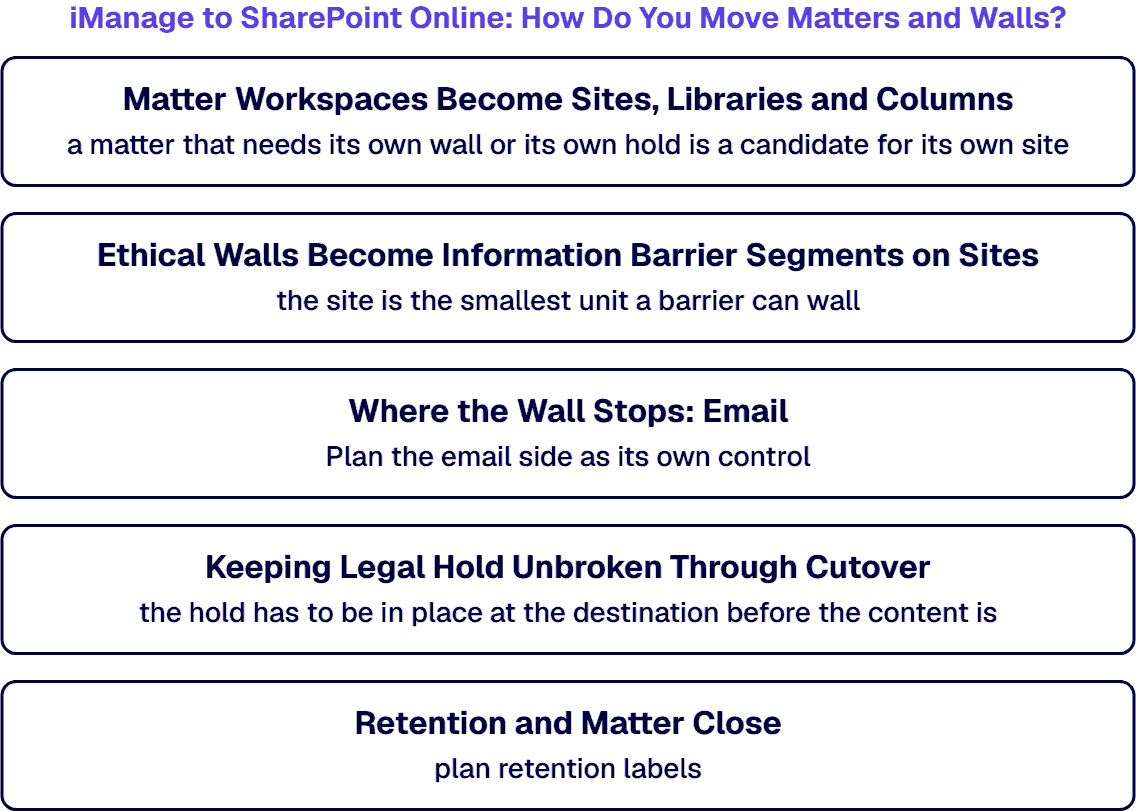
We read that guidance this way for matters; test it in your own tenant before you build on it. A matter is a unit of work, so a matter that needs its own wall or its own hold is a candidate for its own site. Matters that share a client, a team and a wall can sit as libraries in one site, with the matter number, client number and practice area carried as columns so that search and holds can find them. Settle that matter metadata before content moves; Data Classification Before SharePoint Migration: The Classify-First Approach covers that step.
If the plan is to recreate the iManage folder tree inside each library, weigh what the folders cost later. i3solutions has recorded this pattern in its own SharePoint delivery work, in these words: Legal teams report that broken folder structures migrated to SharePoint Online increase legal hold response times by 200 to 400% because content cannot be reliably located or classified.
If your walls run in iManage Security Policy Manager today, start from what they do there. iManage’s Security Policy Manager page says it lets you “Create walls at the client, matter, department, or firm level, including opposing-team walls for M&A and disputes.” It also says: “Policies update themselves as matters open, teams change, and lateral hires arrive, with no manual chase-ups required.”
If your walls move to SharePoint Online, the Microsoft counterpart is Information Barriers. Its Learn about Information Barriers article states: “Microsoft Purview Information Barriers (IB) is a compliance solution that restricts two-way communication and collaboration between groups and users in Microsoft Teams, SharePoint, and OneDrive.” Among its scenarios: “A lawyer’s data obtained from one client can’t be accessed by a lawyer at the same firm who represents a different client.” Its Use Information Barriers with SharePoint article sets the unit: “You associate the segments at the site level (previously called site collection level).” For a site in explicit mode it states: “Only users matching the site’s segments can access and share content.” It also sets the limits: “You can associate up to 100 compatible segments with a site.” and “Your organization can have up to 5,000 segments, and users can be assigned to multiple segments.”
We read the two together this way; check it against your tenant before you design around it. In the words of its Security Policy Manager page, iManage creates walls down to the matter level. A Purview segment is associated with a SharePoint site, so the site is the smallest unit a barrier can wall. A matter that carries its own wall therefore needs a site of its own, and that site’s segments take over the work the matter-level wall did. Opposing-team walls become pairs of segments that an IB policy keeps apart, so decide who owns policy changes before cutover, because Microsoft notes: “If a compliance administrator changes an existing IB policy, the change might affect the compatibility of the segments associated with a site”.
If the plan is to copy the iManage security model onto SharePoint as it stands, rebuild the walls instead. Lift-and-shift migrations typically carry over 60 to 80% of existing permission inconsistencies, creating immediate audit exposure in Microsoft 365 environments rather than resolving the underlying governance debt.
If matter email is filed in iManage today, after the move it lands in a SharePoint library and the site’s segments wall it there. On our reading, the wall does not reach live mail. Microsoft’s Information Barriers article states: “Information barrier (IB) policies can’t restrict communication and collaboration between groups and users in email messages including Exchange Online.” For email, the same article says: “If your organization needs to define and control email communications, consider using Exchange mail flow rules.” Plan the email side as its own control, with the team that runs Exchange Online in your tenant.
If content on legal hold is moving, the hold has to be in place at the destination before the content is. Microsoft’s Create holds in eDiscovery article sets the timing: “After you create an eDiscovery hold, it might take up to 24 hours for the hold to take effect.” It sets two conditions on the site. The first: “To apply a hold to a SharePoint site, the site must have a title.” The second, to avoid potential URL truncation, is that “SharePoint site names stay under 70 characters.” It also warns that “eDiscovery doesn’t continuously monitor location-level changes after a hold is applied.” Where a site’s URL changes after that, the article’s instruction is to “edit the hold policy data sources and reapply or retry the policy so hold status and scope stay accurate.”
The sequence we recommend, built on those sentences:
Before the move, check licensing for the people whose content is held. Microsoft states: “eDiscovery holds require an eligible license on every user whose content you preserve.” If your team has not yet run holds in Purview, Microsoft Purview Technology Readiness Services covers that preparation.
If your matters close on a records schedule, decide first how the destination declares records. iManage’s Records Manager page says that, while users follow their normal workflow, “their filed documents are automatically declared as records in iManage Work and that retention policies are applied to all new content with no additional effort.” In Microsoft Purview, the choice between a retention policy and a retention label matters once content moves between sites. Microsoft’s Learn about retention policies and retention labels article states: “However, the retention settings don’t travel with the content in its new location.” It continues: “If that’s required, use retention labels instead of retention policies.” For matters whose content may move between sites during the transition, plan retention labels.
The file plan itself, and how record series map across, is separate work that this guide does not cover. If your source is Documentum or OpenText rather than iManage, the forthcoming guide Documentum or OpenText Content Server to SharePoint Online: A Migration Guide That Keeps Records Under Microsoft Purview covers that route.
If the plan is to move the content with Microsoft’s own tool, check first what that tool covers. The Migration Manager overview says: “In addition to file shares, use Migration Manager to migrate content from other cloud providers including Google Workspace, Box, Dropbox, and Egynte.” iManage is not on that list, so plan the extraction route as its own workstream and prove it on a pilot matter before committing the estate.
Running both systems for a period is a vendor-supported option. iManage’s Microsoft platform page states: “iManage has multiple connectors available in the Microsoft Power Automate platform.” Microsoft’s List of all Power Apps connectors includes iManage Work and iManage Work for Admins. A phased plan can keep active matters in iManage while closed matters move first, with flows reading from iManage where a process needs both systems.
When your team brings this move to i3solutions, the work is scoped on the SharePoint and Purview side and sized from an inventory of your matters: decide which matters need their own site, map each ethical wall to Information Barrier segments on those sites, place and verify Purview eDiscovery holds on each site before held content lands, choose retention labels for content that may move between sites, and prove the extraction route on a pilot matter. i3solutions implements whatever Microsoft technology a customer needs, SharePoint delivery included: the legal hold and permission carry-over findings quoted above come from i3solutions’ own SharePoint delivery work. i3solutions pre-migration SharePoint assessment engagements run four to six weeks. SharePoint migration consulting describes the problems that assessment is designed to find.
If you are planning the move, design the destination first: decide which matters need their own site, map each ethical wall to Information Barrier segments on those sites, place and verify Purview eDiscovery holds on each site before held content lands, and choose retention labels for content that may move between sites. Then prove the extraction route with one pilot matter and move the rest in phases.
If a wall covers one matter inside a shared repository, Information Barriers can take it over once that matter has its own site, because Microsoft associates segments at the SharePoint site level. Microsoft also states that Information Barrier policies cannot restrict email in Exchange Online, so email needs a separate control.
If content on hold is moving, keep it held without a gap by holding the SharePoint site before the content lands. Create and title each destination site within Microsoft’s site-name length limit, place the Purview eDiscovery hold, allow the delay Microsoft documents before it takes effect, and leave the content in iManage unchanged until the SharePoint hold is verified. If a held site’s URL changes later, edit the hold’s data sources and reapply the policy.
If a matter carries its own ethical wall or its own hold, give it a dedicated site, since Microsoft advises one site for each discrete topic, task or unit of work and Information Barriers apply at the site level. Matters that share a client, a team and a wall can share a site, with the matter number carried as a column.
If you are relying on Information Barriers for email, they do not reach it: Microsoft states that Information Barrier policies cannot restrict communication and collaboration in email messages, including Exchange Online, and suggests Exchange mail flow rules instead. Matter email filed into a walled SharePoint site is covered there by that site’s segments.

US-Based Microsoft System Integrator | Est. 1997
© i3solutions. All rights reserved.
US-Based Microsoft System Integrator | Est. 1997
© i3solutions. All rights reserved.


