
By Michael Branson
When the VMware renewal forces a plan and a date, leaving VMware for Azure is a choice made per workload class among three Microsoft destinations: Azure VMware Solution, which runs VMware vSphere clusters on dedicated bare-metal Azure infrastructure and is available in Azure Commercial and Azure Government; Azure virtual machines, reached with Azure Migrate, which Microsoft describes as a free service; and Azure Local, which extends Azure capabilities to environments you own and which Azure Migrate can also target. According to Microsoft’s Portable VMware Cloud Foundation licensing reference, as of November 1, 2025 Microsoft no longer includes a VCF license or subscription with new Azure VMware Solution node purchases, so that path now needs your own VCF subscription. According to Microsoft, existing Azure VMware Solution deployments that include the license will have to change by October 31, 2026 for pay-as-you-go and by August 30, 2027 for reserved instances.
The VMware renewal quote has arrived, the economics have changed, and finance wants a plan and a date. A single answer for the whole estate ignores that some workloads cannot drop VMware on your timeline, some can move to Azure unchanged, and some cannot leave your building. This guide sets out what Microsoft’s own pages, read on 2026-10-20, say about each of Microsoft’s three destinations, which Microsoft dates apply to whom, and what Microsoft states for Azure Government, so each workload class gets an assignment you can defend.
If your VMware estate runs in your own data centers, the date that drives this decision is your own renewal, and this guide does not date it. The Microsoft dates this guide cites bind deployments that are already on Azure VMware Solution with the license included, and nothing else.
Microsoft’s Portable VMware Cloud Foundation licensing reference for Azure VMware Solution states: “Customers must purchase VCF licenses directly from Broadcom to use hyperscaler cloud services.” It continues: “As of November 1, 2025, Microsoft no longer includes a VCF license or subscription with new Azure VMware Solution node purchases.” The same page introduces its table of dates with “The following dates apply to existing deployments and reservations:” and lists November 1, 2025 as the date from which portable VCF is required for new Azure VMware Solution deployments, October 31, 2026 as the date by which license-included pay-as-you-go deployments must transition to portable VCF, and August 30, 2027 as the date by which customers with active reserved instances for VCF license-included hosts must exchange their reservations for VCF BYOL reservations or transition those workloads off Azure VMware Solution. It adds: “If a reservation expires before August 30, 2027, its license-included benefits end when the reservation expires.”
The retirement page, Azure VMware Solution license-included service retirement, using portable VCF and other options, opens with “AVS is not ending, only the SKU that includes the license is changing.” It states “Azure VMware Solution license-included PayGo SKUs retire on 31 October 2026.” and “To avoid service disruption on 31 August 2027, customers need to be fully transitioned to a new Azure VMware Solution VCF BYOL service or be fully migrated to a new Azure destination.” To customers evaluating modernization opportunities, its advice is to “start assessing current AVS environments immediately, and develop a transition roadmap”.
Those pages give one planning rule. For an estate in your own data centers, plan to your renewal. For a deployment already on Azure VMware Solution with the license included, read the date that applies to it from Microsoft’s licensing reference: pay-as-you-go deployments will face October 31, 2026, reserved instances will face August 30, 2027, and a reservation that expires sooner loses its license-included benefits when it expires. The Microsoft pages this guide relies on do not say whether those dates apply the same way in Azure Government; confirm that with Microsoft before planning on it.
If a destination is chosen before the estate is inventoried, the choice rests on guesses about which workloads can move unchanged. Microsoft’s What is Azure Migrate? page says “Azure Migrate is a service that helps you decide on, plan, and execute your migration to Azure.” and that “Azure Migrate is a free service” for inventory, assessment, planning and migration. The free service is Azure Migrate itself, not the destination. Microsoft’s Create an Azure VMware Solution assessment article “describes how to create an Azure VMware Solution assessment for on-premises VMs in a VMware vSphere environment with Azure Migrate: Discovery and assessment.”
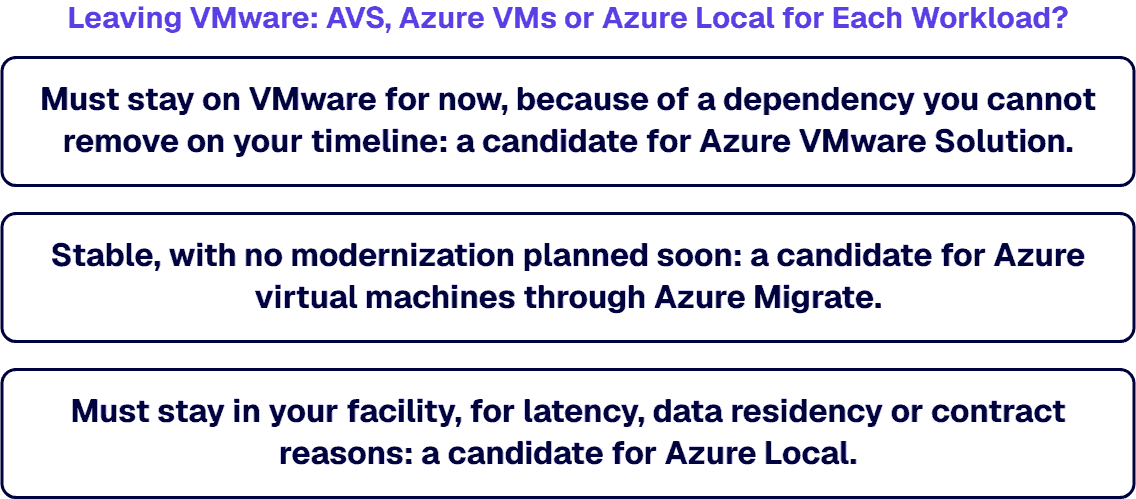
Microsoft’s Cloud Adoption Framework page Select your cloud migration strategies gives the filter to apply first: “Remove options that conflict with compliance, security, or operational constraints.” Then tag each workload with the constraint that decides it:
Inventory with Azure Migrate before pricing any path, and write the deciding constraint beside each workload, so the assignment can be defended when someone asks why a workload went where it did.
If a workload depends on VMware in ways you cannot remove on your timeline, the goal is leaving the building, not leaving VMware. Microsoft’s What is Azure VMware Solution? page says “Azure VMware Solution provides private clouds that contain VMware vSphere clusters built from dedicated bare-metal Azure infrastructure.” and “The minimum initial deployment is three hosts, with the option to add more hosts, up to a maximum of 16 hosts per cluster.” On the division of work it says: “Microsoft manages and maintains the private cloud infrastructure and software, allowing you to focus on developing and running workloads in your private clouds to deliver business value.”
The line between Microsoft’s work and yours is drawn in Microsoft’s Common questions about Azure VMware Solution: “Microsoft is responsible for the lifecycle management of VMware software (ESXi, vCenter Server, and vSAN) and NSX appliances.” The same answer makes the customer responsible for “the NSX SDN configuration: network segments, distributed firewall rules, Tier 1 gateways, and load balancers.” Elsewhere the page says: “Customers are responsible for any workload administration tasks and the associated change management processes.” Plan your team’s network and workload administration work on that basis.
For SQL Server and Windows Server licenses moving with those workloads, Microsoft’s License SQL Server, Windows Server, and Linux in Azure VMware Solution page says that to give you flexibility around your migration timelines, “you can continue to use your licenses outside of Azure for 180 days from the time when the licenses are allocated within Azure VMware Solution.” and “This dual-use rights benefit applies to SQL Server and Windows Server.”
What this path does not change is the VMware license. Under Microsoft’s licensing reference, new Azure VMware Solution deployments use your own portable VCF subscription, and Microsoft’s Portable VMware Cloud Foundation licensing reference for Azure VMware Solution adds: “Portable VCF doesn’t replace the Azure VMware Solution host quota process.” Request host capacity as a separate step. This guide states no host or subscription price.
If a workload is stable and nothing about it needs to change soon, rehosting it onto Azure virtual machines ends its dependency on VMware without rebuilding it. In the strategy table of Microsoft’s Cloud Adoption Framework page Select your cloud migration strategies, the business driver for Rehost reads “Need minimal business disruption and no modernization in near future”.
Microsoft’s Migrate VMware VMs to Azure (agentless) tutorial says: “This article shows you how to migrate on-premises VMware or Azure VMware Solution (AVS) VMs to Azure, using the Migration and modernization tool, with agentless migration.” Its guidance before cutover is plain: “Run a test migration to make sure everything’s working as expected.”
Two planning rules follow. Test-migrate every wave before its cutover, and record the result. Decide the landing zone, identity and network before the first wave moves; that design is a separate piece of work, outside this guide.
If a workload has to stay in your facility for latency, data residency or contract reasons, the choice is not limited to staying on VMware or moving to the public cloud. Microsoft’s What is Azure Local? page describes Azure Local as Microsoft’s “distributed infrastructure solution that extends Azure capabilities to customer-owned environments.” On cost it gives a model, not a figure: “Azure Local is priced per physical core on your on-premises machines, plus any consumption-based charges for additional Azure services you use.”
Microsoft’s Overview of Azure Migrate based VMware migration for Azure Local applies to Azure Local 2503 and later, and says: “You can use the Azure Migrate platform to move on-premises VMware VMs to your Azure Local instance.” Among the benefits it lists, the solution “Keeps the data flow local, from on-premises VMware source servers to Azure Local.”
The Cloud Adoption Framework names this path for workloads that stay where they are. In its Retain strategy, Microsoft’s page Select your cloud migration strategies says: “Consider a more modern on-premises solution like Azure Local for your workloads and connect to Azure.” Confirm your Azure Local release against the version Microsoft names before planning the migration.
If a workload carries a FedRAMP or DoD obligation, choose its path against Microsoft’s current scope tables, not against this guide. Scope each workload in three steps: name the cloud it must run in, Azure Commercial or Azure Government; check that its path is offered there, using the Microsoft pages quoted below; then read its authorization and impact level from Microsoft’s compliance scope page and have your security office confirm it.
For Azure VMware Solution, Microsoft’s What is Azure VMware Solution? page says “Azure VMware Solution is available in Azure Commercial and Azure Government.” Microsoft’s Portable VMware Cloud Foundation licensing reference for Azure VMware Solution answers whether portable VCF is available in all supported regions and clouds with “Yes. Portable VCF is available in all Azure public and Azure Government regions where Azure VMware Solution is supported.”
A move with Azure Migrate has its own table. The Azure Government table in Microsoft’s Azure Migrate support matrix lists the target replication regions as US DoD Central, US DoD East, US Gov Arizona, US Gov Iowa, US Gov Texas and US Gov Virginia. Microsoft’s Compare Azure Government and global Azure page says “You can only create assessments for Azure Government as target regions and using Azure Government offers.” and “The following Azure Migrate features aren’t currently available in Azure Government:”, followed by a list of application containerization features for Java and ASP.NET apps; the list names no virtual machine migration feature.
For Azure Local, Microsoft’s Azure, Dynamics 365, Microsoft 365, and Power Platform services compliance scope page says: “FedRAMP High authorization for edge devices (such as Azure Data Box, Azure Stack Edge and Azure Local) applies only to Azure services that support on-premises, customer-managed devices.” Read the authorization and impact level for Azure VMware Solution and for Azure Local from that page for each workload, and have your security office confirm what each workload needs.
Moving workloads from Azure Commercial into Azure Government is a separate move, covered in Azure Government migration.
If the estate is not ready for a destination choice, forcing one early creates rework:
If you bring in an outside partner, judge the plan against these items:
i3solutions plans and runs governed Azure and Microsoft 365 migrations with senior, U.S.-based engineers.
For a VMware exit, that work is a project: the Azure Migrate inventory and assessment, the map of workload classes to destinations, the build of each destination, test migrations and cutover. Embedded specialists can also work inside your team where it needs them. i3solutions has been a Microsoft Partner with 30 years of enterprise technology delivery experience and has delivered 1,500+ Microsoft engagements across aerospace and defense, financial services, and health sciences. An i3solutions project engagement does not by itself include ongoing support of what it delivers, which i3solutions scopes separately as Application Managed Services, and it is not a replacement for the internal team, open-ended scope expansion, or vendor lock-in.
The migration service is described in Cloud Consulting and Migration, and the wider Azure practice in Azure Development Services.
Inventory with Azure Migrate before pricing any path, and write the deciding constraint beside each workload, so the assignment can be defended when someone asks why a workload went where it did.
New purchases do not include it. Microsoft Learn says that Microsoft no longer includes a VCF license or subscription with new Azure VMware Solution node purchases. New deployments use your own portable VCF subscription, and Microsoft Learn adds that “AVS is not ending, only the SKU that includes the license is changing.” So a plan that keeps VMware on Azure VMware Solution must include your own VCF subscription; if the goal is to stop licensing VMware, the choice is between Azure virtual machines and Azure Local.
If you run license-included pay-as-you-go hosts on Azure VMware Solution, the earlier of the two deadlines applies: on Microsoft Learn, those deployments must transition to portable VCF. Customers with active reserved instances for license-included hosts have the later deadline to exchange them for VCF BYOL reservations or move those workloads off Azure VMware Solution. Both dates appear above in this guide, with the Microsoft Learn source. Microsoft Learn also says that a reservation which expires before the later deadline loses its license-included benefits when it expires, so read each reservation’s end date first.
Yes, according to Microsoft. Microsoft Learn says “You can use the Azure Migrate platform to move on-premises VMware VMs to your Azure Local instance.” and that the solution “Keeps the data flow local, from on-premises VMware source servers to Azure Local.” Microsoft Learn states that the page applies only from a named Azure Local release onward, so confirm your release against it. It is the destination for workloads that must stay in your facility for latency, data residency or contract reasons.
Yes. Microsoft Learn says “Azure VMware Solution is available in Azure Commercial and Azure Government.” and “Portable VCF is available in all Azure public and Azure Government regions where Azure VMware Solution is supported.” Read the authorization and impact level for each workload from Microsoft’s compliance scope page, and have your security office confirm what each workload needs. The Microsoft pages this guide relies on do not say whether the license dates apply the same way in Azure Government, so confirm that with Microsoft before planning on it.
Microsoft Learn says “Azure Migrate is a free service” for inventory, assessment, planning and migration. The free service is Azure Migrate itself, not the destination. Inventory and assess with it before pricing any path, because the destination carries its own charges: on Microsoft Learn, Azure Local is priced per physical core, plus any Azure services you use.

US-Based Microsoft System Integrator | Est. 1997
© i3solutions. All rights reserved.
US-Based Microsoft System Integrator | Est. 1997
© i3solutions. All rights reserved.


