

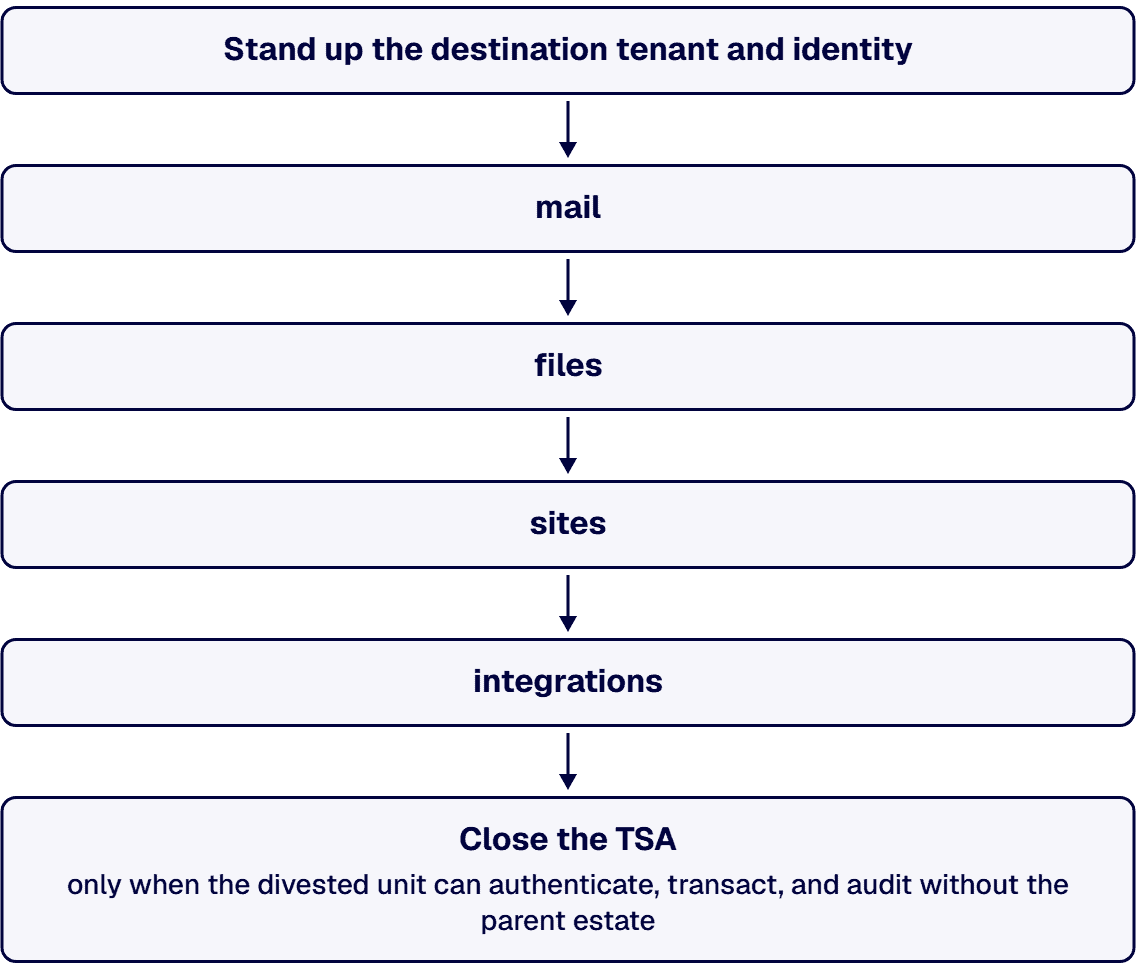
A Microsoft 365 carve-out migration is sequenced by dependency, not by data volume. Stand up the destination tenant and identity first, then move mail, files, sites, and integrations in the order that keeps both organizations operating. Close the TSA only when the divested unit can authenticate, transact, and audit without the parent estate. The failure mode is not slow migration; it is discovering an undocumented dependency after the contractual deadline has already passed.
A Transition Services Agreement keeps a divested unit running on parent systems for a fixed period after close. IT reads it as an engineering task list: which services continue, for whom, and until when. Each contractual obligation translates into inventory work, routing plans, permissions mapping, and dated cutover milestones.
Cost and complexity are driven by three variables: the scope of services under the agreement, the depth of shared dependencies between the two organizations, and the length of the contractual window. The practical approach treats the TSA as a dated punch list and works backward from the exit date, so every workstream has a finish line the agreement can defend.
Before any migration begins, the two organizations resolve what the divested unit legally owns. Three forces compete and require deliberate answers:
Documenting the decisions (what moved, who decided, and the basis for the call) creates provenance that stands up if either party is questioned later. The record is the deliverable, not just the migration.
Identity underpins everything else because mail, files, and applications resolve to accounts. The separation sequence prioritizes directory setup, authentication mechanisms, licensing alignment, and access re-establishment so that divested-unit users authenticate in the destination tenant immediately. Getting this wrong does not produce a typical migration error; it produces authentication failures on day one and stops the business.
The scope stays strictly to accounts, authentication, and access. Employment structure and HR questions belong to their own workstreams and should not slow the identity build.
Workloads move in dependency order: mail, files, sites, then integrations. Volume is a scheduling detail; dependency determines sequence. Undocumented integrations pose the largest risk: a small line-of-business connector between the two tenants can disable entire departments if it is disconnected prematurely, while a large but self-contained mailbox archive can migrate late without consequence.
The critical work is locating and re-homing cross-tenant threads before the corresponding TSA service switches off. That includes SharePoint sites feeding reporting tools, Power Platform flows reading shared lists, and connectors authenticating against the parent directory. Each is found, re-pointed, verified, and only then handed off.
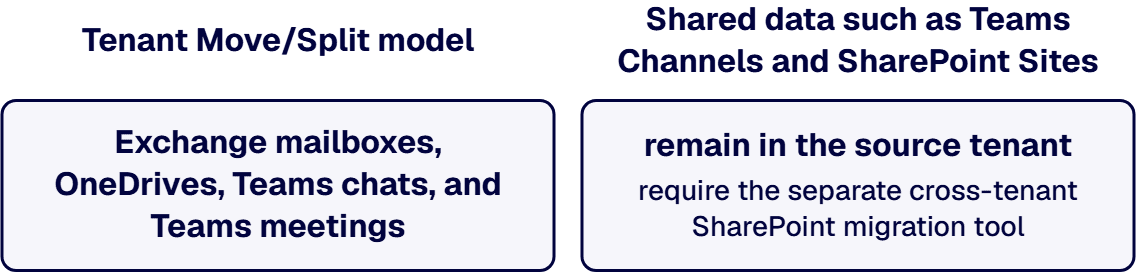
Microsoft’s Tenant Move/Split model handles Exchange mailboxes, OneDrives, Teams chats, and Teams meetings in batch operations designed for divestiture. Shared data such as Teams Channels and SharePoint Sites remain in the source tenant and require the separate cross-tenant SharePoint migration tool.
Licensing differs by workload. Mailboxes and OneDrive use per-user licenses with a one-time fee. SharePoint sites are priced per 100 GB moved and are restricted to Enterprise Agreement customers. Microsoft’s OneDrive migration guidance states that migrations fail if the licensing step is not completed and that no exceptions are offered. Per-user licenses can be assigned to either the source or the target user object, so which side purchases them is a decision made before the exit date, not after.
Government cloud involvement creates hard constraints. Cross-tenant OneDrive migration is not supported for users in GCC, GCC High, DoD, or Consumer clouds. Cross-cloud mailbox migration is not supported either. Establish which cloud environment each tenant occupies before agreeing to an exit date; unsupported migrations require either an extended TSA period or an alternative route.
A single cutover is the right choice when a specific set of conditions holds:
Phased separation is the right choice when the inverse holds: dense or poorly documented integrations, larger user bases that need staged cutover, or a TSA window long enough to permit staged validation.
The wrong reason to choose a single cutover is a tight deadline. Compressing a poorly mapped separation into one event does not eliminate the undocumented dependencies; it guarantees encountering all of them at once. Single cutover is a choice made because the dependency map supports it, not because the calendar is pressing.
i3solutions designs and delivers integration across SharePoint, Power Platform, Dynamics 365, and Azure, with the reference architectures and operational handoff enterprise estates require.
The TSA expires on its date regardless of readiness, so “done” is defined by evidence, not by the feeling that the work is complete. Exit criteria prove the receiving side can operate independently:
The dependencies that get forgotten are typically service accounts, shared mailboxes, scheduled jobs, and integrations that were never inventoried because they simply worked. The exit checklist finds them when it is built from the dependency map rather than from optimism.

Justin has spent more than 15 years at i3solutions and more than 25 years leading project, program, and product delivery across complex technology environments. His work centers on turning strategy into governed execution, aligning technical teams and stakeholders, managing delivery risk, and guiding Microsoft 365, SharePoint, Power Platform, cloud, data, automation, and custom application programs through measurable production outcomes.
Connect on LinkedInA Transition Services Agreement keeps a divested business running on the seller's systems for a fixed period after close. From the IT perspective it functions as a scoped work list with a hard deadline: which services continue, for whom, and until when.
TSA stands for Transition Services Agreement. It exists so the divested business does not stop operating at deal close. The seller continues providing agreed services during the separation window while the divested unit stands up independently.
Separation is the work of untangling a divested business from the parent organization so it can operate on its own. In Microsoft 365 terms, it means extracting shared identities, data, sites, and integrations from a single tenant into a destination tenant the divested unit controls.
From an IT perspective, software licenses, service agreements, and the TSA determine what transfers, what has to be re-provisioned, and when parent-system access ends. Specific contract terms are interpreted by legal counsel.
The timeline is set by the scope of what transfers, the depth of shared dependencies, and the contractual end date. Small, self-contained units with clean dependency maps separate faster than larger businesses with dense, poorly documented integrations. The TSA deadline sets the ceiling.
When business processes cross system boundaries by hand, the integration was promised and never architected. i3solutions' senior integration advisors work with enterprise IT leaders ready to scope the architecture that connects the stack.
Schedule a Microsoft Integration Scoping Discussion
US-Based Microsoft System Integrator | Est. 1997
© i3solutions. All rights reserved.
US-Based Microsoft System Integrator | Est. 1997
© i3solutions. All rights reserved.


