
A failing Microsoft Access application gets rebuilt by a senior U.S.-based custom development team that treats it as a rescue, not a rewrite: stabilize the current database first, extract the real business rules from the queries and VBA that accumulated over years, then rebuild it as a web application on the Microsoft stack with identity, audit, and backup handled by the platform instead of by hope. i3solutions delivers this as fixed-scope work (billing mechanics compared in how Microsoft consulting firms charge) through custom application development, and Microsoft modernization consulting engagements run from approximately four months for single-workstream scope to approximately twelve months for multi-workstream scope with significant compliance evidence requirements.
Stabilize before you rebuild. The Access file that runs a department is usually one corruption event from a very bad week. Step one is containment: compact-and-repair discipline, a real backup cadence, and splitting the front end from the data (linked tables against a protected back end) so the rebuild can proceed while the business keeps running.
Extract the rules, not the schema. The value in a twenty-year-old Access application is the business logic buried in its queries, macros, and VBA. A rebuild that copies tables and ignores rules produces a prettier version of the wrong system. The rules get documented, challenged with the people who use them, and only then reimplemented.
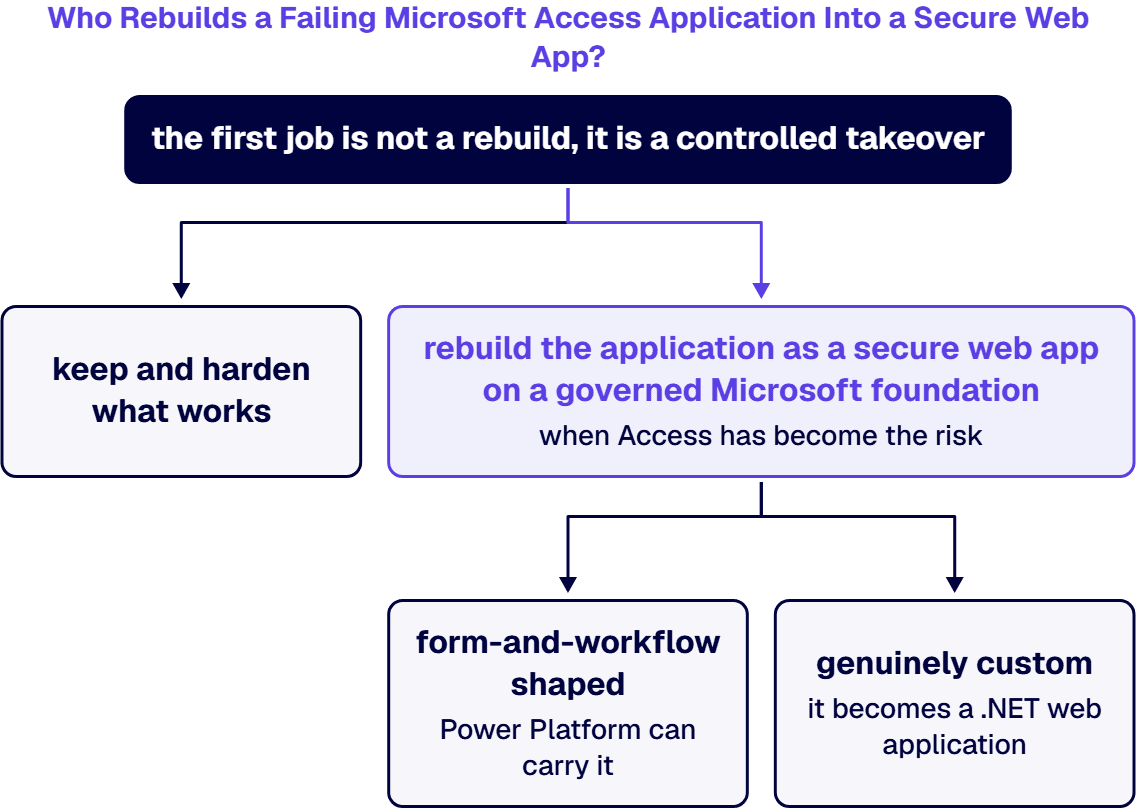
Rebuild on the platform you already own. For most Microsoft-centric organizations the target is a web application backed by SQL Server or Dataverse, secured by Microsoft Entra ID, with audit and backup inherited from the platform. Where the workload is form-and-workflow shaped, Power Platform can carry it; where it is genuinely custom, it becomes a .NET web application.
The outcomes this produces. When i3solutions rebuilt a spreadsheet-bound estimating process into a web application, it removed version-control errors across hundreds of estimates and cut approval cycles from five days to one. One rescued program for a nuclear operator saved about $293,000 a year and returned its full cost within three months, and one modernization retired about $500,000 a year in running cost.
When the sole developer of a custom Microsoft Access or line-of-business application leaves, the first job is not a rebuild, it is a controlled takeover: recover the file and its back end, reverse-engineer the undocumented schema, forms, macros, and business rules into written documentation, and lock down access so the orphaned app is stable and secure before anything changes. i3Solutions does that takeover with 100 percent U.S.-based senior engineers and routes a senior engineer to a client call usually within one to two weeks, so there is no multi-month hiring gap while the application runs unowned. From that documented baseline, i3Solutions modernizes on the evidence: keep and harden what works, or rebuild the application as a secure web app on a governed Microsoft foundation when Access has become the risk. The team has completed more than 600 Microsoft platform implementations; one modernization retired about $500,000 a year in cost, and for a global aerospace and defense manufacturer i3Solutions’ rebuilt web application returned about 8 hours per engineer each month. You keep operating the existing application throughout the takeover.
If an Access application your business depends on is failing, a scoping conversation maps stabilization, rebuild, and cutover against your actual system before you commit. Schedule a Custom Application Development Discussion.
Because the failure modes travel with the file. Multi-user contention, no real audit trail, and logic trapped in VBA survive an upgrade. Moving tables to SharePoint lists relocates the data while keeping the untested logic. A rebuild retires the failure modes instead of rehosting them.
Microsoft modernization consulting engagements with i3solutions run from approximately four months for single-workstream scope to approximately twelve months for multi-workstream scope with significant compliance evidence requirements. A single-department Access application usually sits at the short end.
Yes, and it should. Stabilization is the first phase precisely so the current system runs safely while the replacement is built and validated against it. Cutover happens against a reconciled data migration, not a leap of faith.
A web application on the Microsoft stack: SQL Server or Dataverse for data, Microsoft Entra ID for identity, and platform-level audit and backup. Your team already administers the platform it lands on.
A senior team that can reverse-engineer an undocumented application. i3Solutions recovers the app and its data, documents the schema, forms, and business rules, secures access, and then modernizes or rebuilds from that baseline, with U.S.-based senior engineers engaged usually within one to two weeks so the application is never left unowned.

US-Based Microsoft System Integrator | Est. 1997
© i3solutions. All rights reserved.
US-Based Microsoft System Integrator | Est. 1997
© i3solutions. All rights reserved.


