
Quick answer. As of September 2026, Microsoft’s standalone SharePoint Online and OneDrive for Business Plan 1 and Plan 2 SKUs have already stopped selling to new customers (no new purchases after May 31, 2026), stop renewing entirely at the next renewal on or after January 2027, and fully retire in December 2029, per the partner advisory in Microsoft’s Partner Center announcements for January 2026 (no separate day-level customer notice was found at primary source). Microsoft’s own stated destinations are a Microsoft 365 suite, capacity packs, or pay-as-you-go storage, and Microsoft Learn’s storage add-on page names Microsoft 365 OneDrive Storage, OneDrive Extra Storage, Microsoft 365 SharePoint Storage and Office 365 Extra File Storage, with a billing-channel condition on the last. A tenant that added these plans to raise Frontline Worker OneDrive storage needs a different fix, because the answer in Microsoft’s licensing FAQ names the same plans that are retiring.
Every fact below is drawn from Microsoft’s Partner Center announcements for January 2026, licensing FAQ, SharePoint limits and storage add-on page, all re-read on drafting day, except where a line says it is this guide’s own rule:
If the team is planning around December 2029, it is planning around the wrong date. The partner advisory in Microsoft’s Partner Center announcements for January 2026 opens: “Microsoft is evolving its cloud storage and collaboration offerings and is retiring the standalone SharePoint Online (SPO) plan 1 and plan 2 and OneDrive for Business (ODB) plan 1 and plan 2 SKUs.” It then gives three dates, each with its own condition:
End of sale has already passed. As of September 2026, according to that advisory, no new tenant or customer can buy these plans, and an existing customer can only renew. The date that forces a decision is end of life, January 2027: a contract in force continues until it expires, but it cannot be renewed. So the working deadline for each affected account is the renewal date of the contract it sits on, the first one that falls on or after January 2027. December 2029 is the date the plans are fully retired, and it is the last of the three, not the first.
The dates are at month precision, and that is how Microsoft published them. The same Partner Center announcement states: “Retirement announcement: this change is communicated to customers in late January 2026.” No separate customer-facing Microsoft notice with day-level dates was found in the Microsoft Learn service descriptions, the licensing FAQ or any other Microsoft page read for this guide, so this guide does not supply a day, and neither should a renewal plan. The OneDrive service description, read on drafting day, still states: “OneDrive is included in Microsoft 365 and Office 365 plans, in SharePoint plans, and can also be purchased as a standalone plan.” Treat the advisory as the dated source, and check it again before each renewal.
When a sponsor asks whether the retirement might be reversed, the answer is in Microsoft’s own reasons. The Partner Center announcement states: “This change reflects low customer demand for standalone offerings, increased instances of unintended or nonstandard usage, and higher operational costs associated with maintaining these plans.” It adds: “As Microsoft continues to invest in secure, scalable, and integrated experiences, Microsoft 365 suites remain the primary way customers access SharePoint and OneDrive capabilities.” Those are Microsoft’s words, not this guide’s assessment. They point the same way as the destinations Microsoft names: a suite, a capacity pack, or pay-as-you-go storage.
If no one remembers buying a standalone plan, that is not evidence the tenant is unaffected, and assuming it is the most common mistake here. This guide’s planning rule, not Microsoft’s: before anyone decides the tenant has nothing to do, pull every license assignment for SharePoint Online Plan 1, SharePoint Online Plan 2, OneDrive for Business Plan 1 and OneDrive for Business Plan 2 from the Microsoft 365 admin center, with the contract and renewal date each one sits on. The OneDrive service description is a reminder of why they hide well: OneDrive comes with suites and with SharePoint plans, and it was also sold on its own, so a standalone seat looks like any other OneDrive user until the license is read.
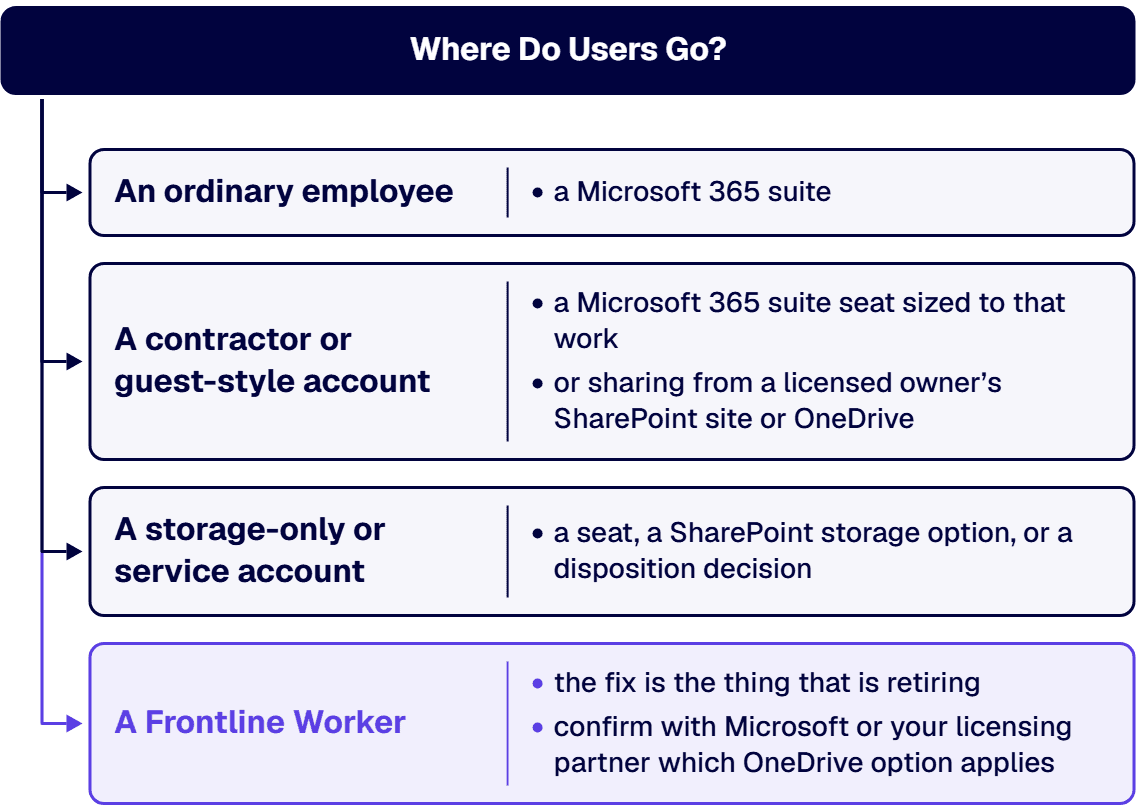
Sort every account that turns up into one of four classes. The classes are this guide’s own framing; Microsoft’s retirement advisory does not use them:
For each account, record the class, the owner, the renewal date of its contract, how much OneDrive or SharePoint content it holds, and who still uses that content. That record is what the rest of this guide routes from.
When a contractor was put on a standalone plan instead of a full suite seat, the question now is what that person actually does in the tenant. Microsoft’s retirement advisory does not mention contractors or guests, so this section is this guide’s own framing, not Microsoft’s guidance. Two routes cover most cases:
Either way, record the decision against the account in the inventory, with the owner who approved it. A contractor account that no one can name an owner for is usually a storage-only account in disguise, and belongs in the next section.
If your Frontline Workers ran short of OneDrive room and someone fixed it by adding a plan, the fix is the thing that is retiring. Microsoft’s licensing FAQ asks: “How can customers increase the OneDrive storage size for Frontline Workers?” Its answer, as read on drafting day: “Add SharePoint P1/P2 or OneDrive P1/P2.” Those are the same standalone plans the Partner Center announcement retires. The FAQ page carries no retirement note and no date, and no Microsoft page read for this guide gives a replacement answer for this case. This guide does not claim Microsoft has, or has not, changed its guidance anywhere else; it states only what these two pages say today.
Microsoft’s SharePoint limits table shows the storage side of the same problem. The rows below restate that table for the organization-level storage figure; the values are Microsoft’s:
The Frontline row is the only one with a flat figure; every other row, including the standalone SharePoint plans, adds storage per license. That flat figure is the organization’s SharePoint total, not a per-user OneDrive figure, and this guide does not apply it to any other row.
Microsoft Learn’s storage add-on page describes the OneDrive options that remain. It states: “Microsoft 365 OneDrive Storage enters public preview in July 2026 and will be available to all commercial customers.” It describes that product as “a pay-as-you-go service” for storage above an account’s licensed quota. It also states: “OneDrive Extra Storage is sold as capacity packs in 100-GB, 500-GB, and 1-TB through 6-TB sizes.” Two limits come with it: “A capacity pack can’t be split across multiple users.” and “A single user’s total storage can’t exceed 25-TB.” The same page says of a capacity pack: “It doesn’t replace the user’s existing OneDrive license.” That page does not mention Frontline plans, so it does not say whether either OneDrive option can be applied to an F1 or F3 user. This guide’s planning rule, not Microsoft’s: for a Frontline-heavy tenant, confirm with Microsoft or your licensing partner which OneDrive option applies to your F1 and F3 users before the first standalone renewal lapses, rather than relying on the FAQ’s current wording.
If an account exists only to hold content, a like-for-like swap is least likely to exist, because a capacity pack is not a license. Microsoft Learn’s storage add-on page says of OneDrive Extra Storage: “It doesn’t replace the user’s existing OneDrive license.” So an account that exists only to hold files in OneDrive still needs a licensed seat under it, and the pack only adds room on top. Where the content is better held in a SharePoint site, the same page names the tenant-level options: “Use the Office 365 Extra File Storage add-on to add more storage in 1-GB increments.” It also states: “As of June 2026, Microsoft 365 SharePoint storage is in public preview for all commercial tenants.” That product is described as “a pay-as-you-go service”. One condition applies to the first of those: “If you bought your subscription through Volume Licensing or a Cloud Solution Provider (CSP), you can’t buy Office 365 Extra File Storage directly from Microsoft.”
Check the tenant’s total before any standalone license lapses. Microsoft’s SharePoint limits table gives the SharePoint Plan 1 or 2 column the same “1 TB + 10GB per license purchased” formula as the suites, and the page warns that a tenant that keeps operating above its storage limits risks being put into read-only mode: “This means that users may be unable to add or modify content until storage usage is reduced or additional capacity is purchased.” This guide’s planning rule, not Microsoft’s: recompute the tenant’s storage total without the standalone licenses you plan to drop, and add capacity or reduce content before the renewal that removes them.
For some accounts the honest answer is that no seat is needed at all, because the content is what matters and no one uses it. That is a disposition decision, and it has its own guide: Which SharePoint Content to Migrate, Archive, or Retire. Make that decision, with its owner, before paying to keep an account alive that exists only to hold files.
If the tenant runs in a US government cloud, do not assume the commercial dates carry over, and do not assume they do not. No Microsoft page read for this guide states whether standalone SharePoint Online or OneDrive for Business Plan 1 or Plan 2 exist in GCC, GCC High, DoD or 21Vianet, or whether this retirement applies there on the same dates. The Office 365 GCC High and DoD service description does not mention standalone SharePoint or OneDrive plans at all, and that silence is not a statement either way. Confirm with Microsoft directly before the plan depends on it.
The storage options are clearer. Microsoft Learn’s storage add-on page states, for both Microsoft 365 OneDrive Storage and Microsoft 365 SharePoint Storage: “This product isn’t currently available to education, GCC, or Microsoft 365 operated by 21Vianet in China customers.” The same page states: “Office 365 Extra File Storage is also available for GCC, GCC High, and DOD plans.” Plan government-cloud destinations from those two statements, not from the commercial list.
If the question from the business is whether files disappear, the source does not answer it. The Partner Center announcement describes licensing status: at end of life, “no renewals; existing contracts continue until expiration”; at end of service, “all standalone plans fully retired”. It does not say whether content held under an unrenewed standalone license is deleted, kept read-only, or simply left without a license, at the moment a contract expires or in December 2029. This guide makes no claim either way. Confirm the data handling with Microsoft or your licensing partner before an account’s contract expires, and move or dispose of the content first rather than finding out afterward.
Before you start, check whether the tenant needs this work at all; some tenants need a different piece of work instead:
Whoever does this work with you, inside the organization or outside it, hold it to these criteria, stated as what they should be able to show you:
No firm or product is named or compared in that list.
According to Microsoft’s Partner Center announcement of January 2026, end of life is January 2027, with no renewals, and existing contracts continue until expiration. End of service, when all standalone plans are fully retired, is December 2029.
No. According to Microsoft’s Partner Center announcement of January 2026, end of sale was June 2026, with no new tenants or customers after May 31, 2026, and renewals for existing customers only.
The source does not say. According to Microsoft’s Partner Center announcement of January 2026, end of life means no renewals and end of service means all standalone plans are fully retired; it does not state whether content is deleted, kept read-only or left unlicensed. Confirm the data handling with Microsoft before a contract expires, and move or dispose of the content first.
According to Microsoft’s licensing FAQ, the answer is to add SharePoint P1/P2 or OneDrive P1/P2, which are the plans being retired, and no Microsoft page read for this guide gives a replacement answer. Microsoft Learn names Microsoft 365 OneDrive Storage and OneDrive Extra Storage capacity packs for adding OneDrive storage, without saying whether they apply to F1 or F3 users, so confirm that with Microsoft first.
No Microsoft page read for this guide says whether standalone SharePoint Online or OneDrive for Business plans exist in GCC or GCC High, or whether the retirement applies there on the same dates, so confirm with Microsoft directly. According to Microsoft Learn, Microsoft 365 OneDrive Storage and Microsoft 365 SharePoint Storage are not currently available to GCC customers, while Office 365 Extra File Storage is available for GCC, GCC High and DoD plans.
i3solutions plans and runs governed Azure and Microsoft 365 migrations with senior, U.S.-based engineers. For this retirement, that means a project, with embedded specialists where your team needs them, that inventories every standalone SharePoint and OneDrive assignment, classifies each account, plans the destination for each one against its renewal date, and moves the accounts and their content. i3solutions has been a Microsoft Partner with 30 years of enterprise technology delivery experience and has delivered 1,500+ Microsoft engagements across aerospace and defense, financial services, and health sciences. An i3solutions engagement does not produce managed-service ownership, a replacement for the internal team, open-ended scope expansion, or vendor lock-in.
For how this fits the wider SharePoint estate, see Enterprise SharePoint Development & Integration Services Built for Scale and Governance.

US-Based Microsoft System Integrator | Est. 1997
© i3solutions. All rights reserved.
US-Based Microsoft System Integrator | Est. 1997
© i3solutions. All rights reserved.


