
By Michael Branson
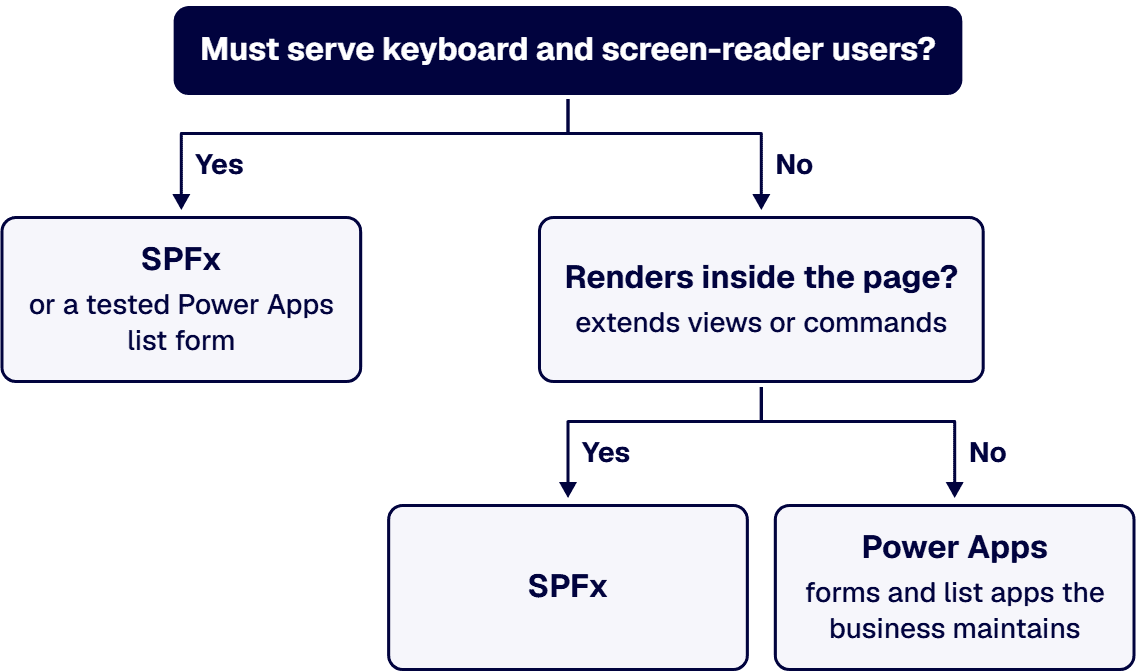
As of September 2026, use Power Apps for SharePoint forms and apps when the business maintains them, and SharePoint Framework (SPFx) for whatever must render in the page, extend views or commands, or serve keyboard and screen-reader users there. Add-ins stopped for all tenants on April 2, 2026.
Two sets of limits carry most of the decision. Power Apps web part viewers must be granted access to the app, Microsoft 365 use rights are intended for Microsoft 365 data and standard connectors, and a nondelegable query stops at 500 records by default. An SPFx package is approved by an administrator in the app catalog, and an Entra ID API permission it is granted applies to the entire tenant.
If your backlog still assumes add-ins, it needs a new plan. Microsoft’s SharePoint Add-In retirement announcement states: “SharePoint Add-Ins will stop working for new tenants as of November 1st, 2024; they will stop working for all tenants as of April 2nd, 2026.” It adds: “This applies to all environments including Government Clouds and the U.S. Department of Defense.” SharePoint Framework is not part of that retirement. Microsoft’s retirement FAQ answers: “No, SharePoint Framework (SPFx) is the recommended development model for SharePoint extensibility and is not impacted by these retirements.”
Server-side code is not a third option. Microsoft’s guide to planning SharePoint customizations states: “Because of the shared nature of the SharePoint infrastructure, Microsoft does not allow the deployment of custom code to its environment.” The same page splits the work between the two remaining tools. For forms it says: “Power Apps can be used to create custom forms for use in modern SharePoint sites.” It lists three ways to use a Power App with a SharePoint site: as a custom SharePoint list form, as a custom SharePoint list view, and as a stand-alone app that uses SharePoint as its data source. It adds: “You can embed a Power App form in a modern page using the Power Apps web part.” For code it says: “Use the SharePoint Framework (SPFx) to render custom web parts on a modern SharePoint page.” And: “Additionally, Extensions to the SPFx provide the ability to add scripts to pages, create modified views of data, and surface new commands in the SharePoint user interface.”
If an add-in broke on April 2, 2026, rebuilding it is a recovery project with its own inventory, and that recovery is not what this guide covers. This guide covers the interfaces you build next.
If the business will change the form every month, the maintenance model decides the tool before anything else does. Microsoft’s SharePoint forms integration article describes the starting point a maker gets: “When you customize a form for a list, you see the default generated form works for all operations, like creating, showing, or editing an item.” A trained business maker edits that form in Power Apps, with no developer release.
SPFx is a developer’s tool. Microsoft’s SharePoint Framework overview describes it as “a page and web part model that provides full support for client-side SharePoint development, easy integration with SharePoint data, and extending Microsoft Teams and Microsoft Viva.” Every change is code, built and shipped as a package. Microsoft’s SPFx enterprise guidance states: “To use a new version of the solution, you must deploy the new set of scripts to your CDN and update the solution package in the app catalog.”
The planning rule: if the business owns the fields and will change them often, build the form in Power Apps. If a developer team owns a component that many sites will use, build it in SPFx.
If a Power Apps form reaches beyond SharePoint, licensing moves with it. Microsoft’s Power Platform licensing overview states: “Some Microsoft 365 licenses include limited Power Apps and Power Automate use rights.” It limits them: “These use rights are intended for scenarios that use Microsoft 365 data and standard connectors.” The Power Platform licensing FAQ names the line: “A standalone Power Apps or Power Automate plan license is required to access all Premium , on-premises, and custom connectors.” Microsoft’s SharePoint connector reference lists that connector as Standard for Power Apps.
For SPFx, the licensing line in Microsoft’s overview is: “The SharePoint Framework components are licensed under this Microsoft EULA.”
The planning rule: list every data source a Power Apps form touches before you approve it. Under that FAQ, adding one premium, on-premises or custom connector puts the app’s users on standalone plan licenses. What that costs in a government cloud is covered in What Does Power Apps Licensing Cost in GCC Compared to the Commercial Cloud?
If a list will grow past a few hundred items, test the queries before you standardize on a Power Apps gallery. In Power Apps, Microsoft’s SharePoint integration overview says: “The list serves as a data source in Power Apps.” Microsoft’s delegation article sets the limit: “When a query is nondelegable, Power Apps gets the first 500 records from the data source and then runs the actions in the query.” It adds: “You can increase this limit to 2,000 records.” And it states the consequence: “If the table has more than 500 records, the formula doesn’t return record 501 or higher, even if it matches the criteria.” The failure is quiet: the gallery shows results, just not all of them.
An SPFx component reads SharePoint data in the browser as the signed-in user. The overview states: “It runs in the context of the current user and connection in the browser.”
The planning rule: before launch, test every Power Apps gallery, filter and search against more than 500 items, the default limit in Microsoft’s delegation guidance. If the data will outgrow a list, the store decision comes first; it is covered in SharePoint and Power Platform Integration in Regulated Enterprises, and the signs that an app has outgrown Power Apps in When Power Apps Is the Wrong Choice: Enterprise Signs.
If federal staff or the public must operate the interface by keyboard or screen reader inside a SharePoint page, this criterion can decide the whole choice. As of September 29, 2026, Microsoft’s support article Use the Power Apps web part states: “The Power Apps web part for SharePoint in Microsoft 365 does not yet support screen readers or keyboard navigation.” The same article says the web part supports canvas apps but “does not yet support model-driven apps”.
SPFx renders inside the page itself. The framework overview states: “In fact, the SPFx is the only extensibility and customization option for Viva Connections.” With SPFx, the markup and keyboard behavior are whatever your developers build and test. The overview also warns: “The SharePoint page HTML DOM is not an API.” A component that depends on the page’s own markup can break when Microsoft changes it.
The planning rule: while Microsoft’s statement stands, do not embed an interface that keyboard or screen-reader users must operate through the Power Apps web part. Build it in SPFx, or as a Power Apps list form that your own accessibility review has tested, and re-read Microsoft’s article before each release. Whether any build meets Section 508 is your accessibility team’s determination, not a property of the tool.
If a regulated change process governs what reaches production, the two tools release differently. For SPFx, the enterprise guidance states: “Deploying SharePoint Framework solutions is done by deploying a solution package to the app catalog and approving it for use in your tenant or site collection.” It adds: “While the developers building the solution decide if the solution supports tenant-wide deployment or not, it’s the administrators who make the final decision on how the solution is deployed.” Microsoft’s ALM APIs let that deployment be scripted.
SPFx permissions need their own review. Microsoft’s article on connecting SPFx to Entra ID-secured APIs states: “All permissions are granted to the whole tenant and not to a specific application that has requested them.” And: “Although permissions to Entra ID resources are being requested by a SharePoint Framework solution, once granted, they apply to the entire tenant”, which means any client-side request in that tenant can use them. And: “Removing the solution that initially requested the particular permission doesn’t revoke the granted permission.”
Power Apps releases differently. Microsoft’s Power Platform ALM overview states: “To use the Power Platform features and tools available to manage ALM, all environments that participate in ALM must include a Dataverse database.” For customized list forms, the forms integration article states: “While you can manually copy a form from one environment to another, there’s currently no automated method in Power Apps to copy a form from one environment to another.” Access is granted app by app. The web part article states: “Users who view the app on your page must have been granted access to the app.” And: “Embedding an app does not automatically give users permission to use the app.”
The planning rule: treat SPFx API permission requests as tenant-wide grants in review, because Microsoft says that is what they become, and revoke them by hand when a solution is retired, because removing the solution does not. For Power Apps list forms, write the manual copy between environments into your change process as a named step with an owner.
If your tenant runs in a US government cloud, confirm each tool in that cloud before you standardize. Microsoft’s Power Apps US Government page says eligible customers have been able to deploy Power Apps US Government to GCC High since September 2019 and to DoD since April 2021. It also states: “The Cloud Solution Provider program isn’t currently available for GCC High customers.” And: “Microsoft strives to maintain functional parity between our commercially available service and those enabled through our US Government clouds.”
For SPFx code that reads Microsoft Graph, the endpoint changes by cloud. Microsoft’s national cloud deployments page tells GCC High tenants to “use https://portal.azure.us and https://graph.microsoft.us” and DoD tenants to “use https://portal.azure.us and https://dod-graph.microsoft.us”.
The planning rule: SPFx code reads its Graph endpoint from configuration per cloud, never from a hard-coded commercial address. Confirm each Power Apps feature you plan to use, including list form customization and the web part, in your own cloud on the day you set the standard. Build constraints specific to GCC High are covered in Building on Microsoft 365 GCC High: What Changes.
If you need one standard to publish to your teams, use this table as the default and record the criterion behind each exception.
If the six criteria do not settle it, one of these cases usually does.
If a team or a firm proposes the build, ask for these before approval:
Ask what the team hands over at the end, and check it against your own inventory of interfaces. An i3solutions SharePoint consulting engagement produces named deliverables: a governance documentation package, architecture artifacts, and runbooks. An i3solutions engagement does not produce managed-service ownership, a replacement for the internal team, open-ended scope expansion, or vendor lock-in.
If you want a team that builds on both tools, that is the work we do. Our dedicated SharePoint developers build enterprise-ready solutions using SPFx, Power Platform, and Microsoft Graph. Our developers implement business logic with SPFx, Power Apps, and customized components that serve real roles and workflows. Because we build on both, the recommendation for each interface follows the six criteria, not a preference for one tool. i3solutions is a Microsoft-focused application development and integration firm that helps enterprises modernize operations, connect platforms, and build tailored solutions. i3solutions has been a Microsoft Partner with 30 years of enterprise technology delivery experience and has delivered 1,500+ Microsoft engagements across aerospace and defense, financial services, and health sciences. All i3solutions SharePoint developers, architects, and consultants are 100% U.S.-based. The wider service is described in Enterprise SharePoint Development & Integration Services Built for Scale and Governance.
If you need a model-driven app on a page, not through that web part. As of September 2026, Microsoft’s support article says the Power Apps web part for SharePoint supports canvas apps but does not yet support model-driven apps.
If your users depend on a keyboard or a screen reader, not yet, by Microsoft’s own statement. As of September 29, 2026, Microsoft’s support article states that the Power Apps web part for SharePoint in Microsoft 365 does not yet support screen readers or keyboard navigation. Build those interfaces in SPFx, or as a Power Apps list form your accessibility review has tested.
If the form uses only Microsoft 365 data and standard connectors, Microsoft says some Microsoft 365 licenses include limited Power Apps use rights intended for that scenario. A standalone Power Apps plan license is required for premium, on-premises and custom connectors. Users must also be granted access to an app embedded on a page.
If you approve an API permission for one SPFx solution, it applies to the whole tenant. Microsoft states that once granted, permissions to Entra ID resources apply to the entire tenant and can be used by any client-side request in it, and that removing the solution does not revoke the permission.

US-Based Microsoft System Integrator | Est. 1997
© i3solutions. All rights reserved.
US-Based Microsoft System Integrator | Est. 1997
© i3solutions. All rights reserved.


