
As of September 2026, Microsoft says Defender for Cloud Apps file policies retire on January 6, 2027 and, after that date, will no longer be supported or enforced, so every file policy has to be recreated as a Microsoft Purview DLP policy or an auto-labeling policy first, according to Microsoft’s guide to migrating file policies to Microsoft Purview and its Partner Center announcement for July 2026. The move needs a Microsoft 365 E5 or Microsoft 365 E5 Compliance license, or an equivalent standalone Microsoft Purview DLP license, according to the same Microsoft guide. Microsoft’s DLP to Purview migration tool moves eligible SharePoint and OneDrive DLP file policies automatically for commercial cloud tenants, but the tool is not available in a government or sovereign cloud, so those tenants recreate their policies in Purview by hand, according to Microsoft’s guide to migrating file policies to Microsoft Purview.
Every fact below is drawn from Microsoft’s guide to migrating file policies to Microsoft Purview and its Partner Center announcement for July 2026, both re-read on drafting day:
Somewhere in the tenant there is a file policy someone built years ago to catch shared documents carrying card numbers or export-controlled drawings in SharePoint and OneDrive. It still runs, it still alerts, and no one has looked at it since. Microsoft has put a date on it: according to Microsoft’s guide to migrating file policies to Microsoft Purview, “File policies in Defender for Cloud Apps are retiring on January 6, 2027.” The questions that follow are practical ones: which license the replacement needs, which policies a tool can move and which have to be rebuilt by hand, and what order keeps files covered on every day between now and the cutoff. This guide answers them in Microsoft’s own words and sets out the order of work.
The retirement is narrower than the headline suggests, and reading it too widely leads to the wrong plan. Microsoft’s guide to migrating file policies to Microsoft Purview gives the instruction in one line: “Recreate your file policies as Microsoft Purview data loss prevention (DLP) or auto-labeling policies before this date.” The same guide states what stays: “Defender for Cloud Apps continues to provide SaaS app discovery, posture management, and threat detection.” And it states where the work moves: “File-based data protection is moving to Microsoft Purview.” So the file policy capability retires; the rest of Defender for Cloud Apps does not.
Microsoft’s partner-facing notice states the consequence in plainer terms. Microsoft’s Partner Center announcement for July 2026, dated July 6, 2026, states: “The Data Loss Prevention (DLP) file policy capabilities within Microsoft Defender for Cloud Apps will be deprecated on January 6, 2027.” The same July 6, 2026 announcement continues: “After this date, all file policies configured in Defender for Cloud Apps will no longer be supported or enforced.” The announcement also confirms the boundary from the other side: “Non-DLP Defender for Cloud Apps capabilities (SaaS security posture, app governance, threat protection) are not affected.”
One more fact shapes the cleanup. Migration does not tidy up after itself: Microsoft’s guide to migrating file policies to Microsoft Purview answers “Does migrating remove my original file policies?” with “No. Migration creates new equivalent policies in Purview.” Disabling and deleting the originals is a separate step your team takes, covered in the order of work below.
The first question to settle is whether the tenant already holds what Purview needs, because every later step depends on it. Microsoft’s guide to migrating file policies to Microsoft Purview lists the license prerequisite in full: “A Microsoft 365 E5 or Microsoft 365 E5 Compliance license (or an equivalent standalone Microsoft Purview DLP license).” That is three options, not one, and the tenant’s own licensing record decides which of them, if any, it already has.
The migration tool carries its own, separate licensing line. Among the tool’s prerequisites, Microsoft’s guide to migrating file policies to Microsoft Purview states: “You have the required E5 or Information Protection and Governance (IP&G) licensing for the Purview products.” Read the two lines separately: the first governs the Purview policies themselves, the second governs using the tool to create them.
Roles matter as much as licenses. The same Microsoft guide names the Purview role group memberships the work needs, Compliance Administrator or Compliance Data Administrator, and on the Defender for Cloud Apps side it names the “Cloud App Security Administrator to review your existing file policies.” Confirm who holds each role before the inventory starts, so the people doing the work can see both products.
This page does not compare license tiers or their cost. For that buying decision, see Microsoft 365 E3 vs E5 Cost: What E5 Really Costs and When to Upgrade.
The most common planning error is treating every file policy as a DLP policy. Microsoft’s instruction names two destinations, and a policy that labels files goes to a different place than one that blocks or alerts. According to Microsoft’s guide to migrating file policies to Microsoft Purview, file policies are recreated “as Microsoft Purview data loss prevention (DLP) or auto-labeling policies,” and the guide’s own feature comparison routes a sensitivity-labeling action to a separate Purview auto-labeling policy rather than to a DLP policy.
That sort also decides what the tool will do for you. Microsoft’s guide lists “Auto-labeling policy migration for Microsoft workloads” among the scenarios the tool does not support yet, so a policy whose job is labeling is rebuilt by hand as an auto-labeling policy in every environment, commercial or government.
This guide’s own recommendation, not Microsoft’s, is to build one record per existing file policy before touching Purview: the apps it targets, the content inspection method it uses, the action it takes, and whether that action is detection and response or labeling. Route each one to a Purview DLP policy or a Purview auto-labeling policy from that record, and keep the record as the evidence of what the old policy did.
For a commercial tenant, Microsoft offers a wizard for part of the work. Microsoft’s guide to migrating file policies to Microsoft Purview states: “Use the DLP to Purview migration tool to move eligible file policies to Microsoft Purview without recreating them by hand.” Its prerequisites begin with the environment: “You’re a commercial cloud customer using a Production environment.”
The word that carries the weight is “eligible.” The same Microsoft guide states: “The migration tool supports SharePoint and OneDrive DLP file policies only.” It lists what the tool does not support yet: “Auto-labeling policy migration for Microsoft workloads,” and “DLP and auto-labeling policy migration for non-Microsoft apps, including Google Workspace, Box, Dropbox, and Salesforce.” The wizard groups each policy it finds as one it can migrate, can partly migrate, or cannot migrate, which gives you a first cut of the manual work.
So even in a commercial tenant, the tool covers one slice: DLP file policies for SharePoint and OneDrive. Labeling policies and policies for non-Microsoft apps are rebuilt by hand in Purview, and a partly migrated policy needs a person to finish it.
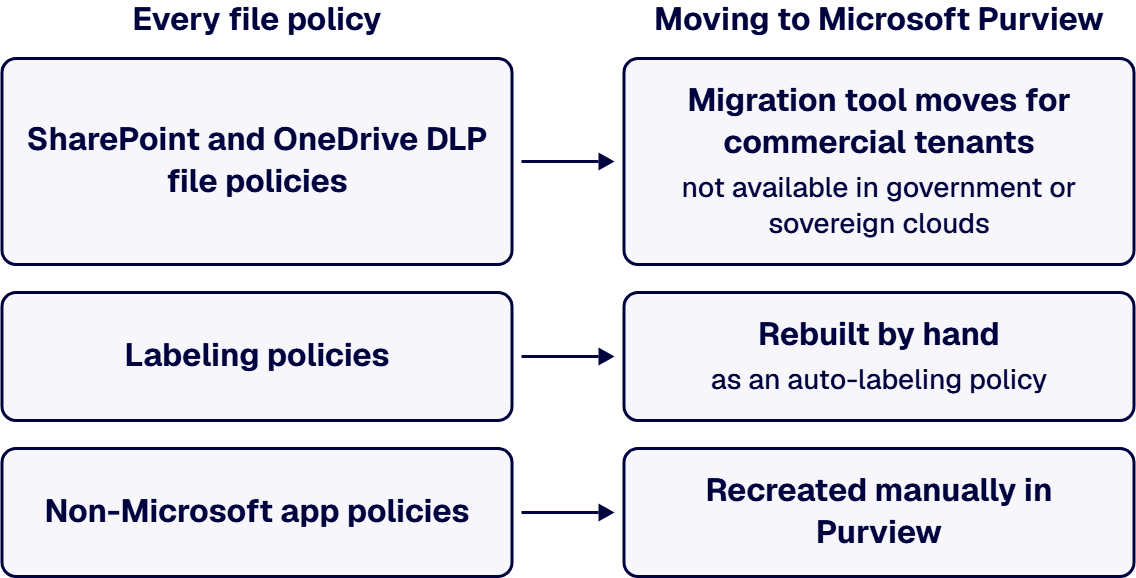
For a tenant in GCC High or another government cloud, the tool is not an option at all. Microsoft’s guide to migrating file policies to Microsoft Purview states it directly: “The tool isn’t available for government or sovereign clouds.” Its FAQ repeats the point in its own words: “The migration tool is available for commercial cloud customers in all Production environments. Government and sovereign clouds aren’t in scope at this time.”
What is available in GCC High is the underlying Purview capability. Microsoft’s GCC High planning guide for Microsoft Purview lists “Files (SPO/ODB) and email” as Available under Microsoft Purview Data Loss Prevention, and lists “Microsoft Defender for Cloud Apps (formerly Microsoft Cloud App Security) integration” as Available too, with a footnote that reads: “Identified status is subject to change as project plans and priorities are reevaluated.” If you are planning Purview controls in GCC High, also see who must sign off on Purview Insider Risk Management in GCC High.
One question the Microsoft pages read for this guide do not answer: whether the January 6, 2027 date for the file policies themselves applies in the same way inside GCC, GCC High or DoD tenants. The pages state that the tool is unavailable there; they do not state a different retirement date. If your tenant is in a government cloud, confirm your own timeline with Microsoft support rather than assuming it, and plan the manual rebuild against the January 6, 2027 date until Microsoft tells you otherwise.
In practice, a government tenant does by hand what the wizard does for a commercial one: recreate each DLP file policy in Purview from its inventory record, then follow the same validate, disable and delete steps Microsoft’s guide sets out for every environment.
Some file policies reach beyond SharePoint and OneDrive into connected apps, and Purview’s coverage there is newer. Microsoft’s guide to migrating file policies to Microsoft Purview names Box, Dropbox, Google Workspace and Salesforce among the non-Microsoft apps Purview supports through a Defender for Cloud Apps app connector, and states: “Support for non-Microsoft connected apps is in preview, and the apps roll out in phases. Not all apps are available in every tenant at the same time.”
Two limits come with that preview. The same Microsoft guide states: “Policy tips and user overrides aren’t supported for non-Microsoft apps.” And the tool does not carry these policies across: “The DLP to Purview migration tool doesn’t migrate non-Microsoft app policies yet, so recreate these policies manually in Purview for now.”
Check which of your connected apps have reached your tenant before you plan their replacement policies, and treat any policy that relied on a user override as needing a new design rather than a copy.
The rule that sets the order is Microsoft’s, and it is easy to break by moving too fast. Microsoft’s guide to migrating file policies to Microsoft Purview states: “Policies in Defender for Cloud Apps and Purview can’t coexist. Running equivalent policies in both products at the same time creates enforcement conflicts. Disable Defender for Cloud Apps policies only after you validate and turn on the Purview policies.”
Microsoft’s guide to migrating file policies to Microsoft Purview sets out the rollout and the cleanup in order, and each step below follows its words:
This guide’s own recommendation, not Microsoft’s, is to run that sequence one policy at a time against its inventory record, and to set an internal finish date well before January 6, 2027, so that the last policy is validated, enforced and its original disabled with time left to spare. A policy that is still mid-sequence on the cutoff date is a policy whose files are not covered.
Not every tenant needs this work in full, and it is worth checking first. If the tenant has no Defender for Cloud Apps file policies at all, there is nothing to migrate; record that and stop. If the real gap is DLP on devices or in Teams chats rather than on files at rest in SharePoint, OneDrive and connected apps, that is a different Microsoft DLP surface and a different piece of work from this one. If every existing file policy only labels content and never blocks or alerts, the whole set becomes auto-labeling policies rebuilt by hand, and the DLP half of this guide does not apply. And if the real question is whether a different product would suit the tenant better than Microsoft Purview, that is a product decision this guide does not make.
Whoever does this work with you, inside the organization or outside it, hold them to these criteria, set against Microsoft’s guide to migrating file policies to Microsoft Purview and stated as what they should be able to show you:
No product vendor is named or compared in that work.
i3solutions maps governance to named control families, enforces it in the platform through Entra ID, Purview, and Azure Policy, and evidences it continuously rather than reconstructing it at audit. For this retirement, that means a project, with embedded specialists where your team needs them, that inventories the file policies, confirms the license the tenant holds, builds and tests the Purview DLP and auto-labeling policies, runs them through simulation and a pilot, and carries the manual rebuild where the wizard cannot run. i3solutions builds and tests Purview DLP policies as part of a CMMC Level 2 implementation. For a government tenant, the relevant experience is narrower and stated as such: i3solutions installs and helps configure applications inside IL4 and IL6 government cloud environments and other government networks. i3solutions has been a Microsoft Partner with 30 years of enterprise technology delivery experience and has delivered 1,500+ Microsoft engagements across aerospace and defense, financial services, and health sciences. Delivery is senior and US-based.
An i3solutions engagement does not produce managed-service ownership, a replacement for the internal team, open-ended scope expansion, or vendor lock-in. The Purview policies and the runbook stay with your team to operate; i3solutions does not monitor DLP alerts as a service.
For how this fits the wider governance program, see Embedding Governance into How the Enterprise Operates and Scales.
According to Microsoft, file policies in Defender for Cloud Apps retire on January 6, 2027, and after that date all file policies configured in Defender for Cloud Apps will no longer be supported or enforced. File-based data protection moves to Microsoft Purview, while Defender for Cloud Apps continues to provide SaaS app discovery, posture management and threat detection.
According to Microsoft, the move needs a Microsoft 365 E5 or Microsoft 365 E5 Compliance license, or an equivalent standalone Microsoft Purview DLP license. Using the DLP to Purview migration tool also requires E5 or Information Protection and Governance (IP&G) licensing for the Purview products.
No. According to Microsoft, the tool isn’t available for government or sovereign clouds, so a government tenant recreates its file policies in Purview by hand. The Microsoft pages read for this guide do not state whether the January 6, 2027 date applies differently in a government cloud; confirm your tenant’s timeline with Microsoft support.
No. According to Microsoft, policies in Defender for Cloud Apps and Purview can’t coexist, because running equivalent policies in both products at the same time creates enforcement conflicts. Disable the Defender for Cloud Apps policy only after you validate and turn on the Purview policy.
No. According to Microsoft, auto-labeling policy migration for Microsoft workloads is not supported by the tool yet, so a file policy that applies labels is recreated by hand as a Purview auto-labeling policy.
No. According to Microsoft, the DLP to Purview migration tool doesn’t migrate non-Microsoft app policies yet, so those policies are recreated manually in Purview. Microsoft’s support for non-Microsoft connected apps is in preview and rolls out in phases.

US-Based Microsoft System Integrator | Est. 1997
© i3solutions. All rights reserved.
US-Based Microsoft System Integrator | Est. 1997
© i3solutions. All rights reserved.


