
By Michael Branson
As of September 2026, the way to share CUI with a prime or subcontractor in Microsoft 365 depends first on which Azure cloud the partner’s directory sits in: a GCC High tenant collaborates with another GCC High tenant under same-cloud B2B, but reaches a GCC or commercial partner only after both organizations enable cross-cloud collaboration, and Microsoft’s Cross-cloud settings page states that B2B direct connect is not supported across that boundary. Microsoft’s GCC High service description says its users “will be able to share only with other organizations in GCC-High”, while its cross-cloud settings page lists SharePoint Online sites, documents and files among the resources an invited partner user can reach, so confirm the behavior in your own tenant before committing a partner to a pattern. Under DFARS 252.204-7012, the prime puts the clause in subcontracts whose performance will involve covered defense information and determines whether the information keeps that identity, and any external cloud that stores, processes or transmits it must meet requirements equivalent to the FedRAMP Moderate baseline, so decide where the CUI will live for each partner before choosing any setting.
The short version, each point sourced above to DFARS 252.204-7012 or to Microsoft’s Cross-cloud settings page:
The request arrives from the program office as one line: set up sharing with the subcontractor. The subcontractor turns out to run commercial Microsoft 365, the prime on the same program runs GCC High, and two answers are already circulating: that GCC High can only share with GCC High, and that you just invite them as guests. Both are partly right, and neither tells you where the covered defense information will live, whose cloud will store it, or what the subcontract has to say. Refuse every partner outside GCC High, and the program works around you with email attachments and personal accounts, so the CUI leaves the tenant anyway. Invite everyone as a guest without checking, and files end up in a partner tenant no one has held to the clause. This guide works partner by partner: which pattern fits a partner in GCC High, GCC or commercial Microsoft 365, what Microsoft’s cross-cloud rules require of both tenants, and what the DFARS 252.204-7012 flow-down asks of that choice.
The first failure is choosing a sharing setting before anyone has read the subcontract. Paragraph (m) of DFARS 252.204-7012, clause date May 2024, tells the prime to “Include this clause, including this paragraph (m), in subcontracts, or similar contractual instruments, for operationally critical support, or for which subcontract performance will involve covered defense information, including subcontracts for commercial products or commercial services, without alteration, except to identify the parties.” The same paragraph puts a determination on the prime: “The Contractor shall determine if the information required for subcontractor performance retains its identity as covered defense information and will require protection under this clause, and, if necessary, consult with the Contracting Officer”. Whether a given subcontract is covered is that determination, made by the prime with its counsel and, where the clause says so, the Contracting Officer, and this guide does not make it.
Underneath sits the baseline duty, stated plainly in the clause: “The Contractor shall provide adequate security on all covered contractor information systems.” Its definition of covered defense information includes information described in the CUI Registry that is “Collected, developed, received, transmitted, used, or stored by or on behalf of the contractor in support of the performance of the contract.” Paragraph (b)(2)(ii)(D) then sets the test for any cloud that ends up holding it: “If the Contractor intends to use an external cloud service provider to store, process, or transmit any covered defense information in performance of this contract, the Contractor shall require and ensure that the cloud service provider meets security requirements equivalent to those established by the Government for the Federal Risk and Authorization Management Program (FedRAMP) Moderate baseline”, and the same sentence goes on to require the provider to meet the clause’s paragraphs (c) through (g) on cyber incident reporting and related duties.
On the standard itself, the published clause ties the security requirements to the NIST SP 800-171 version “in effect at the time the solicitation is issued or as authorized by the Contracting Officer”, but DoD’s Class Deviation 2024-O0013, Revision 1 replaces that rule with Revision 2: “The deviation clause requires contractors, who are subject to 252.204-7012, to comply with NIST SP 800-171 Revision 2, instead of the version of NIST SP 800-171 in effect at the time the solicitation is issued or as authorized by the contracting officer.” The memo adds: “This class deviation remains in effect until rescinded.” Every NIST SP 800-171 reference in this guide therefore means Rev. 2, and your contract shows which clause text it carries.
Paragraph (m) also tells the prime to require two things of each subcontractor under the clause. The subcontractor must “Notify the prime Contractor (or next higher-tier subcontractor) when submitting a request to vary from a NIST SP 800-171 security requirement to the Contracting Officer”, which under the deviation is a Rev. 2 requirement. It must also “Provide the incident report number, automatically assigned by DoD, to the prime Contractor (or next higher-tier subcontractor) as soon as practicable, when reporting a cyber incident to DoD”. The eCFR text of the clause defines the reporting clock: “Rapidly report means within 72 hours of discovery of any cyber incident.”
For the framework view of CMMC, NIST SP 800-171 Rev. 2 and the other regimes inside your own tenant, see Microsoft 365 Compliance Consulting: CMMC, HIPAA, SOC 2, and NIST for Regulated Enterprises.
Planning rule: for each partner, write down whether the information it will touch is covered defense information, which is the prime’s determination under the clause, and where that information will be stored, before choosing any collaboration setting.
The label a partner gives you, GCC, GCC High or commercial, does not by itself tell you which rules apply; the Azure cloud behind its directory does. Microsoft’s Planning identity for Azure Government applications page states that “Azure Public subscriptions trust directories in Microsoft Entra Public whereas Azure Government subscriptions trust directories in Microsoft Entra Government.” and that “The Office 365 GCC environment was designed to use Microsoft Entra Public”, so a GCC tenant’s directory sits in the same cloud as a commercial one, and a GCC High tenant’s sits in the government cloud. Moving your own organization’s identity onto Microsoft Entra ID in a government tenant is a separate project, which i3solutions covers in its guide to Entra ID migration for government tenants; this guide stays with partners.
Microsoft’s Meet with people in other Microsoft 365 cloud environments page groups the Microsoft 365 environments by Azure cloud:
Inside one Azure cloud the defaults favor guests. Microsoft’s Cross-tenant access overview states: “By default, B2B collaboration with other Microsoft Entra organizations is enabled, and B2B direct connect is blocked.” The same page states: “These default settings apply to B2B collaboration with other Microsoft Entra tenants in your same Microsoft Azure cloud.” Across clouds the starting point is the reverse, and Microsoft’s Microsoft Entra B2B in government and national clouds page states that “B2B collaboration isn’t enabled by default across national cloud boundaries”. So a GCC tenant and a commercial tenant work with each other under the same-cloud defaults, and the cross-cloud steps below do not apply between them; the question that remains is where the CUI lives.
Microsoft’s Office 365 GCC High and DoD service description states why the government environments exist: “To meet the unique and evolving requirements of the United States Department of Defense, as well as contractors holding or processing DoD controlled unclassified information (CUI) or subject to International Traffic in Arms Regulations (ITAR), Microsoft offers GCC High and DoD environments.” If your own organization’s environment is not settled yet, that is a separate decision, set out in GCC vs GCC High vs Commercial Microsoft 365 for CUI: An Evaluation Matrix.
Planning rule: list every partner with its Microsoft 365 environment and the Azure cloud its directory sits in, as Microsoft’s cross-tenant access overview frames it, because that pair, not the label, sets which of the patterns below is available.
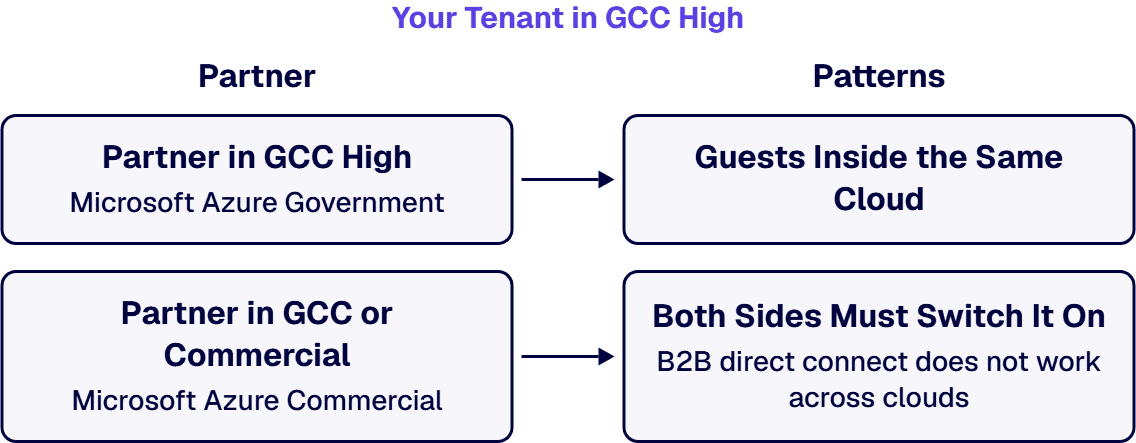
A partner whose tenant is also in GCC High is the case with the fewest moving parts. Microsoft’s Microsoft Entra B2B in government and national clouds page states that within the Azure US Government cloud, B2B collaboration is enabled between tenants where both tenants are within Azure US Government and both support B2B collaboration. It also names the failure case: “If you invite a user outside of these groups (for example, if the user is in a tenant that isn’t part of the Azure US Government cloud or doesn’t yet support B2B collaboration), the invitation fails or the user can’t redeem the invitation.”
The same cloud also allows a second route. Microsoft’s B2B direct connect overview states: “Currently, B2B direct connect capabilities work with Teams shared channels.” It adds: “B2B direct connect is possible only when both organizations allow access to and from the other organization.” Because the same-cloud default blocks direct connect, it is a mutual trust both administrators set up, and Microsoft’s Cross-cloud settings page rules it out between different clouds; for two GCC High tenants, confirm it in your own tenant before planning on it. Running guest access after a move into GCC High, with its admin roles and day-to-day ownership, is a separate decision this guide does not cover.
Planning rule: in the same cloud, decide per partner whether its people come in as invited guests in your tenant or through a mutual direct-connect trust, and scope inbound access to the named groups and resources the subcontract covers.
The guest invitation that works with a GCC High partner fails with a GCC or commercial one until both administrators act. Microsoft’s Microsoft Entra B2B in government and national clouds page states: “To set up B2B collaboration between tenants in different clouds, both tenants need to configure their Microsoft cloud settings to enable collaboration with the other cloud.” It continues: “Then each tenant must configure inbound and outbound cross-tenant access with the tenant in the other cloud.”
Microsoft’s Cross-cloud settings page adds the conditions that trip projects up. It states: “Both organizations must enable collaboration with each other, as described in this article.” It warns: “Once you enable another Microsoft Azure cloud, all B2B collaboration is blocked by default for organizations in that cloud.” It sets the invitation form: “Users from another Microsoft cloud must be invited using their user principal name (UPN).” And it closes one route entirely: “B2B direct connect is not supported for collaboration with Microsoft Entra tenants in a different Microsoft cloud.” So Teams shared channels through direct connect are not available with that partner, and meetings with people in another Microsoft cloud are a separate decision this guide does not cover.
Here Microsoft’s own pages word the sharing boundary differently, and this guide quotes both rather than choose between them. Microsoft’s Office 365 GCC High and DoD service description, last updated August 3, 2026, states: “Users in GCC-High will be able to share only with other organizations in GCC-High.” Microsoft’s Cross-cloud settings page, last updated July 27, 2026, states: “Use B2B collaboration to invite a user in the partner tenant to access resources in your organization, including web line-of-business apps, SaaS apps, and SharePoint Online sites, documents, and files.” Test the behavior in your own tenant, with the partner’s administrator, before committing a partner to a pattern.
Planning rule: for each GCC or commercial partner, agree the change with the partner’s administrator in writing, because Microsoft’s cross-cloud settings do nothing until both tenants make them, and keep the CUI in your GCC High tenant with the partner as an invited guest rather than sending files into the partner’s tenant.
Some partners cannot work as guests: they design and store deliverables in their own tenant, and the covered defense information goes with them. That is the case paragraph (b)(2)(ii)(D) of DFARS 252.204-7012 was written for: the partner’s cloud service provider has to meet security requirements equivalent to the FedRAMP Moderate baseline, and the partner’s own subcontract carries paragraph (m).
Microsoft’s DFARS compliance page states: “The following Microsoft Office 365 cloud services have a FedRAMP moderate authorization and are adequate for DFARS: Office 365 U.S. Government, and Office 365 U.S. Government Defense.” The same page states: “Microsoft can support the requirements applicable to cloud service providers for Azure Government and Office 365 U.S. Government Defense services.” For a contract under the clause the requirement is NIST SP 800-171 Rev. 2, and on that standard Microsoft’s NIST SP 800-171 compliance page states: “Customers are responsible for ensuring that their CUI workloads comply with NIST SP 800-171 guidelines.” The same Microsoft page, read here against Rev. 2, states for commercial Microsoft 365: “Note that Office 365 Commercial isn’t included in the third-party audit conducted for NIST 800-171 and isn’t in scope.”
Those are Microsoft’s statements about its own services, not a finding by this guide about any partner’s tenant. A separate CMMC clause flows its own level requirement down to subcontractors on its own terms, set out in Which CMMC Level Applies to You, and When Does It Start?. If the information is export-controlled technical data, the contract or the export rules can require more than the clause’s cloud test, and this guide does not describe those rules.
Planning rule: where a subcontractor will store or process covered defense information in its own tenant, its subcontract and its own cloud answer paragraph (b)(2)(ii)(D) and paragraph (m) of the clause; where the partner’s tenant is commercial Microsoft 365, keep the information in the prime’s tenant or in a separately authorized environment unless the partner can show its cloud meets the requirement.
The pattern that keeps the most decisions in your own hands is also the one that leaves the partner working in someone else’s tenant. Microsoft’s Cross-cloud settings page describes applying Conditional Access policies to the B2B collaboration user and choosing whether to trust multifactor authentication or device claims from the user’s home tenant, so the host tenant’s own controls govern what the guest can reach. The host tenant’s own cloud still carries the clause’s cloud test. Whether a guest-only partner’s own systems become covered contractor information systems is a question for the prime and, where the clause says so, the Contracting Officer; this guide does not answer it.
Some programs use a separately authorized environment instead, run by the prime or by a third party. Judge any such environment against the clause on four questions: who holds the covered defense information, whether the environment meets the clause’s cloud test, how incidents are reported under paragraphs (c) through (g) and how the report number reaches the prime, and who administers the partner’s access. Stopping your own users from signing in to other organizations’ tenants is a separate control and a separate decision.
Planning rule: prefer one tenant that holds the covered defense information for the program, with partners as scoped guests, and treat any other environment as a second system that has to meet the clause on its own.
This guide assumes the information is covered defense information under DFARS 252.204-7012 and that the question is where it lives. Start somewhere else when:
Hold the design to these criteria, each tied to DFARS 252.204-7012 or to Microsoft’s Cross-cloud settings page:
No provider, product or supplier is named or compared here, because the criteria are the answer. An i3solutions engagement does not produce managed-service ownership, a replacement for the internal team, open-ended scope expansion, or vendor lock-in.
i3solutions maps governance to named control families, enforces it in the platform through Entra ID, Purview, and Azure Policy, and evidences it continuously rather than reconstructing it at audit. For partner collaboration on CUI, the work is delivered as a project, with specialists embedded in your team where it needs them: mapping each partner’s cloud and access, configuring your tenant’s cross-tenant access, Microsoft cloud settings, sharing and Conditional Access for the chosen patterns, and evidencing the result against your control families. i3solutions engineers work inside the client’s own tenant as Microsoft Entra B2B guest accounts with scoped Dataverse security roles, not from an i3solutions-owned tenant.
Where the program first needs a GCC High tenant of its own, the move is a project in its own right. We manage GCC High migrations end-to-end: from eligibility validation and licensing coordination with your AOS-G supplier through identity architecture, data migration, security baseline configuration, and post-migration governance.
i3solutions is an SBA certified small business providing technical and professional services to US Federal Agencies, the DoD and the private sector. i3solutions has been a Microsoft Partner with 30 years of enterprise technology delivery experience and has delivered 1,500+ Microsoft engagements across aerospace and defense, financial services, and health sciences. Delivery is senior and US-based. This work sits within Embedding Governance into How the Enterprise Operates and Scales.
Only after both organizations act, and Microsoft’s pages word the limit differently. According to Microsoft Learn, B2B collaboration between tenants in different clouds needs both tenants to configure their Microsoft cloud settings and then inbound and outbound cross-tenant access, and B2B direct connect is not supported across clouds. According to Microsoft Learn, the GCC High service description says users “will be able to share only with other organizations in GCC-High”, while the cross-cloud settings page lists SharePoint Online sites, documents and files among the resources an invited partner user can reach, so test the behavior in your own tenant. According to DFARS 252.204-7012, any external cloud that stores, processes or transmits covered defense information must meet security requirements equivalent to the FedRAMP Moderate baseline, which is the question to answer before files go to the partner’s tenant.
Yes. According to Microsoft Learn, the Office 365 GCC environment was designed to use Microsoft Entra Public, and Microsoft groups Commercial and GCC in Microsoft Azure Commercial, while GCC High and DoD sit in Microsoft Azure Government. According to Microsoft Learn, the default cross-tenant access settings apply to B2B collaboration with tenants in the same Microsoft Azure cloud, so a GCC tenant and a commercial tenant work under the same-cloud defaults.
Not to every one; the clause sets the conditions. According to DFARS 252.204-7012 paragraph (m), the clause goes into subcontracts or similar contractual instruments for operationally critical support, or for which subcontract performance will involve covered defense information, without alteration except to identify the parties. According to the same paragraph, the prime determines whether the information required for subcontractor performance retains its identity as covered defense information and, if necessary, consults the Contracting Officer, so whether a given subcontract is covered is the prime’s determination, not this guide’s.
Two things, both up the chain. According to DFARS 252.204-7012 paragraph (m), the subcontractor notifies the prime Contractor (or next higher-tier subcontractor) when it submits a request to the Contracting Officer to vary from a NIST SP 800-171 security requirement, which under DoD’s class deviation is a Rev. 2 requirement, and provides the incident report number assigned by DoD to the prime as soon as practicable when it reports a cyber incident to DoD. According to the clause’s definitions, rapidly report means within 72 hours of discovery of any cyber incident.
Not through B2B direct connect. According to Microsoft Learn, B2B direct connect capabilities currently work with Teams shared channels, and B2B direct connect is not supported for collaboration with Microsoft Entra tenants in a different Microsoft cloud. Meetings with people in another Microsoft cloud are a separate decision this guide does not cover.
Microsoft’s statement names two government services, and it sits beside two caveats. According to Microsoft Learn, Microsoft’s DFARS compliance page states: “The following Microsoft Office 365 cloud services have a FedRAMP moderate authorization and are adequate for DFARS: Office 365 U.S. Government, and Office 365 U.S. Government Defense.” According to Microsoft Learn, the same page says Microsoft can support the requirements applicable to cloud service providers for Azure Government and Office 365 U.S. Government Defense services. According to Microsoft Learn, Microsoft’s NIST SP 800-171 page, read here against Rev. 2 for a contract under the clause, states: “Customers are responsible for ensuring that their CUI workloads comply with NIST SP 800-171 guidelines.”

US-Based Microsoft System Integrator | Est. 1997
© i3solutions. All rights reserved.
US-Based Microsoft System Integrator | Est. 1997
© i3solutions. All rights reserved.


