
By Michael Branson
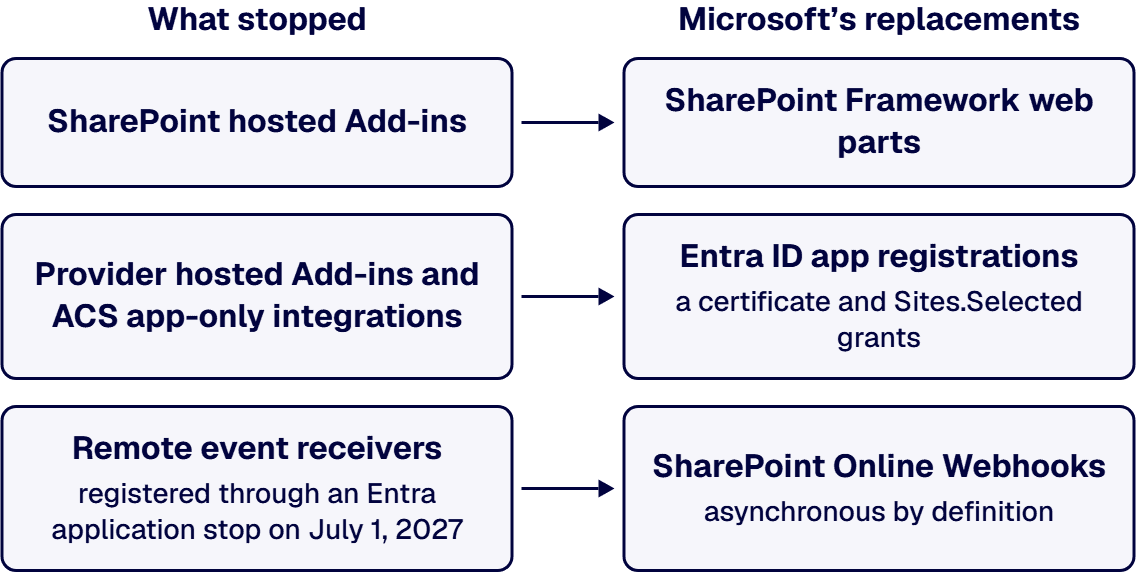
As of September 2026, SharePoint Add-ins and Azure ACS have been fully retired in SharePoint Online since April 2, 2026, for all tenants and all environments, Government Clouds and the U.S. Department of Defense included, and Microsoft’s Azure ACS retirement in Microsoft 365 announcement said there would be no option to extend. What stopped is SharePoint hosted Add-ins, provider hosted Add-ins, and every application that used an ACS app-only principal to reach SharePoint, and Microsoft’s replacements are SharePoint Framework for the in-page experience and Microsoft Entra ID app registrations, with a certificate and Sites.Selected site scoping, for everything that calls SharePoint from outside. Remote event receivers registered through ACS broke on the same date, the ones registered through an Entra application keep working only until July 1, 2027, and Microsoft recommends the Microsoft 365 Assessment tool to find every add-in and ACS principal in the tenant.
These points summarize the Microsoft pages cited above, chiefly the FAQ – SharePoint Add-In and Azure ACS retirement in Microsoft 365:
Start with the integration no one has checked since April: a nightly job that pushed records into a document library with an Azure ACS client secret, or a remote event receiver that stopped deletions in a regulated library. Microsoft’s FAQ – SharePoint Add-In and Azure ACS retirement in Microsoft 365 records that the add-in model was fully retired on April 2, 2026, so anything that authenticated that way has not worked since. The loud failures announced themselves: a web part that stopped rendering, an app that stopped saving. The quiet ones are what an auditor finds when they ask why a control stopped enforcing in April. This guide covers what stopped and what did not, how to find every affected piece, the replacement for each broken class, the government-cloud endpoints, and the one date still ahead.
If your first assumption was that a government tenant got more time, it did not. Microsoft’s SharePoint Add-In retirement in Microsoft 365 announcement set the dates for every tenant and added: “This applies to all environments including Government Clouds and the U.S. Department of Defense.” The same announcement states: “The retirement of SharePoint Add-Ins applies to Project Online as well”
Microsoft’s FAQ – SharePoint Add-In and Azure ACS retirement in Microsoft 365 now states the outcome in the past tense: “The SharePoint Add-In model in SharePoint Online has been deprecated on November 27, 2023 and fully retired on April 2, 2026.” The companion Azure ACS retirement in Microsoft 365 announcement applied to the same environments, Government Clouds and the Department of Defense included, and said: “There will not be an option to extend using Azure ACS with SharePoint Online beyond April 2nd, 2026.” New tenants had already lost both from November 1, 2024.
Three things did not stop, and Microsoft’s FAQ – SharePoint Add-In and Azure ACS retirement in Microsoft 365 answers each one:
This guide’s planning rule: assume nothing in SharePoint Online that authenticated through ACS still works, in any cloud, until someone has tested it and named its owner.
When the only evidence of a failure is a job log no one reads, an inventory is the only way to find it. Microsoft’s SharePoint Add-In retirement in Microsoft 365 announcement says “we recommend that customers run the Microsoft 365 Assessment tool to scan their tenants for SharePoint Add-In usage.” The Microsoft 365 Assessment tool page describes it this way: “The Microsoft 365 Assessment tool is an open source tool that provides customers with data to help them with various retirement and adoption scenarios.”
For Azure ACS, Microsoft’s Azure ACS retirement in Microsoft 365 page lists what the tool’s Azure ACS report lets tenant administrators do:
This guide’s planning rule: build one inventory with four columns, one for each class that broke: SharePoint hosted Add-ins, provider hosted Add-ins, ACS app-only integrations with no add-in at all, and remote event receivers. The third column matters because, as Microsoft’s Azure ACS retirement in Microsoft 365 page explains, ACS was also used to grant applications access to SharePoint Online directly, optionally with application permissions and granular scopes, with no add-in involved. Give every row a named business owner, because a row with no owner is a row no one will retest.
Add-ins you bought rather than built need a decision of their own. Microsoft’s instruction in its SharePoint Add-In retirement in Microsoft 365 announcement is to “contact the provider for an updated version that does not depend on the SharePoint Add-In extensibility model.” For each acquired add-in, record whether such a version exists, who in your organization confirmed it, and on what date.
If an add-in part stopped rendering on a page your users depend on, the rebuild target is already named. Microsoft’s SharePoint Add-In retirement in Microsoft 365 announcement says: “SharePoint hosted Add-Ins can be replaced by SharePoint Framework web parts, for the provider hosted Add-Ins any software as a service application platform (e.g. Microsoft Azure) in combination with Microsoft Entra ID for auth can be used as alternative development model.”
Microsoft’s Modernization guidance for existing SharePoint Add-In model implementations in Microsoft 365 maps each old piece to its replacement. The two pairs that apply to a SharePoint hosted Add-in:
One design constraint carries over from the add-in era and is easy to lose in a rebuild. Microsoft’s Overview of the SharePoint Framework states: “The SharePoint page HTML DOM is not an API.” A rebuilt web part that reads or rewrites page markup to get its data is a rebuild that breaks on the next page change.
Before anyone uninstalls an add-in, get its data out. Microsoft’s FAQ – SharePoint Add-In and Azure ACS retirement in Microsoft 365 is explicit: “It’s important you retrieve the data before you uninstall the SharePoint Add-In, because the app web is deleted when you uninstall the Add-In.” This guide’s planning rule: export the app-web data, have its business owner confirm the export, and only then uninstall.
When the code lived outside SharePoint and called back in, the fix is a new identity rather than a new page. Microsoft’s SharePoint Add-In retirement in Microsoft 365 announcement describes how provider hosted and SharePoint hosted Add-ins reached SharePoint: “They use Azure ACS (Access Control Services) as auth layer to enable calling back into the host web where the SharePoint Add-In was installed.”
The Modernization guidance for existing SharePoint Add-In model implementations in Microsoft 365 gives the same target for both of the other broken classes (Azure AD is the earlier name for Microsoft Entra ID):
For the code itself, Microsoft’s FAQ – SharePoint Add-In and Azure ACS retirement in Microsoft 365 states: “For server-side code the recommendation is to use Microsoft Graph as a first choice.” This guide’s planning rule: every integration that called SharePoint without a user gets its own Entra app registration, never one registration shared across integrations, so that each one can be scoped, rotated and retired on its own.
The fastest rebuild is also the one an auditor flags: a tenant-wide application permission and a client secret pasted into a script. Microsoft’s Granting access via Entra ID Application Permissions page closes the secret option for SharePoint: “In Entra ID when doing app-only you must use a certificate to request access to SharePoint CSOM/REST API’s: anyone having the certificate and its private key can use the app and the permissions granted to the app.” Asked whether anything other than a certificate works for app-only access, the same page answers: “No, all other options are blocked by SharePoint Online and will result in an Access Denied message.”
A certificate decides who can act as the app. Sites.Selected decides where it can act. Microsoft’s Understanding Resource Specific Consent for Microsoft Graph and SharePoint Online page explains: “With Resource Specific Consent (RSC) you can register applications in Microsoft Entra and grant them application-only permissions that can target specific site collections only, like you used to do with ACS.” It also warns that granting the permission is only the first step: “Once the Sites.Selected application permission is assigned and granted, the application still can’t access any target site collection.” Each target site is then granted explicitly, by a tenant global admin or by an application that holds Sites.FullControl.All.
Do not assume what the old principals could reach. Microsoft’s Upgrading SharePoint applications from Azure Access Control Service to Azure Active Directory page describes add-in model app-only permissions reaching the whole tenant, while its resource specific consent page describes ACS registrations targeted at specific site collections. Both describe real registrations. Read each principal’s permission scopes and reachable sites from the assessment report, and size its replacement to what the business process actually used.
This guide’s planning rule: request Sites.Selected, grant only the sites the inventory shows the integration used, keep the certificate’s private key in a managed store with a rotation date, and record a named owner for every registration. For what that ownership record should hold, see Microsoft 365 Integration Firms: The Capability Checklist.
If your tenant is GCC, GCC High or DoD, the retirement date was the same and the rebuilt code differs mainly in where it points. Microsoft’s Azure ACS retirement in Microsoft 365 announcement states: “This applies to all environments including Government Clouds and Department of Defense.”
Microsoft’s Microsoft Graph national cloud deployments page gives the endpoints for each Microsoft 365 government environment:
This guide’s planning rule: rebuilt code reads its cloud’s endpoints from configuration and never hard-codes them from a commercial sample. Confirm on the day that each replacement this guide names (Sites.Selected, SharePoint Online webhooks and the assessment tool) is available on the terms you need in your cloud; this guide does not claim that they behave the same in every cloud. The wider build constraints inside a GCC High tenant are covered in Building on Microsoft 365 GCC High: What Changes.
If a remote event receiver registered through ACS used to stop a deletion in a regulated library, that control stopped when ACS did. Microsoft’s FAQ – SharePoint Add-In and Azure ACS retirement in Microsoft 365 answers the question directly: “Yes, remote event receivers are part of this retirement.” It adds: “Remote event receivers have a dependency on Azure ACS, and will be in broken state when Azure ACS is turned off.”
Receivers registered through an Entra application are on a different path, and it also ends. Microsoft’s Registering and using Remote Event Receivers without having a dependency on Azure ACS page states: “Although these RERs do not depend on Azure ACS they still will retire, the main difference is that they’ll keep working until July 1, 2027 and that they’ll also work for new tenants onboarding after November 1, 2024.” The same page sets a limit on how they work: “Consequence is that your RER service cannot impersonate the user that triggered the RER to fire but it has to use application permissions to call back to SharePoint.”
Microsoft’s FAQ – SharePoint Add-In and Azure ACS retirement in Microsoft 365 names the lasting replacement: “The recommended path forward is to use SharePoint Online Webhooks.” It also names what webhooks cannot do: “As webhooks are asynchronous by definition, synchronous events that allow an app to block or cancel a SharePoint action are no longer possible.” Where a receiver blocked updates or deletions by unauthorized users, the same FAQ points to securing the protected files or folders so they cannot be changed, or moving that data to a hidden library. The mechanics of the move are in Transform SharePoint Add-in model Remote Event Receivers to SharePoint Online Webhooks.
This guide’s planning rule: treat an Entra-registered receiver as a bridge with an end date, not a destination, and redesign every receiver that blocked or cancelled an action before July 1, 2027, recording how each control is now enforced.
Before you plan a rebuild, check that the retirement is really your problem. Microsoft’s Azure ACS retirement in Microsoft 365 page is the test for the first case below:
Whether your own team or an outside one does the work, ask for evidence against the dates and requirements in Microsoft’s FAQ – SharePoint Add-In and Azure ACS retirement in Microsoft 365 before you accept a plan:
Our dedicated SharePoint developers build enterprise-ready solutions using SPFx, Power Platform, and Microsoft Graph. That is the practice described on Enterprise SharePoint Development & Integration Services Built for Scale and Governance, and it is the work this recovery needs: SharePoint Framework for the page experience, Microsoft Graph and Entra ID app registrations for the integrations. i3solutions is a Microsoft-focused application development and integration firm that helps enterprises modernize operations, connect platforms, and build tailored solutions. An i3solutions SharePoint consulting engagement produces named deliverables: a governance documentation package, architecture artifacts, and runbooks. i3solutions has been a Microsoft Partner with 30 years of enterprise technology delivery experience and has delivered 1,500+ Microsoft engagements across aerospace and defense, financial services, and health sciences.
The work runs as a project: the inventory first, then the rebuilds, with embedded specialists where your team needs them. An i3solutions engagement does not produce managed-service ownership, a replacement for the internal team, open-ended scope expansion, or vendor lock-in. The new registrations, certificates and runbooks belong to your tenant and your team, and the decision about what a broken control means under your own obligations stays with your compliance function and assessor.
Yes. According to Microsoft Learn, the SharePoint Add-in and Azure ACS retirements applied to all environments, including Government Clouds and the U.S. Department of Defense, and both stopped on April 2, 2026.
No. According to Microsoft Learn, there was no option to extend Azure ACS with SharePoint Online beyond April 2, 2026, and it has been fully retired since that date. The replacement for anything that called SharePoint through ACS is a Microsoft Entra ID app registration.
No. According to Microsoft Learn, SharePoint Framework (SPFx) is the recommended development model for SharePoint extensibility and is not impacted by these retirements, and it is Microsoft’s replacement for SharePoint hosted Add-ins.
Yes. According to Microsoft Learn, both CSOM and JSOM continue working after Add-ins and Azure ACS were fully retired. What changed is how an app authenticates: app-only access to SharePoint now goes through a Microsoft Entra ID registration with a certificate.
That depends on how each receiver was registered. According to Microsoft Learn, remote event receivers registered using Azure ACS stopped working on April 2, 2026, while those registered using an Entra application keep working until July 1, 2027 and then retire as well.
No. According to Microsoft Learn, SharePoint Online blocks every option for Entra ID app-only access other than a certificate, and those attempts result in an Access Denied message.

US-Based Microsoft System Integrator | Est. 1997
© i3solutions. All rights reserved.
US-Based Microsoft System Integrator | Est. 1997
© i3solutions. All rights reserved.


