
Michael Branson
An operations leader has asked for one picture: assets, events and people on a map, updated as things happen. Your estate already runs on Microsoft, in some cases inside GCC High or Azure Government, and Power BI is in use. A vendor has demonstrated a purpose-built situational awareness product, while an internal team says Power BI and Fabric can carry the same picture. Both may be partly right. The first dashboard mock-up used the Azure Maps visual, which Microsoft’s Power BI feature table marks as unavailable in GCC, GCC High and DoD. The sections of this guide work through the decision one layer at a time, using Microsoft’s own pages as read on 26 September 2026.
You face this decision when a vendor demo sits beside a Power BI tenant the organization already pays for. Build on the Microsoft stack when your data already lands in Azure Government or GCC High, when an IL4 or IL5 boundary is the ceiling you need, and when you are prepared to deliver the map layer as a custom Azure Maps component, because Microsoft lists the Azure Maps visual as unavailable in Power BI for GCC, GCC High and DoD. Look at a purpose-built platform when the map layer must run at Impact Level 6, where the IL6 (Azure Government Secret) column has no entry for Azure Maps, when you need the Azure Maps visual inside a Power BI report in a government cloud on day one, or when there is no Microsoft government estate to reuse.
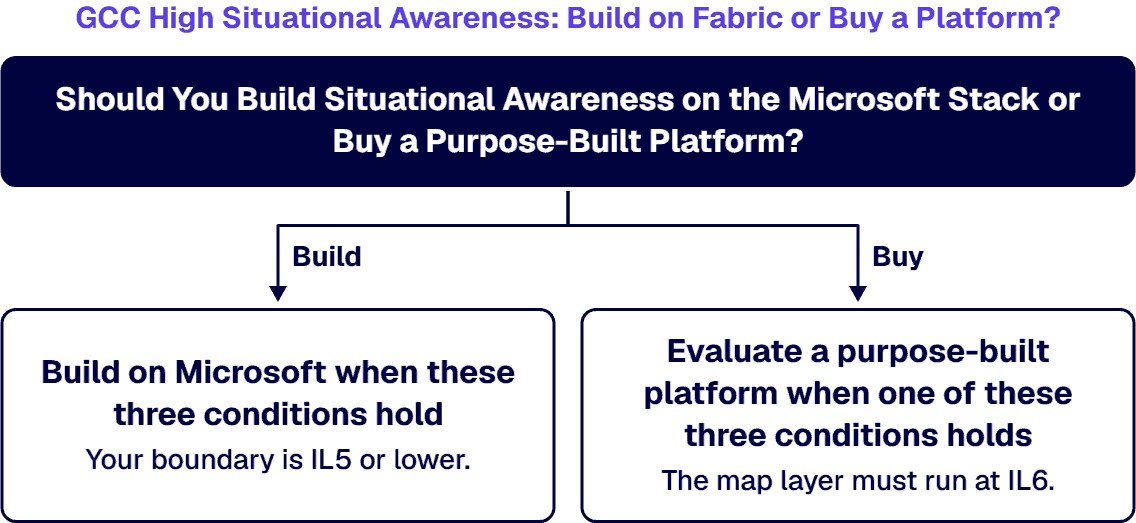
Build on Microsoft when these three conditions hold:
Evaluate a purpose-built platform when one of these three conditions holds:
When the two lists pull in different directions, the boundary condition decides first. An existing Microsoft estate is worth reusing only after the audit-scope table shows the layers you need at the level your contract names; if the map layer must sit at IL6, estate reuse does not change that answer.
When an operations center rebuilds the same picture by hand before each briefing, copying positions and incident notes into slides, a situational awareness platform replaces that manual work with four functions: ingest, fuse, map and alert. Each one maps to a named Microsoft service, and each service has its own government-cloud status.
Ingest. Events arrive continuously from sensors and field systems. Microsoft describes Azure Event Hubs as “a fully managed, real-time data streaming platform that can ingest millions of events per second with low latency.” Inside Microsoft Fabric, Real-Time Intelligence offers the same entry point: “Eventstreams let you collect, transform, and send large amounts of real-time data to different destinations, all without writing code.”
Fuse. Events from different sources have to land in one queryable store before they can share a view. Microsoft calls Azure Data Explorer “a fully managed, high-performance, big data analytics platform that makes it easy to analyze high volumes of data in near real time,” and in Fabric, “Eventhouses are the ideal analytics engine to process data in motion.” Microsoft positions Real-Time Intelligence as “an end-to-end solution for scenarios where you need to respond to events as they happen, process continuously flowing data, or analyze logs.”
Map. The shared view this guide assumes is a map. Azure Maps “is a collection of geospatial services and SDKs that use fresh mapping data to provide geographic context to web and mobile applications.” Fabric also has a map item: “Map in Microsoft Fabric is a dynamic geospatial visualization tool that empowers you to analyze both static and real-time spatial data for deeper intelligence.” Section four explains why this layer is where government builds stall.
Alert. A picture also needs a trigger for events that arrive while the screen is unwatched. In Fabric that function is Activator, which Microsoft’s GCC High page lists as “Activator (All integrations points with RTI)” (section five).
Where these services sit inside a wider Microsoft data estate is covered on the enterprise data integration and analytics architecture page; this page stays on the four functions a live picture needs.
Before a design review, expect the security team to ask one question: which of these services appear in Microsoft’s government audit scope, and at what level. Microsoft answers it in its Azure Government services by audit scope table. The audit-scope table on this page copies its rows for the services a situational awareness build would use, as read on 26 September 2026; the table itself states “Last updated: February 2026”. Microsoft’s legend defines a check as “service is included in audit scope and has been authorized”. An empty cell carries no definition on that page, so this page shows it as “No entry” and nothing more.
| Service (Microsoft’s row name) | FedRAMP High | DoD IL2 | DoD IL4 | DoD IL5WI | DoD IL6 |
|---|---|---|---|---|---|
| Power BI | Included | Included | Included | Included | Included |
| Azure Maps | Included | Included | Included | Included | No entry |
| Event Hubs | Included | Included | Included | Included | Included |
| Data Explorer | Included | Included | Included | Included | Included |
| Stream Analytics | Included | Included | Included | Included | No entry |
Read the column headings in Microsoft’s terms. The page defines “DoD IL5WI = DoD SRG Impact Level 5 Workload Isolation (IL5WI) Provisional Authorization (PA) in Azure Government”, and it adds that in the US Gov regions, “services require extra configuration to meet DoD IL5 compute and storage isolation requirements”. So an IL5 entry describes a workload-isolation authorization that needs that extra configuration; it does not describe a default deployment. The IL6 column is a different cloud: “DoD IL6 = DoD SRG Impact Level 6 Provisional Authorization (PA) in Azure Government Secret”.
Microsoft Fabric is placed differently on the same page. It appears in the Azure public services table, with entries for FedRAMP High and DoD IL2, and it does not appear as a row in the Azure Government table. Fabric in GCC High is described on its own page, covered in section five.
Whether a given workload qualifies at a given level is a determination for your authorizing official and your contract clause. The table tells you what Microsoft lists; it does not tell you that your workload qualifies.
If the mock-up that won the room has a map visual in it, that visual is where a GCC High build first meets a gap. Microsoft’s Power BI for US government customers feature table marks the Azure Maps row as unavailable in GCC, GCC High and DoD, with the legend “The feature isn’t available in the environment, and we don’t have an estimated time frame for delivery.” The Azure Maps Power BI visual documentation says the same thing from the other side: “At this time, Azure Maps is currently available in all countries and regions except:” China and “Azure Government (GCC + GCC High)”.
That limit applies to the Power BI visual. The Azure Maps service itself carries audit-scope entries in Azure Government through IL5 workload isolation, as the audit-scope table on this page shows. The path this page documents for the map layer is a custom map component built on the Azure Maps service in Azure Government. Map platform choices against an Azure Government boundary are covered on the geospatial services page, and the ArcGIS integration work on the Esri consulting and integration services page. For this decision, one narrower step follows: plan the map as its own build item with its own schedule line, because the report visual that made the demo look finished is the one piece Microsoft does not offer in these clouds.
If your program plans to stream events through Fabric in GCC High, plan against what Microsoft’s own page lists. Microsoft’s page Microsoft Fabric for US Government GCC High customers, which carries the line “Last updated on 2026-10-01”, asks organizations to “Complete the Government Community Cloud Eligibility Intake Form to determine whether your organization is eligible.” It also states that “Fabric for GCC High is available only in the following regions:” US Gov Virginia and US Gov Texas.
The same page lists what Real-Time Intelligence includes in GCC High: “KQL queryset, Activator (All integrations points with RTI), eventhouse and KQL database, eventstream, and Real-Time dashboard”. It then draws the boundary in plain words: “Items other than those listed in these tables aren’t currently available in GCC High.” The Map item is not in that list.
What that list means for your schedule and your risk register is your program’s judgment; Microsoft’s list is what this page quotes. If your organization is moving existing Power BI capacity into Fabric in GCC High first, the readiness steps for that move are covered on the Power BI P1 to Fabric in GCC High readiness page.
When the feeds an operations center wants on one screen come from different owners on different schedules (track data, incident reports, sensor events and documents), fusion is the first gap. For a live picture, fusion has two jobs. Sources have to arrive as events rather than as nightly extracts, and they have to resolve into one shared view the operators read from. The method behind governed data fusion is covered on the data fusion and predictive analytics services page.
Three case studies show fusion work behind a shared picture in defense settings. The data fusion platform case study describes a data fusion platform for a US military command with geospatial mapping, heat maps and dashboards; that platform was not a Power BI or Fabric build. The situational awareness case study covers work for an agency within the Department of Defense, and the strategic awareness case study covers a second analytics and fusion engagement.
Some programs should stop the Microsoft build before it starts, and the audit-scope table and the Power BI feature table tell you when.
A purpose-built platform brings its own authorization boundary, which your security team carries for the life of the system. Check the vendor’s own authorization documentation for the level your contract names before you compare anything else; this page makes no statement about any product’s authorization or capability.
When a Microsoft partner writes about building on Microsoft, you should weigh its interest in the answer, so this is what ours rests on. These are the statements we can document, quoted as we can document them:
i3solutions does not hold an authorization of its own and does not issue an ATO for any system; authorization stays with your authorizing official.
The sequence we recommend follows the table, not the demo. Land the operational data in the government environment first and confirm each source arrives as events. Choose the map path against the two Microsoft tables for your environment, audit scope and Power BI feature availability. Then prove the picture with one mission area before scaling it across sites. Where this work sits among wider integration projects is covered on the Microsoft system integration and data management page, and the questions to put to a firm doing government analytics work are on the Power BI consulting for government contractors page.
If your estate is in Azure Government, Microsoft’s audit-scope table, read 26 September 2026, lists Power BI, Event Hubs and Data Explorer at FedRAMP High through DoD IL6, and Azure Maps and Stream Analytics at FedRAMP High through DoD IL5WI. Those services cover ingest and fusion, plus the Azure Maps service for the map; the alert function sits in Fabric’s Activator, which Microsoft’s Fabric for GCC High page (“Last updated on 2026-10-01”) lists as “Activator (All integrations points with RTI)”. The Power BI Azure Maps visual is the gap: Microsoft marks it unavailable in GCC, GCC High and DoD, so the map is built as a custom Azure Maps component.
Not if your report depends on the Azure Maps visual. The feature table on Microsoft’s Power BI for US government customers page marks Azure Maps unavailable in GCC, GCC High and DoD: “The feature isn’t available in the environment, and we don’t have an estimated time frame for delivery.” The Azure Maps visual FAQ lists “Azure Government (GCC + GCC High)” among the exceptions. The Azure Maps service itself is in Azure Government audit scope through IL5 workload isolation, so a custom map component remains possible.
Microsoft lists it, for organizations eligible under Microsoft’s intake form. Microsoft’s Fabric for GCC High page, which reads “Last updated on 2026-10-01”, lists Real-Time Intelligence as “KQL queryset, Activator (All integrations points with RTI), eventhouse and KQL database, eventstream, and Real-Time dashboard”, in US Gov Virginia and US Gov Texas, subject to the Government Community Cloud Eligibility Intake Form. The page also states: “Items other than those listed in these tables aren’t currently available in GCC High.” Map does not appear among the listed items.
Build on Microsoft when your data already lands in Azure Government or GCC High, your boundary is IL5 or lower, and you can deliver the map as a custom Azure Maps component. Buy, or at least evaluate a purpose-built platform, when the map must run at IL6, when the Power BI Azure Maps visual is a day-one requirement in GCC, GCC High or DoD, or when there is no Microsoft government estate to reuse. When those conditions conflict, the boundary requirement in Microsoft’s audit-scope table decides first.
When the map layer must run at IL6: in Microsoft’s audit-scope table, the IL6 (Azure Government Secret) column has no entry for Azure Maps, and Microsoft directs authorization questions for its Secret and Top Secret clouds to your Microsoft account representative. A purpose-built platform also fits when the Power BI Azure Maps visual is needed now in a government cloud, or when no Microsoft government estate exists to reuse. Before comparing anything else, read that vendor’s authorization documentation against the level named in your contract.

US-Based Microsoft System Integrator | Est. 1997
© i3solutions. All rights reserved.
US-Based Microsoft System Integrator | Est. 1997
© i3solutions. All rights reserved.


