
By Michael Branson
Each point in these takeaways restates Microsoft’s About Azure Cloud Services (extended support) page and the other Microsoft Learn pages cited in this guide:
If you are the IT leader, the retirement banner can read like the last one. If your team moved these applications from Cloud Services (classic) to extended support, the web and worker roles came across as they were, and Microsoft’s About Azure Cloud Services (extended support) page said of that move: “No changes are required to runtime code.” This move is different. The target Microsoft names does not run IIS, there is no one-click tool, and the date does not move. A plan that budgets a redeploy per deployment will find, partway through, that some roles need a code change first. This guide sets out Microsoft’s date and target in its own words, a routing rule for every web and worker role, the workstreams that move with the host, and the checks that change in Azure Government.
When you build the budget for this move, start from three Microsoft statements that rule out a lift-and-redeploy plan. Microsoft’s Frequently asked questions (FAQ) page on the move to Service Fabric states that “we can’t grant extension requests” and that customers must migrate within the retirement window. It states that “there’s no one-click migration tooling available.” And it states: “Each application must determine how its code runs on the VM/node and make custom adjustments accordingly.”
Microsoft’s About Azure Cloud Services (extended support) page carries the date as a banner: “As of March 31, 2025, cloud Services (extended support) is deprecated and will be fully retired on March 31, 2027.” Until then, Microsoft’s Frequently asked questions (FAQ) page states: “From now until March 31, 2027, you can continue to use Cloud Services (extended support) without disruption.”
The planning rule that follows: budget a code change per role, not a redeploy per deployment. A deployment with one web role and two worker roles is three routing decisions, and they may not land in the same place.
When your team asks where Microsoft wants these roles to go, the answer is one service. Microsoft’s Azure Updates record Retirement: Cloud Services (Extended Support) to Be Retired on March 31, 2027 tells customers they need to “migrate services that were deployed using this model to Service Fabric managed cluster” before that date. Microsoft’s Frequently asked questions (FAQ) page states: “To avoid service disruption, you must migrate workloads running Cloud Services (extended support) to Service Fabric managed clusters by March 31, 2027.” On cost, the same page states: “There’s no pricing rate change because of this migration and customers continue to get billed at the same rate while using the same size.” Microsoft’s Service Fabric managed clusters page describes the target: “Service Fabric managed clusters are an evolution of the Azure Service Fabric cluster resource model that streamlines your deployment and cluster management experience.”
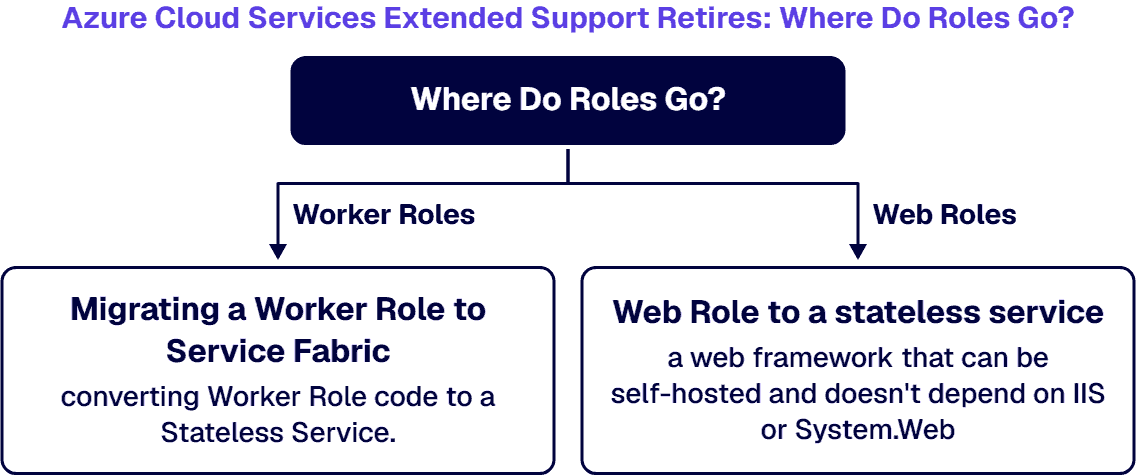
The code question is where roles split. Microsoft’s Learn about the differences between Cloud Services (extended support) and Service Fabric before migrating applications page states: “Cloud Services (extended support) is about deploying applications as VMs.” It also states: “The Web and Worker Roles can be ported to Service Fabric stateless services with minimal code changes.” Microsoft’s Guide to converting Web and Worker Roles to Service Fabric stateless services page then conditions that for web roles:
If your web tier hands work to worker roles through a queue, that pattern carries over. Microsoft’s Learn about the differences between Cloud Services (extended support) and Service Fabric before migrating applications page states: “A common scenario is a web tier that sends jobs to an Azure Queue or Service Bus where Worker Role instances can dequeue and process the jobs.” It adds: “The same communication model can be used in Service Fabric.”
The planning rule: send worker roles, and web roles already on a self-hostable framework, to Service Fabric managed cluster first. Flag every web role that depends on IIS or System.Web before it is scheduled, because its first step is a framework change, not a move.
When a role cannot become a stateless service in time, Microsoft’s own documentation names other Azure services, with a caveat about where that list comes from. Microsoft’s About Azure Cloud Services (extended support) page, under “Additional migration options”, says: “When evaluating migration plans from Cloud Services (classic) to Cloud Services (extended support), consider other Azure services such as: Virtual Machine Scale Sets, Azure Container Apps, App Service, Azure Kubernetes Service, and Azure Service Fabric.” That sentence was written for the earlier move from classic, not as Microsoft’s target for the 2027 retirement, which is Service Fabric managed cluster. The four other services are Azure destinations you choose by what each role’s code depends on, and each choice is checked against its Microsoft documentation:
This is a routing rule for a Cloud Services role that has to move before a date, not a general comparison of Azure hosting. If you are redesigning the application rather than moving it, the general hosting decision is covered in Azure application architecture.
When the destination is chosen, three workstreams still travel with every role, and Microsoft’s documentation names each. Microsoft’s About Azure Cloud Services (extended support) page states: “Customers must use Azure Key Vault to manage certificates in Cloud Services (extended support).” It also states: “All resources deployed through the Azure Resource Manager must be inside a virtual network.” Microsoft’s Frequently asked questions for Azure Cloud Services (extended support) page states: “CSES doesn’t support Managed Identity Support.” The same page explains a capacity limit the move leaves behind: “Cloud Service (extended support) deployments are tied to a cluster like Cloud Services (classic).” It continues: “Therefore, allocation failures continue to exist if the cluster is full.”
Three consequences follow. Certificates already sit in Key Vault, so the work is re-binding them to the new host, not finding them. The virtual network, subnets and network rules each role relies on need to be re-created or re-pointed for the new host. And because the old model had no managed identity, the move is the natural point to decide whether each role adopts one, which touches every secret and connection string it uses. Carry certificates, networking and identity as named workstreams per role, each with an owner. If a deployment sits behind an Application Gateway V1, that gateway has a separate retirement of its own; plan it as its own workstream rather than inside this one.
When you set the plan, work back from the date Microsoft states on its Frequently asked questions (FAQ) page, March 31, 2027, with no extension, and run the work in this order:
This guide states no duration, deployment count or cost for this work; those come from your own inventory.
When your applications run in Azure Government, one more check applies to every destination. Microsoft’s Azure, Dynamics 365, Microsoft 365, and Power Platform services compliance scope page defines its scope this way: “Azure Government = Azure Government regions US Gov Arizona, US Gov Texas, and US Gov Virginia (US Gov regions)”. Its Azure Government table, marked “Last updated: February 2026”, lists each service against FedRAMP High, DoD IL2, DoD IL4, DoD IL5WI and DoD IL6. The rows for the services in this guide are:
For DoD IL5 via Workload Isolation, Microsoft’s Azure, Dynamics 365, Microsoft 365, and Power Platform services compliance scope page states that “services require extra configuration to meet DoD IL5 compute and storage isolation requirements”. Microsoft’s Compare Azure Government and global Azure page states: “The following App Service resources aren’t currently available in Azure Government:” and lists App Service Certificate, App Service Managed Certificate and App Service Domain, so plan certificates for an App Service destination there without those resources.
Two questions stay open, and you confirm them with Microsoft for your own subscriptions: whether the March 31, 2027 date and the no-extension rule in Microsoft’s Frequently asked questions (FAQ) apply to Azure Government exactly as stated for Azure, and whether Service Fabric managed clusters specifically are available in your Azure Government regions at the level you need, since the table’s row reads “Service Fabric” without naming the managed-cluster model. Which impact level a contract or data set requires is your contracting officer’s and authorizing official’s determination; this guide describes the table as Microsoft publishes it. If this re-platform also moves the application from Azure commercial into Azure Government, that is a second project, covered in Azure Government migration.
If your situation is one of these, start somewhere else or settle one question first.
Whether your own team or an outside team carries the move, hold the plan to these criteria:
i3solutions’ Azure specialists handle workload migration for regulated workloads, and this move is scoped as one project: from the inventory and the pattern choice, through re-pointing the applications, identity and logging, to cutover, with embedded specialists where the program needs them. For a Cloud Services (extended support) estate, that means a routing decision per role before any code changes, with Microsoft’s named target as the default and each exception tied to the code dependency that forced it. i3solutions plans and runs governed Azure and Microsoft 365 migrations with senior, U.S.-based engineers. i3solutions advises clients on federal compliance posture as its own assessment rather than as a restatement of Microsoft’s documentation, including whether SharePoint Online meets NIST 800-53, whether Azure Government is required under the DoD Cloud Computing SRG, and whether a CMMC gap assessment is needed to bid. i3solutions has been a Microsoft Partner with 30 years of enterprise technology delivery experience and has delivered 1,500+ Microsoft engagements across aerospace and defense, financial services, and health sciences. An i3solutions project engagement does not by itself include ongoing support of what it delivers, which i3solutions scopes separately as Application Managed Services, and it is not a replacement for the internal team, open-ended scope expansion, or vendor lock-in. This work sits within Azure development services. Delivery is senior and US-based.
According to Microsoft Learn, Cloud Services (extended support) is deprecated and will be fully retired, and Microsoft states that it cannot grant extension requests. The section above on why this migration is not the last one repeated quotes both dates.
Service Fabric managed cluster. According to Microsoft Learn, workloads running Cloud Services (extended support) must be migrated to Service Fabric managed clusters before the retirement date to avoid service disruption; the section above on Microsoft’s named target quotes the date. Microsoft also lists Virtual Machine Scale Sets, Azure Container Apps, App Service and Azure Kubernetes Service as other Azure services, in guidance first written for the move from Cloud Services (classic).
Not if it depends on IIS. Microsoft Learn states that Service Fabric does not support IIS, so a web role must first move to a web framework that can be self-hosted and does not depend on IIS or System.Web, such as ASP.NET Core. Microsoft Learn marks ASP.NET Web Forms as not supported and ASP.NET MVC and Web API as supported with migration.
Where the worker role does background work for a web app, it is a candidate to run as a WebJob beside that app. Microsoft Learn describes WebJobs as a feature of Azure App Service that runs a program or script in the same instance as a web app. Microsoft Learn also states that App Service Windows instances already have all the supported .NET Framework versions installed.
Not in Microsoft’s current table. According to Microsoft Learn, the Azure Government audit-scope table lists Azure Container Apps at FedRAMP High and DoD IL2 and not at DoD IL4, IL5WI or IL6, while App Service, AKS, Service Fabric and Virtual Machine Scale Sets are listed through DoD IL6. Confirm the current table and your own subscription before you plan around it. The section above on roles that run in Azure Government describes the table.

US-Based Microsoft System Integrator | Est. 1997
© i3solutions. All rights reserved.
US-Based Microsoft System Integrator | Est. 1997
© i3solutions. All rights reserved.


