
By Michael Branson
Somewhere in the estate there is a sync group that was set up years ago to keep a plant database, a branch database or a reporting copy in step with Azure, and no one has opened its settings since. The retirement notice says that on September 30, 2027, according to Microsoft’s Azure update, “workloads running SQL Data Sync will be deleted and associated application data will be lost.” Before any product is chosen, one question decides almost everything that follows: does the data in that group flow one way, or two? This guide sets out what changes on the date, how to inventory the sync groups, which Microsoft replacement fits each kind of group, why the two-way groups are the hard case, and the order to do the work in.
If a sync group is still running on the retirement date, the loss is not a slower service; it is the workload and its data. Microsoft’s Azure update on the retirement states: “SQL Data Sync will be retired on September 30th, 2027.” The same update states: “From now to September 30th, 2027, you can continue to use SQL Data Sync without disruption.” And it names the consequence after that date: “workloads running SQL Data Sync will be deleted and associated application data will be lost.” Microsoft Learn’s page What is SQL Data Sync for Azure? gives the same date: “SQL Data Sync retires on September 30, 2027.”
One part of the retirement has already arrived, and it catches plans rather than running workloads. According to Microsoft Learn, “As part of the retirement process, you can’t create new sync groups in Azure subscriptions that didn’t previously use SQL Data Sync.” The same page states: “Existing sync groups can continue operating until the retirement date, but you should migrate them to an alternative solution before that date.”
This guide’s own planning rule, not Microsoft’s, follows from that condition: before any subscription move, tenant consolidation or rebuild on next year’s plan is scheduled, check whether it would need a sync group re-created in a subscription that never used SQL Data Sync, according to the condition Microsoft Learn states about new sync groups. If it would, the replacement has to be in place before that move, not after it.
A replacement chosen from a product list, before anyone has written down what a group does, is how a two-way flow gets replaced with a one-way copy and an application quietly stops seeing its own updates. The inventory comes first, and Microsoft’s own description of the service says what to capture. According to Microsoft Learn, “The Hub Database must be an Azure SQL Database,” while member databases can be databases in Azure SQL Database or instances of SQL Server, and an on-premises member needs a local sync agent installed and configured. On direction, Microsoft Learn states: “The Sync Direction can be bidirectional, or it can flow in only one direction”. On conflicts, it states: “The Conflict Resolution Policy is a group level policy, which can be Hub wins or Member wins”. And where a group has several members, it adds: “If there’s more than one member, the final value depends on which member syncs first.”
For each sync group, this guide recommends recording the following, drawn from those properties on Microsoft Learn’s Data Sync page:
Include the groups that look inactive. A group no one remembers is still a group whose workload Microsoft deletes on the retirement date, and an idle-looking group may be the one that runs at month end.
Microsoft’s Data Sync retirement migration guide sorts sync groups into three scenarios, and tagging each group with one of them shortens the next step: the hybrid scenario, keeping SQL Server in step with Azure SQL Database; distributed applications, separating a workload across databases for reporting; and globally distributed applications, keeping data in step across regions. Of the hybrid scenario, Microsoft Learn states: “This scenario is most used to synchronize data from a SQL Server instance (on-premises or Azure Virtual Machine) to Azure SQL Database or Azure SQL Managed Instance.” Microsoft Learn also states that “The alternatives to replace SQL Data Sync depend on the scenario and platforms.”
When a group only ever moves data in one direction, the decision is narrower than it looks, because Microsoft publishes a direct mapping from source and destination platform to replacement paths. The map table restates the by-platform table in Microsoft’s Data Sync retirement migration guide as this guide’s own table, cell for cell; the paths are Microsoft’s, and which one fits a given group is the inventory’s decision.
Microsoft’s table marks every Azure SQL Managed Instance row and column with a note that Data Sync itself does not support Managed Instance. Microsoft Learn states it directly: “Azure SQL Data Sync doesn’t support Azure SQL Managed Instance or Azure Synapse Analytics.” So a group whose new destination is a managed instance is a new design, not a lift of what Data Sync did.
Each path carries its own condition, and the conditions are where a one-way replacement succeeds or fails:
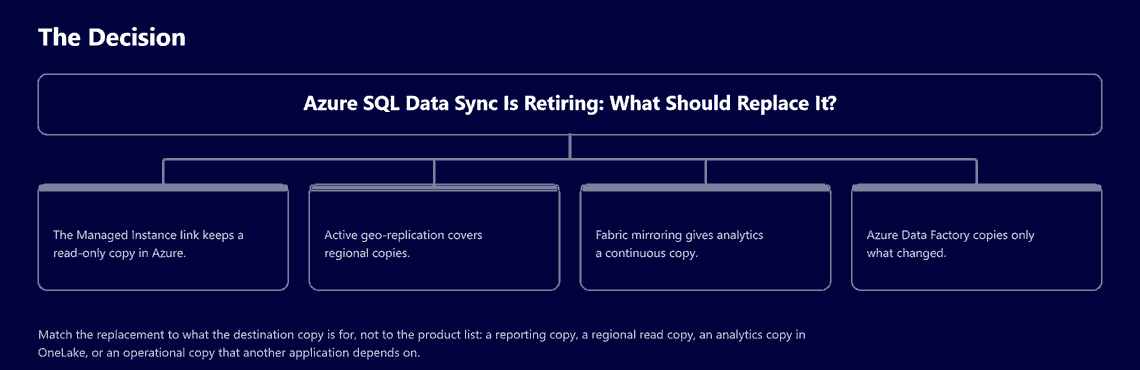
Match the replacement to what the destination copy is for, not to the product list: a reporting copy, a regional read copy, an analytics copy in OneLake, or an operational copy that another application depends on. A reporting or regional copy is a read-only replica problem; an operational copy that an application writes to is not a one-way group at all, and belongs in the next section.
If a group lets both sides write, the deadline turns into an application change, because what Data Sync did for it has no like-for-like Microsoft replacement. Data Sync let both sides write and settled collisions by rule: according to Microsoft Learn, “The Sync Direction can be bidirectional, or it can flow in only one direction,” and “The Conflict Resolution Policy is a group level policy, which can be Hub wins or Member wins”. It never promised more than that; the same page states: “Because Data Sync is trigger-based, it doesn’t guarantee transactional consistency.”
The replication path that looks closest does not go both ways. According to Microsoft Learn’s page on replication to Azure SQL Database, “Azure SQL Database doesn’t support bi-directional, immediate, updatable, or peer-to-peer replication.” The Managed Instance link does have a two-way mode, but for a different job: according to Microsoft Learn’s overview of the Managed Instance link, “Disaster recovery with two-way replication and failback is supported starting with SQL Server 2022”. That is disaster recovery with failback, not two databases accepting writes at the same time, and it is not a replacement for a two-way sync group.
This guide’s framing, not Microsoft’s, is that a bidirectional group leaves three Microsoft-native choices:
The question under all three is whether this data needs two writers at all. Where it does not, the first choice removes the conflict problem instead of re-implementing it; where it does, the second choice makes the conflict rule visible instead of leaving it to a group setting that disappears on the retirement date.
If your identity policy expects every database connection to use Microsoft Entra ID, the service in the data path today is already an exception to it. According to Microsoft Learn, “SQL Data Sync requires SQL authentication for connections to the hub and member databases,” and “Microsoft Entra ID authentication isn’t supported by SQL Data Sync.” The same page draws the conclusion itself: “Because SQL Data Sync is scheduled for retirement, migrate to an alternative that aligns with your organization’s security standards.”
Resilience points the same way. Microsoft Learn states that “SQL Data Sync offers no automatic failover or disaster recovery capabilities,” and, as quoted in the section on bidirectional groups, that Data Sync does not guarantee transactional consistency. A group that keeps a regulated system’s records in step is carrying both properties until it is replaced.
None of this is a statement about what any auditor, regulator or framework requires. It is a description of the service: SQL logins in the data path, no failover, no transactional consistency guarantee. Whether that is a finding on your estate is for your own security team to decide, and the earlier the replacement is designed, the earlier the question closes.
Moving the easy groups first feels like progress, but if the two-way group is left until the last quarter, the discovery that it needs an application change arrives with no time left to make one. The seven-step sequence is this guide’s recommended order, not a sequence Microsoft publishes; it is built on the facts in Microsoft’s Azure update on the retirement and Microsoft Learn’s Data Sync retirement migration guide, with the version limits from Microsoft Learn’s replication and Managed Instance link pages cited in the section on one-way groups:
If your sync groups run in Azure Government, do not assume the commercial answer carries over. Microsoft’s Azure update on the retirement names no cloud, and the Microsoft pages read for this guide do not say whether Data Sync, or each replacement this guide names, is available in Azure Government or at what parity. Confirm the date for Data Sync and the availability of each replacement you plan to use against Microsoft’s Azure Government documentation before the design depends on it. This guide makes no availability claim either way.
Before you start, check whether your estate needs this work at all; some estates need a different piece of work instead:
Whoever does this work with you, inside the organization or outside it, hold it to these criteria, stated as what they should be able to show you:
No firm or product is named or compared in that list.
i3solutions plans and runs governed Azure and Microsoft 365 migrations with senior, U.S.-based engineers. For this retirement, that means a project, with embedded specialists where your team needs them, that inventories the sync groups, designs the Microsoft replacement for each one, builds it, tests it in parallel with the running group, cuts over, and removes the sync resources. i3solutions designs Azure integration architecture and builds and operates Azure Logic Apps workflows for enterprise clients, including running them on an ongoing basis rather than only building them. Fabric mirroring is one of the Microsoft paths in the map by platform. i3solutions has delivered Microsoft Fabric work for clients. i3solutions has been a Microsoft Partner with 30 years of enterprise technology delivery experience and has delivered 1,500+ Microsoft engagements across aerospace and defense, financial services, and health sciences.
For how this fits the wider integration estate, see Microsoft system integration and data management.
According to Microsoft’s Azure update, SQL Data Sync retires on September 30, 2027, and after that date workloads running SQL Data Sync will be deleted and associated application data will be lost. Until then, according to the same update, you can continue to use SQL Data Sync without disruption.
Only in some subscriptions. According to Microsoft Learn, as part of the retirement process, you can’t create new sync groups in Azure subscriptions that didn’t previously use SQL Data Sync; existing sync groups can continue operating until the retirement date.
According to Microsoft Learn’s Data Sync retirement migration guide, the paths from SQL Server to Azure SQL Database are Azure Data Factory, Azure Functions and transactional replication. According to Microsoft Learn, Azure SQL Database can only be the push subscriber of a SQL Server publisher and distributor, and publishing to it is supported from SQL Server 2016 and later versions.
Not like for like. According to Microsoft Learn, Azure SQL Database doesn’t support bi-directional, immediate, updatable, or peer-to-peer replication, so a two-way group is either redesigned to a single writer or given conflict logic the application owns, built on change tracking with Azure Functions or Azure Data Factory.
No. According to Microsoft Learn, SQL Data Sync requires SQL authentication for connections to the hub and member databases, and Microsoft Entra ID authentication isn’t supported by SQL Data Sync.
No. According to Microsoft Learn, Azure SQL Data Sync doesn’t support Azure SQL Managed Instance or Azure Synapse Analytics, so a managed instance destination is a new design. Microsoft Learn’s migration guide lists paths into a managed instance, such as Always On availability groups, Azure Data Factory, transactional replication and linked server.

US-Based Microsoft System Integrator | Est. 1997
© i3solutions. All rights reserved.
US-Based Microsoft System Integrator | Est. 1997
© i3solutions. All rights reserved.


