
By Michael Branson
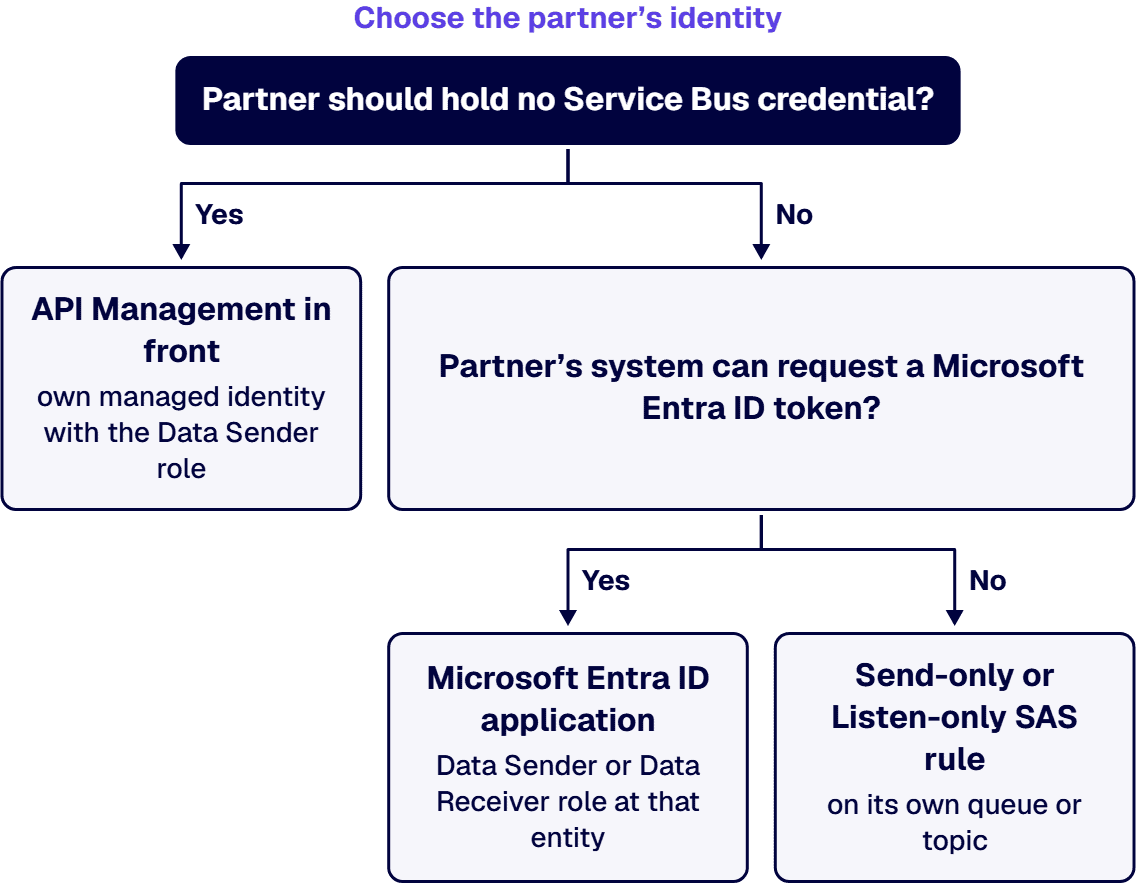
As of September 2026, let a third party reach Azure Service Bus only through the narrowest access Microsoft offers: its own queue, topic or subscription, and either a Microsoft Entra ID application holding the Azure Service Bus Data Sender or Data Receiver role at that entity or, for a queue or topic, a Send-only or Listen-only SAS rule on that entity, never the namespace’s default all-rights rule. Microsoft Learn says a namespace is reachable from the internet by default for any request with valid authentication and authorization, so close it with IP firewall rules, which the Standard tier supports, or, on the Premium tier only, with private endpoints, where a partner connecting from another directory waits for your approval. When the partner should never hold a Service Bus credential, publish an API in API Management on the Developer, Basic, Standard or Premium tier with the classic gateway, let the send-service-bus-message policy write to a pre-created queue or topic under API Management’s own managed identity with the Data Sender role, and authenticate the partner at API Management, for example with client certificates.
The riskiest partner integration is often not the one with the most traffic. It is the one that went live on a connection string built from the namespace’s default all-rights key, because that key was the fastest thing to hand over. When a supplier, a payer, a logistics provider or an agency system needs to drop messages onto your queues, the security review will ask which identity each partner uses, which queue it can touch, what boundary it crosses, and who cuts it off. This guide sets out what Microsoft’s own pages, read on 2026-09-24, say about each of those choices. It assumes Service Bus is already the messaging service; choosing among Microsoft’s messaging services is covered in Event-Driven Integration on Azure for Regulated Enterprises.
If the integration team proposes sending the partner a connection string, check which rule it came from first. Microsoft’s Service Bus authentication and authorization overview states: “By default, a shared access authorization rule with all rights is configured for every namespace when it’s first provisioned.” Microsoft’s Service Bus access control with shared access signatures page names that rule RootManageSharedAccessKey and says of it: “We recommend that you treat this rule like an administrative root account and don’t use it in your application.” The same page says: “The Manage right includes the Send and Listen rights.”
A rule at the namespace level is not narrowed by what you set on a queue. The authentication overview says: “You can configure shared access policies on a Service Bus namespace. The key applies to all messaging entities within that namespace.” The shared access signatures page adds: “The policy at the namespace level applies to all entities in the namespace, irrespective of their individual policy configuration.”
The network does not close the gap by default either. Microsoft’s Network security for Azure Service Bus page states: “By default, users can access Service Bus namespaces from the internet as long as the request comes with valid authentication and authorization.” A partner holding the root key on a namespace with no network rules can therefore reach every queue and topic in it from the internet, with Manage rights as well as Send and Listen.
If two partners share a queue, any right granted on that queue reaches both partners’ messages, so neither partner can be held to its own traffic. Microsoft’s What is Azure Service Bus? page describes the container: “A namespace is a container for all messaging components, such as queues and topics.” Microsoft’s Authenticate and authorize an application with Microsoft Entra ID to access Azure Service Bus entities page says: “Access can be scoped to the level of subscription, resource group, Service Bus namespace, or entity (queue, topic, or subscription).” and “Best practices dictate that it’s always best to grant only the narrowest possible scope.”
SAS rules can be set lower than the namespace, but not as low. The authentication overview says: “You can also configure shared access policies on Service Bus queues and topics.” and “To use SAS, you can configure a shared access authorization rule on a namespace, queue, or topic.” Microsoft’s Service Bus quotas page caps shared access authorization rules per namespace, queue, or topic: “Maximum number of rules per entity type: 12.” Plan partner rules on a busy queue with that limit in view.
For a partner that receives from a topic you share across partners, give it its own subscription. Microsoft’s shared access signatures page says: “Service Bus doesn’t currently support configuring SAS policies on subscriptions, but you can use rules configured on a namespace or topic to secure access to subscriptions.” So where a receiving partner must be held to its own subscription, the Microsoft Entra ID role is the access that reaches that level. On the subscription’s filter, Microsoft’s Topic filters and actions page says: “Whenever possible, applications should choose correlation filters over SQL-like filters because they’re much more efficient in processing and have less impact on throughput.”
List every partner, its direction (send, receive or both) and its entity before any credential exists. How namespaces themselves are separated across the estate is covered in Microsoft Integration Architecture for Large Enterprises: A Reference Guide for Regulated Sectors.
If the partner’s system can request a Microsoft Entra ID token, prefer that over a shared key. Microsoft’s Service Bus authentication and authorization overview says: “Use Microsoft Entra ID with your Azure Service Bus applications when possible.” Microsoft’s Service Bus access control with shared access signatures page gives the reason: “SAS keys lack fine-grained access control, are difficult to manage and rotate, and don’t provide audit capabilities to associate their use with a specific user or service principal.” Microsoft’s Disable local or shared access key authentication with Azure Service Bus page adds: “SAS keys are long-lived shared secrets.” and “SAS key usage doesn’t produce comparable identity-level audit records.”
With Microsoft Entra ID, the partner’s application gets a role at its own entity. Microsoft’s Authenticate and authorize an application with Microsoft Entra ID to access Azure Service Bus entities page lists the built-in roles Azure Service Bus Data Sender and Azure Service Bus Data Receiver, and for a registered application it says: “The application needs a client secret to prove its identity when requesting a token.” That secret is a credential the partner holds, so it needs an owner and an expiry on your side as well as theirs.
A managed identity is not the answer for a system outside Azure. Microsoft’s Use managed identities to access Azure Service Bus resources page says: “Managed identities work only inside the Azure environment, on Azure App Service, Azure virtual machines, and scale sets.” That rules it out for a partner system running in its own data center.
Where the partner can present only a SAS token, issue a Send-only or Listen-only rule on its own queue or topic, never the namespace root rule. How an application registered in the partner’s own Microsoft Entra tenant is authorized in yours is part of the design, settled with the partner; the Microsoft pages this guide relies on do not describe it, so this guide does not either.
If a partner connects from fixed addresses, the Standard tier can already narrow who reaches the namespace. Microsoft’s Allow access to Azure Service Bus namespace from specific IP addresses or ranges page states: “IP firewall rules apply at the Service Bus namespace level.” and “The rules apply to all connections from clients using any supported protocol (AMQP (5671) and HTTPS (443)).” It adds: “The Standard SKU supports IP filtering but doesn’t include the “Trusted Services” option.” Two warnings on that page matter at go-live: “If there are no IP and virtual network rules, the namespace is accessible over the public internet (using the access key).” and “If you don’t specify any IP or virtual network rules, all traffic flows into the namespace even if you set the defaultAction to deny”.
Private connectivity is a Premium decision. Microsoft’s Network security for Azure Service Bus page says: “Virtual networks are supported only in Premium-tier Service Bus namespaces.” Microsoft’s Allow access to Azure Service Bus namespaces via private endpoints page says: “This feature is supported with the premium tier of Azure Service Bus.” Microsoft’s Azure Service Bus premium messaging tier page describes the tier: “The Premium tier of Service Bus provides dedicated resource isolation at the CPU and memory level, so each messaging workload runs independently from other tenants.”
A partner’s private endpoint is a request you approve. The private endpoints page says: “If you’re connecting to an Azure resource in another directory, you must wait for the owner of that resource to approve your connection request.” It also warns that a connectivity test can mislead: “Because traffic is blocked at the application layer rather than the TCP layer, nslookup or a TCP connection against the public endpoint can still succeed even when public access is disabled.” And it states the closed state plainly: “With no rules and public access disabled, the namespace is unreachable from outside the private network.”
If the partner’s own firewall team asks for your namespace’s IP address, Microsoft’s Azure Service Bus – Frequently asked questions (FAQ) notes that the address is not static and says “however using IP addresses isn’t recommended or supported, and you’ll need to keep track of changes to the IP addresses.” Decide Standard with IP rules or Premium with private endpoints per partner before onboarding starts, because the tier sets which boundary is available. The wider security posture for hybrid integration is covered in Hybrid Microsoft Integration Security: On-Premises and Cloud.
If the partner can call an HTTPS API but should hold no Service Bus credential at all, put API Management between them and the queue. Microsoft’s Send service bus message policy reference states: “The send-service-bus-message policy sends a message to an Azure Service Bus queue or topic.” The identity that sends is API Management’s own managed identity, and the page says: “The identity must be assigned the Azure Service Bus Data Sender role.” It also says: “You must pre-create the Azure Service Bus queue or topic that receives a message.”
Check the tier before you design on it. The same policy reference lists it as applying to the Developer, Basic, Standard and Premium tiers, and its usage block reads “Gateways: classic”. Nothing beyond those two lines is assumed here.
The partner then authenticates to API Management, not to Service Bus. Microsoft’s How to secure APIs using client certificate authentication in API Management page describes API Management checking client certificates and mutual TLS on calls from the client to API Management. Use this pattern when the partner should hold no Service Bus credential, or when you want one place to authenticate, throttle and log every partner’s calls. A non-Microsoft gateway in front is a separate decision this guide does not make.
If a partner leaves or a key leaks, the cut-off has to be planned before go-live, because regenerating a key does not end every session at once. Microsoft’s Service Bus access control with shared access signatures page says: “If you regenerate or change a key in the policy, all previously issued tokens based on that key become instantly invalid.” and “However, ongoing connections that are based on such tokens continue to work until the tokens expire.” For planned rotation it says: “The primary and secondary key slots exist so that you can rotate keys gradually.” The same page describes moving clients onto one key while the other is regenerated.
Moving to Microsoft Entra ID only is a sequence, not a switch. Microsoft’s Disable local or shared access key authentication with Azure Service Bus page says: “Before you disable local authentication, update all applications to authenticate by using Microsoft Entra ID.” and “After you disable local auth, existing SAS policies on the namespace remain but can’t be used to generate functional tokens.” It names the built-in Azure Policy definition “Service Bus namespaces should have local authentication methods disabled”, and the authentication overview confirms: “You can disable local or SAS key authentication for a Service Bus namespace and allow only Microsoft Entra authentication.”
Set the transport floor as well. Microsoft’s Configure the minimum TLS version for a Service Bus namespace page says: “Azure Service Bus namespaces permit clients to send and receive data by using TLS 1.2 and later versions.” and “If a Service Bus namespace requires a minimum version of TLS, then any requests made by using an older version fail.” Confirm the partner’s client supports the floor before you raise it.
Give every partner a named owner inside your organization, a rotation date, and an offboarding step that removes its role or rule and then its entity.
If the partner’s client is old, check its protocol before go-live. Microsoft’s Azure Service Bus – Frequently asked questions (FAQ) says: “We’ll also end support of the SBMP protocol, so you’ll no longer be able to use this protocol after 30 September 2026.” The same answer tells readers to “Migrate to the latest Azure SDK libraries, which offer critical security updates and improved capabilities, before that date.” Ports matter too: Microsoft’s Allow access to Azure Service Bus namespace from specific IP addresses or ranges page names AMQP (5671) and HTTPS (443) as the protocols its firewall rules cover.
Do not count on the namespace to tell you which partner sent a message by address. The FAQ says: “We don’t log the IP addresses of clients sending or receiving messages to/from your namespace.” Per-partner identities and per-partner entities are therefore your attribution record.
Malformed partner messages need an owner too. Microsoft’s Overview of Service Bus dead-letter queues page says: “There’s no automatic cleanup of the DLQ.” and “Messages remain in the DLQ until you explicitly retrieve them from the DLQ and complete the dead-letter message.” Name who reviews each partner’s dead-letter queue as part of the partner’s onboarding record.
If the partner’s need is different, a queue design can be the wrong answer:
New partners, rotation dates, offboarding and dead-letter review recur long after the first partner is live, so decide who owns the partner register and the runbook before the project closes. The owner can be the integration team, a platform or security operations team, or an outside provider; what matters is that one of them is named, holds the register, and has the rights to remove a partner’s role or rule when asked.
i3solutions designs Azure integration architecture and builds and operates Azure Logic Apps workflows for enterprise clients, including running them on an ongoing basis rather than only building them.
For a partner-access design, that work covers the entity layout, the identity model, the network boundary, the API Management front, and the rotation and offboarding runbook, scoped as a project. i3solutions builds Dynamics 365 integrations using named Microsoft mechanisms including Dataverse, dual write, virtual tables, Azure Logic Apps, Azure Service Bus, and Power Automate connectors. Its implementation work includes API Management policies for external consumers and configured Service Bus namespaces. Delivery is senior and US-based. Embedded specialists can also work inside your team. The wider practice is Unifying Enterprise Operations Through Microsoft System Integration & Data Management.
Yes, with valid credentials. Microsoft Learn states: “By default, users can access Service Bus namespaces from the internet as long as the request comes with valid authentication and authorization.” Microsoft Learn adds: “If there are no IP and virtual network rules, the namespace is accessible over the public internet (using the access key).”
Yes. Microsoft Learn says: “You can also configure shared access policies on Service Bus queues and topics.” Microsoft Learn also says: “The policy at the namespace level applies to all entities in the namespace, irrespective of their individual policy configuration.” Give the partner the entity rule and no namespace-level rule.
Yes. On private endpoints, Microsoft Learn says: “This feature is supported with the premium tier of Azure Service Bus.” Microsoft Learn also says: “Virtual networks are supported only in Premium-tier Service Bus namespaces.”
Yes, on the tiers Microsoft lists. Microsoft Learn says: “The send-service-bus-message policy sends a message to an Azure Service Bus queue or topic.” and “The identity must be assigned the Azure Service Bus Data Sender role.” Microsoft Learn lists the policy for the Developer, Basic, Standard and Premium tiers with “Gateways: classic”, and says: “You must pre-create the Azure Service Bus queue or topic that receives a message.”
It can keep working for a while. Microsoft Learn says: “If you regenerate or change a key in the policy, all previously issued tokens based on that key become instantly invalid.” Microsoft Learn adds: “However, ongoing connections that are based on such tokens continue to work until the tokens expire.”

US-Based Microsoft System Integrator | Est. 1997
© i3solutions. All rights reserved.
US-Based Microsoft System Integrator | Est. 1997
© i3solutions. All rights reserved.


