
Moving from Salesforce to Dynamics 365 Sales is a sequencing decision IT owns, and the failure it guards against is a cutover that goes wrong because record history, automation or the security model was not carried; the Configuration Migration tool will not carry them, because it moves configuration data between Dataverse environments and is not a path out of Salesforce. Load the accounts, contacts, leads and opportunities you keep into Microsoft Dataverse through Microsoft’s import paths, rebuild the automation, reports, security model and integrations, decide how much history to carry, and cut over after a dress rehearsal with a rollback plan.
What follows starts after Dynamics 365 Sales has been approved and the move belongs to IT, with a sales leader asking about pipeline and an auditor asking whether record history survived.
If you are planning the load, start from what Microsoft says its import paths accept. Microsoft’s Import Data (Microsoft Dataverse) page, read on 2026-10-19, states that “Data import lets you upload data from various customer relationship management systems and data sources into Dataverse.” The same page says “You can import data into standard and customized columns of most business and custom tables,” and “You can also include related data, such as notes and attachments.”
For a load you expect to repeat, Microsoft’s Create and use dataflows in Power Apps page, read on 2026-10-19, describes dataflows that load a chosen data source into Dataverse and states that “Dataflows use a data refresh process to keep data up to date.” The same Microsoft page documents a Salesforce connector for dataflows, with one testing note: “use a production Salesforce account or a developer account for testing.”
The Excel and CSV import has documented limits. Microsoft’s Import data from Excel and export data to CSV page, read on 2026-10-19, states that “The following fields are system fields and aren’t supported for import and export,” and the fields it lists include the record owner and the created and modified dates. For federal tenants, the same Microsoft page states: “Import from Excel or CSV file using the Import > Import data from Excel command isn’t available in GCC, GCC High, and DoD environments.”
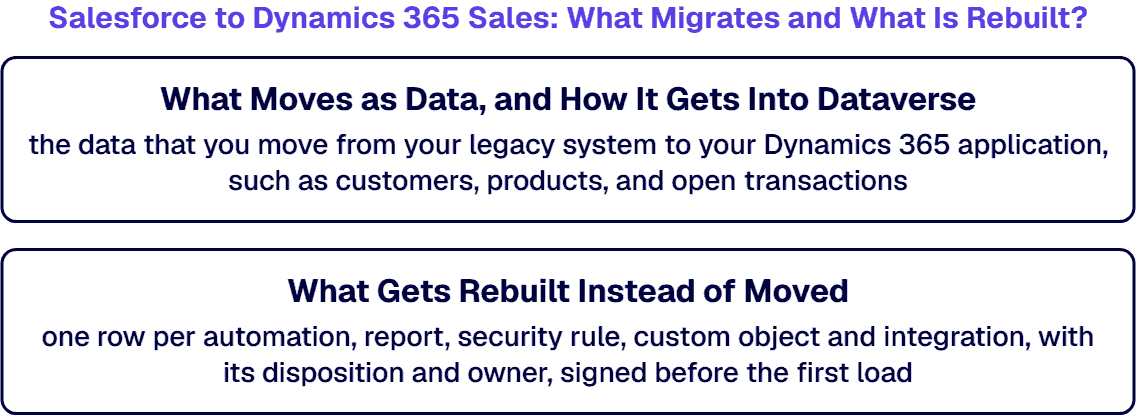
Microsoft separates the data you move from the data that configures the application. Microsoft’s Manage configuration and migration data for Dynamics 365 projects page, read on 2026-10-19, describes migration data as “the data that you move from your legacy system to your Dynamics 365 application, such as customers, products, and open transactions,” and adds: “You need to migrate the data that’s relevant and useful for your Dynamics 365 solution.” The Configuration Migration tool, which Microsoft’s Move configuration data across environments and organizations with the Configuration Migration tool page describes as moving “configuration data across environments and organizations,” carries data between Dataverse environments, for example from test to production. The tool is not a path out of Salesforce.
Pairing each source object with a Dataverse table is a design decision your team documents and signs, object by object, and this page prescribes no pairing.
If your inventory lists only records, it is missing the work that does not travel as data. Every automation, report, security rule, custom object and integration gets a disposition of rebuild, replace or retire, and an owner:
The artifact is the inventory itself: one row per automation, report, security rule, custom object and integration, with its disposition and owner, signed before the first load.
If an auditor will ask whether record history survived, decide it record class by record class before the first load. Original created dates come first. The Excel and CSV path does not support the owner and created-date system fields, according to Microsoft’s Excel and CSV import page, while Microsoft’s Account table/entity reference (Microsoft Dataverse), read on 2026-10-19, lists a column, OverriddenCreatedOn, described as “Date and time that the record was migrated” with the display name “Record Created On”. Dataverse has a place for a migrated record’s original created date; whether your load fills it is a question for whoever builds the load.
The remaining history decisions each need a retention answer an auditor can read:
Carried history also takes storage. Microsoft’s Dataverse capacity-based storage details page, read on 2026-10-19, reports entitlement and usage by “database, file, and log”, so how much history you carry is a storage question to settle with that page open, before cutover.
If the source holds duplicate accounts or contacts, plan to remove them before the load. Microsoft’s Detect duplicate records and merge page, read on 2026-10-19, states that “Microsoft Dataverse helps you address potential duplicates by detecting duplicates for active records such as accounts and contacts,” and then sets the limit that matters for a migration: “The new experience of detecting duplicates and merging them is supported when duplicates are detected while manually entering data in the app and not during import.” The same Microsoft page adds that “Your administrator might also set up duplicate detection rules so duplicates are detected at the time of entering or updating records or importing records.” Detection flags duplicates, and the cleanup is still yours.
After go-live, the same Microsoft page says “The Merge option is available only for Account, Lead, and Contact entities,” and that on a merge “The primary record is kept, and the secondary record is deactivated.” Deduplication is therefore a pre-load cleanup with its own sign-off, and merge is a post-load tool for the record types Microsoft names.
When the source org is switched off, every system that reads from it or writes to it loses its source, so integration re-pointing is its own workstream with its own test plan. Who owns that work, and the choices it forces, is covered in Microsoft integration during an ERP or CRM migration.
Licensing is settled by user. Microsoft’s Dynamics 365 licensing resources page, read on 2026-10-19, states that “The primary licensing method is by named user subscription,” and that “Most Dynamics 365 full user licensing follows the base plus attach model”. The same Microsoft page says “Each Attach license can only be assigned to a user with a qualifying prerequisite Base license.” For a migration plan, those rules become questions: which named users need Dynamics 365 Sales, which already hold a Dynamics 365 base license that a Sales license would attach to, and who signs off the user list before cutover. Microsoft’s Dataverse capacity-based storage page lists user licenses among the sources of storage capacity, with “More capacity added for every user license purchased,” which ties the license decision to the storage question. Product names, prices and entitlements come from Microsoft’s Dynamics 365 Licensing Guide on the day you buy, not from this page.
If the sales team cannot stop selling while the move happens, the first timing decision is a single cutover or a phased move. Microsoft’s data management guidance for Dynamics 365 projects says a migration strategy covers “mode (full push or incremental), and frequency (one-time or recurring)”. For a phased move, Microsoft’s Key considerations for migrating to Dynamics 365 Sales page, read on 2026-10-19, describes “a project where two distinct opportunity management systems migrated to Dynamics 365 Sales” using “a phased approach where they gradually transitioned parts of the organization to the new platform,” and states that “Full synchronization between the legacy and new systems is critical” to keep operations running. Microsoft’s reference architecture does not name its source systems, so read it as Microsoft’s pattern for a phased move to Dynamics 365 Sales.
Whichever timing you choose, Microsoft’s Transition to new solutions successfully with the cutover process page, read on 2026-10-19, lists “A rollback plan in case something goes wrong” as part of the cutover plan and states: “Before you do the real cutover, you should practice your cutover plan in a test environment. This is called a mock cutover or a dress rehearsal.” Microsoft names the final call too: “This is called the go/no-go decision.” Write the go/no-go criteria before the dress rehearsal, so the rehearsal tests them.
If the record map, the rebuild inventory, the history decisions and the integration re-pointing sit with different owners and no one holds the sequence, an outside architect can hold it and keep the plan defensible to the sales leader and the auditor. The broader Dynamics 365 practice is described in Dynamics 365 development services.
i3solutions builds Dynamics 365 integrations using named Microsoft mechanisms including Dataverse, dual write, virtual tables, Azure Logic Apps, Azure Service Bus, and Power Automate connectors. i3solutions has delivered Dynamics 365 integration engagements for regulated enterprises across healthcare, defense and aerospace manufacturing, and financial services. i3solutions has completed more than 20 Dynamics 365 integration engagements. i3solutions implemented Dynamics 365 for a healthcare services firm and integrated it with telephony and email so that a caller’s profile and current case load surface the moment that person makes contact, built to the firm’s HIPAA and PHI requirements. Delivery is senior and US-based.
If the platform decision is still open, the Dynamics 365 vs Salesforce comparison covers that choice.
Two decisions IT owns decide the outcome: which records you carry, such as accounts, contacts, leads and opportunities with their notes and attachments, and which of Microsoft’s documented import paths loads them into Microsoft Dataverse. If the original owner and created-on values matter, decide the load path first, because Microsoft lists those system fields among the ones its Excel and CSV import cannot carry. The automation, reports and integrations around the records are rebuilt in Dynamics 365.
If you need them, settle it before the first load: according to Microsoft, Dataverse has a column for the date and time a record was migrated, displayed as Record Created On, but the Excel and CSV import does not support the owner and created-date system fields. Whether original dates and owners survive depends on the load path your team chooses and tests.
Not with its newer duplicate detection and merge experience: according to Microsoft, that experience works when duplicates are detected during manual data entry and not during import. Clean duplicates in the source before the load, and use merge afterward for accounts, leads and contacts, the record types Microsoft names.
Yes, if you plan a phased move: according to Microsoft, its reference architecture for a phased migration to Dynamics 365 Sales, which does not name its source systems, transitioned parts of the organization gradually and treats full synchronization between the legacy and new systems as critical. Whether the move is phased or a single cutover, Microsoft’s cutover guidance calls for a rollback plan, a rehearsed mock cutover and a go/no-go decision.

US-Based Microsoft System Integrator | Est. 1997
© i3solutions. All rights reserved.
US-Based Microsoft System Integrator | Est. 1997
© i3solutions. All rights reserved.


