
Michael Branson
The warehouse that feeds the regulatory and board reports can be the last system anyone wants to move and the first one an auditor asks about after it moves. The question is not whether the tables copy across. It is who can see what on the first day in Fabric, and whether the new warehouse returns the same numbers before a single report points at it. Decide per database whether to mirror it, move it or leave it. For a warehouse you move, migrate the schema with Microsoft’s Migration Assistant, fix what it flags, including replacing SQL-authenticated users with Microsoft Entra users, before any data is copied, then copy the data, compare the old and new warehouses in parallel, and reroute connections only when that comparison holds. Microsoft’s Fabric Migration Assistant for Data Warehouse page is direct about the size of that job: “Currently, there isn’t full T-SQL compatibility between the source warehouse and Fabric warehouse.” Plan the effort around the fixes and the comparison, not the copy.
If the warehouse still runs on SQL Server 2016, the support question has already been answered for you. Microsoft Lifecycle’s SQL Server 2016 page says “SQL Server 2016 follows the Fixed Lifecycle Policy.” and lists its extended support end as July 14, 2026 in US time; the same page also lists Extended Security Updates for SQL Server 2016. For the next version, Microsoft Lifecycle’s SQL Server 2017 page lists extended support ending October 12, 2027. A support date sets when the decision has to be made. It does not choose the route.
When other systems still write to the warehouse, or it cannot be taken offline, moving it is the wrong first question. Microsoft’s Mirroring SQL Server page describes the alternative: “You can continuously replicate your existing SQL Server databases directly into Fabric’s OneLake.” The source keeps running. According to Microsoft, SQL Server 2016 through 2022 mirror by using Change Data Capture, and the same page says “Fabric Mirroring for SQL Server 2025 requires connection to Azure Arc including the Azure Extension for SQL Server.” On the mirrored database’s SQL analytics endpoint, the page says users have T-SQL commands that “can define and query data objects but not manipulate the data from the SQL analytics endpoint”, and it tells you to “Set up an on-premises data gateway or virtual network data gateway to mirror the data.”
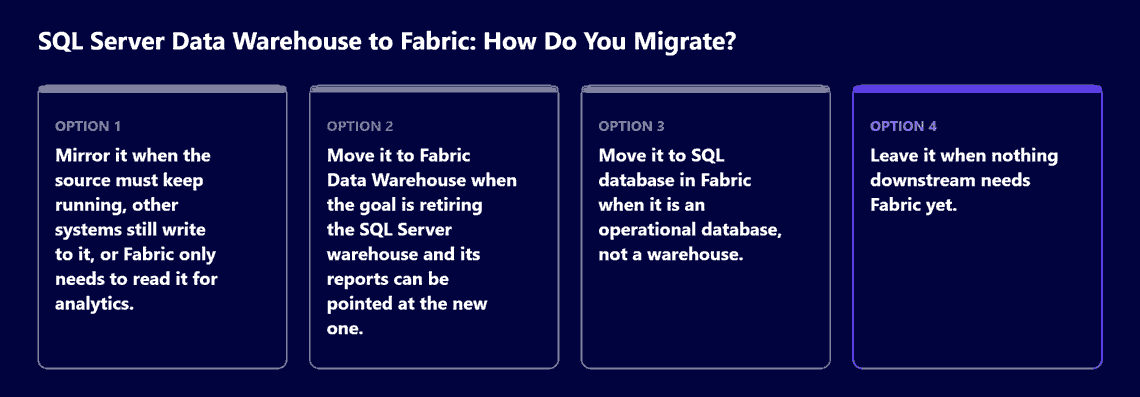
For a warehouse you intend to retire, the target is Fabric Data Warehouse. Microsoft’s Fabric Migration Assistant for Data Warehouse page states its reach as migration “From Azure Synapse Analytics dedicated SQL pool” and from “SQL Server and other SQL Database Engine platforms”. This guide covers the SQL Server source only; an estate that starts in Azure Synapse Analytics follows Microsoft’s separate Synapse migration guidance.
An operational database is a different case. Microsoft’s SQL database in Microsoft Fabric page calls that product “The home in Fabric for OLTP workloads” and describes it as “a developer-friendly transactional database, based on Azure SQL Database”. It is the target for a database an application writes to, not for a warehouse. Microsoft’s Fabric Migration Assistant for SQL database page says that tool “helps you move databases from an on-premises SQL Server instance to a SQL database in Microsoft Fabric.”
Use these criteria, one database at a time:
The failure to prevent is a restricted or masked column that is readable in Fabric the week after cutover. Microsoft’s Fabric Migration Assistant for Data Warehouse page sets out what carries across: “Most types of security objects including roles, permissions (such as GRANT, REVOKE, and DENY), and dynamic data masking migrate automatically.” It also sets out what does not: “Some objects (such as SQL authenticated users or column-level encryption) need updates to work in Fabric.” Its direction for logins is plain: “Replace SQL authenticated users with Microsoft Entra users in Microsoft Fabric.” For column-level encryption, the page’s workaround is to “Use other methods to protect your data, such as implementing encryption at the application layer and Dynamic data masking in Fabric data warehousing to obfuscate sensitive data based on user permissions.” And on order it leaves no room: “Before copying data, ensure you fix the security objects that failed to migrate and review that the security you need is set up, so that users don’t have unintended access to sensitive information.”
Around the warehouse, Microsoft’s Security in Microsoft Fabric page describes the platform’s defaults: “Every interaction with Fabric is encrypted by default and authenticated using Microsoft Entra ID.” It adds: “In Fabric, all data that is stored in OneLake is encrypted at rest. All data at rest is stored in your home region, or in one of your capacities at a remote region of your choice so that you can meet data at rest sovereignty regulations.” It also describes customer managed keys and private links: “With workspace customer managed keys, you can use your Azure Key Vault keys to encrypt the Microsoft encryption key.” and “Private links enable secure connectivity to Fabric by restricting access to your Fabric tenant from an Azure virtual network (VNet), and blocking all public access.” For the connection back to the on-premises server, Microsoft’s What is an on-premises data gateway? page says “The on-premises data gateway initiates outbound connections to the cloud, but requires no inbound connections.” and “Currently, Microsoft actively supports only the last six releases of the on-premises data gateway.”
The record an auditor asks for is a list of every login, role, mask and encrypted column in the source warehouse, and what each became in Fabric. What that record has to satisfy is for your control owners and counsel to decide. Microsoft’s encryption and home-region sentences describe the platform; they are not a determination about your obligations.
If reports depend on T-SQL that Fabric Data Warehouse handles differently, the Migration Assistant flags those objects and someone has to rewrite them. The same Migration Assistant page lists workarounds for some of the common unsupported features. “IDENTITY columns in Fabric Data Warehouse behave differently than they do in other platforms, such as SQL Server.” The page lists external tables and multi-statement table-valued functions as “Other currently unsupported features you might see”, and lists indexes and transparent data encryption as no longer needed, saying of the latter: “Fabric Data Warehouse doesn’t need TDE because it already encrypts data through more advanced means.”
Microsoft’s T-SQL surface area in Fabric Data Warehouse page marks several features as preview, including ALTER COLUMN on warehouse tables (“ALTER COLUMN is in preview.”), nested common table expressions (“nested CTEs are currently a preview feature”) and bcp (“bcp is supported as a preview feature”). About the commands it lists as unsupported, it warns: “Even if they appear to succeed, they might cause problems for your warehouse.”
For scripts that fail, the Migration Assistant offers Copilot assistance, with Microsoft’s own caution beside it: “Mistakes can happen as Copilot uses AI, so verify code suggestions before running them.”
Microsoft’s Migration Assistant page says: “You can upload a DACPAC file or create a direct connection to the source system.” Microsoft’s Migrate by uploading a file with the Fabric Migration Assistant guide covers the file route. Its Migrate with a direct connection to the source system guide covers the connection route and, for a SQL Server source, says: “For SQL Server, Azure SQL Database, or Azure SQL Managed Instance, select SQL Server database.”
For an operational database going to SQL database in Fabric, Microsoft’s Fabric Migration Assistant for SQL database page describes a DACPAC route and states its limits: “The maximum supported size for a DACPAC file upload is 20 MB.” and “Only on-premises data gateways are supported. Virtual network data gateways aren’t supported.” It says “you must configure both an on-premises data gateway and a Fabric SQL connection”, and it offers an optional step to “Validate the uploaded DACPAC without creating a new database.”
If a regulatory figure moves after cutover, the change carries the name of whoever approved it. Microsoft’s Migration Assistant page puts “Test and compare the old warehouse and new warehouse.” ahead of its last step: “Finally, reroute connections from applications that access the source warehouse to use the new warehouse.” Both of Microsoft’s step-by-step guides, Migrate by uploading a file with the Fabric Migration Assistant and Migrate with a direct connection to the source system, give the same instruction: “Test the Fabric warehouse with some reporting before rerouting. Perform comparison and data validation tests in your reporting platforms.”
Start the comparison with the reports regulators and executives read, run on the same cut of data against the old warehouse and the Fabric warehouse. Write the comparison down: which reports, which figures, what matched, what did not and why. Reroute only after it holds, and keep the old warehouse readable until the people who own those reports have signed off on the comparison.
When SSIS packages or pipelines load the warehouse every night, they are a second migration with their own owner. Microsoft’s Migration Assistant page describes its data step as “Copy data by using a copy job in Fabric Data Factory.” That step moves the data you have; the jobs that keep loading the warehouse are a separate decision. SSIS package modernization is covered in SSIS migration to Azure, and the choice between Azure Data Factory and Fabric pipelines in Azure Data Factory best practices.
When moving is premature, a plan that says so early is easier to defend than one that finds out late.
Once the reports run on the Fabric warehouse, someone has to own it day to day. The ownership model after go-live is set out in the enterprise analytics operating model. How sensitivity labels, data loss prevention and audit evidence apply to the migrated warehouse is a separate evidence question from the migration itself.
If you bring in an outside firm for this, the work is the mirror, move or leave decision per database, the security inventory, the schema fixes, the written comparison and the cutover plan. i3solutions has delivered Microsoft Fabric work for clients. Delivery is senior and US-based. All i3solutions Power BI and analytics developers, architects, and consultants are 100% U.S.-based. The Fabric services offer is described in Microsoft Fabric development and integration services.
Decide per database whether to mirror it, move it or leave it. When other systems still write to the warehouse, or it cannot be taken offline, moving it is the wrong first question. For a warehouse you intend to retire, the target is Fabric Data Warehouse.
According to Microsoft, SQL-authenticated users need to be replaced with Microsoft Entra users and column-level encryption needs updates; fix both before any data is copied. The record an auditor asks for is a list of every login, role, mask and encrypted column in the source warehouse, and what each became in Fabric.
Start the comparison with the reports regulators and executives read, run on the same cut of data against the old warehouse and the new one. Write the comparison down: which reports, which figures, what matched, what did not and why. Reroute only after it holds, and keep the old warehouse readable until the people who own those reports have signed off on the comparison.
If the warehouse still runs on SQL Server 2016, the support question has already been answered for you. A support date sets when the decision has to be made. It does not choose the route.
When SSIS packages or pipelines load the warehouse every night, they are a second migration with their own owner.

US-Based Microsoft System Integrator | Est. 1997
© i3solutions. All rights reserved.
US-Based Microsoft System Integrator | Est. 1997
© i3solutions. All rights reserved.


