
By Michael Branson
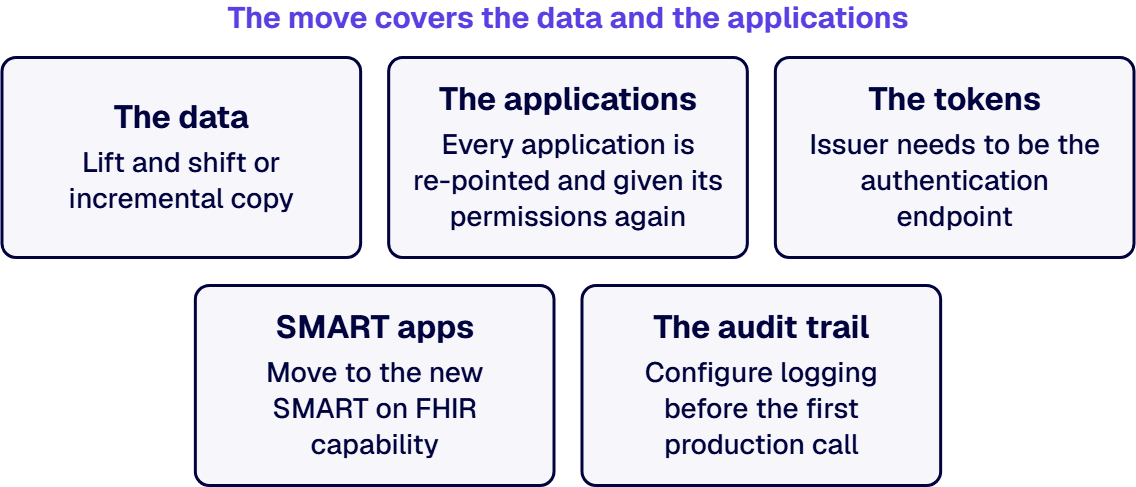
Microsoft set September 30, 2026 as the retirement date for Azure API for FHIR, so workloads must move to the Azure Health Data Services FHIR service. The move covers the data and the applications; those relying on the SMART on FHIR proxy report errors after September 21, 2026.
If the plan for Azure API for FHIR is an export on one side and an import on the other, it covers only the data. The applications, the tokens and the audit trail are what stop working on cutover day. This guide sets out what Microsoft’s pages on Microsoft Learn, read on September 24, 2026, say the retirement forces and what the move involves, and where the i3solutions recommendation sits beside them.
When someone asked whether the deadline could slip, the answer was on Microsoft’s own pages. Microsoft’s What is Azure API for FHIR?, Migration strategies for moving from Azure API for FHIR and What is Azure Health Data Services? pages each state: “Microsoft deprecated Azure API for FHIR on September 30, 2026.” Microsoft stopped new customer deployments on April 1, 2025.
Microsoft’s Retirement Announcement – Azure API for FHIR on Microsoft Learn lists what ended with it: “After September 30, 2026 customers won’t be able to:”
Microsoft’s Ending Support in 2026 page, which lists Azure API for FHIR among the 2026 retirements, describes retirement in general terms: “Upon retirement or end of support, there will be no new security updates, non-security updates, free or paid assisted support options or online technical content updates.” The Microsoft pages this guide relies on state no extension or grace period, and they say nothing about what happens to the stored data beyond the list above.
September 30 was the last day the old endpoint was scheduled to answer. A move that is not done is the last case under When This Guide Is the Wrong Frame, below.
Most of what breaks in this move is not the data but the things wired to the old service. Microsoft’s Migration strategies for moving from Azure API for FHIR page lists the changes that can affect your architecture:
The identity row needs the closest read. The same migration strategies page says “The token issuer authority needs to be the authentication endpoint for the tenant that the FHIR Service is running in.” An application that gets its tokens anywhere else stops working on the new service until that is changed.
For the SMART row, the date is already behind you. Microsoft’s Retirement Announcement – Azure API for FHIR said: “After September 21, 2026, applications relying on SMART on FHIR proxy will report errors when accessing the FHIR service.” That date has passed, so any patient or clinician app still on the proxy is the first item on the list, not the last.
When the copy starts before anyone has agreed how much downtime the data pipeline can take, the pattern gets chosen by accident. Microsoft’s Migration strategies for moving from Azure API for FHIR page describes two. Lift and shift is “The simplest pattern. Ideal if your data pipeline can afford longer downtime.” One route Microsoft lists is to “Configure a workflow to $export your data on Azure API for FHIR, and then $import into Azure Health Data Services FHIR service”. Incremental copy is a “Continuous version of lift and shift, with less downtime.” For that pattern Microsoft says “We created an OSS migration tool to help with this migration pattern.”
Two decisions come before either pattern, and the same Migration strategies for moving from Azure API for FHIR page names both: “Decide if you want to migrate historical versions or not.” and “Take this opportunity to clean up data or FHIR servers that you no longer use.” For a large instance it adds a step that comes first: “If your Azure API for FHIR instance contains more than 2 TB of data, open an Azure support request before starting your migration.”
Decide the historical versions and the downtime budget before the copy starts. This guide gives no copy duration, because the Microsoft pages it relies on give none.
Once the data is on the new service, every application still pointed at the old endpoint fails on the day that endpoint stops answering. Microsoft’s Migration strategies for moving from Azure API for FHIR page says “Change the endpoints on your applications” so they point at the new server’s URL, and “Set up permissions again for these apps”. Both are steps in Microsoft’s own list, not side effects of the data copy.
SMART apps need their own pass. Microsoft’s SMART on FHIR page says the service supports SMART v1.0.0 and SMART v2.0.0, and “You can’t mix and match SMART v1.0.0 and SMART v2.0.0 scopes in the same client app registration.” Microsoft’s What is the FHIR service in Azure Health Data Services? page describes SMART on FHIR app developers using the identity management in “Microsoft Entra ID for authorization of FHIR RESTful API actions”.
Inventory every application, SMART app and service principal that calls the old endpoint, and re-register and re-grant each one against the new service before cutover. The applications that call the FHIR service are HIPAA application work in their own right; who builds them is covered in Who Do We Hire for Building HIPAA-Compliant Healthcare Applications?. i3solutions has successfully delivered software development projects under CMMC, HIPAA, ITAR, and SOC 2 compliance frameworks with audit-ready documentation and governance practices built into our standard delivery methodology.
If the audit trail on the new service starts after the first production call, there is a gap someone will ask about later. Microsoft’s View and enable diagnostic settings in the FHIR service page opens: “Access to diagnostic logs is essential for any healthcare service.” Microsoft’s What is Azure Health Data Services? page says of private link, customer managed keys and logging: “These features enhance the security and compliance of your health data.” For private access, Microsoft’s Configure Azure Private Link for secure Azure Health Data Services access page says “Azure Private Link enables secure access to Azure Health Data Services over a private endpoint in your virtual network.”
Configure logging and private access on the new service, and keep evidence from the Azure portal that they are on, before the first production call reaches it. Which controls a given data set or contract requires is a decision for your privacy and compliance officers; this guide describes what Microsoft states, not what your obligations are.
The jobs and connections around the data move too. Microsoft’s Migration strategies for moving from Azure API for FHIR page says “Set up any jobs that were previously running in your old Azure API for FHIR server (for example, $export jobs)”, and to confirm the two servers match, “you can check both metadata endpoints to compare the two servers”. Event subscribers that relied on FHIR Proxy, and any Dataverse feed through the sync agent, are re-built on the replacements Microsoft names. Downstream interfaces and events at enterprise scale are covered in Microsoft Integration Architecture for Large Enterprises: A Reference Guide for Regulated Sectors. i3solutions runs migrations against named control families across CMMC, HIPAA, SOC 2, and NIST 800-171, producing artifacts auditors can review.
When the new service is stable and the old one is still running, cutover becomes a decision rather than a date. Microsoft’s Migration strategies for moving from Azure API for FHIR page says to “Turn off any remaining pipelines that are running on Azure API for FHIR.” and then “Delete data from your Azure API for FHIR server, and decommission your Azure API for FHIR account.” Its timing advice is to migrate “as soon as feasible”.
The FHIR service itself is Microsoft’s managed platform; the applications around it stay yours to operate. For applications i3solutions built or modernized, their ongoing operation, support and enhancement can be scoped as Application Managed Services for Custom Microsoft Applications. i3solutions does not sell ongoing managed IT operations for the estate, such as a managed security operations service; the migration itself, and embedded specialists inside your team while it runs, are project work.
If your estate matches one of these cases, a different first move applies:
When the move has a fixed date and PHI on it, it is a project with a short list of owners, not a background task. i3solutions plans and runs governed Azure and Microsoft 365 migrations with senior, U.S.-based engineers. i3solutions’ Azure specialists handle workload migration for regulated workloads, and this move is scoped as one project: from the inventory and the pattern choice, through re-pointing the applications, identity and logging, to cutover, with embedded specialists where the program needs them. As a Microsoft-focused application development and integration firm, i3solutions delivers its full service portfolio into healthcare on the same footing as defense manufacturing and finance. Delivery is senior and US-based. The wider practice is Azure Development Services for Regulated Enterprise Workloads.
If you need the inventory, the pattern choice and the cutover plan checked against your own estate, the next step is a conversation about your FHIR workload.
It retired on September 30, 2026, according to Microsoft, whose Azure API for FHIR overview, migration strategies page and Azure Health Data Services overview each state: “Microsoft deprecated Azure API for FHIR on September 30, 2026.”
Microsoft’s retirement announcement on Microsoft Learn says “After September 30, 2026 customers won’t be able to:” “Create or manage Azure API for FHIR accounts”, “Access the data through the Azure portal or APIs/SDKs/client tools”, “Receive service updates to Azure API for FHIR or APIs/SDKs/client tools” and “Access customer support (phone, email, web)”.
No. Microsoft’s migration strategies page says “Azure Health Data Services FHIR service does not support local RBAC and custom authority.” and “The token issuer authority needs to be the authentication endpoint for the tenant that the FHIR Service is running in.”
Microsoft’s migration strategies page says “SMART on FHIR proxy is being deprecated. You need to use the new SMART on FHIR capability.” Its retirement announcement on Microsoft Learn said “After September 21, 2026, applications relying on SMART on FHIR proxy will report errors when accessing the FHIR service.”, and that date has passed.
No. Microsoft’s retirement announcement says “The migration from Azure API for FHIR to Azure Health Data Services FHIR service involves data migration and updating the applications to use Azure Health Data Services FHIR service.” Its migration strategies page adds “Set up permissions again for these apps” and “Set up any jobs that were previously running in your old Azure API for FHIR server (for example, $export jobs)”.

US-Based | Est. 1997
© i3solutions. All rights reserved.
US-Based | Est. 1997
© i3solutions. All rights reserved.


