Copilot Use Case Selection: Four Criteria That Prove Value

September 5, 2026

Copilot Use Case Selection: Which Use Cases Prove Value, and How to Measure Them

By Michael Branson | August 25, 2026

Quick answer. Copilot use case selection scores a candidate on four criteria: task shape, evidence potential, workload fit, and grounding dependency. Score the candidates on those four before seats are assigned, because a use case the Microsoft 365 admin center cannot report on gets argued about instead of measured.

A steering committee asks for a shortlist. Somebody produces one: meeting recaps, email triage, contract summarization, a proposal-drafting assistant, an HR policy answering agent. The list reads as plausible from top to bottom and carries nothing that separates one candidate from another, so the argument runs on preference. Two quarters later the review has a satisfaction score in front of it and no finding.

The missing step is a written scorecard applied to the shortlist already on the table, before a seat is assigned to any of them. A use case that cannot produce a number out of an admin surface is not a weak one, it is one the tenant’s own reporting cannot measure, and that difference decides whether the next license conversation has evidence in it.

What This Page Decides, and What the Neighboring Pages Own

This page owns one method: how a candidate Copilot use case is scored before it is worth the seats. The neighboring decisions arrive before or after this one, and the split matters because different people own them.

Whether the tenant is in a state where turning Copilot on is safe is a readiness decision with its own gates, worked in full in Is Your Microsoft Environment Ready for Copilot? What Must Be True First. This page assumes that decision is settled and restates none of those gates. Where the blocker is permission debt or an overshared estate, the remediation sequence belongs to The Copilot Data Governance Fix, and no amount of use-case selection substitutes for it. What the seats cost is set out in Microsoft 365 Copilot Licensing: What a Governed Enterprise Deployment Actually Costs; the method here decides which candidates deserve seats. Where the work is custom language-model work outside the licensed Microsoft 365 Copilot surface, use-case discovery is offered as engagement scope in LLM Adoption & Strategy Consulting Services, a different product surface with a different evidence problem. And where the organization would rather buy this work as a deliverable, its shape and cost are covered in AI Readiness Assessment Cost for a Mid-Sized Regulated Enterprise.

The decision one layer up is whether to pilot at all, and when a pilot has earned the company-wide rollout. That belongs to a sibling page titled Copilot Pilot vs Enterprise Rollout: When Does a Pilot Earn the Company-Wide Rollout?, which owns cohort design, the exit criteria, and the reading of the result. The method here runs earlier.

Candidate Criteria: What Makes a Copilot Use Case Worth Testing

Four criteria decide whether a candidate belongs on a shortlist: task shape, evidence potential, workload fit, and grounding dependency. Apply them in that order, because a candidate failing the first produces nothing the other three can measure, so a candidate with no task shape leaves the shortlist before the other three are read.

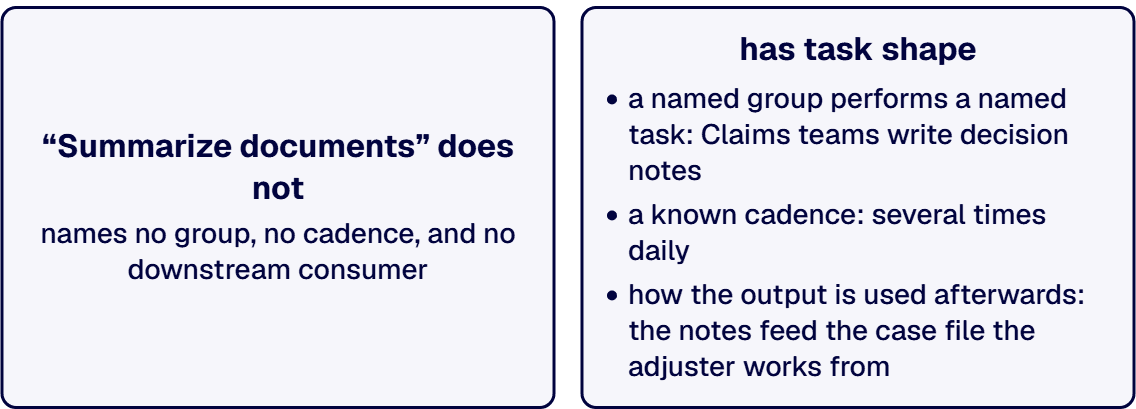
Task shape is the cheapest to check. A use case has task shape when a named group performs a named task on a known cadence, and someone can say how the output is used afterwards. “Summarize documents” has no task shape. “The claims team reads each adjuster report and writes a two-paragraph decision note, several times a day per person, and the note goes to a supervisor for sign-off” has task shape. The test needs no tooling: ask the group’s manager to state task, cadence, and consumer in three sentences.

Task shape also settles the question behind which teams first. Ask the team whose weekly work is already legible: a repeating task, a known volume, an output somebody downstream inspects. A team whose work is real and irregular is not a bad team, and its candidate is harder to score, so it sits behind a legible one.

Evidence potential is whether the tenant can report on the use case at all, and workload fit is whether the work happens inside an application Copilot reporting recognizes, and at what resolution. Each gets its own section below, because these are the two criteria a shortlist can look complete without.

Grounding dependency asks where the value comes from: the model’s general capability, or the organization’s own content. Microsoft’s License options for Microsoft Copilot splits the two chat surfaces on exactly that line. Web-based chat “Shows results from the internet” and is “Automatically included with an eligible Microsoft 365 subscription at no extra cost”; work-based chat “Shows results that the Microsoft Entra work or school account can access” and “Is available with a Microsoft Copilot license”. A candidate served by the internet can be tested on a subscription already eligible for it, and its result says nothing about whether seats are worth buying; a candidate served by tenant content is the one whose result belongs in the license conversation.

When two of the four criteria disagree on the same candidate, the rule is fixed and belongs in the shortlist document before the first argument: evidence potential outranks the other three. A candidate with excellent task shape that no admin surface can report on is defended and attacked with anecdotes, while one with adequate task shape the Microsoft 365 admin center reports on is argued from a number both sides can read. Grounding dependency breaks the remaining tie, because it decides whether the result speaks to the license question.

Evidence Potential: Can the Admin Center Produce a Number Someone Will Accept?

A use case has evidence potential when a named admin surface produces a named artifact a named person will accept as an answer. The third part decides whether the first two matter: an export nobody agreed to read in advance carries no weight at the review it was written for.

The Microsoft 365 admin center’s Microsoft Copilot usage report defines active usage precisely, and that definition sets the ceiling on what a usage number can mean: “A user is active in a given app if they perform an intentional action for an AI-powered capability.” Its worked example is the one to read before agreeing to any metric: “if a user selects the Copilot icon in the Word ribbon to open the Copilot chat pane, this action doesn’t count towards active usage. However, if the user interacts with the chat pane by submitting a prompt, this action counts towards active usage.” Opening the pane does not count; submitting a prompt does. A use case measured there is measured on the intentional actions the report counts, which record that a capability was used and do not record whether the work was completed.

That same report is where the artifact comes from, and a metric with no export behind it dies at the first challenge: “To add or remove columns from the report, select Choose columns .” and “To export the report data into an Excel .csv file, select Export .” That .csv is what the evidence claim rests on, so agree the columns before the window opens. One default shapes what it shows about a team: “By default, user-specific information like usernames, display names, groups, and sites is hidden in usage reports.” Where the plan is to compare two named teams, settle that default with the tenant’s administrators first, or read at group level and say so in the shortlist document.

A second surface answers a different question. The Microsoft Copilot readiness report “helps you identify which users are technically eligible for Copilot”. Its per-user table carries a column called “Suggested candidate for Copilot”, and its definition matters more than its name: it “Indicates the top 25% of nonlicensed users based on their Microsoft 365 app usage over the prior month.” That column ranks application usage. It does not rank use-case value, and a shortlist treating it as a ranking of candidates has substituted an activity proxy for a business argument. Note the word collision, because Microsoft’s column names a candidate PERSON while the four criteria here score a candidate USE CASE.

The Microsoft Copilot readiness report’s export scope is why it is a workload-fit input and not a value input: the same Microsoft documentation states that the export covers “all users with any engagement on Teams meetings, Teams chat, and Outlook email for Office docs in the past 30 days.” It shows whether the people a candidate would touch had any engagement in those applications over the window that export covers, and says nothing about whether the work done inside them was worth doing with Copilot.

If your shortlist holds candidates nobody can rank, working out which of them the tenant can report on is worth a conversation with someone outside the argument. Talk to a senior AI architect

Workload Fit: Where Copilot Reporting Sees the Work, and Where It Does Not

Workload fit asks a narrow question with an expensive answer: does the work sit inside an application whose Copilot usage the tenant reports on, and at what resolution?

The Connect to the Microsoft Copilot Dashboard for Microsoft 365 customers documentation draws the line, and it is a line about resolution and not about coverage. Microsoft states that “Group totals for Microsoft 365 apps like Teams, Outlook, and Word reflect all users based on the filtered group”, then adds the limit: “Feature-level totals are subject to the minimum group size.” Its worked example for the Microsoft Copilot Dashboard is an organization whose minimum group size is 10 and only 2 users who have used the Analyze data feature in Excel, where a double dash appears for that row.

A selection rule falls out of those two sentences. A candidate defined at application level, such as drafting in Word for a named team, sits inside a group total the dashboard reports for that application. A candidate defined at feature level, such as one specific Excel capability, is subject to the minimum group size the organization configured, and a small group working a narrow feature returns a double dash where the finding was supposed to be. Two responses are legitimate: widen the definition to the application the work sits in, or widen the population it is tested across. Where both are open, widen the definition first, because that changes what is being measured while widening the population changes who is measured, and a definition at the wrong level stays wrong at any population. Choosing neither, then reporting a suppressed row as a poor result, is what this criterion exists to prevent.

Application-level reporting is not uniform either. On Copilot in Word, Microsoft records: “NOTE: Edit with Word counts towards “Prompts submitted in Copilot Chat (work),” but Edit with Excel and Edit with PowerPoint don’t.” A shortlist treating prompt counts as comparable across applications is comparing quantities the documentation constructs differently.

Resolution also depends on how many seats the tenant holds. The dashboard documentation states that “For tenants with at least 1 Copilot license, the dashboard includes both the Microsoft Copilot adoption insights and insights for Copilot Chat usage by users without a Copilot license”, and that “Tenants with at least 50 Copilot licenses or at least 50 Viva Insights licenses also have access to agent-related insights, benchmarks, intelligent summaries, scoped group-level data, delegation support, and survey data (if available).” A tenant below that second threshold holds its own numbers without the comparison set, so a success definition written around a benchmark assumes a tier it may not have.

Two reporting windows are documented on two Microsoft surfaces, and they are not the same window. The Microsoft Copilot usage report documentation states that its user-level table “shows all users who were licensed for Microsoft Copilot at any point over the past 180 days, even if the user later removed the license or never had any Copilot active usage.” The Microsoft Copilot Dashboard documentation states that its readiness, adoption, and impact pages represent “data over the previous 28 days”, with “up to a six-day data delay from the current date.” A shortlist naming a measurement window has to name the surface in the same line.

That 180-day scope on the Microsoft Copilot usage report has a second use. A user-level table including people who “never had any Copilot active usage” is where licenses sitting idle become countable instead of suspected, and become names only where the tenant has turned off the default that hides user-specific information, and a candidate that failed evidence potential is one reason a name is on it.

The Selection Scorecard

Each row is a criterion, the middle column is its question, and the right-hand column names the surface or the person that answers it. A candidate that cannot fill the right-hand column has been discussed and not scored.

Criterion The question it asks What answers it, by name
Task shape Which named group performs which named task, at what cadence, and who consumes the output? The group’s own manager, in three sentences, before any tooling is involved
Evidence potential Which admin surface produces the artifact, and who agreed in advance to accept it? The Microsoft Copilot usage report in the Microsoft 365 admin center, its Choose columns selection and its Export to .csv, plus the named person who reads the file
Workload fit Is the use case defined at application level or feature level, and does the seat count reach the insight tier that definition assumes? The Microsoft Copilot Dashboard in Viva Insights, read against the organization’s configured minimum group size and its assigned Copilot license count
Grounding dependency Does the value come from the internet or from tenant content the signed-in account can reach? Microsoft’s published Copilot Chat split between web-based chat and work-based chat, checked against the candidate’s own description

Where two criteria disagree on the same candidate, evidence potential outranks the other three, and grounding dependency breaks the remaining tie. Where a candidate fails evidence potential and somebody still wants it tested, record it as an unmeasured trial so nobody later mistakes an anecdote for a finding.

The scorecard also produces the output with the most value and the least glamour: the rejected list, with reasons. A shortlist with nothing rejected has not been scored against this scorecard.

Measurement Design, One Use Case at a Time

A scored candidate still needs a measurement design of its own, per use case, because the column reporting Copilot in Word is not counting the same action as the column counting Copilot Chat prompts. Write the following down before the seats move.

The unit of activity, quoted from the documentation and not paraphrased. Where the reading is the usage report, the unit is an intentional action for an AI-powered capability, and opening the Copilot pane in Word is documented as not counting. A design saying “usage” without naming the unit has agreed to a number somebody else will define later.

The surface and the export. Name the report and the person who receives it, and where the report is the Microsoft Copilot usage report, name the columns selected through Choose columns and the Export to .csv that produces the file. A design that names a metric and no file has no artifact behind it.

The resolution. State whether the reading is at application level or feature level, and state the minimum group size your organization set beside it, because that number decides whether a feature-level row renders as a value or as a double dash.

The qualitative half, gathered as a structured record. Instrument data reports that prompts were submitted, and not whether the output was used, corrected, or discarded. Ask the group performing the task to record, per instance, what the output needed before it was usable and where it went. Kept for long enough to cover the task’s normal cadence, that structured record produces a claim no usage export produces, read alongside the export and not above it.

One rule keeps the design honest. All of it is written down before the first seat is assigned, and the person who would approve a wider license purchase reads it first. A definition agreed after the numbers arrive is chosen to fit the numbers.

Where the scorecard disagrees with what the room believes, that disagreement is the most useful thing in the process, and it is worth talking through with somebody who has watched it happen elsewhere. Talk to a senior AI architect

Which Workloads Should Not Be Early Copilot Use Cases

Some candidates are worth doing later and refusing now, and refusing early costs less than discovering the same thing through a window that produces nothing. Six shapes are worth deferring.

Work that lives outside the reported applications. Where the task happens in a line-of-business system, a specialist desktop tool, or a browser application outside Microsoft 365, the Copilot reporting surfaces named above report nothing about the task itself, and its evidence has to be designed rather than assumed.

Candidates defined at a single feature inside a small group. Where the group is smaller than the minimum group size the organization set and the definition is feature-level, the row that was supposed to be the finding is suppressed by design.

Work whose value comes from the internet. Where the candidate runs on web-based chat, which Microsoft documents as automatically included with an eligible Microsoft 365 subscription at no extra cost, its result carries no argument about seats. Test it, and score its result somewhere other than the license decision.

Work sitting on content the group’s access does not already cover cleanly. Where the content a candidate depends on has open permission debt, that debt is the work standing in front of the candidate, and the remediation page linked above owns it.

Work with no named consumer of the output. Where nobody downstream inspects the result, the qualitative half of the measurement design has no source.

Anything chosen because it demonstrated well. A capability that shows beautifully in a twenty-minute demonstration is evidence about the demonstration. Score highly the repetitive task the group performs whether or not anybody is watching.

Use cases that stick share a property easy to state and awkward to apply: somebody would complain if the capability were withdrawn, and the complaint would name a task. A shortlist that cannot predict which candidate draws that complaint is a wish list.

When This Is Not the Work You Need

Some organizations reading this are solving a different problem, and saying so costs less than a wasted quarter.

Where the tenant has not been through readiness, use-case selection is premature and the readiness page linked above is the first stop. Where security or counsel has stopped the work over data exposure, the remediation sequence on the data governance page linked above is the work. Where the question is whether to pilot at all, or whether a pilot already run has earned a company-wide rollout, that belongs to the sibling page named above. Where the real question is which custom agents to build on the Copilot Studio surface, the problem is a build-portfolio problem with a different evidence model, and the Copilot Studio page in Related Reading owns it. And where the organization wants somebody else to run the inventory and hand back a scored list, the assessment page linked above describes that purchase.

What is left is the organization this page was written for: seats bought or about to be, a shortlist nobody can rank, and a finance conversation coming that will ask what the last block of licenses proved. i3solutions has been a Microsoft partner since 1997. If yours is close to that description, the next step is a conversation about the candidates already on your list. Talk to a senior AI architect

Frequently Asked Questions

Which Copilot use cases prove value fastest?

The ones the tenant can already report on. Speed here is a property of the evidence and not of the capability: a candidate whose activity shows up in the Microsoft Copilot usage report in the Microsoft 365 admin center produces an answer out of that report’s own reporting window, and a candidate read on the Microsoft Copilot Dashboard produces one only at a resolution the organization’s minimum group size does not suppress. A candidate needing a bespoke measurement built for it produces its answer whenever that measurement is finished. Prefer a task a named group performs on a known cadence, inside a Microsoft 365 application, with somebody downstream who inspects the output, because those are the conditions under which an export means something.

How do we select Copilot use cases for a pilot?

Score the candidates already on the table on four criteria, in this order: task shape, evidence potential, workload fit, and grounding dependency. Task shape asks which named group does which named task, how often, and who consumes the output. Evidence potential asks which admin surface produces the artifact and who agreed in advance to accept it. Workload fit asks whether the definition sits at application level or feature level, and whether the seat count reaches the insight tier that definition assumes. Grounding dependency asks whether the value comes from the internet or from tenant content. Where two criteria disagree, evidence potential outranks the other three and grounding dependency breaks the remaining tie. Record the rejected list, with reasons; it carries the most value.

What makes a Copilot use case measurable?

The unit of activity, the surface and the export, the resolution, and the qualitative half, all named before the work starts. The unit of activity: the action the report counts, which the Microsoft Copilot usage report defines as an intentional action for an AI-powered capability. The surface and the export: the Microsoft Copilot usage report or the Microsoft Copilot Dashboard, chosen deliberately since each documents its own reporting window and the two windows differ, and the file that surface exports, which for the Microsoft Copilot usage report is the .csv its Export produces with columns chosen through Choose columns and agreed in advance. The resolution: application level or feature level, checked against the organization’s configured minimum group size, since Microsoft documents that feature-level totals are subject to that number while group totals for applications such as Teams, Outlook and Word reflect all users in the filtered group. And the qualitative half: a structured record from the group performing the task, because the export reports that prompts were submitted and not whether the output was usable.

Which workloads should not be early Copilot use cases?

Six shapes are worth deferring. Work happening outside the Microsoft 365 applications the Copilot reporting surfaces cover. Candidates defined at a single feature inside a group smaller than the minimum group size the organization set, where the row is suppressed by design. Work whose value comes from the internet, which Microsoft documents as served by web-based chat included with an eligible Microsoft 365 subscription at no extra cost, so its result carries no argument about seats. Work sitting on content with open permission debt. Work with no named consumer of the output, which leaves nobody able to say whether the result was usable. And anything chosen because it demonstrated well.

How many Copilot use cases should we test at once?

Few enough that each one has its own named surface, its own agreed artifact, and its own named reader. The constraint is attribution: where one group runs several candidates inside the same application at the same time, a usage export cannot separate which candidate produced the activity, so the reading collapses into a single number about the group. Testing candidates in different groups avoids that collision at the cost of comparing populations differing in other ways. State which of the two you chose in the shortlist document, because the choice governs what the result is allowed to claim.

What is the difference between a Copilot use case and a Copilot pilot?

A use case is a named task performed by a named group, scored on task shape, evidence potential, workload fit, and grounding dependency before anything is committed. A pilot is the bounded exercise putting one or more scored use cases in front of a group for a fixed window and producing a decision at the end of it. Selection comes first and is cheap: desk work over a shortlist, an admin report, and a manager’s description of the work. Pilot design comes second, and it belongs to the sibling page titled Copilot Pilot vs Enterprise Rollout: When Does a Pilot Earn the Company-Wide Rollout?

Related Reading

About the Author

Michael Branson co-founded i3solutions and brings executive, operational, and technical perspective to organizations running complex, secure, and mission-critical Microsoft estates. He works with enterprise teams on the governance and architecture decisions that determine whether a platform investment holds its value.

CONTACT US

Leave a Comment

Your feedback is valuable for us. Your email will not be published.

Please wait...