
For a business-critical form, use Power Apps when the form carries regulated data (PHI, CUI, or financial records), needs role-based authentication, multi-step conditional logic, or feeds more than one downstream system. Microsoft Forms is the right choice only for bounded, low-sensitivity, single-destination intake: registrations, surveys, feedback. The deciding factors are branching complexity, authentication, data sensitivity, integration depth, and downstream constraints, not tool preference.
Most enterprises ask this question the wrong way around, starting from the tool someone already knows instead of the form’s actual risk profile. The result shows up on audit: a business-critical intake running on a survey tool, or a sixty-question survey rebuilt in Power Apps that nobody needed to build at all. The five factors below sort every form in an estate, and they sort quickly.
Branching complexity. Microsoft Forms handles a linear question sequence with simple branching. The moment the flow depends on prior answers across multiple steps, you are describing Power Apps.
Authentication. Forms supports anonymous or authenticated response modes. If the form needs role-based authorization, where what a user sees and submits depends on who they are, that is Azure AD-aligned authentication in Power Apps.
Data sensitivity. Event feedback sits below regulated-data thresholds. PHI, CUI, and financial records do not: they require classification at the point of capture, which Forms cannot enforce and Power Apps with Dataverse can, down to row-level security.
Integration depth. A Form writes cleanly to one destination through Power Automate. A form that must update multiple systems with transactional consistency needs an application, not a survey.
Downstream constraints. Offline capability, real-time validation against external data sources, and branded enterprise styling are application requirements. If any of them appears in the requirements list, the decision has already been made.
Forms earns its place when the collection scope is bounded, branching is shallow, the audience is broad and anonymous-friendly, sensitivity sits below regulated thresholds, and the data lands in a single destination. Event registrations, employee pulse surveys, customer satisfaction scoring, internal process feedback: these are Forms workloads, and rebuilding them in Power Apps is wasted effort. Users need no training, IT needs no separate license tier, and governance stays straightforward because the data lives in one defined location with defined retention. The mistake to avoid on this side of the line is quiet scope creep: a bounded survey that starts collecting account numbers has crossed a factor and belongs in the other column.
Cross any of the five factors and Power Apps stops being optional: multi-step conditional navigation, role-based authorization, regulated data needing classification at capture, multi-system writes with transactional consistency, or offline and real-time-validation requirements. Power Apps supports branching beyond what Forms exposes, persists structured data in Dataverse with row-level security, authenticates against the same identity controls the rest of the enterprise runs on, and scales toward the broader application portfolio instead of dead-ending at a response spreadsheet. This is what business-critical means in practice: the form is the front door of a governed process, and the tool has to carry the governance, not just the questions. i3solutions governs client Power Platform tenants with the Center of Excellence Starter Kit, tenant-level and environment-level DLP policies, and managed environment controls.
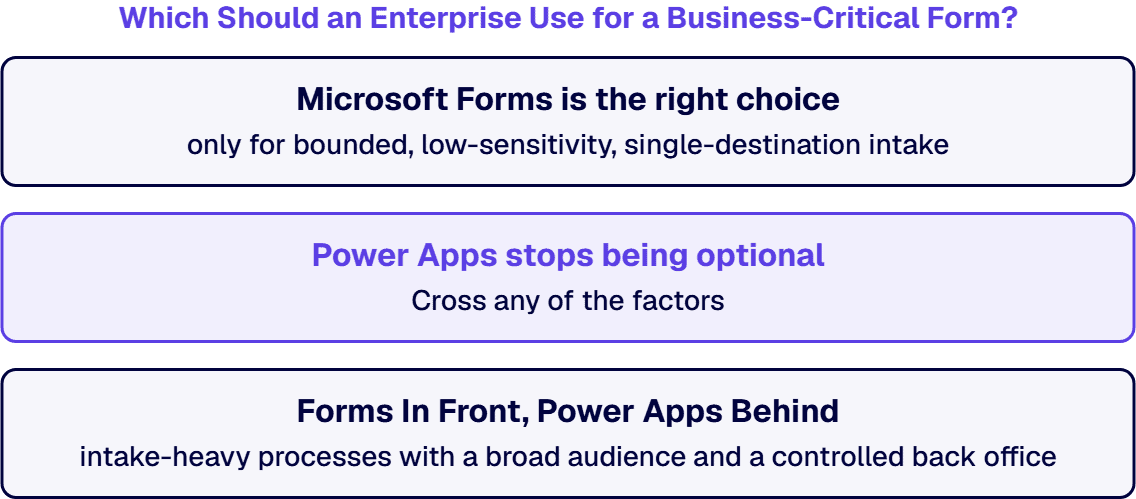
A common third path uses Forms as the lightweight public-facing intake and Power Apps as the authenticated logic and processing layer. The Form captures initial information from an anonymous or lightly authenticated user, a Power Automate flow hanging off the Forms connector’s When a new response is submitted trigger validates and routes the record, and Power Apps handles the governed processing behind it. The pattern fits intake-heavy processes with a broad audience and a controlled back office, and it keeps each tool inside its design instead of forcing either past it. Our Microsoft Forms enterprise integration consulting page details the three integration patterns behind this: Forms to Power Automate to SharePoint, Forms to Dataverse, and Forms to Power BI, each with its own governance requirements. When the flows themselves carry the process weight, our workflow automation services team designs and governs them end to end.
InfoPath retired on July 14, 2026, and every InfoPath form still running is now on unsupported technology. The migration sorts by exactly the rule on this page: forms that carried validation, conditional fields, or approval chains rebuild as Power Apps with Power Automate (the rebuild is the work: on a state National Guard migration we used a purpose-built tool precisely because the logic, not the layout, had to come across), and flat questionnaires move to Microsoft Forms. Replacing 32 outdated InfoPath forms with Power Apps reduced maintenance demands by 40%, saving an estimated $150K-$200K annually in IT labor and support. If that migration is still ahead of you, start with the InfoPath alternatives guide or go straight to InfoPath migration services.
If you are holding a form that does not sort cleanly, or an estate full of them, a short conversation settles which side of the line each one belongs on. You leave with a per-form ruling against the five factors and the licensing consequences priced in. If the decision has to survive a governance committee, that documented ruling is the artifact you take into the room.
Power Apps, in most cases. A business-critical form usually carries at least one of the traits that puts it past what Microsoft Forms is built for: regulated data such as PHI, CUI, or financial records, role-based authentication, multi-step conditional logic, or integration into more than one downstream system. Microsoft Forms is the right choice only when the intake is bounded, low-sensitivity, and single-destination. Sort by the five factors (branching complexity, authentication, data sensitivity, integration depth, and downstream constraints), not by tool preference.
Yes, through Power Automate: a Forms response can trigger a flow that routes an approval and writes the record to SharePoint. That pattern works well for simple, single-chain approvals on low-sensitivity data. When the approval logic branches on prior answers, needs role-based routing, or has to update multiple systems transactionally, the front-end belongs in Power Apps.
Microsoft Forms is included with Microsoft 365 subscriptions. Power Apps is licensed separately once an app goes beyond the standard-connector usage included with Microsoft 365, and Dataverse storage carries its own capacity considerations. That licensing line is one of the five deciding factors: crossing it is justified by regulated data, authentication, or integration depth, not by cosmetics.
Both, sorted by the same rule this page describes. InfoPath forms that carried validation rules, conditional fields, or approval chains rebuild as Power Apps with Power Automate handling the routing. Flat questionnaires move to Microsoft Forms. InfoPath itself retired on July 14, 2026, so this sorting is now live-exposure triage rather than forward planning.
When the audience is broad or anonymous but the processing is not. The Form captures initial information from an anonymous or lightly authenticated user, a Power Automate flow validates and routes the record, and Power Apps provides the authenticated logic and processing layer behind it. You get Forms’ zero-training intake and Power Apps’ governed processing without forcing either tool past its design.

US-Based | Est. 1997
© i3solutions. All rights reserved.
US-Based | Est. 1997
© i3solutions. All rights reserved.


