
When your compliance office asks which container holds a regulated file and the answer turns on who happened to create the channel, the platform question is already settled: as of Microsoft Learn documentation updated June 25, 2026, December 3, 2024, and February 9, 2025, “The files you see on the Files tab in a team are stored in a SharePoint site.” (Microsoft Learn, teams-connected sites, updated June 25, 2026). So the decision in front of you is not Teams or SharePoint; it is which container regulated content lands in, and who is accountable for it. Content that will carry a retention label, needs external-party access, or is a records source belongs in a standalone governed SharePoint site with a named site owner, regardless of where the conversation started. Everything else can stay where the conversation happens, in the channel and on whichever site that channel type connects to, under the owner that channel type actually gives you. The container you choose is the governance decision; the platform underneath it is the same either way.
If nobody can say where a given file actually sits, start with what Teams created on your behalf when the team was set up. A Teams-connected site is created automatically whenever you create a team (Microsoft Learn, teams-connected sites, updated June 25, 2026). All standard channels in a team share the same SharePoint site, but each private channel has its own site. Each shared channel has its own SharePoint site for file storage. In Teams, the Files tab on each standard channel is connected to a folder in the parent site’s default document library. The Files tab on each private and shared channel is connected to the default document library in the corresponding channel site. If ownership of teams and files is unclear, score the estate with the Microsoft Teams governance readiness checklist before deciding where regulated files belong.
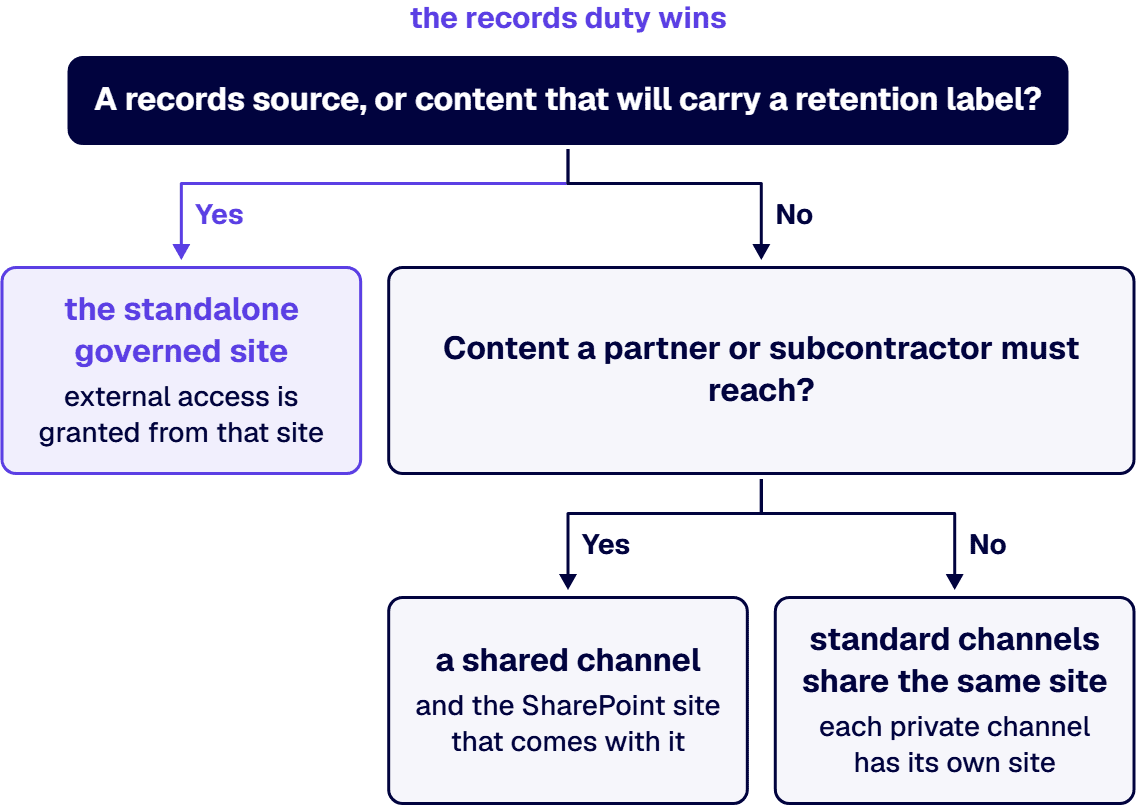
When a file has to be placed and the team is already running, the rule below turns the container question into a records question. Work each kind of content through it before the first file goes in.
Where two of these disagree, and the content is both a records source and something a partner needs, the records duty wins: the container is the standalone governed site, and external access is granted from that site rather than by moving the content into a channel.
If you are expecting a SharePoint administrator to fix a permissions problem inside a channel, check which kind of channel it is first. Site permissions for a private channel site can’t be managed independently through SharePoint (Microsoft Learn, private channels, updated December 3, 2024). Teams manages the lifecycle of the private channel site. A private channel owner or team owner (whether or not they’re a member of the private channel) can delete the private channel.
Site permissions for a shared channel site can’t be managed independently through SharePoint (Microsoft Learn, shared channels, updated February 9, 2025). A shared channel site inherits the sensitivity label of the parent team. A file that is encrypted by a sensitivity label can’t be opened by external participants unless permissions are granted. While guests (people with Microsoft Entra guest accounts in your organization) can’t be added to a shared channel, you can invite people outside your organization to participate in a shared channel by using Microsoft Entra B2B direct connect.
If nobody can name the owner of a container, the placement rule has nothing to attach to. The membership for each team is stored in a Microsoft 365 group and that group also gives those people access to the team’s parent SharePoint site (Microsoft Learn, teams-connected sites, updated June 25, 2026). Team owners and members are automatically included in the site owners and members permission groups. Review and archival cadence for a named owner is set out on the SharePoint Site Ownership and Lifecycle Governance page, which owns that decision.
When a file’s records duty outlives the conversation that produced it, the retention question moves ahead of the platform question. Retention policies can also be used for private channel sites (Microsoft Learn, private channels, updated December 3, 2024). Admins can apply a retention policy on a team where all channels, including shared channels, inherit the retention policy (Microsoft Learn, shared channels, updated February 9, 2025). The compliance office owns the determination of which retention applies to which content, and the IT director owns naming the container before the first file goes in. For guidance on FINRA books-and-records and other regulatory duties, see the Embedding Governance into How the Enterprise Operates and Scales page.
If your organization runs everything in Teams and nothing has gone wrong, the Teams channel model is working for your content and your retention rules. A small team whose content never carries a retention label, needs external access, or represents a records source can live safely in a Teams channel and its channel site. A dedicated records site is still needed if your organization runs a records management program that requires archiving by department or legal matter rather than by conversation.
An i3solutions SharePoint consulting engagement produces named deliverables: a governance documentation package, architecture artifacts, and runbooks. i3solutions has delivered enterprise SharePoint and Power Platform programs for aerospace and defense manufacturers, major defense organizations, a financial-services firm, a national healthcare system, and military organizations.
If the container rule is going to hold once people start creating workspaces, it has to sit inside a governance model somebody already owns. The following pages establish that framework:

US-Based | Est. 1997
© i3solutions. All rights reserved.
US-Based | Est. 1997
© i3solutions. All rights reserved.


