
By Michael Branson
Quick answer. As of September 2026, SharePoint is a sound base for a regulated enterprise intranet when you treat the intranet as part of the SharePoint estate you already secure: Microsoft Learn says the SharePoint app in Teams, formerly Viva Connections, “is built on the SharePoint home site technology”, so the intranet runs on the SharePoint permissions, retention and auditing you already operate. Before the build is funded, decide the license, because Microsoft Learn says “Users with a Microsoft 365 subscription (E, F, or A license) are limited to creating and using one SharePoint app in Teams experience.” and “If you want to create or use two or more experiences (up to 50), then every user in your tenant must have a Microsoft Viva Suite or Viva Communications and Communities license.” Decide the access model, because Microsoft Support says that with audience targeting “specific content will be prioritized to specific audiences”, and Microsoft Learn says “Hub sites do not alter an associated site’s permissions”. Decide the records design, because Microsoft Learn says “List items aren’t supported by retention policies but are supported by retention labels with the exception of items in system lists.” In GCC High or DoD, confirm availability before the design is promised, because Microsoft Learn says “Viva Engage for enterprise isn’t available in the GCC High and DoD environments.” and “Users in GCC-High will be able to share only with other organizations in GCC-High.”
If communications has seen demos of a packaged intranet product, establish first what Microsoft’s own intranet experience runs on. Microsoft Learn’s Overview of the SharePoint app in Teams says “The SharePoint app in Teams, formerly Viva Connections, brings full SharePoint capabilities into Microsoft Teams.” and “It is built on the SharePoint home site technology.” It describes the app as “A user experience app in Microsoft Teams that allows organizations to create unique experiences for different audiences like information workers, frontline workers, educators, researchers, or students.” If a budget review has gone further and questioned SharePoint itself, Does Anyone Still Use SharePoint separates the file layer under Teams, the server versions whose support dates have passed, and the workloads that belong on the platform.
The home site’s reach matters for the security review. Microsoft Learn’s Plan, build, and launch a SharePoint home site for your organization says “The search scope for the SharePoint home site searches the entire intranet instead of just the site collection like a typical site.”
Evaluate the intranet on the permissions, retention and audit you already run, not on page templates. A front door whose search reaches the entire intranet makes every site’s access model part of the intranet design.
If office staff, frontline workers and regional teams are each expected to get their own intranet experience, settle the license before anyone promises it. The SharePoint app in Teams overview says “Users with a Microsoft 365 subscription (E, F, or A license) are limited to creating and using one SharePoint app in Teams experience.” Microsoft Learn also says “If you want to create or use two or more experiences (up to 50), then every user in your tenant must have a Microsoft Viva Suite or Viva Communications and Communities license.” The home site planning page also says “You must have an Enterprise (E), Frontline (F), or Academic (A) license type to create a Connections experience.”
Decide the number of experiences first, and treat a second experience as a licensing decision for every user in the tenant, not a design choice for one audience. Where one experience has to serve several workforces, plan how content reaches each audience inside it before a second experience is proposed.
When records management says intranet announcements, policies and forms are records, the retention design has to match where that content lives. Microsoft Learn’s Learn about retention for SharePoint and OneDrive says “All files stored in SharePoint (and SharePoint Embedded) or OneDrive sites can be retained by applying a retention policy or retention label.” It also says “List items aren’t supported by retention policies but are supported by retention labels with the exception of items in system lists.” and “To retain all versions of a file, versioning must be turned on for the site.”
Audit sits in the same estate. Microsoft’s SharePoint service description lists “Unified auditing (auditing SharePoint user and admin activity)” in its table of features available across plans.
Name which intranet content is a record before any content moves, and use retention labels wherever that content lives in lists. Microsoft Support’s How to find your SharePoint pages and news posts says “Pages and news posts that you create, save, or publish are stored in the Pages library for your site.” Microsoft’s retention page cited here does not mention news posts, so confirm with the records team how intranet news is retained before the first post goes out. How long any record is kept is for records management, legal and your regulator to set; this guide does not advise a retention period. Controlled documents and standard operating procedures are a separate decision from the intranet and are not covered here.
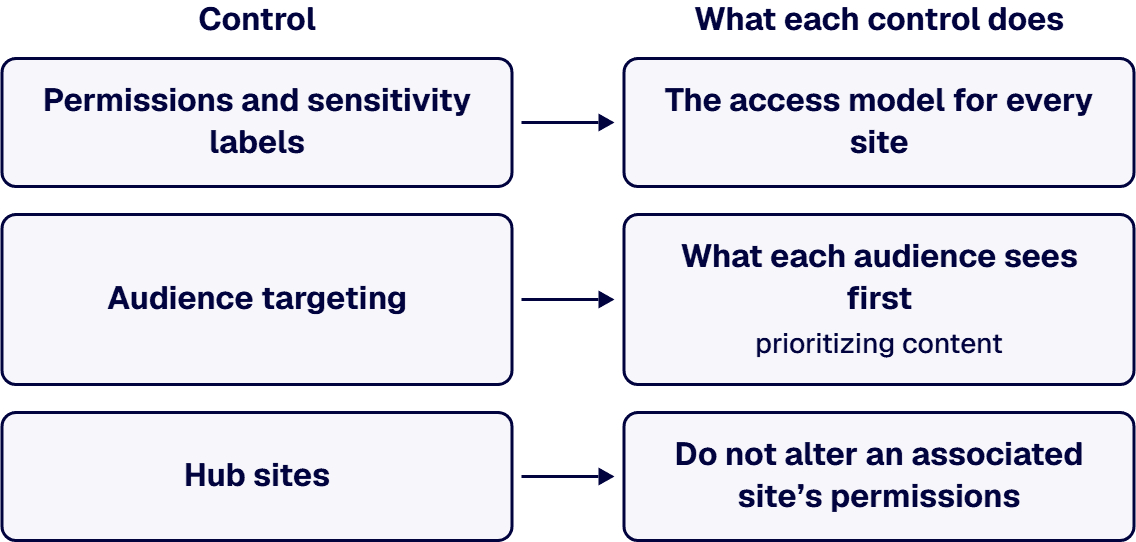
If the intranet must show HR policies to everyone but keep some pages to managers, decide which control does that job before any page is built. Microsoft’s support article Target navigation, news, files, links, and web parts to specific audiences says “By enabling audience targeting, specific content will be prioritized to specific audiences through SharePoint web parts, page libraries, and navigational links.” Microsoft Learn’s Planning your SharePoint hub sites says “Hub sites do not alter an associated site’s permissions”. The Microsoft Learn page Overview of the SharePoint app in Teams says “Owners and members setting up a SharePoint app in Teams experience should confirm who has access to certain sites within SharePoint to ensure only authorized users have access to certain data and features.”
Sensitivity labels add conditions at the site level. Microsoft Learn’s Use sensitivity labels to protect collaborative workspaces (groups and sites) says “The settings for unmanaged devices and authentication contexts work in conjunction with Microsoft Entra Conditional Access.”
Write the access model for every site in permissions and sensitivity labels, and use audience targeting for what each audience sees first. Microsoft’s documentation cited here describes targeting as prioritizing content, so test every page meant for a restricted group against the permissions of the site it sits on.
Structure sets how far a permission or a policy reaches. The Microsoft Learn page Planning your SharePoint hub sites says “One of the key principles of modern intranets based on Microsoft SharePoint is that each unit of work should get a separate site collection.” and “Subsites can also create challenges when it comes to governance because many features (including policy features like retention and classification) in SharePoint apply to all sites within the site collection”. The Microsoft Learn page Plan, build, and launch a SharePoint home site for your organization says “Consider making the SharePoint home site a hub site if you need to add an extra layer of navigation and make it easier to sync associated site permissions and branding.” Microsoft Learn’s Introduction to SharePoint information architecture says “Well-planned and executed information architecture is a prerequisite for an intelligent and high-performing intranet, hub, or site.” and “All navigation types (site, hub, global, and footer) are limited to 500 child links at each level.”
Give each unit of work its own site, so that its permissions, retention and label can be set for that unit alone. The wider information architecture method is covered in Governance-First SharePoint Information Architecture for Large Enterprises.
If the tenant is in GCC High or DoD, check each feature the design depends on before the design is promised. The Microsoft Learn page SharePoint service description says “Unless otherwise noted, the following table lists the major features available across all plans (Small Business, Enterprise, Education, GCC, GCC-High, and DOD Plans) that include SharePoint, and all SharePoint standalone plans.” That table lists “Home site and Hub sites”. Microsoft Learn’s Office 365 GCC High and DoD service description says “Viva Engage for enterprise isn’t available in the GCC High and DoD environments.” and “Users in GCC-High will be able to share only with other organizations in GCC-High.”
No Microsoft page read for this guide states whether the SharePoint app in Teams is available in GCC High or DoD, so confirm it against Microsoft’s current service descriptions before an experience in Teams is part of the design. Communities that would run on Viva Engage need a different design in those clouds. What a GCC High move means for existing SharePoint customizations is covered in GCC High SharePoint Migration: A Defense Contractor’s Pre-Migration Guide to Customizations, Compliance, and Partner Selection.
When IT hands the intranet over, the home site’s news carries the most weight, so name its approver first. The home site planning page says “By default, a SharePoint home site is set as the organizational news source.” and “News posts that are created from the SharePoint home site automatically become official organizational news and take priority on the SharePoint start page.”
Name an owner for each of these decisions before launch:
The site-level ownership model is covered in SharePoint Site Ownership and Lifecycle Governance.
If any of these four situations describes your program, the decision changes shape:
When bids come in, require each of these in writing before one is scored:
How to choose the consulting firm itself is covered in SharePoint Consulting Firm for Regulated Enterprises: How to Choose.
When the intranet decision has to be defensible before the build is funded, i3solutions designs and builds SharePoint intranets as project work: the home site, hubs, the SharePoint app in Teams experience, custom components, and the access, retention and label configuration, with embedded specialists joining your own team where the program needs them. An i3solutions SharePoint consulting engagement produces named deliverables: a governance documentation package, architecture artifacts, and runbooks.
For regulated tenants, the compliance view is stated as advice, not as certification. i3solutions advises clients on federal compliance posture as its own assessment rather than as a restatement of Microsoft’s documentation, including whether SharePoint Online meets NIST 800-53, whether Azure Government is required under the DoD Cloud Computing SRG, and whether a CMMC gap assessment is needed to bid.
The delivery record is stated plainly. i3solutions has delivered enterprise SharePoint and Power Platform programs for aerospace and defense manufacturers, major defense organizations, a financial-services firm, a national healthcare system, and military organizations. In one engagement, i3solutions built a corporate SharePoint portal for a professional services firm that had just acquired another company, integrating the new organization into a shared platform while day-to-day operations kept running throughout. An anonymized intranet and document-management upgrade is described in Centralized Document Management Drives Team Collaboration.
Delivery is senior and US-based. All i3solutions SharePoint developers, architects, and consultants are 100% U.S.-based. The wider service line is described on Enterprise SharePoint Development & Integration Services Built for Scale and Governance.
No. Microsoft Learn says “The SharePoint app in Teams, formerly Viva Connections, brings full SharePoint capabilities into Microsoft Teams.”
One. Microsoft Learn says “Users with a Microsoft 365 subscription (E, F, or A license) are limited to creating and using one SharePoint app in Teams experience.” and “If you want to create or use two or more experiences (up to 50), then every user in your tenant must have a Microsoft Viva Suite or Viva Communications and Communities license.”
Microsoft’s documentation describes targeting as prioritizing content and describes access in terms of site permissions. Microsoft Support says “By enabling audience targeting, specific content will be prioritized to specific audiences through SharePoint web parts, page libraries, and navigational links.” Microsoft Learn says “Hub sites do not alter an associated site’s permissions” and “Owners and members setting up a SharePoint app in Teams experience should confirm who has access to certain sites within SharePoint to ensure only authorized users have access to certain data and features.”
Yes, with retention labels. Microsoft Learn says “List items aren’t supported by retention policies but are supported by retention labels with the exception of items in system lists.”
No. Microsoft Learn’s GCC High and DoD service description says “Viva Engage for enterprise isn’t available in the GCC High and DoD environments.”

US-Based | Est. 1997
© i3solutions. All rights reserved.
US-Based | Est. 1997
© i3solutions. All rights reserved.


