

Employees were routing around a cluttered intranet that had become an unreliable document repository.
The client is a global wireless communications technology company that recognized its existing intranet was not living up to employee needs or company objectives. Initially designed as a simple repository for documents and announcements, the platform had become cluttered, difficult to navigate, and underutilized. Employees often resorted to alternate methods to collaborate and access critical information, leading to inefficiencies, duplication of effort, and missed communication. An intranet employees route around is a specific failure, not a cosmetic one: the work still gets done, but it gets done somewhere the rest of the company cannot see it.
By reimagining the intranet’s purpose and design, the organization aimed to create a centralized internal hub where departments could securely share up-to-date documents, coordinate as teams, and promote company-wide engagement. The goal was to introduce intuitive features, such as advanced search functionality, tailored dashboards, and user-friendly forums, that would simplify daily tasks, encourage collaboration, and ultimately reinforce a sense of community within the organization.
A wireless technology company’s intranet had become such a cluttered, hard-to-search repository that employees routed around it with unofficial workarounds. i3solutions rebuilt it with real information architecture and working search, restoring it as the place people actually use.
Faster, more relevant search boosted productivity, easier-to-find online forms cut duplicated effort in rebuilding them, and the intranet became a centralized internal hub instead of a cluttered, underused document repository.
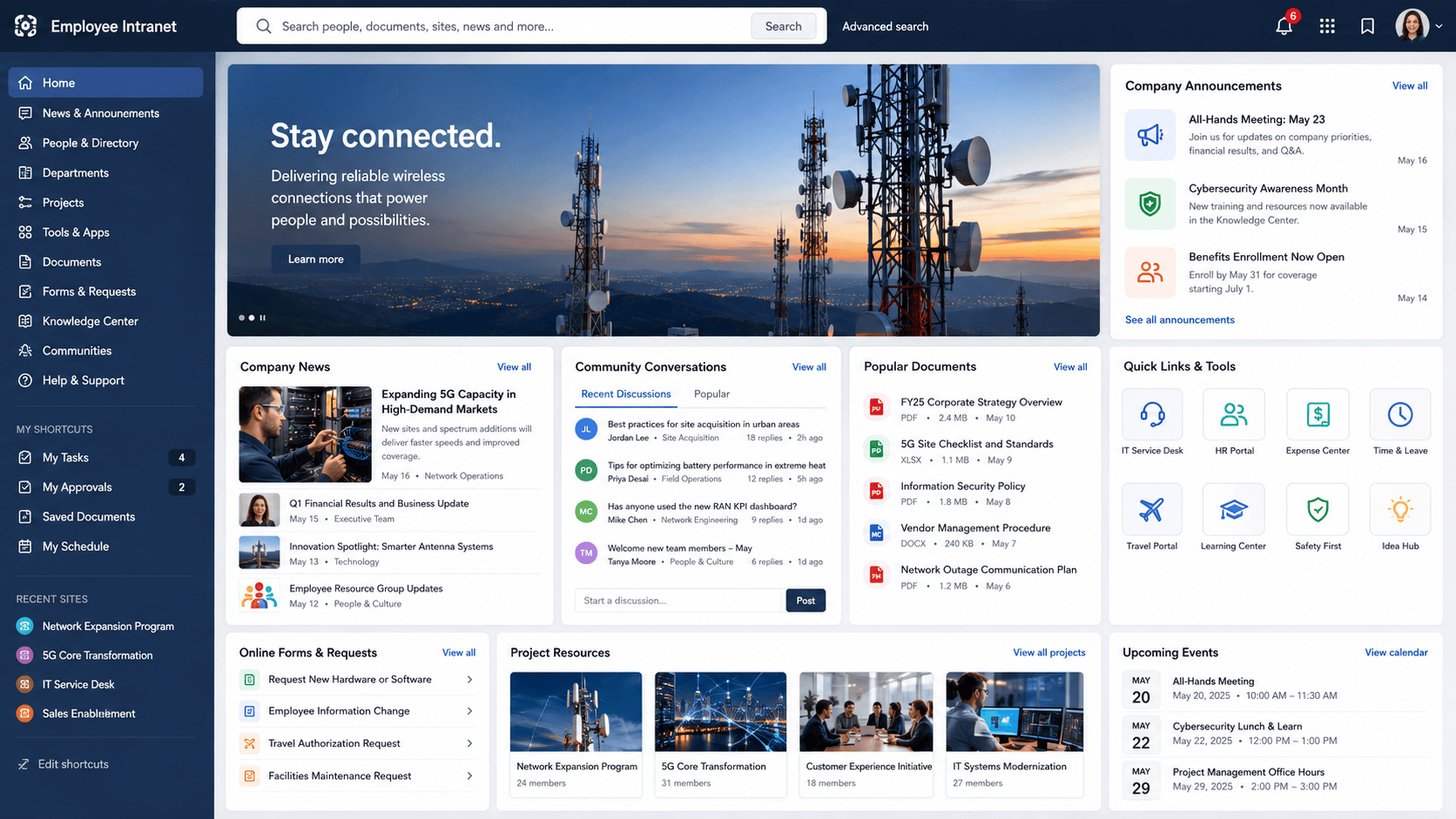
Work Was Happening Everywhere Except the Intranet
The trigger was not that the intranet looked dated. It was that people had stopped using it. Built as a simple repository for documents and announcements, it had grown cluttered and difficult to navigate, and the practical consequence was that employees often resorted to alternate methods to collaborate and access critical information. Every one of those workarounds is a private copy of something the company already owns, held somewhere nobody else thinks to look.
That is where the cost lands, as inefficiency, duplicated work, and messages that never reach the people who needed them. A company whose departments sit in different parts of the world absorbs that badly, because the side channels people fall back on do not reach across those departments either. Leadership’s response was to reimagine the intranet’s purpose and design rather than restyle it, aiming at one internal hub where departments could securely share up-to-date documents, coordinate as teams, and promote company-wide engagement.
Employees had routed around this company’s intranet because of navigation and content problems, not missing features. If adoption is the issue with your own intranet, the fix usually starts with structure, not a new feature list.
A Company-Wide System Nobody Uses
An underutilized intranet does not fail loudly. It degrades. Content goes out of date because nobody trusts the platform enough to maintain it, navigation gets worse as more material is poured into a structure that was never designed to hold it, and each employee who gives up takes their work somewhere the rest of the company cannot reach. Left alone, the platform would have kept collecting documents and announcements while the collaboration it was built for happened elsewhere.
The organizational cost is the one the company named for itself, and it lands across departments spread around the world. Effort spent rebuilding a form that already exists is effort spent twice. A message that misses its audience costs whatever depended on it arriving. Those are the failures the overhaul was funded to stop. The result was reported qualitatively; no before-and-after figures were published for this engagement.
Rebuild the Structure Before Adding Features
The first constraint was diagnostic rather than technical. A cluttered intranet presents a long list of symptoms, and rebuilding against the wrong ones produces a better-looking platform people still avoid. So the engagement could not open with a design. It had to open by establishing, from the people who use the system, which failures actually drove them away, across multiple departments and multiple roles, because a workforce spread across the world does not experience one intranet the same way.
The second constraint was sequence. An advanced search tool, dashboards, and forums are worth little sitting on an information architecture nobody can navigate, so the underlying structure had to be simplified first and the functionality layered onto it afterward. And because the platform’s users are employees rather than administrators, every addition had to earn its place without training: intuitive features that simplify daily tasks, encourage collaboration, and reinforce a sense of community, not a second system to learn.
A Research-Led Partner for a Company-Wide Rebuild
The requirements defined the vendor profile. The company needed a team that would spend the opening phase of the engagement listening rather than designing, rebuild an information architecture around what employees were actually trying to do, and only then deliver the collaboration functionality on top of it: an advanced search tool, discussion forums, secure document sharing, and greater automation of online forms and data. That is a systems analysis problem before it is a build problem, and getting the analysis wrong is how intranet redesigns reproduce the original failure in a new theme.
The organization engaged i3solutions, and the engagement opened the way those requirements implied. i3solutions led a full overhaul of the intranet, beginning with user research and feedback sessions across multiple departments and roles, and the insights gathered there set the scope of everything built afterward. The redesign was user-centric by construction: it was guided by a shared goal of creating an environment that promoted transparency and ease of collaboration.
i3solutions led a full overhaul of the intranet: user research first, then a simplified information architecture, then the communication and knowledge-sharing functionality the old repository never had.
PHASE 01
User Research and Systems Analysis
The engagement opened with user research and feedback sessions across multiple departments and roles rather than with a design. Those sessions identified the specific challenges: confusing navigation, outdated content, and the lack of intuitive collaboration features. What employees reported, not assumptions about what a modern intranet ought to contain, defined the scope of the overhaul.
PHASE 02
Information Architecture Redesign
With those insights, i3solutions reimagined the intranet’s underlying structure, simplifying its information architecture so that employees could quickly locate essential documents, access project resources, and stay informed about company-wide announcements. The redesign was guided by a shared goal of creating an environment that promoted transparency and ease of collaboration.
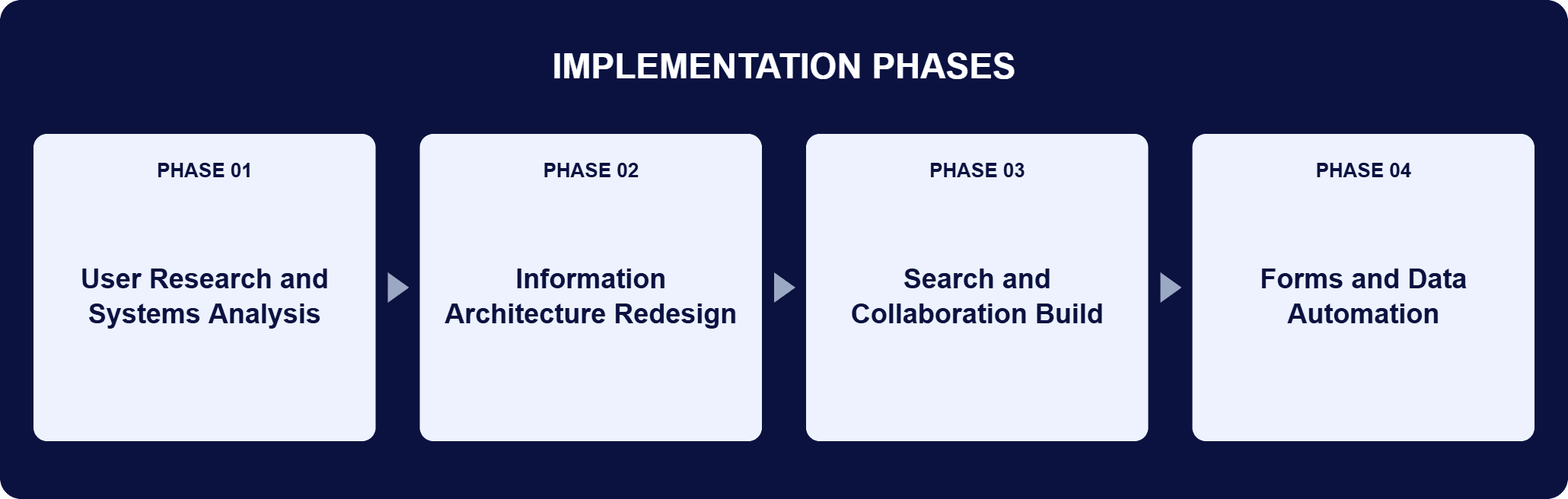
PHASE 03
Search and Collaboration Build
With the structure simplified, i3solutions built the communication and knowledge-sharing functionality onto it. An advanced search tool ensured staff could quickly find relevant information, reducing time wasted on inefficient searches. Collaborative tools, including discussion forums and secure document sharing, encouraged real-time team engagement between departments that had been working apart.
PHASE 04
Forms and Data Automation
The redesigned intranet provides greater automation to increase consistency and compliance in online data and forms, so the information employees produce through the platform holds together. Existing forms became easier to find, which is what stops people rebuilding something the company already has.
The technical work is a rebuild of the platform’s structure followed by a functional layer placed on top of it. The old intranet was a simple repository: documents and announcements accumulated inside a structure never designed to hold them, and navigation degraded as the pile grew. The replacement is a centralized internal hub with a simplified information architecture, organized around what employees told the research sessions they were trying to do, which is locate essential documents, reach project resources, and stay informed about company-wide announcements. On that foundation sit the capabilities the repository never had. An advanced search tool returns relevant results quickly, which is the difference between a large document estate being usable and being merely stored. Discussion forums and secure document sharing carry real-time work between departments that previously sat in silos, with sharing controlled rather than open. Greater automation of online data and forms raises consistency and compliance in what employees produce through the platform. The order of the two layers is the load-bearing decision. Search and forums added on top of an architecture nobody can navigate inherit that problem instead of solving it, which is why the structure was simplified before any of them were built.
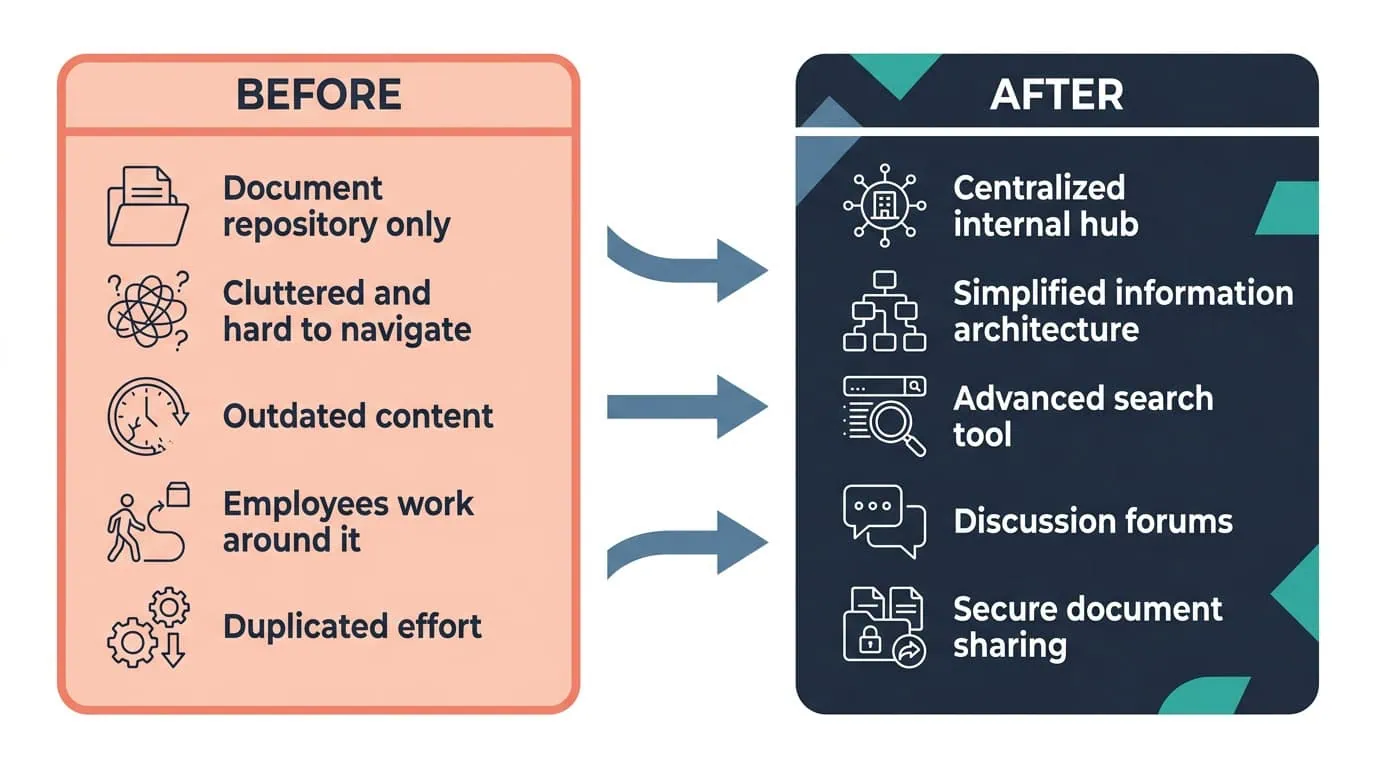
Faster Search, Fewer Workarounds
A rebuilt information architecture with advanced search and discussion forums increased collaboration and cut wasted time finding information.
| Outcome | Before | After |
|---|---|---|
| Cross-department collaboration | Employees resorting to alternate methods, with duplication of effort and missed communication | Increased collaboration between various departments across the world |
| Finding information | Confusing navigation, outdated content, and time wasted on inefficient searches | Boosted productivity with faster, more relevant searches |
| Online forms | Existing forms hard to find, so effort went into rebuilding them | Streamlined processes to limit duplication of effort as existing forms are easier to find |
| Data consistency and compliance | Online data and forms produced without that automation | Elevated compliance and consistency and overall quality in data |
| What the intranet is | A simple repository for documents and announcements, cluttered and underutilized | A centralized internal hub with an intuitive interface that is easier to navigate |
The outcomes this engagement reported are qualitative, and the page is explicit about it: no before-and-after figures were published. What the company reported is a change in where work happens. Collaboration increased between departments across the world. Searches became faster and more relevant. Existing forms are easier to find, so people stop recreating them. And greater automation of online data and forms raised consistency, compliance, and overall data quality.
The pattern behind those four results is the one the research surfaced. Confusing navigation and outdated content were what pushed employees to alternate methods, so simplifying the information architecture and making search return relevant results removed the reason to leave. Discussion forums and secure document sharing then gave the work a place to happen inside the platform instead of outside it. A rebuilt intranet is worth having only if it is where people already are, and that is the change the overhaul set out to produce.

PENDING-CLIENT-QUOTE
This engagement is relevant for
Less relevant for
A Repository Became the Place the Work Happens
The engagement established that an intranet nobody uses is an information architecture problem before it is a feature problem. i3solutions opened with user research and feedback sessions across multiple departments and roles, and those sessions named confusing navigation, outdated content, and the lack of intuitive collaboration features as the reasons employees had routed around the platform.
The structure was simplified against what those employees were actually trying to do, and only then did the advanced search tool, discussion forums, secure document sharing, and greater automation of online data and forms go on top of it. The reported outcome is a platform where departments across the world collaborate, searches return faster and more relevant results, and existing forms are found rather than rebuilt. Those results were reported qualitatively, with no before-and-after figures published for this engagement.
A unified digital workplace intranet is a centralized internal hub rather than a place to deposit files, and that distinction is what this engagement turned on. The company’s original platform was designed as a simple repository for documents and announcements, and it did what repositories do: it accumulated. A digital workplace holds the work itself. Here that meant a simplified information architecture so employees could quickly locate essential documents, access project resources, and stay informed about company-wide announcements; an advanced search tool so finding something does not depend on knowing where it was filed; discussion forums and secure document sharing so team engagement happens in real time inside the platform; and greater automation of online data and forms. The test is behavioral rather than architectural: employees stop resorting to alternate methods to collaborate.
By asking the people who use it. The engagement opened with user research and feedback sessions across multiple departments and roles, before any design work, and those sessions identified the specific challenges: confusing navigation, outdated content, and the lack of intuitive collaboration features. The information architecture was then rebuilt against what employees said they were actually trying to do, rather than against a list of features a modern intranet is supposed to have. That sequence matters for a workforce spread across the world, where one department’s experience of the platform is not another’s, and it is what kept the redesign from producing a better-looking system people still avoided. The search, the forums, and the secure document sharing were layered on afterward, onto a structure the research had already validated.
It had been built as a simple repository for documents and announcements, and it had grown cluttered, difficult to navigate, and underutilized. Navigation was confusing and content was out of date, so employees fell back on other ways to collaborate and to find what they needed. That is what produced the inefficiencies, duplication of effort, and missed communication behind the overhaul. The failure was not a missing feature list. It was that the structure holding everything had never been designed for what it ended up holding, and every addition made it harder to navigate. Once employees stop trusting an intranet to answer a question quickly, they stop maintaining it too, and the outdated content that follows confirms the original decision to work somewhere else.
It works as a centralized internal hub instead of a document drop. The simplified structure lets employees locate essential documents, reach project resources, and stay current on company-wide announcements. An advanced search tool returns relevant results quickly, which is the difference between a large document estate being usable and being merely stored. Discussion forums and secure document sharing carry real-time work between departments that used to sit in silos, with sharing controlled rather than open. Greater automation of online data and forms increases consistency and compliance in what employees produce through the platform, and existing forms are easier to find, so they are reused rather than rebuilt. The redesign brief also called for dashboards alongside search and forums.
Collaboration increased between departments across the world, searches became faster and more relevant, and existing forms are easier to find, so people stop recreating them. Greater automation of online data and forms raised consistency, compliance, and overall data quality. The everyday version of that is smaller and more useful than the summary: someone who needs a document looks in one place and finds it, a team that needs to coordinate does so in the platform rather than in a side channel, and a form that already exists gets used again instead of rebuilt from scratch. These results are reported qualitatively. No before-and-after figures were published for this engagement, so the change is described in behavior rather than in percentages.
Because the hard part of this work is deciding what to fix, and that is where the engagement started. i3solutions led a full overhaul that opened with user research and feedback sessions across multiple departments and roles rather than with a design, let those sessions name the real problems, and rebuilt the information architecture against them before adding anything new. The advanced search tool, the discussion forums, the secure document sharing, and the greater automation of online data and forms then went onto a structure employees had already validated. A redesign that skips the research step tends to reproduce the original problem in a new theme. For organizations weighing this class of work, a short scoping conversation establishes what the equivalent overhaul would take in your environment.
The redesign started by identifying which specific failures were driving people away, rather than assuming a full rebuild was the answer. For this wireless technology company, that meant examining why the existing intranet had become an unreliable document repository and what employees were routing around it to avoid. The rebuilt information architecture and improved search targeted those named failures directly, which is why usage and collaboration increased instead of the redesign repeating the same pattern under a new coat of paint.
Simplifying the structure before adding features is what turned this intranet into a platform people actually use. We can talk through what that same sequencing would look like for your environment.

US-Based | Est. 1997
© i3solutions. All rights reserved.
US-Based | Est. 1997
© i3solutions. All rights reserved.


