

Critical information lived in redundant systems across dispersed offices and relief areas.
The client is a global humanitarian relief organization, a nonprofit that helps people affected by conflict and disaster survive, recover, and regain control of their lives. That work is carried out from dispersed offices and relief areas, so the person who needs a document, a procedure, or a colleague’s expertise is usually nowhere near the department that holds it. The organization set out to build a more effective intranet: one that shares information efficiently and increases collaboration across those offices and relief areas rather than inside each of them.
What it had instead were redundant systems running alongside each other. The same critical information sat in more than one of them, with no single place for departments and programs to store, manage, and retrieve it, so staff assembled what they needed from whichever system they happened to know about. The organization wanted a modern, user-centric platform that would consolidate critical data, enhance real-time communication, and take manual steps out of the workflows staff follow while operating in remote or challenging environments. It was looking for a SharePoint solution to do it.
A global relief organization’s offices and field locations each maintained their own redundant systems, leaving critical documents and expertise out of reach for whoever needed them next. i3solutions built a single SharePoint intranet with shared libraries and automated workflows to replace them.
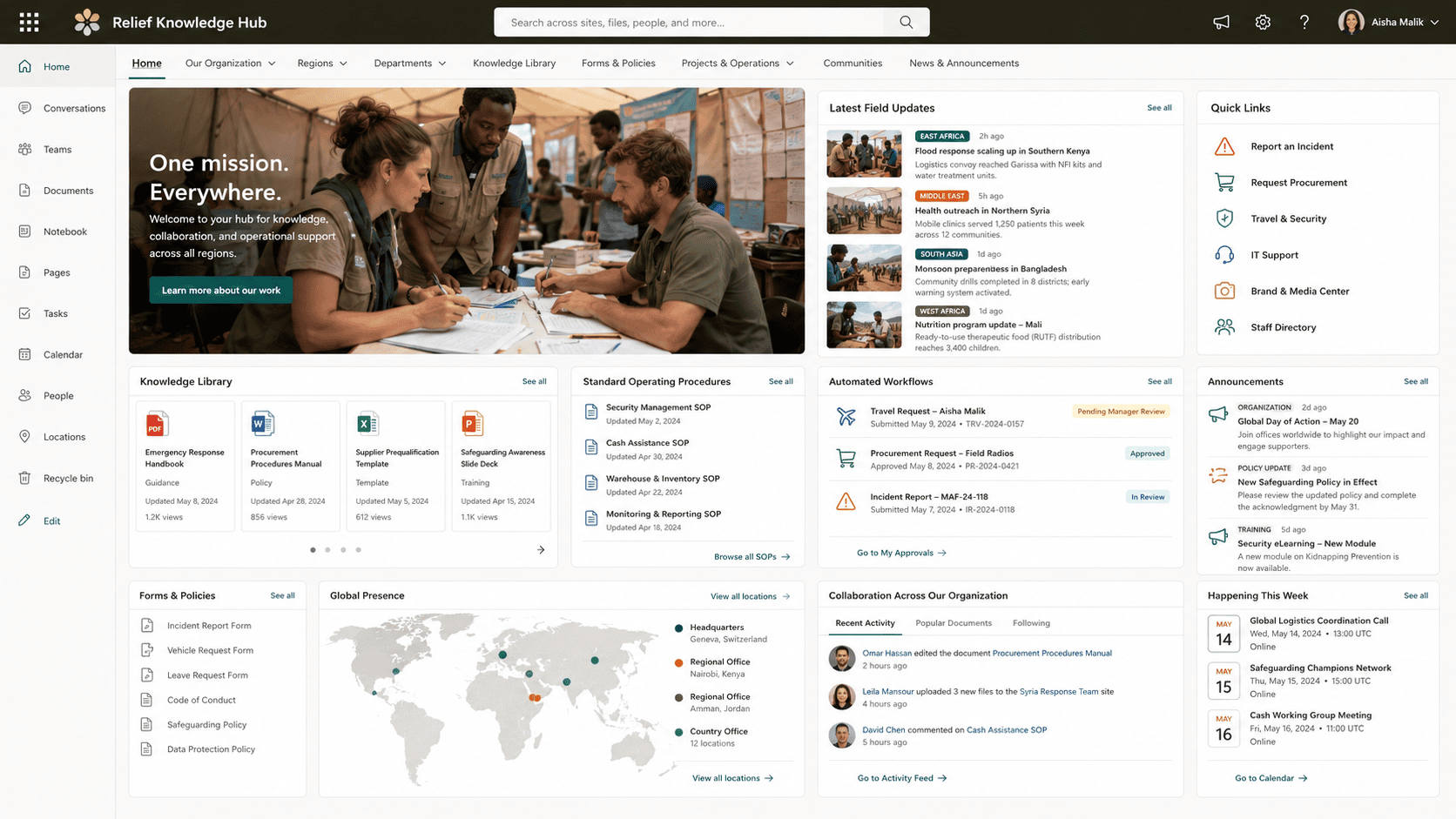
A single organization-wide intranet on Microsoft SharePoint replaced the redundant systems that once held the same information in multiple places, significantly reducing the time employees spend searching for and compiling essential information. Collaboration is now strengthened across departments instead of confined within them, and offices and relief areas that once worked with limited, disconnected systems share the same real-time communication and automated workflows as headquarters.
Relief Work Does Not Wait While Someone Finds the Right Document
The organization’s operating footprint is what made duplicated systems expensive. Its staff work from dispersed offices and relief areas, so the gap between a person with a question and the department holding the answer is not a corridor, and a copy of a document that is current in one system and stale in another is not a filing annoyance. Time spent searching for and compiling essential information is time taken from helping people affected by conflict and disaster survive, recover, and regain control of their lives.
Leadership framed the answer as one intranet rather than better discipline on the systems already in place. The requirement was an intranet that efficiently shares information and increases collaboration across dispersed offices and relief areas, delivered on a modern, user-centric platform, and it had to reach the whole organization: every department, every program, one place.
This relief organization runs from offices and relief areas worldwide, and it still operates from one knowledge base rather than a set of disconnected systems. If your organization’s dispersed locations are the reason information doesn’t travel, that’s solvable without consolidating the locations themselves.
Redundant Systems Bill the Mission, Not a Budget Line
Left alone, the duplicate systems kept charging the same cost every day, and none of it appeared as a line item. Employees spent hours searching for and compiling essential information instead of using it. Insights and updates that would have moved across departments stayed inside them, because there was no shared place to put them and no reason to assume a colleague in another office would ever see them.
The second cost compounds rather than repeats. Best practices and critical knowledge held in a system another team does not open are, in practice, unavailable, and work that could have been done once gets done again somewhere else at a different standard. That is why the requirement was never simply more storage: the platform had to connect people with the expertise they need, and it had to manage and repurpose content rather than let each program accumulate its own copy.
One Platform for Headquarters and for Relief Areas
The intranet had to be organization-wide from the start, not a departmental site that other groups might adopt later. Every department and program needed the same place to access, organize, and share information, because the systems it was replacing were redundant precisely in the sense that each group had solved the problem separately. A platform that served headquarters well and field programs poorly would have recreated the split it was commissioned to close.
The operating environment set the second constraint. The people using this intranet work in remote or challenging environments, so the platform had to support real-time communication with the rest of the organization and take manual steps out of the workflows those staff follow. It also had to be user-centric enough that the person using it is a relief worker, not a document administrator, which ruled out anything that depended on training a global workforce to maintain it.
Senior Microsoft Specialists with Proven Delivery Depth
The requirements defined the vendor profile: a team that could deliver an organization-wide intranet on Microsoft SharePoint, build document libraries and workflow automation behind it, and migrate a nonprofit off redundant systems without a period where nobody is sure which copy is current. Getting the model right the first time mattered more here than it would at an organization with in-house SharePoint staff to correct it afterward.
The organization engaged i3solutions, a Microsoft Partner with 30 years of delivery experience and 1,500+ Microsoft engagements, delivered by an all-senior, all US-based delivery team. That profile fit the work: senior engineers who have built SharePoint intranets and document management repeatedly, and who could put one platform in front of every department and program on the first attempt.
i3solutions implemented an organization-wide intranet on Microsoft SharePoint, giving departments and programs one platform for collaboration and knowledge sharing in place of the redundant systems they had been running alongside each other.
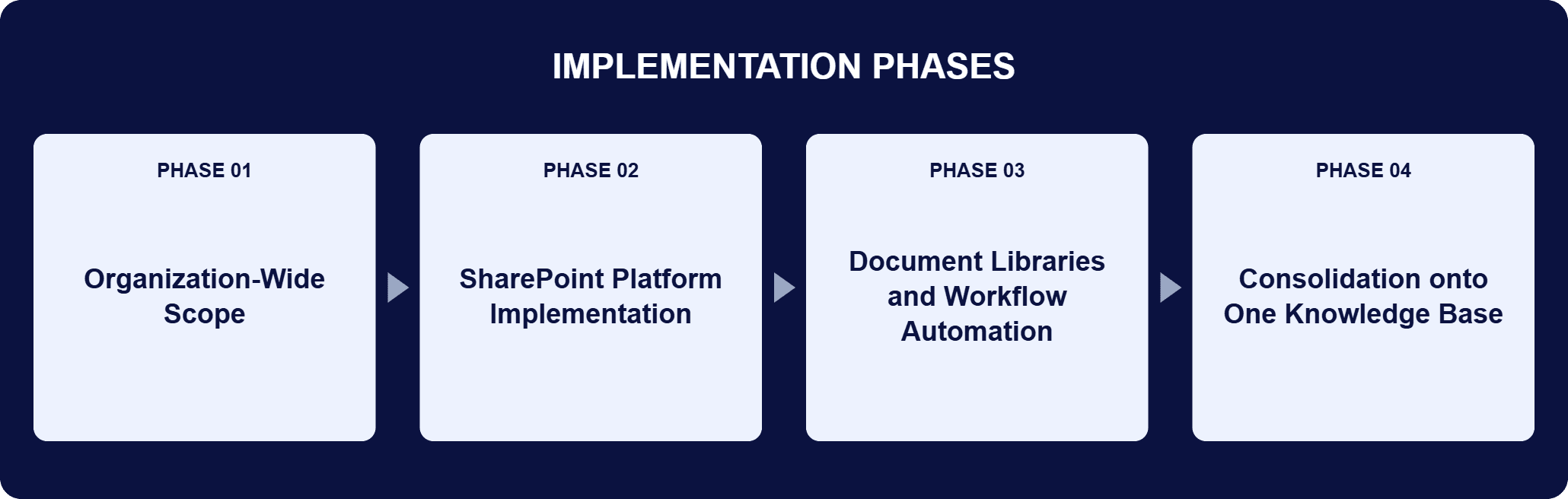
PHASE 01
Organization-Wide Scope
The engagement was defined at the scale of the organization rather than a department at a time. Every department and program would work from the same intranet, and the systems duplicating each other were the ones it had to absorb. That scope set what the platform had to hold: the critical information staff store, manage, and retrieve to do the work.
PHASE 02
SharePoint Platform Implementation
i3solutions implemented the intranet on Microsoft SharePoint, establishing one platform for collaboration and knowledge sharing across departments and programs. The platform became the place where content is organized and shared, rather than one more system alongside the others.
PHASE 03
Document Libraries and Workflow Automation
SharePoint document libraries hold the content, and workflow automation carries the processes that had depended on manual steps, including for staff operating in remote or challenging environments. The interface layer was built to be user-centric so employees can organize and share content as part of their work.
PHASE 04
Consolidation onto One Knowledge Base
Content moved out of the redundant systems, which the intranet replaced. Departments and programs now access, organize, and share information from one location, and corporate knowledge and documents sit together as a single knowledge base rather than as separate departmental holdings.
The platform is Microsoft SharePoint, deployed organization-wide rather than department by department. Document libraries hold the content: the critical information every department and program stores, manages, and retrieves, in one place instead of duplicated across the systems the intranet replaced. Workflow automation carries the processes that used to run on manual steps, which matters most for staff operating in remote or challenging environments, where a manual handoff is the step most likely to stall. The interface layer is user-centric by design, so employees organize and share content as part of the work rather than as a separate administrative task. Above the libraries sits the effect the organization was after: corporate knowledge and documents consolidated into one knowledge base, real-time communication between headquarters and dispersed offices and relief areas, and content that can be managed and repurposed instead of recreated by whichever program needs it next. Because the same platform holds the documents and runs the workflows, business-critical information is presented in one accessible location, and decisions are made against it rather than against whatever a search of several systems turned up.
One Place for Every Department
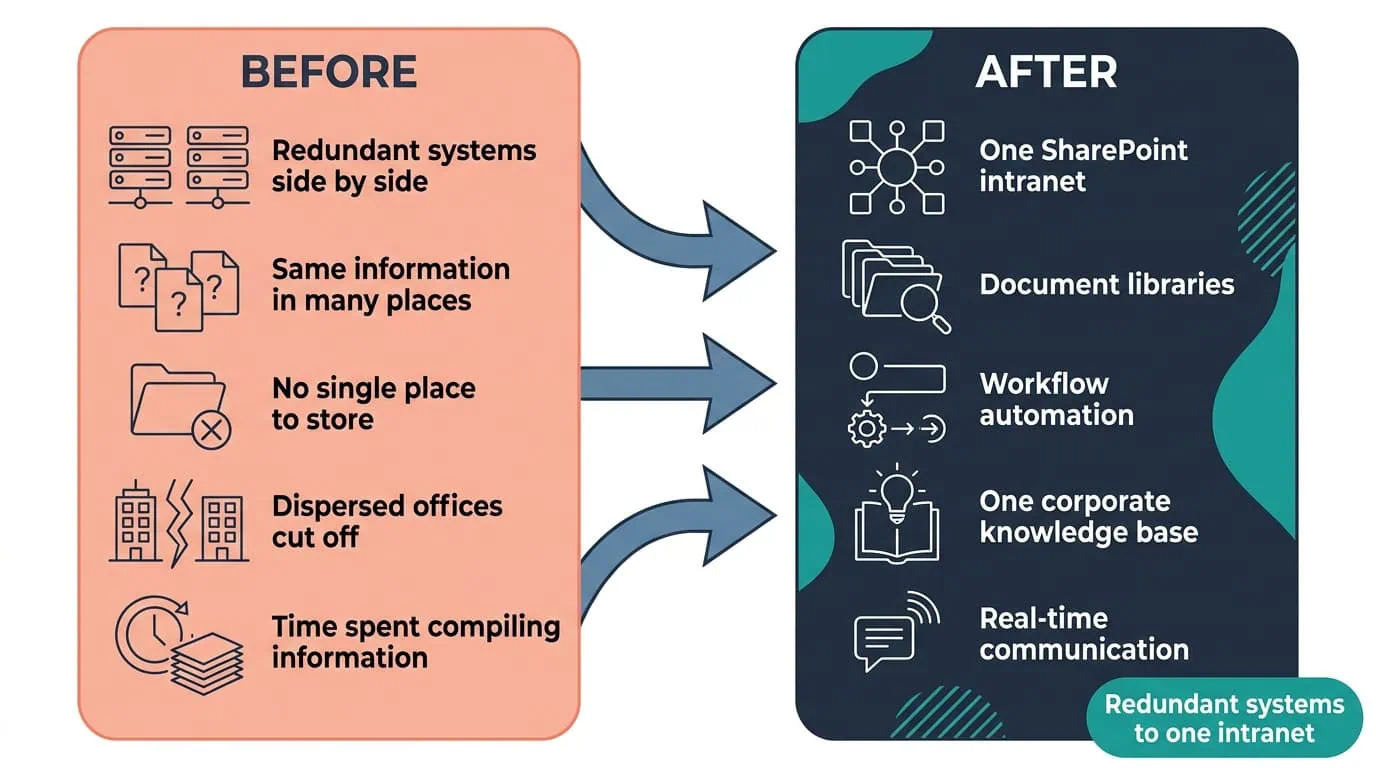
A single SharePoint intranet with document libraries and workflow automation significantly cut the time staff spent finding and compiling information.
| Outcome | Before | After |
|---|---|---|
| Where critical information lives | Redundant systems holding the same information in more than one place | One organization-wide intranet on Microsoft SharePoint |
| Time spent finding information | Employees searching for and compiling essential information | Significantly reduced time spent searching and compiling |
| Cross-department collaboration | Insights and updates staying inside the department that produced them | Strengthened collaboration; teams share insights and updates across departments |
| Consistency and quality of work | Best practices held where other teams could not reach them | Elevated product consistency and quality; best practices and critical knowledge readily accessible |
| Access from offices and relief areas | Collaboration across dispersed offices and relief areas limited by the systems in use | The same intranet as headquarters, with real-time communication and automated workflows |
The organization states its results in kind rather than in figures, and the first of them is time: employees significantly reduced the time they spend searching for and compiling essential information, because the information is in one location instead of spread across the systems the intranet replaced. The second is reach. Teams share insights and updates across departments more easily, and staff working from dispersed offices and relief areas draw on the same content and the same expertise as the people at headquarters.
The third result is about the quality of the work rather than the speed of it. Best practices and critical knowledge are readily accessible, so product consistency and quality improved as work stopped being redone to a different standard in each program. Underneath all three sits the same structural change: corporate knowledge and documents are consolidated, content is managed and repurposed rather than recreated, and business-critical information is presented in one easily accessible location, which is where decisions now get made from.

PENDING-CLIENT-QUOTE
This engagement is relevant for
Less relevant for
One Intranet for Every Department and Program, in Place of the Systems It Replaced
The engagement established that an organization operating from dispersed offices and relief areas can run on one knowledge base rather than on a set of systems that each hold part of the answer. An organization-wide intranet on Microsoft SharePoint, with document libraries holding the content and workflow automation carrying the processes that used to run on manual steps, gave every department and program one place to store, manage, and retrieve critical information.
Employees spend significantly less time searching for and compiling what they need, teams share insights and updates across departments, and best practices stay readily accessible rather than sitting in a system another team does not open. For a nonprofit whose work is helping people affected by conflict and disaster survive, recover, and regain control of their lives, that recovered time and reach go straight back into the mission.
An organization-wide intranet is one internal platform that every department and program works from, rather than a departmental site that other groups may adopt later. Built on Microsoft SharePoint, as i3solutions built it for this global humanitarian relief organization, it gives the whole organization a single place to store, manage, and retrieve critical information, and it replaces the redundant systems that had been holding that information separately. Two things make it an intranet rather than a document store. First, document libraries hold the content in one location so departments and programs access, organize, and share it from the same place. Second, workflow automation carries processes that would otherwise depend on manual steps, which is what makes the platform usable by staff operating in remote or challenging environments rather than only at headquarters.
An organization-wide intranet on Microsoft SharePoint, built with document libraries and workflow automation. It gives departments and programs one centralized place to access, organize, and share information, and it replaced the redundant systems the organization had been running alongside each other. The intranet is where corporate knowledge and documents now sit together, so people working from dispersed offices and relief areas share content, reach the expertise they need, and work from one corporate knowledge base instead of assembling it from whichever system they knew about. The organization had been looking for a SharePoint solution that would share information efficiently and increase collaboration across those offices and relief areas, on a modern, user-centric platform, and that is the scope the engagement delivered.
They work from the same intranet as everyone else. It centralizes critical data, supports real-time communication, and takes manual steps out of the workflows staff follow in remote or challenging environments, so a field team is looking at the same current information as headquarters. Collaboration across dispersed offices and relief areas was the requirement that started the project, not something added afterward: the organization set out to build an intranet that would share information efficiently and increase collaboration across exactly those locations. That is also why the platform had to be user-centric. The people using it in relief areas are doing relief work, not document administration, so the intranet has to be usable without a training program behind it.
Employees spend less time searching for and compiling the information they need, and teams share insights and updates across departments more easily. Work stays more consistent because best practices and critical knowledge are readily accessible, and decisions get made against information held in one place rather than assembled from scattered systems each time. The change is structural rather than procedural: once corporate knowledge and documents sit in one knowledge base, content can be managed and repurposed instead of recreated by each program, and the effort a team spends producing something becomes available to the rest of the organization. That is the difference between a place to file documents and a platform that connects people with the expertise they need.
The libraries take the storage problem and the automation takes the process problem, and between them there is nothing left for the old systems to do. SharePoint document libraries hold the critical information every department and program needs to store, manage, and retrieve, in one location, so the reason each group maintained its own system disappears. Workflow automation then carries the steps that used to be performed by hand, which is what makes the platform work for staff operating in remote or challenging environments where a manual handoff is the step most likely to stall. The result the organization was after follows from both: content organized and shared across the organization, real-time communication with dispersed offices and relief areas, and business-critical information presented in one easily accessible location.
i3solutions is a Microsoft Partner with 30 years of delivery experience and 1,500+ Microsoft engagements, with every engagement staffed by an all-senior, all US-based delivery team. That profile matters for intranet work at a nonprofit, where there is no in-house SharePoint group to repair a platform that arrives half right and where the hours spent working around it come out of the mission. This engagement is representative of the pattern: an organization-wide intranet on Microsoft SharePoint with document libraries and workflow automation behind it, redundant systems replaced rather than supplemented, and departments, programs, and field locations left working from one corporate knowledge base. For organizations weighing this class of work, a short scoping conversation establishes what the equivalent build would take in your environment.
It replaced the redundant systems rather than adding to them. This intranet consolidated document libraries and workflow automation onto one SharePoint platform for a global relief organization operating across dispersed offices and field programs, closing the gap where the same information existed in multiple, inconsistent copies. Staff in remote or field locations work from the same intranet as headquarters, which is what actually cut the time spent finding and compiling information rather than just relocating the problem.
Less time spent searching for information is what this organization’s recovered capacity looks like in practice. We can talk through what a comparable intranet consolidation would look like for your organization.

US-Based | Est. 1997
© i3solutions. All rights reserved.
US-Based | Est. 1997
© i3solutions. All rights reserved.


